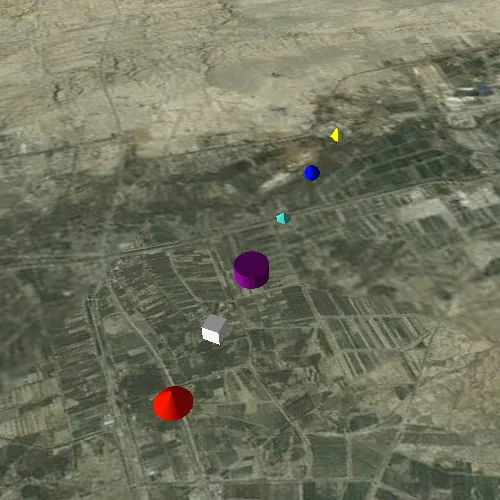
Show various kinds of 3D symbols in a scene.
Use case
You can programmatically create different types of 3D symbols and add them to a scene at specified locations. You could do this to call attention to the prominence of a location.
How to use the sample
When the scene loads, note the different types of 3D symbols that you can create.
How it works
- Create a
GraphicsOverlay. - Create various simple marker scene symbols by specifying different styles and colors, and a height, width, depth, and anchor position of each.
- Create a
Graphicfor each symbol. - Add the graphics to the graphics overlay.
- Add the graphics overlay to the
SceneView.
Relevant API
- SceneSymbol::anchorPosition
- SimpleMarkerSceneSymbol
- SimpleMarkerSceneSymbol::style
About the data
This sample shows arbitrary symbols in an empty scene with imagery basemap.
Tags
3D, cone, cube, cylinder, diamond, geometry, graphic, graphics overlay, pyramid, scene, shape, sphere, symbol, tetrahedron, tube, visualization
Sample code
// [WriteFile Name=Symbols, Category=Scenes]// [Legal]// Copyright 2016 Esri.//// Licensed under the Apache License, Version 2.0 (the "License");// you may not use this file except in compliance with the License.// You may obtain a copy of the License at// http://www.apache.org/licenses/LICENSE-2.0//// Unless required by applicable law or agreed to in writing, software// distributed under the License is distributed on an "AS IS" BASIS,// WITHOUT WARRANTIES OR CONDITIONS OF ANY KIND, either express or implied.// See the License for the specific language governing permissions and// limitations under the License.// [Legal]
#ifdef PCH_BUILD#include "pch.hpp"#endif // PCH_BUILD
// sample headers#include "Symbols.h"
// ArcGIS Maps SDK headers#include "ArcGISTiledElevationSource.h"#include "Basemap.h"#include "Camera.h"#include "ElevationSourceListModel.h"#include "Graphic.h"#include "GraphicListModel.h"#include "GraphicsOverlay.h"#include "GraphicsOverlayListModel.h"#include "LayerSceneProperties.h"#include "MapTypes.h"#include "Point.h"#include "Scene.h"#include "SceneQuickView.h"#include "SceneViewTypes.h"#include "SimpleMarkerSceneSymbol.h"#include "SpatialReference.h"#include "Surface.h"#include "SymbolTypes.h"
using namespace Esri::ArcGISRuntime;
Symbols::Symbols(QQuickItem* parent) :  QQuickItem(parent){}
Symbols::~Symbols() = default;
void Symbols::init(){  qmlRegisterType<SceneQuickView>("Esri.Samples", 1, 0, "SceneView");  qmlRegisterType<Symbols>("Esri.Samples", 1, 0, "SymbolsSample");}
void Symbols::componentComplete(){  QQuickItem::componentComplete();
  // find QML SceneView component  m_sceneView = findChild<SceneQuickView*>("sceneView");
  // create a new basemap instance  Basemap* basemap = new Basemap(BasemapStyle::ArcGISImageryStandard, this);  // create a new scene instance  m_scene = new Scene(basemap, this);  // set scene on the scene view  m_sceneView->setArcGISScene(m_scene);
  // create a new elevation source  ArcGISTiledElevationSource* elevationSource = new ArcGISTiledElevationSource(QUrl("https://elevation3d.arcgis.com/arcgis/rest/services/WorldElevation3D/Terrain3D/ImageServer"), this);  // add the elevation source to the scene to display elevation  m_scene->baseSurface()->elevationSources()->append(elevationSource);
  // create a camera  Camera camera(34, 45, 6000, 0, 0, 0);  // set the viewpoint  m_sceneView->setViewpointCameraAndWait(camera);
  // create a graphics overlay  GraphicsOverlay* graphicsOverlay = new GraphicsOverlay(this);  graphicsOverlay->setSceneProperties(LayerSceneProperties(SurfacePlacement::Absolute));  // add the graphics overlay to the scene view  m_sceneView->graphicsOverlays()->append(graphicsOverlay);
  // create a map of the symbol styles and color  QMap<SimpleMarkerSceneSymbolStyle, QColor> symbolStyles;  symbolStyles.insert(SimpleMarkerSceneSymbolStyle::Cone, QColor("red"));  symbolStyles.insert(SimpleMarkerSceneSymbolStyle::Cube, QColor("white"));  symbolStyles.insert(SimpleMarkerSceneSymbolStyle::Cylinder, QColor("purple"));  symbolStyles.insert(SimpleMarkerSceneSymbolStyle::Diamond, QColor("turquoise"));  symbolStyles.insert(SimpleMarkerSceneSymbolStyle::Sphere, QColor("blue"));  symbolStyles.insert(SimpleMarkerSceneSymbolStyle::Tetrahedron, QColor("yellow"));  QMapIterator<SimpleMarkerSceneSymbolStyle, QColor> i(symbolStyles);
  constexpr double x = 44.975;  constexpr double y = 34.0;  constexpr double z = 500.0;  int counter = 0;
  // iterate over the map  while (i.hasNext())  {    i.next();    // create a scene symbol based on the current type    SimpleMarkerSceneSymbol* smss = new SimpleMarkerSceneSymbol(i.key(), i.value(), 200, 200, 200, SceneSymbolAnchorPosition::Center, this);    // create a graphic using the symbol above and a point location    Graphic* graphic = new Graphic(Point(x + 0.01 * counter++, y, z, m_sceneView->spatialReference()), smss, this);    // add the graphic to the graphics overlay    graphicsOverlay->graphics()->append(graphic);  }}
// [WriteFile Name=Symbols, Category=Scenes]// [Legal]// Copyright 2016 Esri.//// Licensed under the Apache License, Version 2.0 (the "License");// you may not use this file except in compliance with the License.// You may obtain a copy of the License at// http://www.apache.org/licenses/LICENSE-2.0//// Unless required by applicable law or agreed to in writing, software// distributed under the License is distributed on an "AS IS" BASIS,// WITHOUT WARRANTIES OR CONDITIONS OF ANY KIND, either express or implied.// See the License for the specific language governing permissions and// limitations under the License.// [Legal]
#ifndef SYMBOLS_H#define SYMBOLS_H
// Qt headers#include <QQuickItem>
namespace Esri::ArcGISRuntime{ class Scene; class SceneQuickView;}
class Symbols : public QQuickItem{ Q_OBJECT
public: explicit Symbols(QQuickItem* parent = nullptr); ~Symbols() override;
void componentComplete() override; static void init();
private: Esri::ArcGISRuntime::Scene* m_scene = nullptr; Esri::ArcGISRuntime::SceneQuickView* m_sceneView = nullptr;};
#endif // SYMBOLS_H// [WriteFile Name=Symbols, Category=Scenes]// [Legal]// Copyright 2016 Esri.//// Licensed under the Apache License, Version 2.0 (the "License");// you may not use this file except in compliance with the License.// You may obtain a copy of the License at// http://www.apache.org/licenses/LICENSE-2.0//// Unless required by applicable law or agreed to in writing, software// distributed under the License is distributed on an "AS IS" BASIS,// WITHOUT WARRANTIES OR CONDITIONS OF ANY KIND, either express or implied.// See the License for the specific language governing permissions and// limitations under the License.// [Legal]
import QtQuickimport QtQuick.Controlsimport Esri.Samples
SymbolsSample { width: 800 height: 600
// add a mapView component SceneView { anchors.fill: parent objectName: "sceneView"
Component.onCompleted: { // Set the focus on SceneView to initially enable keyboard navigation forceActiveFocus(); } }}