Add clustering feature reduction to a point feature layer.
Use case
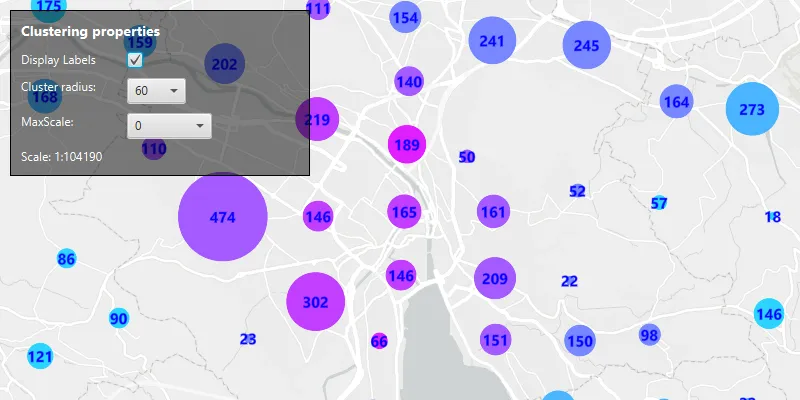
Feature clustering can be used to dynamically aggregate groups of points that are within proximity of each other in order to represent each group with a single symbol. Such grouping allows you to see patterns in the data that are difficult to visualize when a layer contains hundreds or thousands of points that overlap and cover each other. Users can add feature clustering to point feature layers. This is useful when the layer does not have the feature reduction defined or when the existing feature reduction properties need to be overridden.
How to use the sample
Interact with the controls to customize clustering feature reduction properties. Click on any clustered aggregate geoelement to see the cluster feature count and aggregate fields in the popup.
How it works
- Create a map from a web map
PortalItem. - Create a
ClassBreaksRendererand define aFieldNameandDefaultSymbol.FieldNamemust be one of the summary fields in theAggregateFieldscollection. - Add
ClassBreakobjects each with an associatedSimpleMarkerSymbolto the renderer. - Create a
ClusteringFeatureReductionusing the renderer. - Add
AggregateFieldobjects to the feature reduction where theFieldNameis the name of the field to aggregate and theStatisticTypeis the type of aggregation to perform. - Define the
MinSymbolSizeandMaxSymbolSizefor the feature reduction. If these are not defined they default to 12 and 70 respectively. - Add the
ClusteringFeatureReductionto theFeatureLayer. - Create a
LabelDefinitionwith aSimpleLabelExpressionandTextSymbolto define the cluster label.
Relevant API
- AggregateGeoElement
- ClassBreaksRenderer
- FeatureLayer
- FeatureReduction
- GeoElement
- IdentifyLayerResult
About the data
This sample uses a web map that displays residential data for Zurich, Switzerland.
Tags
aggregate, bin, cluster, group, merge, normalize, popup, reduce, renderer, summarize
Sample code
/* * Copyright 2024 Esri. * * Licensed under the Apache License, Version 2.0 (the "License"); you may not * use this file except in compliance with the License. You may obtain a copy of * the License at * * http://www.apache.org/licenses/LICENSE-2.0 * * Unless required by applicable law or agreed to in writing, software * distributed under the License is distributed on an "AS IS" BASIS, WITHOUT * WARRANTIES OR CONDITIONS OF ANY KIND, either express or implied. See the * License for the specific language governing permissions and limitations under * the License. */
package com.esri.samples.configure_clusters;
import java.util.ArrayList;import java.util.List;import java.util.Map;import java.util.concurrent.ExecutionException;import java.util.stream.Collectors;
import com.esri.arcgisruntime.ArcGISRuntimeEnvironment;import com.esri.arcgisruntime.arcgisservices.LabelDefinition;import com.esri.arcgisruntime.arcgisservices.LabelingPlacement;import com.esri.arcgisruntime.concurrent.ListenableFuture;import com.esri.arcgisruntime.layers.FeatureLayer;import com.esri.arcgisruntime.loadable.LoadStatus;import com.esri.arcgisruntime.mapping.ArcGISMap;import com.esri.arcgisruntime.mapping.LayerList;import com.esri.arcgisruntime.mapping.labeling.SimpleLabelExpression;import com.esri.arcgisruntime.mapping.popup.Popup;import com.esri.arcgisruntime.mapping.popup.PopupDefinition;import com.esri.arcgisruntime.mapping.reduction.AggregateField;import com.esri.arcgisruntime.mapping.reduction.AggregateStatisticType;import com.esri.arcgisruntime.mapping.reduction.ClusteringFeatureReduction;import com.esri.arcgisruntime.mapping.view.IdentifyLayerResult;import com.esri.arcgisruntime.mapping.view.MapView;import com.esri.arcgisruntime.portal.Portal;import com.esri.arcgisruntime.portal.PortalItem;import com.esri.arcgisruntime.symbology.ClassBreaksRenderer;import com.esri.arcgisruntime.symbology.SimpleMarkerSymbol;import com.esri.arcgisruntime.symbology.TextSymbol;import javafx.application.Application;import javafx.application.Platform;import javafx.geometry.Insets;import javafx.geometry.Point2D;import javafx.geometry.Pos;import javafx.scene.Scene;import javafx.scene.control.CheckBox;import javafx.scene.control.ComboBox;import javafx.scene.control.Label;import javafx.scene.layout.Background;import javafx.scene.layout.BackgroundFill;import javafx.scene.layout.Border;import javafx.scene.layout.BorderStroke;import javafx.scene.layout.BorderStrokeStyle;import javafx.scene.layout.BorderWidths;import javafx.scene.layout.CornerRadii;import javafx.scene.layout.HBox;import javafx.scene.layout.StackPane;import javafx.scene.layout.VBox;import javafx.scene.paint.Color;import javafx.scene.paint.Paint;import javafx.scene.text.Font;import javafx.stage.Stage;
public class ConfigureClustersSample extends Application {
  private ArcGISMap map;  private CheckBox displayLabelsCheckbox;  private Label clusterRadiusLabel;  private ComboBox<Integer> clusterRadiusPicker;  private Label maxScaleLabel;  private ComboBox<Integer> maxScalePicker;  private Label currentMapScaleLabel;  private FeatureLayer layer;  private Label popupContentLabel;  private ClusteringFeatureReduction clusteringFeatureReduction;  private String popupContent;  private MapView mapView;  private PortalItem portalItem; // keep loadable in scope to avoid garbage collection
  private final int DEFAULT_CLUSTER_RADIUS = 60;  private final int MIN_WIDTH = 100;  private final int MAX_WIDTH = 300;  private final int SPACING = 6;
  @Override  public void start(Stage stage) {
    try {      // create stack pane and application scene      StackPane stackPane = new StackPane();      Scene scene = new Scene(stackPane);
      // set title, size, and add scene to stage      stage.setTitle("Configure Clusters Sample");      stage.setWidth(800);      stage.setHeight(700);      stage.setScene(scene);      stage.show();
      // authentication with an API key or named user is required to access basemaps and other location services      String yourAPIKey = System.getProperty("apiKey");      ArcGISRuntimeEnvironment.setApiKey(yourAPIKey);
      // create a portal and portal item, using the portal and item ID      var portal = new Portal("https://www.arcgis.com/");      portalItem = new PortalItem(portal, "aa44e79a4836413c89908e1afdace2ea");
      map = new ArcGISMap(portalItem);
      VBox vBoxPopupInformation = new VBox();      popupContentLabel = new Label();      setupVBoxStyling(vBoxPopupInformation);      vBoxPopupInformation.getChildren().addAll(popupContentLabel);      vBoxPopupInformation.setVisible(false);
      // Get the Zurich buildings feature layer once the map has finished loading      map.addDoneLoadingListener(() -> {        if (map.getLoadStatus() == LoadStatus.LOADED) {          LayerList l = map.getOperationalLayers();          if (l.isEmpty())            return;          layer = (FeatureLayer) l.get(0);
          mapView.setOnMouseClicked(mouseEvent -> {            if (layer == null) {              return;            }            // Identify the tapped observation.            Point2D point = new Point2D(mouseEvent.getX(), mouseEvent.getY());            ListenableFuture<IdentifyLayerResult> identifiedLayerResults = mapView.identifyLayerAsync(layer, point, 3.0, true);            identifiedLayerResults.addDoneListener(() -> {              try {                // clear the list of popup content                popupContent = "";                IdentifyLayerResult layer = identifiedLayerResults.get();
                popupContent = layer.getPopups().stream()                    .flatMap(popup->popup.getGeoElement().getAttributes().entrySet().stream())                    .map(entry->entry.getKey() + ": " + entry.getValue().toString() + "\n")                        .collect(Collectors.joining());
                Platform.runLater(() ->{                  popupContentLabel.setText(popupContent);                  popupContentLabel.setTextFill(Color.WHITE);                  vBoxPopupInformation.setVisible(!popupContentLabel.getText().isEmpty());                });
              } catch (ExecutionException | InterruptedException e) {                System.err.println(e.getMessage());              }            });          });
          // set up the user interface          VBox vBoxControls = controlsVBox();
          // add the map view to the stack pane          stackPane.getChildren().addAll(mapView, vBoxControls, vBoxPopupInformation);          StackPane.setAlignment(vBoxControls, Pos.TOP_LEFT);          StackPane.setMargin(vBoxControls, new Insets(10, 0, 0, 10));          StackPane.setAlignment(vBoxPopupInformation, Pos.TOP_RIGHT);          StackPane.setMargin(vBoxPopupInformation, new Insets(10, 0, 0, 10));
          // Add a class break for each intended value range and define a symbol to display for features in that range.          // In this case, the average building height ranges from 0 to 8 stories.          // For each cluster of features with a given average building height, a symbol is defined with a specified          // color.          List<ClassBreaksRenderer.ClassBreak> classBreaks = new ArrayList<>();          classBreaks.add(new ClassBreaksRenderer.ClassBreak("0", "0", 0.0, 1.0,              new SimpleMarkerSymbol(SimpleMarkerSymbol.Style.CIRCLE, Color.rgb(4, 251, 255), 8.0f)));          classBreaks.add(new ClassBreaksRenderer.ClassBreak("1", "1", 1.0, 2.0,              new SimpleMarkerSymbol(SimpleMarkerSymbol.Style.CIRCLE, Color.rgb(44, 211, 255), 8.0f)));          classBreaks.add(new ClassBreaksRenderer.ClassBreak("2", "2", 2.0, 3.0,              new SimpleMarkerSymbol(SimpleMarkerSymbol.Style.CIRCLE, Color.rgb(74, 181, 255), 8.0f)));          classBreaks.add(new ClassBreaksRenderer.ClassBreak("3", "3", 3.0, 4.0,              new SimpleMarkerSymbol(SimpleMarkerSymbol.Style.CIRCLE, Color.rgb(120, 135, 255), 8.0f)));          classBreaks.add(new ClassBreaksRenderer.ClassBreak("4", "4", 4.0, 5.0,              new SimpleMarkerSymbol(SimpleMarkerSymbol.Style.CIRCLE, Color.rgb(165, 90, 255), 8.0f)));          classBreaks.add(new ClassBreaksRenderer.ClassBreak("6", "6", 6.0, 7.0,              new SimpleMarkerSymbol(SimpleMarkerSymbol.Style.CIRCLE, Color.rgb(194, 61, 255), 8.0f)));          classBreaks.add(new ClassBreaksRenderer.ClassBreak("5", "5", 5.0, 6.0,              new SimpleMarkerSymbol(SimpleMarkerSymbol.Style.CIRCLE, Color.rgb(224, 31, 255), 8.0f)));          classBreaks.add(new ClassBreaksRenderer.ClassBreak("7", "7", 7.0, 8.0,              new SimpleMarkerSymbol(SimpleMarkerSymbol.Style.CIRCLE, Color.rgb(254, 1, 255), 8.0f)));
          // Create a class breaks renderer to apply to the custom feature reduction.          // Define the field to use for the class breaks renderer.          // Note that this field name must match the name of an aggregate field contained in the clustering feature          // reduction's aggregate fields property.          ClassBreaksRenderer classBreaksRenderer = new ClassBreaksRenderer("Average Building Height", classBreaks);
          // Define a default symbol to use for features that do not fall within any of the ranges defined by the          // class breaks.          classBreaksRenderer.setDefaultSymbol(new SimpleMarkerSymbol(SimpleMarkerSymbol.Style.CIRCLE, Color.PINK, 8));
          // Create a new clustering feature reduction using the class breaks renderer.          clusteringFeatureReduction = new ClusteringFeatureReduction(classBreaksRenderer);
          // Set the feature reduction's aggregate fields. Note that the field names must match the names of fields          // in the feature layer's dataset.          // The aggregate fields summarize values based on the defined aggregate statistic type.          clusteringFeatureReduction.getAggregateFields().add(              new AggregateField("Total Residential Buildings", "Residential_Buildings", AggregateStatisticType.SUM));
          clusteringFeatureReduction.getAggregateFields().add(              new AggregateField("Average Building Height", "Most_common_number_of_storeys",                  AggregateStatisticType.MODE));
          // Enable the feature reduction.          clusteringFeatureReduction.setEnabled(true);
          // Set the popup definition for the custom feature reduction.          clusteringFeatureReduction.setPopupDefinition(new PopupDefinition(clusteringFeatureReduction));
          // Set values for the feature reduction's cluster minimum and maximum symbol sizes.          // Note that the default values for Max and Min symbol size are 70 and 12 respectively.          clusteringFeatureReduction.setMinSymbolSize(5.0);          clusteringFeatureReduction.setMaxSymbolSize(90.0);
          // Set the feature reduction for the layer.          layer.setFeatureReduction(clusteringFeatureReduction);
          // Set initial ComboBox values.          // Note that the default value for cluster radius is 60.          // Increasing the cluster radius increases the number of features that are grouped together into a cluster.          clusteringFeatureReduction.setRadius(DEFAULT_CLUSTER_RADIUS);
          // Note that the default value for max scale is 0.          // The max scale value is the maximum scale at which clustering is applied.          clusteringFeatureReduction.setMaxScale(0);        }      });
      // create a map view and set the map to it      mapView = new MapView();      mapView.setMap(map);
    } catch (Exception e) {      // on any error, display the stack trace.      e.printStackTrace();    }  }
  /**   * Sets styling for the given VBox.   */  private void setupVBoxStyling(VBox vBox) {    vBox.setBackground(new Background(new BackgroundFill(Paint.valueOf("rgba(0,0,0,0.5)"),        CornerRadii.EMPTY,        Insets.EMPTY)));    vBox.setPadding(new Insets(10.0));    vBox.setMaxSize(MAX_WIDTH, MIN_WIDTH);    vBox.getStyleClass().add("panel-region");    vBox.setBorder(new Border(new BorderStroke(Color.BLACK, BorderStrokeStyle.SOLID, CornerRadii.EMPTY, new BorderWidths(1))));  }
  /**   * Creates a UI with a checkbox and two combo boxes.   *   * @return a vBox populated with checkbox, combo boxes, and labels   */  private VBox controlsVBox() {
    Label label = new Label("Clustering properties");    label.setStyle("-fx-font-weight: bold; -fx-text-color: black;");    label.setFont(new Font(14));    label.setTextFill(Color.WHITE);
    HBox displayHBox = new HBox(SPACING);    Label label1 = new Label("Display Labels: ");    label1.setMinWidth(MIN_WIDTH);    label1.setTextFill(Color.WHITE);
    // create checkbox to toggle the showing of cluster count
    SimpleLabelExpression simpleLabelExpression = new SimpleLabelExpression("[cluster_count]");    TextSymbol textSymbol = new TextSymbol(15.0f, "", Color.BLUE, TextSymbol.HorizontalAlignment.CENTER, TextSymbol.VerticalAlignment.MIDDLE);    textSymbol.setFontWeight(TextSymbol.FontWeight.BOLD);    LabelDefinition labelDefinition = new LabelDefinition(simpleLabelExpression, textSymbol);    labelDefinition.setPlacement(LabelingPlacement.POINT_CENTER_CENTER);
    displayLabelsCheckbox = new CheckBox();    displayLabelsCheckbox.setSelected(false);    displayLabelsCheckbox.setTextFill(Color.WHITE);    displayLabelsCheckbox.selectedProperty().addListener(o -> {      if (displayLabelsCheckbox.isSelected()) {        clusteringFeatureReduction.getLabelDefinitions().add(labelDefinition);      }      else {        clusteringFeatureReduction.getLabelDefinitions().clear();      }    });    displayHBox.getChildren().addAll(label1, displayLabelsCheckbox);
    HBox clusterRadiusHBox = new HBox(SPACING);    clusterRadiusLabel = new Label("Cluster radius: ");    clusterRadiusLabel.setMinWidth(MIN_WIDTH);    clusterRadiusLabel.setTextFill(Color.WHITE);    clusterRadiusPicker = new ComboBox<>();    clusterRadiusPicker.getItems().addAll(30, 45, 60, 75, 90);    clusterRadiusPicker.setValue(DEFAULT_CLUSTER_RADIUS);
    // add a listener to the ComboBox's value property to set the cluster radius    clusterRadiusPicker.setOnAction(event -> {      clusteringFeatureReduction.setRadius(clusterRadiusPicker.getValue());    });    clusterRadiusHBox.getChildren().addAll(clusterRadiusLabel, clusterRadiusPicker);
    HBox maxScaleHBox = new HBox(SPACING);    maxScaleLabel = new Label("MaxScale: ");    maxScaleLabel.setMinWidth(MIN_WIDTH);    maxScaleLabel.setTextFill(Color.WHITE);    // create a ComboBox for adjusting max scale    maxScalePicker = new ComboBox<>();    maxScalePicker.getItems().addAll(0, 1000, 5000, 10000, 50000, 100000, 500000);    maxScalePicker.setValue(0);
    // add a listener to the ComboBox's value property to set the max scale    maxScalePicker.setOnAction(event -> {      clusteringFeatureReduction.setMaxScale(maxScalePicker.getValue());    });    maxScaleHBox.getChildren().addAll(maxScaleLabel, maxScalePicker);
    // show current map scale in a label within the control panel    currentMapScaleLabel = new Label("Scale: 1:" + mapView.getMapScale());    currentMapScaleLabel.setTextFill(Color.WHITE);
    // listen for map scale changes and update the label    currentMapScaleLabel.textProperty().bind(mapView.mapScaleProperty().map(i -> "Scale: 1:" + Math.round(i.doubleValue())));
    VBox controlsVBox = new VBox(10);    setupVBoxStyling(controlsVBox);    controlsVBox.getChildren().addAll(label, displayHBox, clusterRadiusHBox, maxScaleHBox, currentMapScaleLabel);
    return controlsVBox;  }
  /**   * Stops and releases all resources used in application.   */  @Override  public void stop() {
    if (mapView != null) {      mapView.dispose();    }  }
  /**   * Opens and runs application.   *   * @param args arguments passed to this application   */  public static void main(String[] args) {
    Application.launch(args);  }
}