List features related to the selected feature.
Use case
Related features are useful for managing relational information, like what you would store in a relational database management system (RDBMS). You can define relationships between records as one-to-one, one-to-many, or many-to-one. For example, you could model inspections and facilities as a many-to-one relationship. Then, for any facility feature, you could list related inspection features.
How to use the sample
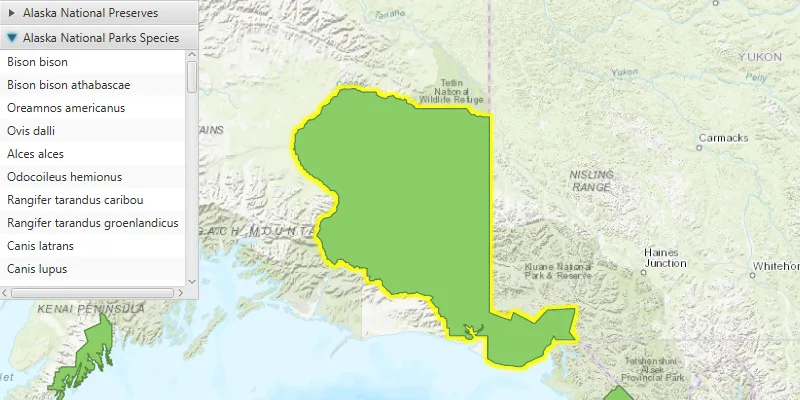
Click on a feature to select it. The related features will be displayed in a list.
How it works
- With a
Feature, callqueryRelatedFeaturesAsync()on the feature’s feature table. - Iterate over the result’s collection of
RelatedFeatureQueryResultobjects to get the related features and add them to a list.
Relevant API
- ArcGISFeature
- ArcGISFeatureTable
- FeatureQueryResult
- FeatureTable
- RelatedFeatureQueryResult
Tags
features, identify, query, related, relationship, search
Sample code
ListRelatedFeaturesSample.java
/* * Copyright 2017 Esri. * * Licensed under the Apache License, Version 2.0 (the "License"); you may not * use this file except in compliance with the License. You may obtain a copy of * the License at * * http://www.apache.org/licenses/LICENSE-2.0 * * Unless required by applicable law or agreed to in writing, software * distributed under the License is distributed on an "AS IS" BASIS, WITHOUT * WARRANTIES OR CONDITIONS OF ANY KIND, either express or implied. See the * License for the specific language governing permissions and limitations under * the License. */
package com.esri.samples.list_related_features;
import java.util.List;import java.util.concurrent.ExecutionException;
import javafx.application.Application;import javafx.geometry.Point2D;import javafx.geometry.Pos;import javafx.scene.Scene;import javafx.scene.control.Accordion;import javafx.scene.control.Alert;import javafx.scene.control.ListView;import javafx.scene.control.ProgressIndicator;import javafx.scene.control.TitledPane;import javafx.scene.input.MouseButton;import javafx.scene.layout.StackPane;import javafx.scene.paint.Color;import javafx.stage.Stage;
import com.esri.arcgisruntime.concurrent.ListenableFuture;import com.esri.arcgisruntime.data.ArcGISFeature;import com.esri.arcgisruntime.data.ArcGISFeatureTable;import com.esri.arcgisruntime.data.Feature;import com.esri.arcgisruntime.data.RelatedFeatureQueryResult;import com.esri.arcgisruntime.layers.FeatureLayer;import com.esri.arcgisruntime.mapping.ArcGISMap;import com.esri.arcgisruntime.mapping.GeoElement;import com.esri.arcgisruntime.mapping.view.DrawStatus;import com.esri.arcgisruntime.mapping.view.IdentifyLayerResult;import com.esri.arcgisruntime.mapping.view.MapView;
public class ListRelatedFeaturesSample extends Application {
  private MapView mapView;  private ArcGISMap map; // keep loadable in scope to avoid garbage collection
  @Override  public void start(Stage stage) {
    try {      // create stack pane and application scene      StackPane stackPane = new StackPane();      Scene scene = new Scene(stackPane);
      // set title, size, and add scene to stage      stage.setTitle("List Related Features Sample");      stage.setWidth(800);      stage.setHeight(700);      stage.setScene(scene);      stage.show();
      // show a progress indicator while the map loads      ProgressIndicator progressIndicator = new ProgressIndicator();      progressIndicator.setProgress(ProgressIndicator.INDETERMINATE_PROGRESS);      progressIndicator.setMaxSize(25, 25);
      // create an accordion view for displaying the related features according to their feature table      Accordion accordion = new Accordion();      accordion.setMaxSize(200, 300);
      // use the Alaska National Parks and Preserves Species web map      map = new ArcGISMap("https://arcgisruntime.maps.arcgis.com/home/item.html?id=dcc7466a91294c0ab8f7a094430ab437");
      // add the map to the map view      mapView = new MapView();      mapView.setMap(map);
      // make selection outline yellow      mapView.getSelectionProperties().setColor(Color.YELLOW);
      // display a progress indicator when drawing is in progress      progressIndicator.visibleProperty().bind(mapView.drawStatusProperty().isEqualTo(DrawStatus.IN_PROGRESS));
      // wait until the map is done loading      map.addDoneLoadingListener(() -> {        // get the first feature layer for querying        FeatureLayer featureLayer = (FeatureLayer) map.getOperationalLayers().get(0);
        mapView.setOnMouseClicked(event -> {          // check for primary or secondary mouse click          if (event.isStillSincePress() && event.getButton() == MouseButton.PRIMARY) {
            // clear previous selections            featureLayer.clearSelection();
            // create a point from where the user clicked            Point2D point = new Point2D(event.getX(), event.getY());
            // identify the clicked features            ListenableFuture<IdentifyLayerResult> identifyLayerResult =              mapView.identifyLayerAsync(featureLayer, point, 10, false, 1);            identifyLayerResult.addDoneListener(() -> {
              try {                IdentifyLayerResult identifiedLayer = identifyLayerResult.get();                List<GeoElement> identifiedLayerGeoElements = identifiedLayer.getElements();                // get the first selected feature                for (GeoElement geoElement : identifiedLayerGeoElements) {                  ArcGISFeature selectedFeature = (ArcGISFeature) geoElement;                  featureLayer.selectFeature(selectedFeature);                  // get the feature's feature table                  ArcGISFeatureTable featureTable = selectedFeature.getFeatureTable();
                  // query related features                  final ListenableFuture<List<RelatedFeatureQueryResult>> relatedFeatureQuery = featureTable                    .queryRelatedFeaturesAsync(selectedFeature);                  relatedFeatureQuery.addDoneListener(() -> {                    try {                      //clear previous results                      accordion.getPanes().clear();                      // add all related features (grouped) into panes of the accordion                      List<RelatedFeatureQueryResult> results = relatedFeatureQuery.get();                      for (RelatedFeatureQueryResult relatedFeatureQueryResult : results) {                        ListView<String> featureList = new ListView<>();                        String relatedTableName = relatedFeatureQueryResult.getRelatedTable().getTableName();                        // create a pane for the feature table with a list for its features                        TitledPane tablePane = new TitledPane(relatedTableName, featureList);                        accordion.getPanes().add(tablePane);                        for (Feature relatedFeature : relatedFeatureQueryResult) {                          // show the related feature with its display field value in the list                          ArcGISFeature feature = (ArcGISFeature) relatedFeature;                          String displayFieldName = feature.getFeatureTable().getLayerInfo().getDisplayFieldName();                          String displayFieldValue = feature.getAttributes().get(displayFieldName).toString();                          featureList.getItems().add(displayFieldValue);                        }                      }                      //expand the accordion's last pane to show the related features                      accordion.setExpandedPane(accordion.getPanes().get(accordion.getPanes().size() - 1));                    } catch (InterruptedException | ExecutionException e) {                      Alert alert = new Alert(Alert.AlertType.ERROR, "Failed to get related features");                      alert.show();                    }                  });                }              } catch (InterruptedException | ExecutionException e) {                Alert alert = new Alert(Alert.AlertType.ERROR, "Failed to get identify the selected feature");                alert.show();              }            });          }        });      });
      // add the map view and accordion view to stack pane      stackPane.getChildren().addAll(mapView, accordion, progressIndicator);      StackPane.setAlignment(accordion, Pos.TOP_LEFT);      StackPane.setAlignment(progressIndicator, Pos.CENTER);    } catch (Exception e) {      // on any error, display the stack trace.      e.printStackTrace();    }  }
  /**   * Stops and releases all resources used in application.   */  @Override  public void stop() {
    if (mapView != null) {      mapView.dispose();    }  }
  /**   * Opens and runs application.   *   * @param args arguments passed to this application   */  public static void main(String[] args) {
    Application.launch(args);  }
}