Generate a local geodatabase replica from an online feature service.
Use case
Generating geodatabase replicas is the first step toward taking a feature service offline. It allows you to save features locally for offline display.
How to use the sample
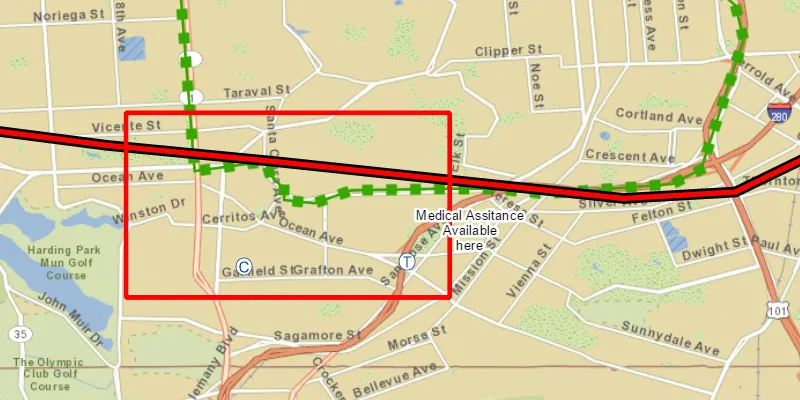
Zoom to any extent. Then click the generate button to generate a geodatabase of features from a feature service filtered to the current extent. A red outline will show the extent used. The job’s progress is shown while the geodatabase is generated. When complete, the map will reload with only the layers in the geodatabase, clipped to the extent.
How it works
- Create a
GeodatabaseSyncTaskwith the URL of the feature service and load it. - Create
GenerateGeodatabaseParametersspecifying the extent and whether to include attachments. - Create a
GenerateGeodatabaseJobwithgeodatabaseSyncTask.generateGeodatabaseAsync(parameters, downloadPath). Start the job withjob.start(). - When the job is done,
job.getResult()will return the geodatabase. Inside the geodatabase are feature tables which can be used to add feature layers to the map. - Call
syncTask.unregisterGeodatabaseAsync(geodatabase)after generation when you’re not planning on syncing changes to the service.
Relevant API
- GenerateGeodatabaseJob
- GenerateGeodatabaseParameters
- Geodatabase
- GeodatabaseSyncTask
Tags
disconnected, local geodatabase, offline, replica, sync
Sample code
GenerateGeodatabaseReplicaFromFeatureServiceSample.java
/* * Copyright 2017 Esri. * * Licensed under the Apache License, Version 2.0 (the "License"); you may not * use this file except in compliance with the License. You may obtain a copy of * the License at * * http://www.apache.org/licenses/LICENSE-2.0 * * Unless required by applicable law or agreed to in writing, software * distributed under the License is distributed on an "AS IS" BASIS, WITHOUT * WARRANTIES OR CONDITIONS OF ANY KIND, either express or implied. See the * License for the specific language governing permissions and limitations under * the License. */package com.esri.samples.generate_geodatabase_replica_from_feature_service;
import java.io.File;import java.io.IOException;import java.util.concurrent.ExecutionException;import java.util.concurrent.atomic.AtomicInteger;
import javafx.application.Application;import javafx.application.Platform;import javafx.beans.binding.Bindings;import javafx.geometry.Insets;import javafx.geometry.Pos;import javafx.scene.Scene;import javafx.scene.control.Alert;import javafx.scene.control.Button;import javafx.scene.control.ProgressBar;import javafx.scene.layout.StackPane;import javafx.scene.paint.Color;import javafx.stage.Stage;
import com.esri.arcgisruntime.concurrent.Job;import com.esri.arcgisruntime.concurrent.ListenableFuture;import com.esri.arcgisruntime.data.Geodatabase;import com.esri.arcgisruntime.data.TileCache;import com.esri.arcgisruntime.geometry.Envelope;import com.esri.arcgisruntime.layers.ArcGISTiledLayer;import com.esri.arcgisruntime.layers.FeatureLayer;import com.esri.arcgisruntime.loadable.LoadStatus;import com.esri.arcgisruntime.mapping.ArcGISMap;import com.esri.arcgisruntime.mapping.Basemap;import com.esri.arcgisruntime.mapping.view.Graphic;import com.esri.arcgisruntime.mapping.view.GraphicsOverlay;import com.esri.arcgisruntime.mapping.view.MapView;import com.esri.arcgisruntime.symbology.SimpleLineSymbol;import com.esri.arcgisruntime.tasks.geodatabase.GenerateGeodatabaseJob;import com.esri.arcgisruntime.tasks.geodatabase.GenerateGeodatabaseParameters;import com.esri.arcgisruntime.tasks.geodatabase.GeodatabaseSyncTask;
public class GenerateGeodatabaseReplicaFromFeatureServiceSample extends Application {
  private MapView mapView;  // keep loadables in scope to avoid garbage collection  private GeodatabaseSyncTask syncTask;  private Geodatabase geodatabase;
  private final AtomicInteger replica = new AtomicInteger();
  @Override  public void start(Stage stage) {
    try {      // create stack pane and application scene      StackPane stackPane = new StackPane();      Scene scene = new Scene(stackPane);
      // size the stage, add a title, and set scene to stage      stage.setTitle("Generate Geodatabase Replica from Feature Service Sample");      stage.setWidth(800);      stage.setHeight(700);      stage.setScene(scene);      stage.show();
      // use a local tile package for the basemap      File tpkFile = new File(System.getProperty("data.dir"), "./samples-data/sanfrancisco/SanFrancisco.tpk");      TileCache tileCache = new TileCache(tpkFile.getAbsolutePath());      ArcGISTiledLayer tiledLayer = new ArcGISTiledLayer(tileCache);
      // create a map view and add a map      mapView = new MapView();      ArcGISMap map = new ArcGISMap(new Basemap(tiledLayer));      mapView.setMap(map);
      // create a graphics overlay and symbol to mark the extent      GraphicsOverlay graphicsOverlay = new GraphicsOverlay();      mapView.getGraphicsOverlays().add(graphicsOverlay);      SimpleLineSymbol boundarySymbol = new SimpleLineSymbol(SimpleLineSymbol.Style.SOLID, Color.RED, 5);
      // add a button to generate the geodatabase and a progress bar      Button generateButton = new Button("Generate Geodatabase");      generateButton.setDisable(true); //wait until sync task loaded      ProgressBar progressBar = new ProgressBar();      progressBar.visibleProperty().bind(Bindings.createBooleanBinding(() -> progressBar.getProgress() > 0,          progressBar.progressProperty()));      progressBar.setProgress(0.0);
      // create a geodatabase sync task      String featureServiceURL =          "https://sampleserver6.arcgisonline.com/arcgis/rest/services/Sync/WildfireSync/FeatureServer";      syncTask = new GeodatabaseSyncTask(featureServiceURL);      syncTask.loadAsync();      syncTask.addDoneLoadingListener(() -> generateButton.setDisable(false));
      // generate the geodatabase on button click      generateButton.setOnMouseClicked(event -> {        // clear any previous operational layers and graphics if button clicked more than once        map.getOperationalLayers().clear();        graphicsOverlay.getGraphics().clear();
        // show the extent used as a graphic        Envelope extent = mapView.getVisibleArea().getExtent();        Graphic boundary = new Graphic(extent, boundarySymbol);        graphicsOverlay.getGraphics().add(boundary);
        // create generate geodatabase parameters for the current extent        ListenableFuture<GenerateGeodatabaseParameters> defaultParameters = syncTask            .createDefaultGenerateGeodatabaseParametersAsync(extent);        defaultParameters.addDoneListener(() -> {          try {            // set parameters            GenerateGeodatabaseParameters parameters = defaultParameters.get();            parameters.setReturnAttachments(false);
            // temporary file for geodatabase            File tempFile = File.createTempFile("gdb" + replica.getAndIncrement(), ".geodatabase");            tempFile.deleteOnExit();
            // create and start the job            GenerateGeodatabaseJob job = syncTask.generateGeodatabase(parameters, tempFile.getAbsolutePath());            job.start();
            // show progress            job.addProgressChangedListener(() -> {              int progress = job.getProgress();              progressBar.setProgress((double) progress / 100.0);            });
            // get geodatabase when done            job.addJobDoneListener(() -> {              if (job.getStatus() == Job.Status.SUCCEEDED) {                geodatabase = job.getResult();                displayMessage("Geodatabase successfully generated", "Unregistering geodatabase since we're not " +                    "syncing it here");                geodatabase.loadAsync();                geodatabase.addDoneLoadingListener(() -> {                  if (geodatabase.getLoadStatus() == LoadStatus.LOADED) {                    geodatabase.getGeodatabaseFeatureTables().forEach(ft -> {                      ft.loadAsync();                      map.getOperationalLayers().add(new FeatureLayer(ft));                    });                  } else {                    displayMessage("Error loading geodatabase", geodatabase.getLoadError().getMessage());                  }                });                // unregister since we're not syncing                syncTask.unregisterGeodatabaseAsync(geodatabase);              } else if (job.getError() != null) {                displayMessage("Error generating geodatabase", job.getError().getMessage());              } else {                displayMessage("Unknown Error generating geodatabase", null);              }            });          } catch (InterruptedException | ExecutionException e) {            displayMessage("Error generating geodatabase parameters", e.getMessage());          } catch (IOException e) {            displayMessage("Could not create file for geodatabase", e.getMessage());          }        });      });
      // add the map view and controls to stack pane      stackPane.getChildren().addAll(mapView, generateButton, progressBar);      StackPane.setAlignment(generateButton, Pos.TOP_LEFT);      StackPane.setMargin(generateButton, new Insets(10, 0, 0, 10));      StackPane.setAlignment(progressBar, Pos.TOP_RIGHT);      StackPane.setMargin(progressBar, new Insets(10, 10, 0, 0));
    } catch (Exception e) {      // on any error, display stack trace      e.printStackTrace();    }  }
  /**   * Shows a message in an alert dialog.   *   * @param title title of alert   * @param message message to display   */  private void displayMessage(String title, String message) {
    Platform.runLater(() -> {      Alert dialog = new Alert(Alert.AlertType.INFORMATION);      dialog.setHeaderText(title);      dialog.setContentText(message);      dialog.showAndWait();    });  }
  /**   * Stops and releases all resources used in application.   */  @Override  public void stop() {
    // release resources when the application closes    if (mapView != null) {      mapView.dispose();    }  }
  /**   * Opens and runs application.   *   * @param args arguments passed to this application   */  public static void main(String[] args) {
    Application.launch(args);  }}