Create a mobile geodatabase.
Use case
A mobile geodatabase is a collection of various types of GIS datasets contained in a single file (.geodatabase) on disk that can store, query, and manage spatial and non-spatial data. Mobile geodatabases are stored in a SQLite database and can contain up to 2 TB of portable data. Users can create, edit and share mobile geodatabases across ArcGIS Pro, ArcGIS Maps SDKs for Native Apps, or any SQL software. These mobile geodatabases support both viewing and editing and enable new offline editing workflows without requiring a feature service.
For example, a user would like to track the location of their device at various intervals to generate a heat map of the most visited locations. The user can add each location as a feature to a table and generate a mobile geodatabase. The user can then instantly share the mobile geodatabase to ArcGIS Pro to generate a heat map using the recorded locations stored as a geodatabase feature table.
How to use the sample
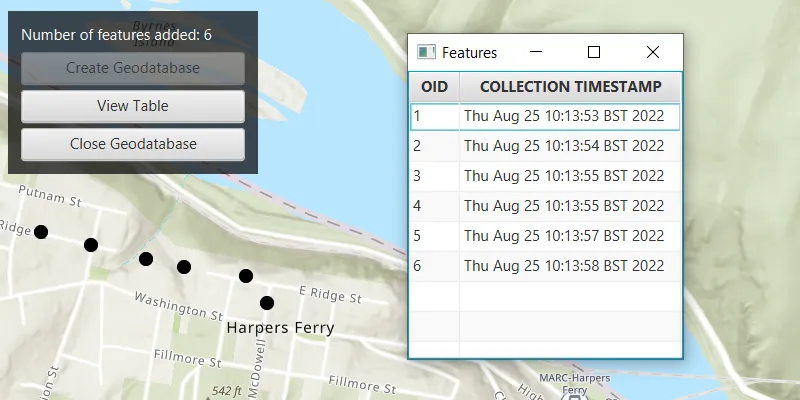
Click “Create Geodatabase” to create the geodatabase and its feature table. Click on the map to add new features to the geodatabase. Click “View Table” to view the contents of the geodatabase feature table. Once you have added the features to the map, click on “Close Geodatabase” to save the .geodatabase file which can then be imported into ArcGIS Pro or opened with ArcGIS Maps SDKs for Native Apps.
How it works
- Create an empty mobile geodatabase with
Geodatabase.createAsync(String path)and pass in a specific path as the parameter. - Create a new
TableDescriptionand add a list of newFieldDescriptions to its collection of field descriptions withtableDescription.getFieldDescriptions().addAll(). - Create a new table in the geodatabase from the table description with
geodatabase.createTableAsync(). Once the listenable future has completed, get the newly created geodatabase feature table withgeodatabaseFeatureTableFuture.get(). - Create a feature on the selected map point using
geodatabaseFeatureTable.createFeature(), passing a map of feature attributes and a geometry as parameters. - Add the feature to the table using
geodatabaseFeatureTable.addFeatureAsync(feature). - Each feature added to the geodatabase feature table is committed to the mobile geodatabase file.
- Close the mobile geodatabase with
geodatabase.close().
Relevant API
- ArcGISFeature
- FeatureLayer
- FieldDescription
- Geodatabase
- GeodatabaseFeatureTable
- TableDescription
Additional information
Learn more about mobile geodatabases and how to utilize them on the ArcGIS Pro documentation page. The following mobile geodatabase behaviors are supported in the ArcGIS Maps SDKs for Native Apps: annotation, attachments, attribute rules, contingent values, dimensions, domains, feature-linked annotation, subtypes, utility network and relationship classes.
Learn more about the types of fields supported with mobile geodatabases on the ArcGIS Pro documentation page.
Tags
arcgis pro, database, feature, feature table, geodatabase, mobile geodatabase, sqlite
Sample code
/* * Copyright 2022 Esri. * * Licensed under the Apache License, Version 2.0 (the "License"); you may not * use this file except in compliance with the License. You may obtain a copy of * the License at * * http://www.apache.org/licenses/LICENSE-2.0 * * Unless required by applicable law or agreed to in writing, software * distributed under the License is distributed on an "AS IS" BASIS, WITHOUT * WARRANTIES OR CONDITIONS OF ANY KIND, either express or implied. See the * License for the specific language governing permissions and limitations under * the License. */
package com.esri.samples.create_mobile_geodatabase;
import java.io.IOException;import java.nio.file.Files;import java.nio.file.Path;import java.nio.file.Paths;import java.util.ArrayList;import java.util.Calendar;import java.util.HashMap;import java.util.List;import java.util.Map;import java.util.concurrent.ExecutionException;
import javafx.fxml.FXML;import javafx.collections.FXCollections;import javafx.collections.ObservableList;import javafx.geometry.Point2D;import javafx.scene.Scene;import javafx.scene.control.Alert;import javafx.scene.control.Button;import javafx.scene.control.Label;import javafx.scene.control.TableColumn;import javafx.scene.control.TableView;import javafx.scene.control.cell.PropertyValueFactory;import javafx.scene.input.MouseButton;import javafx.scene.layout.Region;import javafx.scene.layout.StackPane;import javafx.scene.paint.Color;import javafx.stage.Stage;
import com.esri.arcgisruntime.ArcGISRuntimeEnvironment;import com.esri.arcgisruntime.mapping.ArcGISMap;import com.esri.arcgisruntime.mapping.BasemapStyle;import com.esri.arcgisruntime.mapping.view.MapView;import com.esri.arcgisruntime.data.Field;import com.esri.arcgisruntime.data.FieldDescription;import com.esri.arcgisruntime.data.Geodatabase;import com.esri.arcgisruntime.data.GeodatabaseFeatureTable;import com.esri.arcgisruntime.data.TableDescription;import com.esri.arcgisruntime.geometry.GeometryEngine;import com.esri.arcgisruntime.geometry.GeometryType;import com.esri.arcgisruntime.geometry.Multipoint;import com.esri.arcgisruntime.geometry.Point;import com.esri.arcgisruntime.geometry.PointCollection;import com.esri.arcgisruntime.geometry.SpatialReferences;import com.esri.arcgisruntime.layers.FeatureLayer;import com.esri.arcgisruntime.mapping.view.Graphic;import com.esri.arcgisruntime.mapping.view.GraphicsOverlay;import com.esri.arcgisruntime.symbology.SimpleMarkerSymbol;import com.esri.arcgisruntime.data.QueryParameters;
public class CreateMobileGeodatabaseController {
  @FXML private MapView mapView;  @FXML private Label label;  @FXML private Button viewTableButton;  @FXML private Button createGeodatabaseButton;  @FXML private Button closeGeodatabaseButton;  @FXML private Stage tableStage;
  private ArcGISMap map;  private GraphicsOverlay graphicsOverlay;  private Geodatabase geodatabase;  private Path geodatabasePath;  private GeodatabaseFeatureTable geodatabaseFeatureTable;  private List<Point> inputs;  private boolean isTableWindowOpen;
  @FXML  private void initialize() {
    try {      // authentication with an API key or named user is required to access base maps and other location services      String yourAPIKey = System.getProperty("apiKey");      ArcGISRuntimeEnvironment.setApiKey(yourAPIKey);
      // create a map with the topographic imagery basemap style      map = new ArcGISMap(BasemapStyle.ARCGIS_TOPOGRAPHIC);
      // set the map to the mapview      mapView.setMap(map);
      // create a point located at Harper's Ferry, West Virginia to be used as the viewpoint for the map      var point = new Point(-77.7332, 39.3238, SpatialReferences.getWgs84());      mapView.setViewpointCenterAsync(point, 15000);
      // create a graphics overlay to display the input points      graphicsOverlay = new GraphicsOverlay();      mapView.getGraphicsOverlays().add(graphicsOverlay);
      // create a graphic to add the simple marker symbol in the graphics overlay      var simpleMarkerSymbol = new SimpleMarkerSymbol(SimpleMarkerSymbol.Style.CIRCLE, Color.BLACK, 10);      var graphic = new Graphic();      graphic.setSymbol(simpleMarkerSymbol);      graphicsOverlay.getGraphics().add(graphic);
      // keep track of the points added by the user      inputs = new ArrayList<>();
      // create a point from user input and add it to the geodatabase feature table      mapView.setOnMouseClicked(e -> {        if (createGeodatabaseButton.isDisabled()) {          if (e.isStillSincePress() && e.getButton() == MouseButton.PRIMARY) {            // create 2D point from pointer location            var point2D = new Point2D(e.getX(), e.getY());
            // create a map point from 2D point            Point mapPoint = mapView.screenToLocation(point2D);
            // the map point should be normalized to the central meridian when wrapping around a map, so its value            // stays within the coordinate system of the map view            Point normalizedMapPoint = (Point) GeometryEngine.normalizeCentralMeridian(mapPoint);
            // add a point where the user clicks on the map and update the inputs graphic geometry            inputs.add(normalizedMapPoint);            Multipoint inputsGeometry = new Multipoint(new PointCollection(inputs));            graphic.setGeometry(inputsGeometry);
            if (!inputs.isEmpty()) {              // close and refresh table display              handleTableWindowVisibility();              // set up the feature attributes              Map<String, Object> featureAttributes = new HashMap<>(Map.of("collection_timestamp", Calendar.getInstance().getTime().toString()));              // create a new feature at the map point              var feature = geodatabaseFeatureTable.createFeature(featureAttributes, normalizedMapPoint);              // add the feature to the feature table              var addFeatureFuture = geodatabaseFeatureTable.addFeatureAsync(feature);              addFeatureFuture.addDoneListener(() -> {                try {                  addFeatureFuture.get();                  // update the total feature count on screen if feature was added successfully                  label.setText("Number of features added: " + geodatabaseFeatureTable.getTotalFeatureCount());
                } catch (InterruptedException | ExecutionException ex) {                  new Alert(Alert.AlertType.ERROR, "Unable to add feature.").show();                  ex.printStackTrace();                }              });            }          }        }      });
    } catch (Exception ex) {      // on any error, display the stack trace.      ex.printStackTrace();    }  }
  /**   * Creates geodatabase and feature layer from geodatabase feature table descriptions.   */  @FXML  private void handleCreateGeodatabase() {
    // get the path for the geodatabase file    geodatabasePath = Paths.get(System.getProperty("user.dir") + "/LocationHistory.geodatabase");    try {      // delete geodatabase from previous run      Files.deleteIfExists(geodatabasePath);    } catch (IOException ioException) {      new Alert(Alert.AlertType.ERROR, "Unable to delete previous geodatabase file").show();      ioException.printStackTrace();    }
    // create geodatabase from the specified geodatabase file path    var geodatabaseFuture = Geodatabase.createAsync(geodatabasePath.toString());    geodatabaseFuture.addDoneListener(() -> {      try {        // get the instance of the mobile geodatabase        geodatabase = geodatabaseFuture.get();
        // create a table description to store features as map points and set non-required properties to false        var tableDescription = new TableDescription("LocationHistory", SpatialReferences.getWgs84(),          GeometryType.POINT);
        // set up the fields for the table. FieldType.OID is the primary key of the SQLite table        var fieldDescriptionOID = new FieldDescription("oid", Field.Type.OID);        var fieldDescriptionText = new FieldDescription("collection_timestamp", Field.Type.TEXT);        tableDescription.getFieldDescriptions().addAll(List.of(fieldDescriptionOID, fieldDescriptionText));
        // add a new table to the geodatabase feature table by creating one from the table description        var geodatabaseFeatureTableFuture = geodatabase.createTableAsync(tableDescription);
        // set up the map view to display the feature layer using the loaded tableFuture geodatabase feature table        geodatabaseFeatureTableFuture.addDoneListener(() -> {          try {            // get the result of the loaded "LocationHistory" table            geodatabaseFeatureTable = geodatabaseFeatureTableFuture.get();            // create a feature layer for the map using the GeodatabaseFeatureTable            var featureLayer = new FeatureLayer(geodatabaseFeatureTable);            map.getOperationalLayers().add(featureLayer);            createGeodatabaseButton.setDisable(true);            closeGeodatabaseButton.setDisable(false);            viewTableButton.setDisable(false);            mapView.setDisable(false);            label.setText("Click map to add features");
          } catch (Exception ex) {            new Alert(Alert.AlertType.ERROR, "Failed to get feature table result").show();            ex.printStackTrace();          }        });
      } catch (Exception ex) {        new Alert(Alert.AlertType.ERROR, "Failed to get geodatabase result").show();        ex.printStackTrace();          }    });  }
  /**   * Closes the geodatabase, displays its directory, and updates UI components.   */  @FXML  private void handleCloseGeodatabase() {
    // close geodatabase, table, and clear input list    geodatabase.close();    inputs.clear();
    if (tableStage != null) {      tableStage.close();    }
    // display geodatabase file location    Alert dialog = new Alert(Alert.AlertType.INFORMATION,      "Mobile geodatabase has been closed and saved in the following directory: " + geodatabasePath.toString());    dialog.initOwner(mapView.getScene().getWindow());    dialog.setHeaderText(null);    dialog.setTitle(("Information"));    dialog.setResizable(true);    dialog.getDialogPane().setMinHeight(Region.USE_PREF_SIZE);    dialog.showAndWait();
    // handle UI    viewTableButton.setDisable(true);    closeGeodatabaseButton.setDisable(true);    createGeodatabaseButton.setDisable(false);    label.setText("Click button to start.");    graphicsOverlay.getGraphics().clear();    map.getOperationalLayers().clear();  }
  /**   * Displays a new window with the table of features stored in the geodatabase feature table.   */  @FXML  private void handleDisplayTable() {
    // close previous table    handleTableWindowVisibility();
    // create observable list of type GeoFeature to store the geodatabase features    final ObservableList<FeatureAttributeField> fieldData = FXCollections.observableArrayList();
    // query all the features loaded to the table    var queryResultFuture = geodatabaseFeatureTable.queryFeaturesAsync(new QueryParameters());    queryResultFuture.addDoneListener(() -> {      try {        var queryResults = queryResultFuture.get();        queryResults.forEach(feature ->          // add features to the observable list          fieldData.add(            new FeatureAttributeField(feature.getAttributes().get("oid").toString(),              feature.getAttributes().get("collection_timestamp").toString())));
        // create and set up a new table view to display the features in a table        TableView<FeatureAttributeField> table = new TableView<>();
        // create two table columns and add them to the table view        TableColumn<FeatureAttributeField, String> oidCol = new TableColumn<>("OID");        TableColumn<FeatureAttributeField, String> timeCol = new TableColumn<>("COLLECTION TIMESTAMP");        table.getColumns().add(oidCol);        table.getColumns().add(timeCol);
        // associate data to the table columns referencing the fields in the GeoFeature class        oidCol.setCellValueFactory(new PropertyValueFactory<>("oid"));        timeCol.setCellValueFactory(new PropertyValueFactory<>("timestamp"));
        // add data to the table view        table.setItems(fieldData);
        // create a StackPane, Scene, and Stage for displaying the table view in a new window        var pane = new StackPane();        pane.getChildren().add(table);        var scene = new Scene(pane, 220, 230);
        // set up stage properties before display        tableStage = new Stage();        tableStage.setTitle("Features");        tableStage.centerOnScreen();        tableStage.setScene(scene);        tableStage.show();
      } catch (InterruptedException | ExecutionException ex) {        new Alert(Alert.AlertType.ERROR, "Failed to query the feature table").show();        ex.printStackTrace();      }    });  }
  /**   * Handles visibility of the table window and closes table window before adding new features.   */  private void handleTableWindowVisibility() {
    if (tableStage != null) {      if (tableStage.isShowing()) {        isTableWindowOpen = true;      }      else if (!tableStage.isShowing()) {        isTableWindowOpen = false;      }    }
    if (tableStage != null && isTableWindowOpen) {      tableStage.close();      isTableWindowOpen = false;    }  }
  /**   * Closes the geodatabase and disposes of application resources.   */  void terminate() {
    if (geodatabase != null) {      geodatabase.close();    }
    if (mapView != null) {      mapView.dispose();    }  }
}
/* * Copyright 2022 Esri. * * Licensed under the Apache License, Version 2.0 (the "License"); you may not * use this file except in compliance with the License. You may obtain a copy of * the License at * * http://www.apache.org/licenses/LICENSE-2.0 * * Unless required by applicable law or agreed to in writing, software * distributed under the License is distributed on an "AS IS" BASIS, WITHOUT * WARRANTIES OR CONDITIONS OF ANY KIND, either express or implied. See the * License for the specific language governing permissions and limitations under * the License. */
package com.esri.samples.create_mobile_geodatabase;
import java.io.IOException;
import javafx.application.Application;import javafx.fxml.FXMLLoader;import javafx.scene.Parent;import javafx.scene.Scene;import javafx.stage.Stage;
public class CreateMobileGeodatabaseSample extends Application {
private static CreateMobileGeodatabaseController controller;
@Override public void start(Stage stage) throws IOException { // set up the scene FXMLLoader loader = new FXMLLoader(getClass().getResource("/create_mobile_geodatabase/main.fxml")); Parent root = loader.load(); controller = loader.getController(); Scene scene = new Scene(root);
// set up the stage stage.setTitle("Create Mobile Geodatabase"); stage.setWidth(800); stage.setHeight(700); stage.setScene(scene); stage.show(); }
/** * Stops and releases all resources used in application. */ @Override public void stop() { controller.terminate(); }
/** * Opens and runs application. * * @param args arguments passed to this application */ public static void main(String[] args) {
Application.launch(args); }
}package com.esri.samples.create_mobile_geodatabase;
import javafx.beans.property.SimpleStringProperty;
/** * Create a new class as data model to hold feature data. * Instances of this class are used to populate the TableView. */public class FeatureAttributeField {
private final SimpleStringProperty oid; private final SimpleStringProperty timestamp;
public FeatureAttributeField(String oid, String timestamp) { this.oid = new SimpleStringProperty(oid); this.timestamp = new SimpleStringProperty(timestamp); }
public String getOid() { return oid.get(); }
public String getTimestamp() { return timestamp.get(); }}