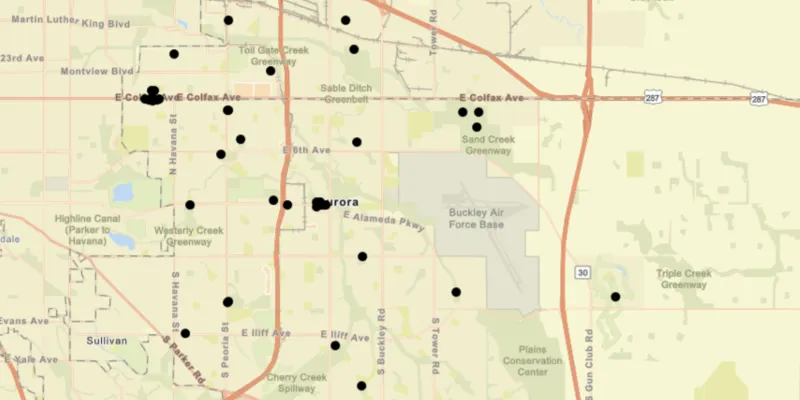
Display features from a local GeoPackage.
Use case
A GeoPackage is an OGC standard, making it useful when your project requires an open source data format or when other, non-ArcGIS systems may be creating the data. Accessing data from a local GeoPackage is useful when working in an environment that has an inconsistent internet connection or that does not have an internet connection at all. For example, a department of transportation field worker might source map data from a GeoPackage when conducting signage inspections in rural areas with poor network coverage.
How to use the sample
Pan and zoom around the map. View the data loaded from the geopackage.
How it works
- Create a
GeoPackagepassing the URI string into the constructor. - Load the
GeoPackagewithGeoPackage.loadAsync - When it’s done loading, get the
GeoPackageFeatureTableobjects from the geopackage withgeoPackage.getGeoPackageFeatureTables() - Create a
FeatureLayer(featureTable)for each feature table and add it to the map as an operational layer. Add each to the map as an operational layer withmap.getOperationalLayers().add(featureLayer)
Relevant API
- ArcGISMap
- FeatureLayer
- GeoPackage
- GeoPackageFeatureTable
About the data
The map shows point locations of public art installations in Aurora, Colorado.
Tags
feature table, geopackage, gpkg, OGC, package, standards
Sample code
/* * Copyright 2017 Esri. * * Licensed under the Apache License, Version 2.0 (the "License"); you may not * use this file except in compliance with the License. You may obtain a copy of * the License at * * http://www.apache.org/licenses/LICENSE-2.0 * * Unless required by applicable law or agreed to in writing, software * distributed under the License is distributed on an "AS IS" BASIS, WITHOUT * WARRANTIES OR CONDITIONS OF ANY KIND, either express or implied. See the * License for the specific language governing permissions and limitations under * the License. */
package com.esri.samples.feature_layer_geopackage;
import java.io.File;import java.util.List;
import javafx.application.Application;import javafx.scene.Scene;import javafx.scene.control.Alert;import javafx.scene.layout.StackPane;import javafx.stage.Stage;
import com.esri.arcgisruntime.ArcGISRuntimeEnvironment;import com.esri.arcgisruntime.data.GeoPackage;import com.esri.arcgisruntime.data.GeoPackageFeatureTable;import com.esri.arcgisruntime.layers.FeatureLayer;import com.esri.arcgisruntime.loadable.LoadStatus;import com.esri.arcgisruntime.mapping.ArcGISMap;import com.esri.arcgisruntime.mapping.BasemapStyle;import com.esri.arcgisruntime.mapping.Viewpoint;import com.esri.arcgisruntime.mapping.view.MapView;
public class FeatureLayerGeoPackageSample extends Application {
  private MapView mapView;  private GeoPackage geoPackage; // keep loadable in scope to avoid garbage collection
  @Override  public void start(Stage stage) {
    try {      // create stack pane and application scene      StackPane stackPane = new StackPane();      Scene scene = new Scene(stackPane);
      // set title, size, and add scene to stage      stage.setTitle("Feature Layer GeoPackage Sample");      stage.setWidth(800);      stage.setHeight(700);      stage.setScene(scene);      stage.show();
      // authentication with an API key or named user is required to access basemaps and other location services      String yourAPIKey = System.getProperty("apiKey");      ArcGISRuntimeEnvironment.setApiKey(yourAPIKey);
      // create a map with the streets basemap style      ArcGISMap map = new ArcGISMap(BasemapStyle.ARCGIS_STREETS);
      // create a map view and set the map to it      mapView = new MapView();      mapView.setMap(map);
      // create a GeoPackage from a local gpkg file      File geoPackageFile = new File(System.getProperty("data.dir"), "./samples-data/auroraCO/AuroraCO.gpkg");      geoPackage = new GeoPackage(geoPackageFile.getAbsolutePath());      geoPackage.loadAsync();
      // create a feature layer from the first feature table in the gpkg      geoPackage.addDoneLoadingListener(() -> {        if (geoPackage.getLoadStatus() == LoadStatus.LOADED) {          List<GeoPackageFeatureTable> featureTables = geoPackage.getGeoPackageFeatureTables();          if (featureTables.size() > 0) {            FeatureLayer featureLayer = new FeatureLayer(featureTables.get(0));            map.getOperationalLayers().add(featureLayer);            // zoom to the layer            featureLayer.addDoneLoadingListener(() ->              mapView.setViewpointAsync(new Viewpoint(featureLayer.getFullExtent()))            );          }        } else {          Alert alert = new Alert(Alert.AlertType.ERROR, geoPackage.getLoadError().getMessage());          alert.show();        }      });
      // add the map view to stack pane      stackPane.getChildren().add(mapView);
    } catch (Exception e) {      // on any error, display the stack trace.      e.printStackTrace();    }  }
  /**   * Stops and releases all resources used in application.   */  @Override  public void stop() {
    if (mapView != null) {      mapView.dispose();    }  }
  /**   * Opens and runs application.   *   * @param args arguments passed to this application   */  public static void main(String[] args) {
    Application.launch(args);  }
}