Use different feature request modes to populate the map from a service feature table.
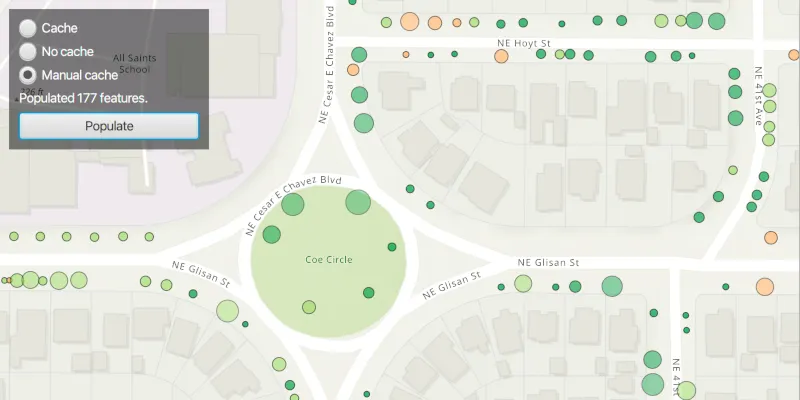
Use case
Feature tables can be initialized with a feature request mode which controls how frequently features are requested and locally cached in response to panning, zooming, selecting, or querying. The feature request mode affects performance and should be chosen based on considerations such as how often the data is expected to change or how often changes in the data should be reflected to the user.
-
ON_INTERACTION_CACHE- fetches features within the current extent when needed (after a pan or zoom action) from the server and caches those features in a table on the client. Queries will be performed locally if the features are present, otherwise they will be requested from the server. This mode minimizes requests to the server and is useful for large batches of features which will change infrequently. -
ON_INTERACTION_NO_CACHE- always fetches features from the server and doesn’t cache any features on the client. This mode is best for features that may change often on the server or whose changes need to always be visible.NOTE: No cache does not guarantee that features won’t be cached locally. Feature request mode is a performance concept unrelated to data security.
-
MANUAL_CACHE- only fetches features when explicitly populated from a query. This mode is best for features that change minimally or when it is not critical for the user to see the latest changes.
How to use the sample
Choose a request mode by clicking on a radio button. Pan and zoom to see how the features update at different scales. If you choose “Manual cache”, click the “Populate” button to manually get a cache with a subset of features.
Note: The service limits requests to 2000 features.
How it works
- Create a
ServiceFeatureTablewith a feature service URL. - Set the
FeatureRequestModeproperty of the service feature table to the desired mode (ON_INTERACTION_CACHE,ON_INTERACTION_NO_CACHE, orMANUAL_CACHE).- If using
MANUAL_CACHE, populate the features withServiceFeatureTable.populateFromServiceAsync().
- If using
- Create a
FeatureLayerwith the feature table and add it to anArcGISMap’s operational layers to display it.
Relevant API
- FeatureLayer
- ServiceFeatureTable
- ServiceFeatureTable.FeatureRequestMode
About the data
This sample uses the Trees of Portland service showcasing over 200,000 street trees in Portland, OR. Each tree point models the health of the tree (green - better, red - worse) as well as the diameter of its trunk.
Tags
cache, data, feature, feature request mode, performance
Sample code
/* * Copyright 2021 Esri. * * Licensed under the Apache License, Version 2.0 (the "License"); you may not * use this file except in compliance with the License. You may obtain a copy of * the License at * * http://www.apache.org/licenses/LICENSE-2.0 * * Unless required by applicable law or agreed to in writing, software * distributed under the License is distributed on an "AS IS" BASIS, WITHOUT * WARRANTIES OR CONDITIONS OF ANY KIND, either express or implied. See the * License for the specific language governing permissions and limitations under * the License. */
package com.esri.samples.toggle_between_feature_request_modes;
import java.util.Collections;import java.util.List;import java.util.concurrent.atomic.AtomicInteger;
import javafx.application.Application;import javafx.geometry.Insets;import javafx.geometry.Pos;import javafx.scene.Scene;import javafx.scene.control.*;import javafx.scene.layout.Background;import javafx.scene.layout.BackgroundFill;import javafx.scene.layout.CornerRadii;import javafx.scene.layout.StackPane;import javafx.scene.layout.VBox;import javafx.scene.paint.Paint;import javafx.stage.Stage;
import com.esri.arcgisruntime.ArcGISRuntimeEnvironment;import com.esri.arcgisruntime.concurrent.ListenableFuture;import com.esri.arcgisruntime.data.FeatureQueryResult;import com.esri.arcgisruntime.data.QueryParameters;import com.esri.arcgisruntime.data.ServiceFeatureTable;import com.esri.arcgisruntime.layers.FeatureLayer;import com.esri.arcgisruntime.loadable.LoadStatus;import com.esri.arcgisruntime.mapping.ArcGISMap;import com.esri.arcgisruntime.mapping.BasemapStyle;import com.esri.arcgisruntime.mapping.Viewpoint;import com.esri.arcgisruntime.mapping.view.DrawStatus;import com.esri.arcgisruntime.mapping.view.MapView;
public class ToggleBetweenFeatureRequestModesSample extends Application {
  private Button populateButton;  private FeatureLayer featureLayer; // keep loadable in scope to avoid garbage collection  private Label label;  private MapView mapView;  private ProgressIndicator progressIndicator;  private RadioButton cacheButton;  private RadioButton noCacheButton;  private RadioButton manualCacheButton;  private ServiceFeatureTable featureTable;  private ToggleGroup toggleGroup;  private VBox controlsVBox;
  private static final String SERVICE_FEATURE_URL =      "https://services2.arcgis.com/ZQgQTuoyBrtmoGdP/arcgis/rest/services/Trees_of_Portland/FeatureServer/0";
  @Override  public void start(Stage stage) {
    try {      // create stack pane and application scene      StackPane stackPane = new StackPane();      Scene scene = new Scene(stackPane);      scene.getStylesheets().add(getClass().getResource("/toggle_between_feature_request_modes/style.css").toExternalForm());
      // set title, size, and add scene to stage      stage.setTitle("Toggle Between Feature Request Modes Sample");      stage.setWidth(800);      stage.setHeight(700);      stage.setScene(scene);      stage.show();
      // authentication with an API key or named user is required to access basemaps and other location services      String yourAPIKey = System.getProperty("apiKey");      ArcGISRuntimeEnvironment.setApiKey(yourAPIKey);
      // create a map with the topographic basemap style      ArcGISMap map = new ArcGISMap(BasemapStyle.ARCGIS_TOPOGRAPHIC);
      // create service feature table from a url      featureTable = new ServiceFeatureTable(SERVICE_FEATURE_URL);      // create a feature layer from the service feature table      featureLayer = new FeatureLayer(featureTable);      // set up the control panel for switching between request modes      setUpUi();
      // listen for when a radio button within the toggle group is selected      toggleGroup.selectedToggleProperty().addListener(e -> {
        // check if the feature layer has already been added to the map's operational layers, and if not, add it        if (map.getOperationalLayers().size() == 0){          map.getOperationalLayers().add(featureLayer);        }
        // check the feature layer has loaded before setting the request mode of the feature table, selected from        // the radio button's user data        featureLayer.addDoneLoadingListener(() -> {          if (featureLayer.getLoadStatus() == LoadStatus.LOADED) {            // enable populate button if the manual cache radio button is selected            populateButton.setDisable(!manualCacheButton.isSelected());            // if the manual radio button isn't selected, display a blank label, otherwise display instruction to user            if (!manualCacheButton.isSelected()) {              label.setText("");            } else {              label.setText("Click populate to view results");            }            // set request mode of service feature table to selected toggle option            featureTable.setFeatureRequestMode((ServiceFeatureTable.FeatureRequestMode)              toggleGroup.getSelectedToggle().getUserData());
          } else {            new Alert(Alert.AlertType.ERROR, "Feature Layer Failed to Load!").show();          }        });      });
      // fetch cache manually when the populate button is clicked      populateButton.setOnAction(e -> fetchCacheManually());
      // create a map view and set the map to it      mapView = new MapView();      mapView.setMap(map);      // set the starting viewpoint for the map view      mapView.setViewpoint(new Viewpoint(45.5266, -122.6219, 6000));      // disable the vbox and show a progress indicator when the map view is drawing (e.g. when fetching caches)      controlsVBox.disableProperty().bind(mapView.drawStatusProperty().isEqualTo(DrawStatus.IN_PROGRESS));      progressIndicator.visibleProperty().bind(mapView.drawStatusProperty().isEqualTo(DrawStatus.IN_PROGRESS));
      // add label and button to the control panel      controlsVBox.getChildren().addAll(cacheButton, noCacheButton, manualCacheButton, label, populateButton);
      // add the map view and control panel to stack pane      stackPane.getChildren().addAll(mapView, controlsVBox, progressIndicator);      StackPane.setAlignment(controlsVBox, Pos.TOP_LEFT);      StackPane.setMargin(controlsVBox, new Insets(10, 0, 0, 10));    } catch (Exception e) {      // on any error, display the stack trace      e.printStackTrace();    }  }
  /**   * Fetches the cache from a Service Feature Table manually.   */  private void fetchCacheManually() {
    // create query to select all tree features    QueryParameters queryParams = new QueryParameters();    // query for all tree conditions except "dead" with coded value '4' within the visible extent    queryParams.setWhereClause("Condition < '4'");    queryParams.setGeometry(mapView.getVisibleArea().getExtent());
    List<String> outfields = Collections.singletonList("*");     // * means all features    // get queried features from service feature table and clear previous cache    ListenableFuture<FeatureQueryResult> tableResult = featureTable.populateFromServiceAsync(queryParams, true, outfields);
    tableResult.addDoneListener(() -> {      try {        // find the number of features returned from query        AtomicInteger featuresReturned = new AtomicInteger();        tableResult.get().forEach(feature -> featuresReturned.getAndIncrement());
        // display number of returned features to the user        // note the service has a maximum record count of 2000        label.setText("Populated " + featuresReturned + " features.");      } catch (Exception e) {        // on any error, display the stack trace        e.printStackTrace();      }    });  }
  /**   * Sets up a control panel with radio buttons to toggle between feature request modes, a label displaying the features   * returned from a manual cache result, and a button to manually request cache if manual cache feature request mode   * is selected.   */  private void setUpUi() {
    // create a control panel    controlsVBox = new VBox(6);    controlsVBox.setBackground(new Background(new BackgroundFill(Paint.valueOf("rgba(0,0,0,0.5)"), CornerRadii.EMPTY,      Insets.EMPTY)));    controlsVBox.setPadding(new Insets(10.0));    controlsVBox.setMaxSize(200, 80);    controlsVBox.getStyleClass().add("panel-region");
    // create a label to display information on the UI    label = new Label("Choose a feature request mode.");
    // set the feature request mode as the user data on the equivalent radio button    cacheButton = new RadioButton("Cache");    cacheButton.setUserData(ServiceFeatureTable.FeatureRequestMode.ON_INTERACTION_CACHE);    noCacheButton = new RadioButton("No cache");    noCacheButton.setUserData(ServiceFeatureTable.FeatureRequestMode.ON_INTERACTION_NO_CACHE);    manualCacheButton = new RadioButton("Manual cache");    manualCacheButton.setUserData(ServiceFeatureTable.FeatureRequestMode.MANUAL_CACHE);
    // create a new toggle group and add the radio buttons to it    toggleGroup = new ToggleGroup();    toggleGroup.getToggles().addAll(cacheButton, noCacheButton, manualCacheButton);
    // create button to request the service table's cache    populateButton = new Button("Populate");    populateButton.setMaxWidth(Double.MAX_VALUE);    populateButton.setDisable(true);
    // create a progress indicator    progressIndicator = new ProgressIndicator();    progressIndicator.setVisible(false);  }
  /**   * Stops and releases all resources used in application.   */  @Override  public void stop() {
    if (mapView != null) {      mapView.dispose();    }  }
  /**   * Opens and runs application.   *   * @param args arguments passed to this application   */  public static void main(String[] args) {
    Application.launch(args);  }
}