Display features on a map using a definition expression or a display filter.
Use case
Definition queries allow you to define a subset of features to work with in a layer by filtering which features are retrieved from the dataset by the layer. This means that a definition query affects not only drawing, but also which features appear in the layer’s attribute table and therefore which features can be selected, labeled, identified, and processed by geoprocessing tools.
Alternatively, display filters limit which features are drawn, but retain all features in queries and when processing. Definition queries and display filters can be used together on a layer, but definition queries limit the features available in the layer, while display filters only limit which features are displayed.
How to use the sample
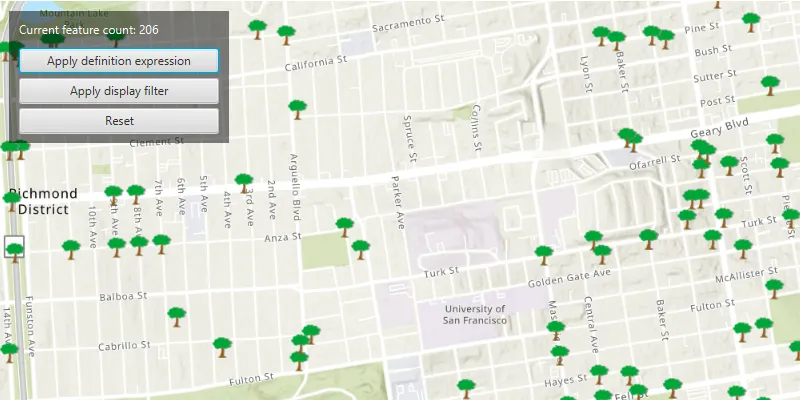
In this sample you can filter a dataset of tree quality selecting for only those trees which require maintenance or are damaged.
Click the ‘Apply definition expression’ button to limit the features requested from the feature layer to those specified by the SQL query definition expression. This option not only narrows down the results that are drawn, but also removes those features from the layer’s attribute table.
To filter the results being drawn without modifying the attribute table, click the ‘Apply display filter’ button.
Click the ‘Reset’ button to remove the definition expression or display filter on the feature layer, and return all records.
The feature count value shows the current number of features in the current map view extent. When a definition expression is applied to narrow down the list of features being drawn, the count is updated to reflect this change. However if a display filter is applied, the features which are not visible on the map will still be included in the total feature count.
How it works
- Create a feature layer from a service feature table (from a URL).
- Filter features on your feature layer using a
DefinitionExpressionto view a subset of features and modify the attribute table. - Filter features on your feature layer using a
DisplayFilterto view a subset of features without modifying the attribute table.
Relevant API
- DefinitionExpression
- DisplayFilter
- FeatureLayer
- ServiceFeatureTable
About the data
The San Francisco 311 incidents layer in this sample displays point features related to crime incidents such as graffiti and tree damage that have been reported by city residents.
Tags
definition expression, display filter, filter, limit data, query, restrict data, SQL, where clause
Sample code
/* * Copyright 2022 Esri. * * Licensed under the Apache License, Version 2.0 (the "License"); you may not * use this file except in compliance with the License. You may obtain a copy of * the License at * * http://www.apache.org/licenses/LICENSE-2.0 * * Unless required by applicable law or agreed to in writing, software * distributed under the License is distributed on an "AS IS" BASIS, WITHOUT * WARRANTIES OR CONDITIONS OF ANY KIND, either express or implied. See the * License for the specific language governing permissions and limitations under * the License. */
package com.esri.samples.filter_by_definition_expression_or_display_filter;
import java.util.Collections;import java.util.concurrent.ExecutionException;
import javafx.application.Application;import javafx.geometry.Insets;import javafx.geometry.Pos;import javafx.scene.Scene;import javafx.scene.control.Alert;import javafx.scene.control.Button;import javafx.scene.control.Label;import javafx.scene.control.ProgressIndicator;import javafx.scene.layout.Background;import javafx.scene.layout.BackgroundFill;import javafx.scene.layout.CornerRadii;import javafx.scene.layout.HBox;import javafx.scene.layout.StackPane;import javafx.scene.layout.VBox;import javafx.scene.paint.Paint;import javafx.stage.Stage;
import com.esri.arcgisruntime.ArcGISRuntimeEnvironment;import com.esri.arcgisruntime.data.QueryParameters;import com.esri.arcgisruntime.data.ServiceFeatureTable;import com.esri.arcgisruntime.geometry.Envelope;import com.esri.arcgisruntime.geometry.Point;import com.esri.arcgisruntime.geometry.SpatialReferences;import com.esri.arcgisruntime.layers.DisplayFilter;import com.esri.arcgisruntime.layers.FeatureLayer;import com.esri.arcgisruntime.layers.ManualDisplayFilterDefinition;import com.esri.arcgisruntime.loadable.LoadStatus;import com.esri.arcgisruntime.mapping.ArcGISMap;import com.esri.arcgisruntime.mapping.BasemapStyle;import com.esri.arcgisruntime.mapping.Viewpoint;import com.esri.arcgisruntime.mapping.view.DrawStatus;import com.esri.arcgisruntime.mapping.view.MapView;
public class FilterByDefinitionExpressionOrDisplayFilterSample extends Application {
  private Button applyExpressionButton;  private Button applyFilterButton;  private Button resetButton;  private Label featureCountLabel;
  private MapView mapView;  private FeatureLayer featureLayer; // keep loadable in scope to avoid garbage collection
  private static final String FEATURE_SERVICE_URL =    "https://services2.arcgis.com/ZQgQTuoyBrtmoGdP/arcgis/rest/services/SF_311_Incidents/FeatureServer/0";
  @Override  public void start(Stage stage) {
    try {      // create stack pane and application scene      StackPane stackPane = new StackPane();      Scene scene = new Scene(stackPane);      scene.getStylesheets().add(getClass().getResource("/filter_by_definition_expression_or_display_filter/style.css").toExternalForm());
      // set title, size, and add scene to stage      stage.setTitle("Filter by Definition Expression or Display Filter Sample");      stage.setWidth(800);      stage.setHeight(700);      stage.setScene(scene);      stage.show();
      // authentication with an API key or named user is required to access basemaps and other location services      String yourAPIKey = System.getProperty("apiKey");      ArcGISRuntimeEnvironment.setApiKey(yourAPIKey);
      // create a map with the topographic basemap style      ArcGISMap map = new ArcGISMap(BasemapStyle.ARCGIS_TOPOGRAPHIC);      // create a map view and set the map to it      mapView = new MapView();      mapView.setMap(map);      // disable interaction with the map view to avoid navigating away from the data      mapView.setDisable(true);
      // create feature layer from service feature table      featureLayer = new FeatureLayer(new ServiceFeatureTable(FEATURE_SERVICE_URL));      // add the feature layer to the map's operational layers      map.getOperationalLayers().add(featureLayer);
      // starting location for sample      Point startPoint = new Point(-122.45044007080793, 37.775915492745874, SpatialReferences.getWgs84());      // set the viewpoint for the map view      mapView.setViewpointCenterAsync(startPoint, 20000);
      // set up user interface      VBox vBox = controlsVBox();
      // add a progress indicator and display it when drawing is in progress      var progressIndicator = new ProgressIndicator();      progressIndicator.visibleProperty().bind(mapView.drawStatusProperty().isEqualTo(DrawStatus.IN_PROGRESS));
      // create a new display filter with a name and where clause      var displayFilter = new DisplayFilter("Damaged Trees", "req_type LIKE '%Tree Maintenance%'");      var manualDisplayFilterDefinition = new ManualDisplayFilterDefinition(displayFilter,        Collections.singletonList(displayFilter));
      // reset any existing definition expression on the feature layer, and set a display filter definition to it      applyFilterButton.setOnAction(e -> {          // reset the definition expression on the feature layer          featureLayer.setDefinitionExpression("");          // set the display filter definition to the feature layer          featureLayer.setDisplayFilterDefinition(manualDisplayFilterDefinition);        }      );
      // reset any existing display filter definition on the feature layer, and set a definition expression to it      applyExpressionButton.setOnAction(e -> {        // reset the display filter definition        featureLayer.setDisplayFilterDefinition(null);        // set the definition expression to the feature layer        featureLayer.setDefinitionExpression("req_Type = 'Tree Maintenance or Damage'");      });
      // reset the definition expression and display filter definition on the feature layer      resetButton.setOnAction(e -> {        // reset the display filter definition        featureLayer.setDisplayFilterDefinition(null);        // reset the definition expression on the feature layer        featureLayer.setDefinitionExpression("");      });
      // check that the feature layer has loaded, then add a listener to the mapview to count      // the features visible in the viewpoint extent every time the map is redrawn      featureLayer.addDoneLoadingListener(() -> {        if (featureLayer.getLoadStatus() == LoadStatus.LOADED) {          mapView.drawStatusProperty().addListener((observable, oldValue, newValue) -> {            if (newValue == DrawStatus.IN_PROGRESS) {              // set the count label text              featureCountLabel.setText("updating..");            } else {              // get the map view's current view point, create query parameters and set the view point to it              Envelope viewPointExtent =                mapView.getCurrentViewpoint(Viewpoint.Type.BOUNDING_GEOMETRY).getTargetGeometry().getExtent();              QueryParameters queryParameters = new QueryParameters();              queryParameters.setGeometry(viewPointExtent);
              // update the UI with the count of features in the extent              if (!viewPointExtent.isEmpty()) {                var queryFeatures = featureLayer.getFeatureTable().queryFeatureCountAsync(queryParameters);                // once the query feature count is done, update the label to show the total incidents counted                queryFeatures.addDoneListener(() -> {                  Long totalIncidentReported;                  try {                    totalIncidentReported = queryFeatures.get();                    featureCountLabel.setText(totalIncidentReported.toString());                  } catch (InterruptedException | ExecutionException e) {                    e.printStackTrace();                  }                });              }            }          });        } else {          new Alert(Alert.AlertType.ERROR, "Feature layer failed to load").show();        }      });
      // add the map view and control panel to stack pane      stackPane.getChildren().addAll(mapView, vBox, progressIndicator);      StackPane.setAlignment(vBox, Pos.TOP_LEFT);      StackPane.setMargin(vBox, new Insets(10, 0, 0, 10));
    } catch (Exception e) {      // on any error, display the stack trace      e.printStackTrace();    }  }
  /**   * Creates a UI with three buttons and a label.   * @return a vBox populated with buttons and labels   */  private VBox controlsVBox() {
    Label label = new Label("Current feature count: ");    featureCountLabel = new Label("loading...");
    applyExpressionButton = new Button("Apply definition expression");    applyFilterButton = new Button("Apply display filter");    resetButton = new Button("Reset");
    var buttonVBox = new VBox(5);    buttonVBox.setMinWidth(200);    buttonVBox.getChildren().addAll(applyExpressionButton, applyFilterButton, resetButton);
    applyExpressionButton.prefWidthProperty().bind(buttonVBox.widthProperty());    applyFilterButton.prefWidthProperty().bind(buttonVBox.widthProperty());    resetButton.prefWidthProperty().bind(buttonVBox.widthProperty());
    VBox controlsVBox = new VBox(10);    controlsVBox.setBackground(new Background(new BackgroundFill(Paint.valueOf("rgba(0,0,0,0.5)"), CornerRadii.EMPTY,      Insets.EMPTY)));    controlsVBox.setPadding(new Insets(10.0));    controlsVBox.setMaxSize(200, 100);    controlsVBox.getStyleClass().add("panel-region");    var hBox = new HBox();    hBox.getChildren().addAll(label, featureCountLabel);    controlsVBox.getChildren().addAll(hBox, buttonVBox);
    return controlsVBox;  }
  /**   * Stops and releases all resources used in application.   */  @Override  public void stop() {
    if (mapView != null) {      mapView.dispose();    }  }
  /**   * Opens and runs application.   *   * @param args arguments passed to this application   */  public static void main(String[] args) {
    Application.launch(args);  }
}