Find features in a feature table which match an SQL query.
Use case
Query expressions can be used in ArcGIS to select a subset of features from a feature table. This is most useful in large or complicated data sets. A possible use case might be on a feature table marking the location of street furniture through a city. A user may wish to query by a TYPE column to return “benches”. In this sample, we query a U.S. state by STATE_NAME from a feature table containing all U.S. states.
How to use the sample
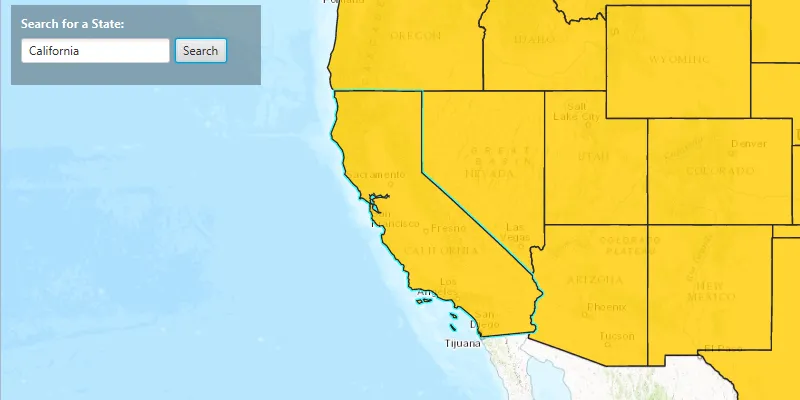
Input the name of a U.S. state into the text field. When you click “Search”, a query is performed and the matching features are highlighted or an error is returned.
How it works
- Create a
ServiceFeatureTableusing the URL of a feature service. - Create a
QueryParameterswith a where clause specified usingsetWhereClause(). - Perform the query using
queryFeaturesAsync(query)on the service feature table. - When complete, the query will return a
FeatureQueryResultwhich can be iterated over to get the matching features.
About the data
This sample uses U.S. State polygon features from the USA 2016 Daytime Population feature service.
Relevant API
- FeatureLayer
- FeatureQueryResult
- QueryParameters
- ServiceFeatureTable
Tags
search
Sample code
FeatureLayerQuerySample.java
/* * Copyright 2017 Esri. * * Licensed under the Apache License, Version 2.0 (the "License"); you may not * use this file except in compliance with the License. You may obtain a copy of * the License at * * http://www.apache.org/licenses/LICENSE-2.0 * * Unless required by applicable law or agreed to in writing, software * distributed under the License is distributed on an "AS IS" BASIS, WITHOUT * WARRANTIES OR CONDITIONS OF ANY KIND, either express or implied. See the * License for the specific language governing permissions and limitations under * the License. */
package com.esri.samples.feature_layer_query;
import javafx.application.Application;import javafx.application.Platform;import javafx.geometry.Insets;import javafx.geometry.Pos;import javafx.scene.Scene;import javafx.scene.control.Alert;import javafx.scene.control.Alert.AlertType;import javafx.scene.control.Button;import javafx.scene.control.Label;import javafx.scene.control.TextField;import javafx.scene.layout.Background;import javafx.scene.layout.BackgroundFill;import javafx.scene.layout.CornerRadii;import javafx.scene.layout.HBox;import javafx.scene.layout.StackPane;import javafx.scene.layout.VBox;import javafx.scene.paint.Color;import javafx.scene.paint.Paint;import javafx.stage.Stage;
import com.esri.arcgisruntime.ArcGISRuntimeEnvironment;import com.esri.arcgisruntime.concurrent.ListenableFuture;import com.esri.arcgisruntime.data.Feature;import com.esri.arcgisruntime.data.FeatureQueryResult;import com.esri.arcgisruntime.data.QueryParameters;import com.esri.arcgisruntime.data.ServiceFeatureTable;import com.esri.arcgisruntime.geometry.Envelope;import com.esri.arcgisruntime.geometry.Point;import com.esri.arcgisruntime.geometry.SpatialReferences;import com.esri.arcgisruntime.layers.FeatureLayer;import com.esri.arcgisruntime.loadable.LoadStatus;import com.esri.arcgisruntime.mapping.ArcGISMap;import com.esri.arcgisruntime.mapping.BasemapStyle;import com.esri.arcgisruntime.mapping.view.MapView;import com.esri.arcgisruntime.symbology.SimpleFillSymbol;import com.esri.arcgisruntime.symbology.SimpleLineSymbol;import com.esri.arcgisruntime.symbology.SimpleRenderer;
public class FeatureLayerQuerySample extends Application {
  private Alert dialog;
  private MapView mapView;  private FeatureLayer featureLayer;  private ServiceFeatureTable featureTable;  private Point startPoint;  private ListenableFuture<FeatureQueryResult> tableQueryResult;
  private final int SCALE = 100000000;
  @Override  public void start(Stage stage) {
    try {      // create stack pane and application scene      StackPane stackPane = new StackPane();      Scene scene = new Scene(stackPane);      scene.getStylesheets().add(getClass().getResource("/feature_layer_query/style.css").toExternalForm());
      // set title, size, and add scene to stage      stage.setTitle("Feature Layer Query Sample");      stage.setWidth(800);      stage.setHeight(700);      stage.setScene(scene);      stage.show();
      // authentication with an API key or named user is required to access basemaps and other location services      String yourAPIKey = System.getProperty("apiKey");      ArcGISRuntimeEnvironment.setApiKey(yourAPIKey);
      // create a control panel      VBox controlsVBox = new VBox(6);      controlsVBox.setBackground(new Background(new BackgroundFill(Paint.valueOf("rgba(0,0,0,0.3)"), CornerRadii.EMPTY,          Insets.EMPTY)));      controlsVBox.setPadding(new Insets(10.0));      controlsVBox.setMaxSize(250, 80);      controlsVBox.getStyleClass().add("panel-region");
      // create area for searching      Label searchLabel = new Label("Search for a State:");      searchLabel.getStyleClass().add("panel-label");      TextField searchField = new TextField();      searchField.setMaxWidth(150);      Button searchButton = new Button("Search");      HBox searchBox = new HBox(5);      searchBox.getChildren().addAll(searchField, searchButton);      searchBox.setDisable(true);
      // create dialog to display alert information      dialog = new Alert(AlertType.WARNING);
      // search for the state that was entered      searchButton.setOnAction(e -> {        // clear the selection of the feature        featureLayer.clearSelection();        String stateText = searchField.getText();
        if (stateText.trim().length() > 0) {          searchForState(stateText);        } else {          dialog.setContentText("State Not Found! Add a valid state name.");          dialog.showAndWait();          mapView.setViewpointCenterAsync(startPoint, SCALE);        }      });
      // add search label and box to the control panel      controlsVBox.getChildren().addAll(searchLabel, searchBox);
      // create a starting point for the view      startPoint = new Point(-11000000, 5000000, SpatialReferences.getWebMercator());
      // set fill to golden color for the US states with a black color outline      SimpleLineSymbol lineSymbol = new SimpleLineSymbol(SimpleLineSymbol.Style.SOLID, Color.BLACK, 1);      SimpleFillSymbol fillSymbol = new SimpleFillSymbol(SimpleFillSymbol.Style.SOLID, Color.DARKGOLDENROD, lineSymbol);
      // create a service feature table      featureTable = new ServiceFeatureTable("https://services.arcgis.com/jIL9msH9OI208GCb/arcgis/rest/services/USA_Daytime_Population_2016/FeatureServer/0");
      // create a feature layer from table      featureLayer = new FeatureLayer(featureTable);      featureLayer.setOpacity(0.8f);      featureLayer.setMaxScale(10000);
      // enable search once the feature layer is loaded      featureLayer.addDoneLoadingListener(() -> {        if (featureLayer.getLoadStatus() == LoadStatus.LOADED) {          searchBox.setDisable(false);        } else {          Alert alert = new Alert(Alert.AlertType.ERROR, "Feature Layer Failed to Load!");          alert.show();        }      });
      // set renderer for feature layer      featureLayer.setRenderer(new SimpleRenderer(fillSymbol));
      // create a map with the topographic basemap style      final ArcGISMap map = new ArcGISMap(BasemapStyle.ARCGIS_TOPOGRAPHIC);
      // create a map view and set the map to it      mapView = new MapView();      mapView.setMap(map);
      // add the feature layer to the map's operational layers      map.getOperationalLayers().add(featureLayer);
      // set viewpoint to the start point      mapView.setViewpointCenterAsync(startPoint, SCALE);
      // add the map view and control panel to stack pane      stackPane.getChildren().addAll(mapView, controlsVBox);      StackPane.setAlignment(controlsVBox, Pos.TOP_LEFT);      StackPane.setMargin(controlsVBox, new Insets(10, 0, 0, 10));    } catch (Exception e) {      // on any error, display the stack trace      e.printStackTrace();    }  }
  /**   * Searches for a US state inside the current ServiceFeatureTable.   *   * @param state a US state that is being searched   */  private void searchForState(String state) {
    // create a query for the state that was entered    QueryParameters query = new QueryParameters();    query.setWhereClause("upper(STATE_NAME) LIKE '" + state.toUpperCase() + "'");
    // search for the state feature in the feature table    tableQueryResult = featureTable.queryFeaturesAsync(query);
    tableQueryResult.addDoneListener(() -> {      try {        // get the result from the query        FeatureQueryResult result = tableQueryResult.get();        // if a state feature was found        if (result.iterator().hasNext()) {          // get state feature and zoom to it          Feature feature = result.iterator().next();          Envelope envelope = feature.getGeometry().getExtent();          mapView.setViewpointGeometryAsync(envelope, 200);
          // set the state feature to be selected          featureLayer.selectFeature(feature);        } else {          Platform.runLater(() -> {            dialog.setContentText("State Not Found! Add a valid state name.");            dialog.showAndWait();            mapView.setViewpointCenterAsync(startPoint, SCALE);          });        }      } catch (Exception e) {        // on any error, display the stack trace        e.printStackTrace();      }    });  }
  /**   * Stops and releases all resources used in application.   */  @Override  public void stop() {
    if (mapView != null) {      mapView.dispose();    }  }
  /**   * Opens and runs application.   *   * @param args arguments passed to this application   */  public static void main(String[] args) {
    Application.launch(args);  }
}