Select features in a feature layer.
Use case
Selecting features, whether by query or identify, can be an important step both in editing data and visualizing results. One possible use case would be to query a feature layer containing street furniture. A query might look for type “bench” and return a list of bench features contained in the features with an attribute of type bench. These might be selected for further editing (see FeatureQueryResult) or may just be highlighted visually.
How to use the sample
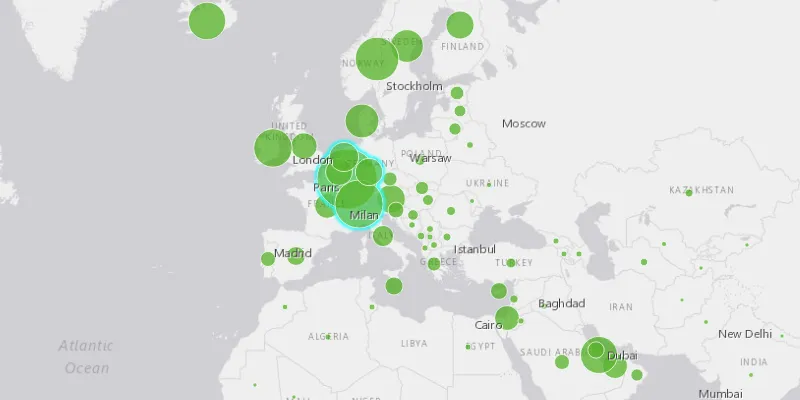
Click on a feature in the map. All features within a given tolerance (in pixels) of the click will be selected.
How it works
- Create a
ServiceFeatureTablefrom a feature service URL. - Create a
FeatureLayerfrom the service feature table. - Identify nearby features at the clicked location using
identifyLayerAsync(featureLayer, clickLocation, tolerance, returnPopupsOnly, maxResults)on the map view. - Select all identified features in the feature layer with
selectFeatures(features).
Relevant API
- Feature
- FeatureLayer
- ServiceFeatureTable
About the data
This sample uses the Gross Domestic Product, 1960-2016 feature service. Only the 2016 GDP values are shown.
Tags
features, layers, select, selection, tolerance
Sample code
FeatureLayerSelectionSample.java
/* * Copyright 2017 Esri. * * Licensed under the Apache License, Version 2.0 (the "License"); you may not * use this file except in compliance with the License. You may obtain a copy of * the License at * * http://www.apache.org/licenses/LICENSE-2.0 * * Unless required by applicable law or agreed to in writing, software * distributed under the License is distributed on an "AS IS" BASIS, WITHOUT * WARRANTIES OR CONDITIONS OF ANY KIND, either express or implied. See the * License for the specific language governing permissions and limitations under * the License. */
package com.esri.samples.feature_layer_selection;
import java.util.List;import java.util.stream.Collectors;
import javafx.application.Application;import javafx.geometry.Point2D;import javafx.scene.Scene;import javafx.scene.input.MouseButton;import javafx.scene.layout.StackPane;import javafx.stage.Stage;
import com.esri.arcgisruntime.ArcGISRuntimeEnvironment;import com.esri.arcgisruntime.concurrent.ListenableFuture;import com.esri.arcgisruntime.data.Feature;import com.esri.arcgisruntime.data.ServiceFeatureTable;import com.esri.arcgisruntime.geometry.Envelope;import com.esri.arcgisruntime.geometry.SpatialReferences;import com.esri.arcgisruntime.layers.FeatureLayer;import com.esri.arcgisruntime.mapping.ArcGISMap;import com.esri.arcgisruntime.mapping.BasemapStyle;import com.esri.arcgisruntime.mapping.Viewpoint;import com.esri.arcgisruntime.mapping.view.IdentifyLayerResult;import com.esri.arcgisruntime.mapping.view.MapView;
public class FeatureLayerSelectionSample extends Application {
  private MapView mapView;
  @Override  public void start(Stage stage) {
    try {      // create stack pane and application scene      StackPane stackPane = new StackPane();      Scene scene = new Scene(stackPane);
      // size the stage, add a title, and set scene to stage      stage.setTitle("Feature Layer Selection Sample");      stage.setWidth(800);      stage.setHeight(700);      stage.setScene(scene);      stage.show();
      // authentication with an API key or named user is required to access basemaps and other location services      String yourAPIKey = System.getProperty("apiKey");      ArcGISRuntimeEnvironment.setApiKey(yourAPIKey);
      // create a map with the light gray basemap style      ArcGISMap map = new ArcGISMap(BasemapStyle.ARCGIS_LIGHT_GRAY);
      // create a map view and set the map to it      mapView = new MapView();      mapView.setMap(map);
      // set a viewpoint on the map view      mapView.setViewpoint(new Viewpoint(new Envelope(-6603299.491810, 1679677.742046, 9002253.947487,        8691318.054732, 0, 0, SpatialReferences.getWebMercator())));
      // create the service feature table      String damageAssessmentFeatureService = "https://services1.arcgis.com/4yjifSiIG17X0gW4/arcgis/rest/services/GDP_per_capita_1960_2016/FeatureServer/0";      final ServiceFeatureTable serviceFeatureTable = new ServiceFeatureTable(damageAssessmentFeatureService);
      // create the feature layer      final FeatureLayer featureLayer = new FeatureLayer(serviceFeatureTable);
      // add the layer to the map's operational layers      map.getOperationalLayers().add(featureLayer);
      mapView.setOnMouseClicked(event -> {        // check for primary or secondary mouse click        if (event.isStillSincePress() && event.getButton() == MouseButton.PRIMARY) {          // clear previous results          featureLayer.clearSelection();
          // create a point from where the user clicked          Point2D point = new Point2D(event.getX(), event.getY());
          // identify the clicked features          final ListenableFuture<IdentifyLayerResult> results = mapView.identifyLayerAsync(featureLayer, point, 10,              false, 10);          results.addDoneListener(() -> {
            try {              IdentifyLayerResult layer = results.get();
              // search the layers for identified features              List<Feature> features = layer.getElements().stream()                  .filter(geoElement -> geoElement instanceof Feature)                  .map(g -> (Feature) g)                  .collect(Collectors.toList());
              // select features              featureLayer.selectFeatures(features);
            } catch (Exception e) {              e.printStackTrace();            }          });        }      });
      // add the map view to stack pane      stackPane.getChildren().add(mapView);
    } catch (Exception e) {      // on any error, display exception      e.printStackTrace();    }  }
  /**   * Stops and releases all resources used in application.   */  @Override  public void stop() {
    // release resources when the application closes    if (mapView != null) {      mapView.dispose();    }  }
  /**   * Opens and runs application.   *   * @param args arguments passed to this application   */  public static void main(String[] args) {
    Application.launch(args);  }}