Create and save a map as a web map item to an ArcGIS portal.
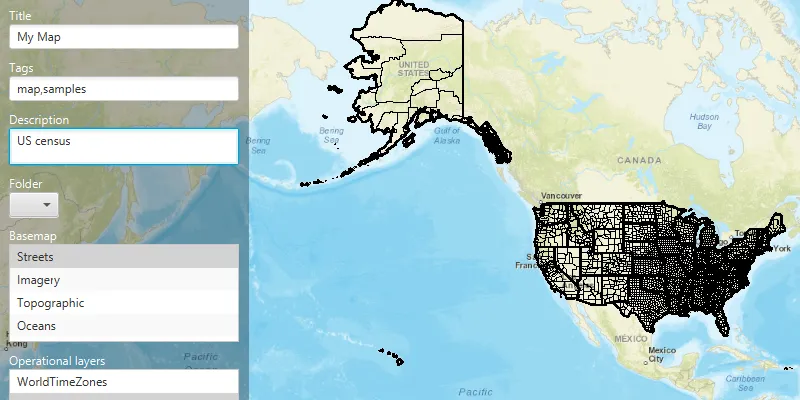
Use case
Maps can be created programmatically in code and then serialized and saved as an ArcGIS portal item. In this case, the portal item is a web map which can be shared with others and opened in various applications and APIs throughout the platform, such as ArcGIS Pro, ArcGIS Online, the JavaScript API, Collector, and Explorer.
How to use the sample
When you run the sample, you will be challenged for an ArcGIS Online login. Enter a username and password for an ArcGIS Online named user account (such as your ArcGIS for Developers account). Then, choose the basemap and layers for your new map. To save the map, choose a title, tags and description (optional), and a folder on your portal (you will need to create one in your portal’s My Content section if you don’t already have one). Click the Save button to save the map to the chosen folder.
How it works
- Set a
DefaultAuthenticationChallengeHandlerto the app’sAuthenticationManager. - Create a new
Portaland load it to invoke the authentication challenge. - Access the
PortalUserContentwithportal.getUser().fetchContentAsync().get(), to get the user’s list of portal folders withportalUserContent.getFolders(). - Create an
ArcGISMapwith aBasemapStyleand a few operational layers. - Call
map.saveMapAsAsync()to save a newArcGISMapwith the specified title, tags, and folder to the portal.
Relevant API
- ArcGISMap
- Portal
Tags
ArcGIS Online, ArcGIS Pro, portal, publish, share, web map
Sample code
/* * Copyright 2019 Esri. * * Licensed under the Apache License, Version 2.0 (the "License"); you may not * use this file except in compliance with the License. You may obtain a copy of * the License at * * http://www.apache.org/licenses/LICENSE-2.0 * * Unless required by applicable law or agreed to in writing, software * distributed under the License is distributed on an "AS IS" BASIS, WITHOUT * WARRANTIES OR CONDITIONS OF ANY KIND, either express or implied. See the * License for the specific language governing permissions and limitations under * the License. */
package com.esri.samples.create_and_save_map;
import java.util.Arrays;import java.util.List;import java.util.concurrent.ExecutionException;
import javafx.fxml.FXML;import javafx.geometry.Insets;import javafx.scene.control.Alert;import javafx.scene.control.Button;import javafx.scene.control.ComboBox;import javafx.scene.control.ListCell;import javafx.scene.control.ListView;import javafx.scene.control.ProgressIndicator;import javafx.scene.control.SelectionMode;import javafx.scene.control.TextArea;import javafx.scene.control.TextField;import javafx.scene.layout.VBox;import javafx.util.StringConverter;
import com.esri.arcgisruntime.concurrent.ListenableFuture;import com.esri.arcgisruntime.layers.ArcGISMapImageLayer;import com.esri.arcgisruntime.layers.Layer;import com.esri.arcgisruntime.loadable.LoadStatus;import com.esri.arcgisruntime.mapping.ArcGISMap;import com.esri.arcgisruntime.mapping.Basemap;import com.esri.arcgisruntime.mapping.BasemapStyle;import com.esri.arcgisruntime.mapping.view.MapView;import com.esri.arcgisruntime.portal.Portal;import com.esri.arcgisruntime.portal.PortalFolder;import com.esri.arcgisruntime.portal.PortalItem;import com.esri.arcgisruntime.portal.PortalUserContent;import com.esri.arcgisruntime.security.AuthenticationManager;import com.esri.arcgisruntime.security.DefaultAuthenticationChallengeHandler;
public class CreateAndSaveMapController {
  @FXML private MapView mapView;  @FXML private TextField title;  @FXML private TextField tags;  @FXML private TextArea description;  @FXML private ComboBox<PortalFolder> folderList;  @FXML private ListView<BasemapStyle> basemapStyleListView;  @FXML private ListView<Layer> layersList;  @FXML private Button saveButton;  @FXML private ProgressIndicator progress;  @FXML private VBox vBox;
  private ArcGISMap map;  private Portal portal;
  @FXML  private void initialize() {
    // set up the authentication manager to handle authentication challenges    DefaultAuthenticationChallengeHandler defaultAuthenticationChallengeHandler = new DefaultAuthenticationChallengeHandler();    AuthenticationManager.setAuthenticationChallengeHandler(defaultAuthenticationChallengeHandler);
    portal = new Portal("https://www.arcgis.com", true);    portal.addDoneLoadingListener(() -> {      if (portal.getLoadStatus() == LoadStatus.LOADED) {        try {          // get the users list of portal folders          PortalUserContent portalUserContent = portal.getUser().fetchContentAsync().get();          List<PortalFolder> portalFolders = portalUserContent.getFolders();          folderList.getItems().addAll(portalFolders);        } catch (Exception e) {          e.printStackTrace();        }
        saveButton.setDisable(false);
        // set the basemap style options        basemapStyleListView.getItems().addAll(          BasemapStyle.ARCGIS_STREETS,          BasemapStyle.ARCGIS_IMAGERY_STANDARD,          BasemapStyle.ARCGIS_TOPOGRAPHIC,          BasemapStyle.ARCGIS_OCEANS);
        basemapStyleListView.setCellFactory(c -> new BasemapCell());        // update the basemap when the selection changes        basemapStyleListView.getSelectionModel().selectFirst();        basemapStyleListView.getSelectionModel().selectedItemProperty().addListener(o -> {
          Basemap selectedBasemap = new Basemap(basemapStyleListView.getSelectionModel().getSelectedItem());          map.setBasemap(selectedBasemap);        });
        // create a map with the first basemap style option, and authenticate the basemap to access it using your API key        map = new ArcGISMap(new Basemap(basemapStyleListView.getSelectionModel().getSelectedItem()));        mapView.setMap(map);        mapView.setViewInsets(new Insets(0, 0, 0, vBox.getWidth()));
        // set operational layer options        ArcGISMapImageLayer worldElevation = new ArcGISMapImageLayer(          "https://sampleserver6.arcgisonline.com/arcgis/rest/services/WorldTimeZones/MapServer");        worldElevation.loadAsync();
        ArcGISMapImageLayer worldCensus = new ArcGISMapImageLayer(          "https://sampleserver6.arcgisonline.com/arcgis/rest/services/Census/MapServer");        worldCensus.loadAsync();
        layersList.getItems().addAll(worldElevation, worldCensus);        layersList.getSelectionModel().setSelectionMode(SelectionMode.MULTIPLE);
        layersList.getSelectionModel().selectedItemProperty().addListener(o -> {          map.getOperationalLayers().clear();          map.getOperationalLayers().addAll(layersList.getSelectionModel().getSelectedItems());        });
        layersList.setCellFactory(c -> new LayerCell());
        // set portal folder title converter        folderList.setConverter(new StringConverter<>() {
          @Override          public String toString(PortalFolder folder) {            return folder != null ? folder.getTitle() : "";          }
          @Override          public PortalFolder fromString(String string) {            return null;          }        });
      } else if (portal.getLoadStatus() == LoadStatus.FAILED_TO_LOAD) {
        // show alert message on error        new Alert(Alert.AlertType.ERROR, "Authentication failed: " + portal.getLoadError().getMessage()).show();      }    });
    // load the portal info of a secured resource. This will invoke the authentication challenge    portal.loadAsync();
  }
  /**   * Shows a BasemapStyle title in a ListView.   */  private static class BasemapCell extends ListCell<BasemapStyle> {
    @Override    protected void updateItem(BasemapStyle basemapStyle, boolean empty) {      super.updateItem(basemapStyle, empty);      setText(empty || basemapStyle == null ? null : basemapStyle.name());      setGraphic(null);    }  }
  /**   * Shows a Layer title in a ListView.   */  private static class LayerCell extends ListCell<Layer> {
    @Override    protected void updateItem(Layer layer, boolean empty) {      super.updateItem(layer, empty);      setText(empty || layer == null ? null : layer.getName());      setGraphic(null);    }  }
  /**   * Save the map to the portal and raise an exception if save not successful.   */  @FXML  private void saveMap() {    progress.setVisible(true);    try {      ListenableFuture<PortalItem> result = map.saveAsAsync(portal, folderList.getSelectionModel().getSelectedItem(),        title.getText(), Arrays.asList(tags.getText().split(",")), description.getText(), null, true);      result.addDoneListener(() -> {        try {          PortalItem portalItem = result.get();          new Alert(Alert.AlertType.CONFIRMATION, "Map titled " + title.getText() + " saved to portal item with id: " + portalItem.getItemId()).show();        } catch (InterruptedException | ExecutionException e) {          new Alert(Alert.AlertType.ERROR, "Save Unsuccessful: " + e.getCause().getMessage()).show();        } finally {          progress.setVisible(false);        }      });    } catch (Exception e) {      progress.setVisible(false);      new Alert(Alert.AlertType.ERROR, "Could not save map. " + e.getMessage()).show();    }  }
  /**   * Stops and releases all resources used in application.   */  void terminate() {
    if (mapView != null) {      mapView.dispose();    }  }
}
/* * Copyright 2017 Esri. * * Licensed under the Apache License, Version 2.0 (the "License"); you may not * use this file except in compliance with the License. You may obtain a copy of * the License at * * http://www.apache.org/licenses/LICENSE-2.0 * * Unless required by applicable law or agreed to in writing, software * distributed under the License is distributed on an "AS IS" BASIS, WITHOUT * WARRANTIES OR CONDITIONS OF ANY KIND, either express or implied. See the * License for the specific language governing permissions and limitations under * the License. */
package com.esri.samples.create_and_save_map;
import java.io.IOException;
import javafx.application.Application;import javafx.fxml.FXMLLoader;import javafx.scene.Parent;import javafx.scene.Scene;import javafx.stage.Stage;
public class CreateAndSaveMapSample extends Application {
private static CreateAndSaveMapController controller;
@Override public void start(Stage stage) throws IOException { // set up the scene FXMLLoader loader = new FXMLLoader(getClass().getResource("/create_and_save_map/main.fxml")); Parent root = loader.load(); controller = loader.getController(); Scene scene = new Scene(root);
// set up the stage stage.setTitle("Create and Save Map Sample"); stage.setWidth(800); stage.setHeight(700); stage.setScene(scene); stage.show();
}
/** * Stops and releases all resources used in application. */ @Override public void stop() { controller.terminate(); }
/** * Opens and runs application. * * @param args arguments passed to this application */ public static void main(String[] args) {
Application.launch(args); }}