Add, remove, and reorder operational layers in a map.
Use case
Operational layers display the primary content of the map and usually provide dynamic content for the user to interact with (as opposed to basemap layers that provide context).
The order of operational layers in a map determines the visual hierarchy of layers in the view. You can bring attention to a specific layer by rendering it above other layers.
How to use the sample
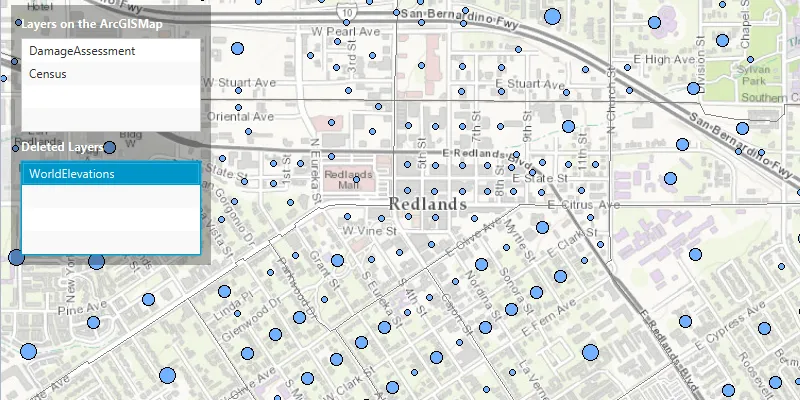
When the app starts, a list displays the operational layers that are currently displayed in the map. Right-click on the list item to remove the layer, or left-click to move it to the top. The map will be updated automatically.
The second list shows layers that have been removed from the map. Click one to add it to the map.
How it works
- Get the operational layers
LayerListfrom the map usingmap.getOperationalLayers(). - Add or remove layers using
layerList.add(layer)andlayerList.remove(layer)respectively. The last layer in the list will be rendered on top.
Relevant API
- ArcGISMap
- ArcGISMapImageLayer
- LayerList
Additional information
You cannot add the same layer to the map multiple times or add the same layer to multiple maps. Instead, clone the layer with layer.copy() before duplicating.
Tags
add, delete, layer, map, remove
Sample code
/* * Copyright 2017 Esri. * * Licensed under the Apache License, Version 2.0 (the "License"); you may not * use this file except in compliance with the License. You may obtain a copy of * the License at * * http://www.apache.org/licenses/LICENSE-2.0 * * Unless required by applicable law or agreed to in writing, software * distributed under the License is distributed on an "AS IS" BASIS, WITHOUT * WARRANTIES OR CONDITIONS OF ANY KIND, either express or implied. See the * License for the specific language governing permissions and limitations under * the License. */
package com.esri.samples.manage_operational_layers;
import java.util.ArrayList;import java.util.Arrays;
import javafx.application.Application;import javafx.geometry.Insets;import javafx.geometry.Pos;import javafx.scene.Scene;import javafx.scene.control.Alert;import javafx.scene.control.Label;import javafx.scene.control.ListView;import javafx.scene.input.MouseButton;import javafx.scene.layout.Background;import javafx.scene.layout.BackgroundFill;import javafx.scene.layout.CornerRadii;import javafx.scene.layout.StackPane;import javafx.scene.layout.VBox;import javafx.scene.paint.Paint;import javafx.stage.Stage;
import com.esri.arcgisruntime.ArcGISRuntimeEnvironment;import com.esri.arcgisruntime.layers.ArcGISMapImageLayer;import com.esri.arcgisruntime.layers.Layer;import com.esri.arcgisruntime.loadable.LoadStatus;import com.esri.arcgisruntime.mapping.ArcGISMap;import com.esri.arcgisruntime.mapping.BasemapStyle;import com.esri.arcgisruntime.mapping.LayerList;import com.esri.arcgisruntime.mapping.Viewpoint;import com.esri.arcgisruntime.mapping.view.MapView;
public class ManageOperationalLayersSample extends Application {
  private MapView mapView;
  @Override  public void start(Stage stage) {
    try {      // create the stack pane and the application scene      StackPane stackPane = new StackPane();      Scene scene = new Scene(stackPane);      scene.getStylesheets().add(getClass().getResource("/manage_operational_layers/style.css").toExternalForm());
      // set a title, size, and add the scene to the stage      stage.setTitle("Manage Operational Layers Sample");      stage.setWidth(800);      stage.setHeight(700);      stage.setScene(scene);      stage.show();
      // authentication with an API key or named user is required to access basemaps and other location services      String yourAPIKey = System.getProperty("apiKey");      ArcGISRuntimeEnvironment.setApiKey(yourAPIKey);
      // create a map with the topographic basemap style      ArcGISMap map = new ArcGISMap(BasemapStyle.ARCGIS_TOPOGRAPHIC);
      // create a map view and set the map to it      mapView = new MapView();      mapView.setMap(map);
      // set a viewpoint on the map view      mapView.setViewpoint(new Viewpoint(41.056295, -106.195800, 50000000));
      // create and add new image layers to the map's operational layers      LayerList mapLayers = map.getOperationalLayers();      mapLayers.addAll(Arrays.asList(        (new ArcGISMapImageLayer("https://sampleserver5.arcgisonline.com/arcgis/rest/services/Elevation/WorldElevations/MapServer")),        (new ArcGISMapImageLayer("https://sampleserver5.arcgisonline.com/arcgis/rest/services/DamageAssessment/MapServer")),        (new ArcGISMapImageLayer("https://sampleserver5.arcgisonline.com/arcgis/rest/services/Census/MapServer"))      ));
      // check that each layer has loaded correctly and if not display an error message      mapLayers.forEach(layer ->        layer.addDoneLoadingListener(() -> {          if (layer.getLoadStatus() != LoadStatus.LOADED) {            new Alert(Alert.AlertType.ERROR, "Map image layer failed to load: " + layer.getLoadError().getCause().getMessage()).show();          }        })      );
      // create a list to hold deleted layers      ArrayList<Layer> deletedLayers = new ArrayList<>();
      // create a list view to display the list of added and deleted layers by name, and create labels for them      ListView<String> addedLayerNamesList = new ListView<>();      Label addedLayersLabel = new Label("Added layers");      ListView<String> deletedLayerNamesList = new ListView<>();      Label deletedLayersLabel = new Label("Deleted layers");
      // add the names of the layers on the map to the list of added layers      // note this should be the reverse order they were added to the map      addedLayerNamesList.getItems().add(mapLayers.get(2).getName());      addedLayerNamesList.getItems().add(mapLayers.get(1).getName());      addedLayerNamesList.getItems().add(mapLayers.get(0).getName());
      // create a listener for clicks on the list of added layers      addedLayerNamesList.setOnMouseClicked(e -> {
        // if there are added layers        if (!mapLayers.isEmpty() && !addedLayerNamesList.getItems().isEmpty()) {
          // get the index of the selected item          int selectedIndex = addedLayerNamesList.getSelectionModel().getSelectedIndex();
          // if a valid index is selected          if (selectedIndex >= 0) {
            // get the selected layer from the map and its index in the list of operational layers on the map            ArcGISMapImageLayer selectedLayer = (ArcGISMapImageLayer) mapLayers.get(mapLayers.size() - selectedIndex - 1);            int indexOfSelectedLayer = mapLayers.indexOf(selectedLayer);
            if (e.getButton() == MouseButton.PRIMARY) {
              // if the layer is not already at the top, move it to the top of the list and layers on the map              if (selectedIndex != 0) {
                // move the layer's name to the top of the added layers list. Note this is adding to index 0.                addedLayerNamesList.getItems().remove(selectedIndex);                addedLayerNamesList.getItems().add(0, selectedLayer.getName());
                // move the layer to the top of the layers on the map. Note this is adding to the last index.                mapLayers.remove(indexOfSelectedLayer);                mapLayers.add(mapLayers.size(), selectedLayer);
                // update the UI to keep the current layer selected                addedLayerNamesList.getSelectionModel().select(0);              }
            } else if (e.getButton() == MouseButton.SECONDARY) {
              // remove the selected layer from the map and add it to the deleted layers              mapLayers.remove(selectedLayer);              deletedLayers.add(selectedLayer);
              // remove the selected layer's name from the added layers list and add it to the deleted layers list              addedLayerNamesList.getItems().remove(selectedIndex);              deletedLayerNamesList.getItems().add(selectedLayer.getName());            }          }        }      });
      // create a listener for clicks on the list of deleted layers      deletedLayerNamesList.setOnMouseClicked(e -> {
        // if there are deleted layers        if (!deletedLayers.isEmpty() && !deletedLayerNamesList.getItems().isEmpty()) {
          // get the index of the selected layer          int selectedIndex = deletedLayerNamesList.getSelectionModel().getSelectedIndex();
          // if a valid index is selected          if (selectedIndex >= 0) {
            if (e.getButton() == MouseButton.SECONDARY) {
              // add the layer to the map and remove from the deleted layers              mapLayers.add(0, deletedLayers.get(selectedIndex));              deletedLayers.remove(selectedIndex);
              // add the selected layer's name to the added layers list and remove it from the deleted layers list              addedLayerNamesList.getItems().add(deletedLayerNamesList.getSelectionModel().getSelectedItem());              deletedLayerNamesList.getItems().remove(selectedIndex);            }          }        }      });
      // create a control panel and add the label and list UI components      VBox controlsVBox = new VBox(6);      controlsVBox.setBackground(new Background(new BackgroundFill(Paint.valueOf("rgba(0,0,0,0.3)"), CornerRadii.EMPTY,        Insets.EMPTY)));      controlsVBox.getStyleClass().add("panel-region");      controlsVBox.setPadding(new Insets(10.0));      controlsVBox.setMaxWidth(200);      controlsVBox.setMaxHeight(260);      controlsVBox.getChildren().addAll(addedLayersLabel, addedLayerNamesList, deletedLayersLabel, deletedLayerNamesList);
      // add the map view and control panel to stack pane      stackPane.getChildren().addAll(mapView, controlsVBox);      StackPane.setAlignment(controlsVBox, Pos.TOP_LEFT);      StackPane.setMargin(controlsVBox, new Insets(10, 0, 0, 10));    } catch (Exception e) {      // on any error, display the stack trace      e.printStackTrace();    }  }
  /**   * Stops and releases all resources used in application.   */  @Override  public void stop() {
    if (mapView != null) {      mapView.dispose();    }  }
  /**   * Opens and runs application.   *   * @param args arguments passed to this application   */  public static void main(String[] args) {
    Application.launch(args);  }}