Set the map’s reference scale and which feature layers should honor the reference scale.
Use case
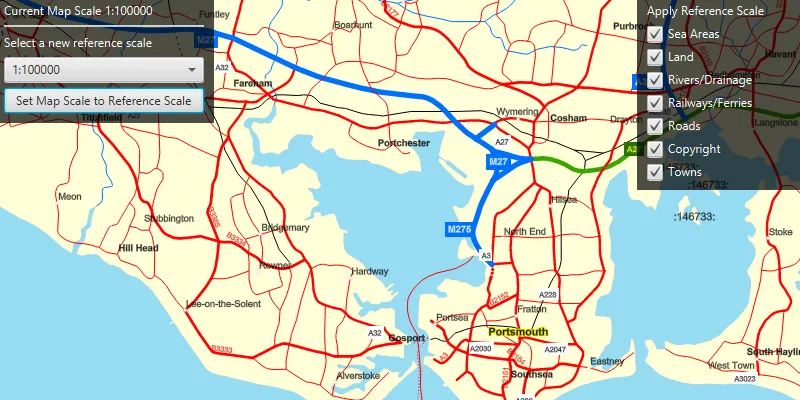
Setting a reference scale on an ArcGISMap fixes the size of symbols and text to the desired height and width at that scale. As you zoom in and out, symbols and text will increase or decrease in size accordingly. When no reference scale is set, symbol and text sizes remain the same size relative to the MapView.
Map annotations are typically only relevant at certain scales. For instance, annotations to a map showing a construction site are only relevant at that construction site’s scale. So, when the map is zoomed out that information shouldn’t scale with the MapView, but should instead remain scaled with the ArcGISMap.
How to use the sample
Use the drop box at the top to set the map’s reference scale (1:500,000 1:250,000 1:100,000 1:50,000). Click the ‘Set Map Scale to Reference Scale’ button to set the map scale to the reference scale. Use the menu checkboxes in the layer menu to set which feature layers should honor the reference scale.
How it works
- Get and set the reference scale property of the
ArcGISMap. - Get and set the scale symbols property on each individual
FeatureLayer.
Relevant API
- ArcGISMap
- FeatureLayer
Additional information
The map reference scale should normally be set by the map’s author and not exposed to the end user like it is in this sample.
Tags
map, reference scale, scene
Sample code
/* * Copyright 2019 Esri. * * Licensed under the Apache License, Version 2.0 (the "License"); you may not * use this file except in compliance with the License. You may obtain a copy of * the License at * * http://www.apache.org/licenses/LICENSE-2.0 * * Unless required by applicable law or agreed to in writing, software * distributed under the License is distributed on an "AS IS" BASIS, WITHOUT * WARRANTIES OR CONDITIONS OF ANY KIND, either express or implied. See the * License for the specific language governing permissions and limitations under * the License. */
package com.esri.samples.map_reference_scale;
import com.esri.arcgisruntime.geometry.Point;import com.esri.arcgisruntime.layers.FeatureLayer;import com.esri.arcgisruntime.layers.Layer;import com.esri.arcgisruntime.loadable.LoadStatus;import com.esri.arcgisruntime.mapping.ArcGISMap;import com.esri.arcgisruntime.mapping.Viewpoint;import com.esri.arcgisruntime.mapping.view.MapView;import com.esri.arcgisruntime.portal.Portal;import com.esri.arcgisruntime.portal.PortalItem;
import javafx.beans.binding.Bindings;import javafx.fxml.FXML;import javafx.scene.control.Alert;import javafx.scene.control.CheckBox;import javafx.scene.control.ComboBox;import javafx.scene.control.Label;import javafx.scene.control.ProgressIndicator;import javafx.scene.layout.VBox;import javafx.util.StringConverter;
public class MapReferenceScaleController {
  @FXML  private MapView mapView;  @FXML  private Label scaleLabel;  @FXML  private ComboBox<Double> scaleComboBox;  @FXML  private VBox layerVBox;  @FXML  private VBox scaleVBox;  @FXML  private ProgressIndicator progressIndicator;
  private ArcGISMap map;
  @FXML  private void initialize() {
    // access a web map as a portal item    Portal portal = new Portal("https://runtime.maps.arcgis.com");    PortalItem portalItem = new PortalItem(portal, "3953413f3bd34e53a42bf70f2937a408");
    // create a map with the portal item    map = new ArcGISMap(portalItem);
    // set the map to the map view    mapView.setMap(map);    map.setReferenceScale(250000);
    scaleComboBox.setConverter(new StringConverter<>() {      @Override      public String toString(Double value) {        return "1:" + Math.round(value);      }
      @Override      public Double fromString(String string) {        // not required        return null;      }    });
    // display the current map scale    scaleLabel.textProperty().bind(Bindings.createStringBinding(() -> {      return "Current map scale: 1:" + Math.round(mapView.mapScaleProperty().get());    }, mapView.mapScaleProperty()));
    map.addDoneLoadingListener(() -> {      if (map.getLoadStatus() == LoadStatus.LOADED) {
        // remove progress indicator when the map has loaded        progressIndicator.setVisible(false);
        // create a check box for each feature layer in the map        for (Layer layer : map.getOperationalLayers()) {          if (layer instanceof FeatureLayer) {            FeatureLayer featureLayer = (FeatureLayer) layer;            CheckBox checkBox = new CheckBox(featureLayer.getName());            checkBox.setSelected(true);            layerVBox.getChildren().add(checkBox);            // make the feature layer honor the reference scale if the check box is selected            checkBox.setOnAction(event -> featureLayer.setScaleSymbols(checkBox.isSelected()));          }        }        scaleVBox.setVisible(true);        layerVBox.setVisible(true);
      } else {        Alert alert = new Alert(Alert.AlertType.ERROR, "Map Failed to Load!");        alert.show();      }    });  }
  /**   * Set the map's reference scale to the scale selected in the combo box.   */  @FXML  private void handleComboBoxSelection() {
    map.setReferenceScale(scaleComboBox.getSelectionModel().getSelectedItem());  }
  /**   * Takes the reference scale from the combobox, and sets it as the map's reference scale.   */  @FXML  private void handleScaleButtonClicked() {
    // get the center of the current viewpoint extent    Point centerPoint = mapView.getCurrentViewpoint(Viewpoint.Type.CENTER_AND_SCALE).getTargetGeometry().getExtent().getCenter();    // get the map's current reference scale    double currentReferenceScale = mapView.getMap().getReferenceScale();    // set a viewpoint with the scale at the map's reference scale    Viewpoint newViewPoint = new Viewpoint(centerPoint, currentReferenceScale);    // set new view point    mapView.setViewpointAsync(newViewPoint);  }
  /**   * Stops the animation and disposes of application resources.   */  void terminate() {
    if (mapView != null) {      mapView.dispose();    }  }}
/* * Copyright 2019 Esri. * * Licensed under the Apache License, Version 2.0 (the "License"); you may not * use this file except in compliance with the License. You may obtain a copy of * the License at * * http://www.apache.org/licenses/LICENSE-2.0 * * Unless required by applicable law or agreed to in writing, software * distributed under the License is distributed on an "AS IS" BASIS, WITHOUT * WARRANTIES OR CONDITIONS OF ANY KIND, either express or implied. See the * License for the specific language governing permissions and limitations under * the License. */
package com.esri.samples.map_reference_scale;
import javafx.application.Application;import javafx.fxml.FXMLLoader;import javafx.scene.Parent;import javafx.scene.Scene;import javafx.stage.Stage;
public class MapReferenceScaleSample extends Application {
private static MapReferenceScaleController controller;
@Override public void start(Stage stage) throws Exception {
// set up the scene FXMLLoader loader = new FXMLLoader(getClass().getResource("/map_reference_scale/main.fxml")); Parent root = loader.load(); controller = loader.getController(); Scene scene = new Scene(root);
// set up the stage stage.setTitle("Map Reference Scale Sample"); stage.setWidth(800); stage.setHeight(700); stage.setScene(scene); stage.show(); }
/** * Stops and releases all resources used in application. */ @Override public void stop() { controller.terminate(); }
/** * Opens and runs application. * * @param args arguments passed to this application */ public static void main(String[] args) {
Application.launch(args); }}