Take a web map offline using a local basemap on the device.
Use case
There are a number of use-cases where you may wish to use a basemap which is already on the device, rather than downloading:
- You want to limit the total download size.
- You want to be able to share a single set of basemap files between many offline maps.
- You want to use a custom basemap (for example authored in ArcGIS Pro) which is not available online.
- You do not wish to sign into ArcGIS.com in order to download Esri basemaps.
The author of a web map can support the use of basemaps which are already on a device by configuring the web map to specify the name of a suitable basemap file. This could be a basemap which:
- Has been authored in ArcGIS Pro to make use of your organizations custom data.
- Is available as a PortalItem which can be downloaded once and re-used many times.
How to use the sample
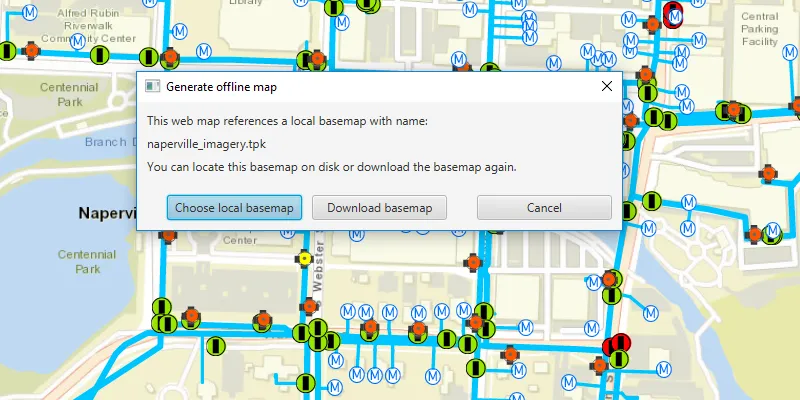
Click on the “Take Map Offline” button. You will be prompted to choose whether you wish to download a basemap or use the local basemap (which is already saved in the samples-data directory as “naperville_imagery.tpkx”).
If you choose to download the online basemap, the offline map will be generated with the same (topographic) basemap as the online web map.
If you choose to use the local basemap from the device, the offline map will be generated with the local imagery basemap. The download will be quicker since no tiles are exported or downloaded.
How it works
- Create an
ArcGISMapwith a portal item pointing to the web map. - Create
GenerateOfflineMapParametersspecifying the download area geometry, min scale, and max scale. - Once the generate offline map parameters are created, check the
getReferenceBasemapFilename()property. The author of an online web map can configure this setting to indicate the name of a suitable basemap. In this sample, the app checks the local device for the suggested “naperville_imagery.tpkx” file. - If the user chooses to use the basemap on the device, use
setReferenceBasemapFileName()andsetReferenceBasemapDirectory()on the generate offline map parameters to set the absolute path of the directory which contains the .tpkx file. If this property is set, no online basemap will be downloaded and instead, the mobile map will be created with a reference to the .tpkx on the device. - A
GenerateOfflineMapJobis created by callingofflineMapTask.generateOfflineMappassing the parameters and the download location for the offline map. - Create the offline map job and start it.
- When the job is done, use
getOfflineMapon theGenerateOfflineMapResultobject to get the map.
Relevant API
- GenerateOfflineMapJob
- GenerateOfflineMapParameters
- GenerateOfflineMapResult
- OfflineMapTask
Offline data
This sample uses naperville_imagery.tpkx TileCache. It is downloaded from ArcGIS Online automatically.
Tags
basemap, download, local, offline, save, web map
Sample code
/* * Copyright 2019 Esri. * * Licensed under the Apache License, Version 2.0 (the "License"); you may not * use this file except in compliance with the License. You may obtain a copy of * the License at * * http://www.apache.org/licenses/LICENSE-2.0 * * Unless required by applicable law or agreed to in writing, software * distributed under the License is distributed on an "AS IS" BASIS, WITHOUT * WARRANTIES OR CONDITIONS OF ANY KIND, either express or implied. See the * License for the specific language governing permissions and limitations under * the License. */
package com.esri.samples.generate_offline_map_with_local_basemap;
import javafx.beans.property.SimpleStringProperty;import javafx.beans.property.StringProperty;import javafx.fxml.FXML;import javafx.fxml.FXMLLoader;import javafx.scene.control.ButtonType;import javafx.scene.control.Dialog;import javafx.scene.control.Label;
/** * Custom dialog for selection of local basemap or online base map when generating an offline map. */class GenerateOfflineMapDialog extends Dialog<Boolean> {
  @FXML  private Label referencedBasemapFileNameLabel;  @FXML  private ButtonType localBasemapButton;  @FXML  private ButtonType downloadBasemapButton;
  private final StringProperty referencedBasemapFileName = new SimpleStringProperty();
  GenerateOfflineMapDialog() {    FXMLLoader loader = new FXMLLoader(getClass().getResource("/generate_offline_map_with_local_basemap" +            "/basemap_dialog.fxml"));    loader.setRoot(this);    loader.setController(this);
    setTitle("Generate offline map");
    try {      loader.load();
      referencedBasemapFileNameLabel.textProperty().bind(referencedBasemapFileName);    } catch (Exception e) {      e.printStackTrace();    }
    setResultConverter(dialogButton -> {      if (dialogButton == localBasemapButton) {        return true;      } else if (dialogButton == downloadBasemapButton) {        return false;      }      return null;    });  }
  public String getReferencedBasemapFileName() {    return referencedBasemapFileName.get();  }
  public StringProperty referencedBasemapFileNameProperty() {    return referencedBasemapFileName;  }
  public void setReferencedBasemapFileName(String referencedBasemapFileName) {    this.referencedBasemapFileName.set(referencedBasemapFileName);  }}
/* * Copyright 2019 Esri. * * Licensed under the Apache License, Version 2.0 (the "License"); you may not * use this file except in compliance with the License. You may obtain a copy of * the License at * * http://www.apache.org/licenses/LICENSE-2.0 * * Unless required by applicable law or agreed to in writing, software * distributed under the License is distributed on an "AS IS" BASIS, WITHOUT * WARRANTIES OR CONDITIONS OF ANY KIND, either express or implied. See the * License for the specific language governing permissions and limitations under * the License. */
package com.esri.samples.generate_offline_map_with_local_basemap;
import java.io.File;import java.io.IOException;import java.nio.file.Files;import java.nio.file.Path;import java.util.Optional;import java.util.concurrent.ExecutionException;
import javafx.application.Application;import javafx.beans.value.ChangeListener;import javafx.beans.value.ObservableValue;import javafx.geometry.Insets;import javafx.geometry.Point2D;import javafx.geometry.Pos;import javafx.scene.Scene;import javafx.scene.control.Alert;import javafx.scene.control.Button;import javafx.scene.control.ProgressBar;import javafx.scene.layout.StackPane;import javafx.scene.paint.Color;import javafx.stage.DirectoryChooser;import javafx.stage.Stage;
import com.esri.arcgisruntime.ArcGISRuntimeEnvironment;import com.esri.arcgisruntime.concurrent.Job;import com.esri.arcgisruntime.concurrent.ListenableFuture;import com.esri.arcgisruntime.geometry.Envelope;import com.esri.arcgisruntime.geometry.Point;import com.esri.arcgisruntime.loadable.LoadStatus;import com.esri.arcgisruntime.mapping.ArcGISMap;import com.esri.arcgisruntime.mapping.view.DrawStatus;import com.esri.arcgisruntime.mapping.view.Graphic;import com.esri.arcgisruntime.mapping.view.GraphicsOverlay;import com.esri.arcgisruntime.mapping.view.MapView;import com.esri.arcgisruntime.portal.Portal;import com.esri.arcgisruntime.portal.PortalItem;import com.esri.arcgisruntime.symbology.SimpleLineSymbol;import com.esri.arcgisruntime.tasks.offlinemap.GenerateOfflineMapJob;import com.esri.arcgisruntime.tasks.offlinemap.GenerateOfflineMapParameters;import com.esri.arcgisruntime.tasks.offlinemap.GenerateOfflineMapResult;import com.esri.arcgisruntime.tasks.offlinemap.OfflineMapTask;
public class GenerateOfflineMapWithLocalBasemapSample extends Application {
private MapView mapView; private Graphic downloadArea; private ArcGISMap map;
@Override public void start(Stage stage) { try { // create stack pane and application scene StackPane stackPane = new StackPane(); Scene scene = new Scene(stackPane); scene.getStylesheets().add(getClass().getResource("/generate_offline_map_with_local_basemap/style.css").toExternalForm());
// set title, size, and add scene to stage stage.setTitle("Generate Offline Map With Local Basemap Sample"); stage.setWidth(800); stage.setHeight(700); stage.setScene(scene); stage.show();
// authentication with an API key or named user is required to access basemaps and other location services String yourAPIKey = System.getProperty("apiKey"); ArcGISRuntimeEnvironment.setApiKey(yourAPIKey);
// create a map view mapView = new MapView(); // create a graphics overlay to show the download area extent var graphicsOverlay = new GraphicsOverlay(); mapView.getGraphicsOverlays().add(graphicsOverlay);
// create a graphic to show a box around the extent we want to download downloadArea = new Graphic(); graphicsOverlay.getGraphics().add(downloadArea); var simpleLineSymbol = new SimpleLineSymbol(SimpleLineSymbol.Style.SOLID, Color.RED, 2); downloadArea.setSymbol(simpleLineSymbol);
// load a web map from a portal item var portal = new Portal("https://www.arcgis.com"); var portalItem = new PortalItem(portal, "acc027394bc84c2fb04d1ed317aac674"); map = new ArcGISMap(portalItem); mapView.setMap(map);
// draw the download extent area as a red outline when the draw status is completed for the first time
ChangeListener<DrawStatus> drawStatusPropertyChangedListener = new ChangeListener<>() { @Override public void changed(ObservableValue<? extends DrawStatus> observable, DrawStatus oldValue, DrawStatus newValue) { if (newValue == DrawStatus.COMPLETED) { updateDownloadArea(); mapView.drawStatusProperty().removeListener(this); } } }; mapView.drawStatusProperty().addListener(drawStatusPropertyChangedListener);
// update the download area box whenever the viewpoint changes mapView.addViewpointChangedListener(viewpointChangedEvent -> updateDownloadArea());
// create a progress bar to show download progress var progressBar = new ProgressBar(0.0); progressBar.setVisible(false); progressBar.setMaxSize(200, 25);
// create a button to take the map offline Button offlineMapButton = new Button("Take Map Offline"); offlineMapButton.setDisable(true);
// when the take map offline button is clicked, start the offline map task job offlineMapButton.setOnAction(e -> {
// specify the extent, min scale, and max scale as parameters double minScale = mapView.getMapScale(); double maxScale = map.getMaxScale(); // minScale must always be larger than maxScale if (minScale <= maxScale) { minScale = maxScale + 1; }
// create an offline map task with the map OfflineMapTask task = new OfflineMapTask(map);
// create default generate offline map parameters ListenableFuture<GenerateOfflineMapParameters> generateOfflineMapParametersListenableFuture = task.createDefaultGenerateOfflineMapParametersAsync(downloadArea.getGeometry(), minScale, maxScale);
generateOfflineMapParametersListenableFuture.addDoneListener(() -> { try { GenerateOfflineMapParameters generateOfflineMapParameters = generateOfflineMapParametersListenableFuture.get();
GenerateOfflineMapDialog dialog = new GenerateOfflineMapDialog(); dialog.setReferencedBasemapFileName(generateOfflineMapParameters.getReferenceBasemapFilename()); Optional<Boolean> usingLocalBasemap = dialog.showAndWait(); // if the user chose to cancel, the optional will be empty if (usingLocalBasemap.isPresent()) { // if the user chose to use a local basemap, this will be true // if the user chose to download the basemap again, this requires authentication, which is handled via the API key set at // the start of this sample if (usingLocalBasemap.get()) { // open a directory chooser to select the directory containing the referenced basemap var directoryChooser = new DirectoryChooser(); // for this sample, the directory chosen should be "naperville" directoryChooser.setInitialDirectory(new File(System.getProperty("data.dir"), "./samples-data/")); directoryChooser.setTitle("Choose directory containing local basemap"); File localBasemapDirectory = directoryChooser.showDialog(stage.getOwner());
if (localBasemapDirectory != null) { // set the path to the references basemap directory generateOfflineMapParameters.setReferenceBasemapFilename("naperville_imagery.tpkx"); generateOfflineMapParameters.setReferenceBasemapDirectory(localBasemapDirectory.getAbsolutePath()); } }
// create an offline map job with the download directory path and parameters and start the job Path tempDirectory = Files.createTempDirectory("offline_map"); GenerateOfflineMapJob generateOfflineMapJob = task.generateOfflineMap(generateOfflineMapParameters, tempDirectory.toAbsolutePath().toString()); generateOfflineMapJob.start();
offlineMapButton.setDisable(true); progressBar.setVisible(true);
// show the job's progress with the progress bar generateOfflineMapJob.addProgressChangedListener(() -> progressBar.setProgress(generateOfflineMapJob.getProgress() / 100.0));
// replace the current map with the result offline map when the job finishes generateOfflineMapJob.addJobDoneListener(() -> { if (generateOfflineMapJob.getStatus() == Job.Status.SUCCEEDED) { // replace the map in the map view with the offline map GenerateOfflineMapResult result = generateOfflineMapJob.getResult(); mapView.setMap(result.getOfflineMap()); graphicsOverlay.getGraphics().clear(); offlineMapButton.setDisable(true); progressBar.setVisible(false); } else { new Alert(Alert.AlertType.ERROR, generateOfflineMapJob.getError().getMessage()).show(); } }); } } catch (InterruptedException | ExecutionException ex) { new Alert(Alert.AlertType.ERROR, "Failed to get default generate offline map parameters").show(); } catch (IOException ex) { new Alert(Alert.AlertType.ERROR, "Failed to create temporary file for mobile map").show(); } }); });
// enable the button when the map is loaded map.addDoneLoadingListener(() -> { if (map.getLoadStatus() == LoadStatus.LOADED) { offlineMapButton.setDisable(false); } else { new Alert(Alert.AlertType.ERROR, "Map failed to load").show(); } });
// add the map view, button, and progress bar to stack pane stackPane.getChildren().addAll(mapView, offlineMapButton, progressBar); StackPane.setAlignment(offlineMapButton, Pos.TOP_LEFT); StackPane.setAlignment(progressBar, Pos.TOP_RIGHT); StackPane.setMargin(offlineMapButton, new Insets(10)); StackPane.setMargin(progressBar, new Insets(10));
} catch (Exception ex) { // on any error, display the stack trace. ex.printStackTrace(); } }
/** * Updates the download area graphic to show a red border around the current view extent that will be downloaded if * taken offline. */ private void updateDownloadArea() { if (map.getLoadStatus() == LoadStatus.LOADED) { // upper left corner of the area to take offline Point2D minScreenPoint = new Point2D(50, 50); // lower right corner of the downloaded area Point2D maxScreenPoint = new Point2D(mapView.getWidth() - 50, mapView.getHeight() - 50); // convert screen points to map points Point minPoint = mapView.screenToLocation(minScreenPoint); Point maxPoint = mapView.screenToLocation(maxScreenPoint); // use the points to define and return an envelope if (minPoint != null && maxPoint != null) { Envelope envelope = new Envelope(minPoint, maxPoint); downloadArea.setGeometry(envelope); } } }
/** * Stops and releases all resources used in application. */ @Override public void stop() { if (mapView != null) { mapView.dispose(); } }
/** * Opens and runs application. * * @param args arguments passed to this application */ public static void main(String[] args) {
Application.launch(args); }}