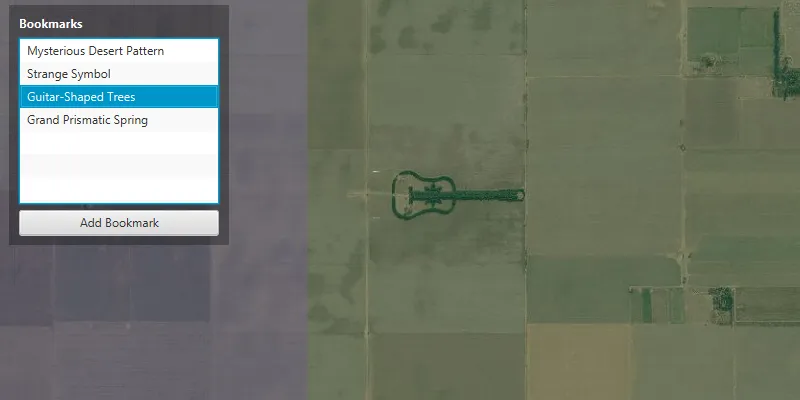
Access and create bookmarks on a map.
Use case
Bookmarks are saved extents for a map. A tour app may save a bookmark for each site in the tour. An app may also allow users to add their own favorite places as bookmarks.
How to use the sample
The map in the sample comes pre-populated with a set of bookmarks. To access a bookmark and move to that location, click on a bookmark’s name from the list. To add a bookmark, pan and/or zoom to a new location and click on the ‘Add Bookmark’ button. Enter a unique name for the bookmark and click ok, and the bookmark will be added to the list.
How it works
- Instantiate a new
ArcGISMapobject and create aBookmarkListwithArcGISMap.getBookmarks(). - To create a new bookmark and add it to the bookmark list:
- Instantiate a new
Bookmarkobject passing in text (the name of the bookmark) and aViewpointas parameters. - Add the new bookmark to the bookmark list with
BookmarkList.add(bookmark).
- Instantiate a new
Relevant API
- Bookmark
- BookmarkList
- Viewpoint
Tags
bookmark, extent, location, zoom
Sample code
ManageBookmarksSample.java
/* * Copyright 2017 Esri. * * Licensed under the Apache License, Version 2.0 (the "License"); you may not * use this file except in compliance with the License. You may obtain a copy of * the License at * * http://www.apache.org/licenses/LICENSE-2.0 * * Unless required by applicable law or agreed to in writing, software * distributed under the License is distributed on an "AS IS" BASIS, WITHOUT * WARRANTIES OR CONDITIONS OF ANY KIND, either express or implied. See the * License for the specific language governing permissions and limitations under * the License. */
package com.esri.samples.manage_bookmarks;
import java.util.Optional;
import javafx.application.Application;import javafx.geometry.Insets;import javafx.geometry.Pos;import javafx.scene.Scene;import javafx.scene.control.Alert;import javafx.scene.control.Alert.AlertType;import javafx.scene.control.Button;import javafx.scene.control.Label;import javafx.scene.control.ListCell;import javafx.scene.control.ListView;import javafx.scene.control.TextInputDialog;import javafx.scene.layout.Background;import javafx.scene.layout.BackgroundFill;import javafx.scene.layout.CornerRadii;import javafx.scene.layout.StackPane;import javafx.scene.layout.VBox;import javafx.scene.paint.Paint;import javafx.stage.Stage;
import com.esri.arcgisruntime.ArcGISRuntimeEnvironment;import com.esri.arcgisruntime.mapping.ArcGISMap;import com.esri.arcgisruntime.mapping.BasemapStyle;import com.esri.arcgisruntime.mapping.Bookmark;import com.esri.arcgisruntime.mapping.BookmarkList;import com.esri.arcgisruntime.mapping.Viewpoint;import com.esri.arcgisruntime.mapping.view.MapView;
public class ManageBookmarksSample extends Application {
  private MapView mapView;  private BookmarkList bookmarkList;  private Bookmark bookmark;
  @Override  public void start(Stage stage) {
    try {      // create stack pane and application scene      StackPane stackPane = new StackPane();      Scene scene = new Scene(stackPane);      scene.getStylesheets().add(getClass().getResource("/manage_bookmarks/style.css").toExternalForm());
      // set title, size, and add scene to stage      stage.setTitle("Manage Bookmarks Sample");      stage.setWidth(800);      stage.setHeight(700);      stage.setScene(scene);      stage.show();
      // authentication with an API key or named user is required to access basemaps and other location services      String yourAPIKey = System.getProperty("apiKey");      ArcGISRuntimeEnvironment.setApiKey(yourAPIKey);
      // create a control panel      VBox controlsVBox = new VBox(6);      controlsVBox.setBackground(new Background(new BackgroundFill(Paint.valueOf("rgba(0,0,0,0.3)"), CornerRadii.EMPTY,          Insets.EMPTY)));      controlsVBox.setPadding(new Insets(10.0));      controlsVBox.setMaxSize(220, 240);      controlsVBox.getStyleClass().add("panel-region");
      // create label for bookmarks      Label bookmarkLabel = new Label("Bookmarks");      bookmarkLabel.getStyleClass().add("panel-label");
      // create a ListView to display the bookmarks      ListView<Bookmark> bookmarkListView = new ListView<>();      bookmarkListView.setMaxHeight(190);      bookmarkListView.setCellFactory(p -> new BookmarkListCell());
      // when user clicks on a bookmark change to that location      bookmarkListView.getSelectionModel().selectedItemProperty().addListener(          (observable, oldValue, newValue) -> mapView.setBookmarkAsync(newValue));
      // create button to add a bookmark      Button addBookmarkButton = new Button("Add Bookmark");      addBookmarkButton.setMaxWidth(Double.MAX_VALUE);
      // show dialog to user and add a bookmark if text is entered      addBookmarkButton.setOnAction(e -> {        TextInputDialog dialog = new TextInputDialog();        dialog.initOwner(mapView.getScene().getWindow());        dialog.setHeaderText("Add Bookmark");        dialog.setContentText("Bookmark Name");
        Optional<String> result = dialog.showAndWait();        result.ifPresent(text -> {          if (text.trim().length() > 0) {            bookmark = new Bookmark(text, mapView.getCurrentViewpoint(Viewpoint.Type.BOUNDING_GEOMETRY));            bookmarkList.add(bookmark);          } else {            Alert alert = new Alert(AlertType.INFORMATION);            alert.initOwner(mapView.getScene().getWindow());            alert.setHeaderText("Text Error");            alert.setContentText("Bookmark Name must not be empty.");            alert.showAndWait();          }        });      });
      // add label and bookmarks to the control panel      controlsVBox.getChildren().addAll(bookmarkLabel, bookmarkListView, addBookmarkButton);
      // create a map with the standard imagery basemap style      ArcGISMap map = new ArcGISMap(BasemapStyle.ARCGIS_IMAGERY_STANDARD);
      // create a map view and set the map to it      mapView = new MapView();      mapView.setMap(map);
      // get all the bookmarks from the map      bookmarkList = map.getBookmarks();
      // set bookmarkList as the data model for the ListView      bookmarkListView.setItems(bookmarkList);
      // add default bookmarks      Viewpoint viewpoint;
      viewpoint = new Viewpoint(27.3805833, 33.6321389, 6e3);      bookmark = new Bookmark("Mysterious Desert Pattern", viewpoint);      bookmarkList.add(bookmark);      // set this bookmark as the map's initial viewpoint      mapView.setBookmarkAsync(bookmarkList.get(0));
      viewpoint = new Viewpoint(37.401573, -116.867808, 6e3);      bookmark = new Bookmark("Strange Symbol", viewpoint);      bookmarkList.add(bookmark);
      viewpoint = new Viewpoint(-33.867886, -63.985, 4e4);      bookmark = new Bookmark("Guitar-Shaped Trees", viewpoint);      bookmarkList.add(bookmark);
      viewpoint = new Viewpoint(44.525049, -110.83819, 6e3);      bookmark = new Bookmark("Grand Prismatic Spring", viewpoint);      bookmarkList.add(bookmark);
      // add the map view and control panel to stack pane      stackPane.getChildren().addAll(mapView, controlsVBox);      StackPane.setAlignment(controlsVBox, Pos.TOP_LEFT);      StackPane.setMargin(controlsVBox, new Insets(10, 0, 0, 10));
    } catch (Exception e) {      // on any error, display the stack trace      e.printStackTrace();    }  }
  /**   * Stops and releases all resources used in application.   */  @Override  public void stop() {
    if (mapView != null) {      mapView.dispose();    }  }
  /**   * Opens and runs application.   *   * @param args arguments passed to this application   */  public static void main(String[] args) {
    Application.launch(args);  }
  /**   * A ListCell for displaying Bookmarks. Simply displays the Bookmark's name.   */  private static class BookmarkListCell extends ListCell<Bookmark> {    @Override    public void updateItem(Bookmark bookmark, boolean empty) {      super.updateItem(bookmark, empty);      if (empty || bookmark == null) {        setText(null);        setGraphic(null);      } else {        setText(bookmark.getName());      }    }  }}