Display a web map.
Use case
For displaying web maps stored on ArcGIS Online.
How to use the sample
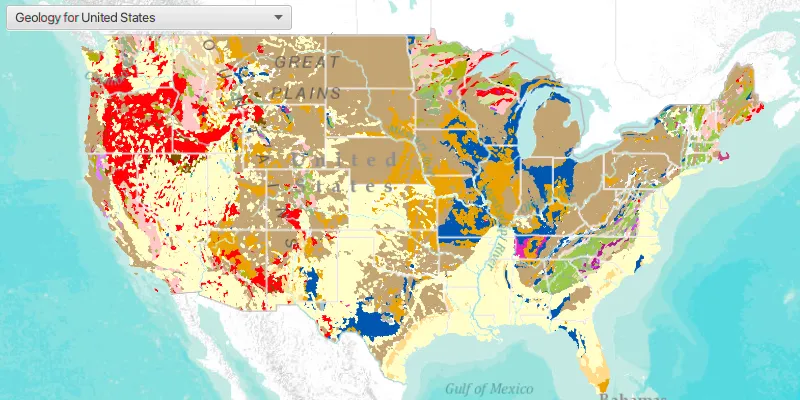
A web map can be selected from the drop-down list. On selection the web map displays in the map view.
How it works
- Create a
Portal. - Create a
PortalItemusing the Portal and the web map ID:new PortalItem(portal, ID). - Create a
ArcGISMapusing the portal item. - Set the map to the
MapView.
Relevant API
- ArcGISMap
- MapView
- Portal
- PortalItem
About the data
The web maps accessed by this sample show Recent Hurricanes, Cyclones and Typhoons and Geology for United States.
Tags
portal item, web map
Sample code
OpenMapURLSample.java
/* * Copyright 2017 Esri. * * Licensed under the Apache License, Version 2.0 (the "License"); you may not * use this file except in compliance with the License. You may obtain a copy of * the License at * * http://www.apache.org/licenses/LICENSE-2.0 * * Unless required by applicable law or agreed to in writing, software * distributed under the License is distributed on an "AS IS" BASIS, WITHOUT * WARRANTIES OR CONDITIONS OF ANY KIND, either express or implied. See the * License for the specific language governing permissions and limitations under * the License. */
package com.esri.samples.open_map_url;
import java.util.List;import java.util.stream.Collectors;import java.util.stream.Stream;
import javafx.application.Application;import javafx.geometry.Insets;import javafx.geometry.Pos;import javafx.scene.Scene;import javafx.scene.control.ComboBox;import javafx.scene.control.ListCell;import javafx.scene.layout.StackPane;import javafx.stage.Stage;import javafx.util.StringConverter;
import com.esri.arcgisruntime.mapping.ArcGISMap;import com.esri.arcgisruntime.mapping.view.MapView;import com.esri.arcgisruntime.portal.Portal;import com.esri.arcgisruntime.portal.PortalItem;
public class OpenMapURLSample extends Application {
  private MapView mapView;  private List<ArcGISMap> webMaps; // keep loadable in scope to avoid garbage collection
  private static final String[] portalItemIDs = new String[] {      "92ad152b9da94dee89b9e387dfe21acd", "064f2e898b094a17b84e4a4cd5e5f549"  };
  @Override  public void start(Stage stage) {
    // create stack pane and application scene    StackPane stackPane = new StackPane();    Scene scene = new Scene(stackPane);
    // set title, size, and add scene to stage    stage.setTitle("Open Map URL Sample");    stage.setWidth(800);    stage.setHeight(700);    stage.setScene(scene);    stage.show();
    // create a map view    mapView = new MapView();
    // create a combo box to list maps    ComboBox<ArcGISMap> webMapComboBox = new ComboBox<>();
    // create maps using portal item IDs    Portal portal = new Portal("http://www.arcgis.com/");    webMaps = Stream.of(portalItemIDs)        .map(id -> new PortalItem(portal, id))        .map(ArcGISMap::new)        .collect(Collectors.toList());
    // load maps and add to combo box    webMaps.forEach(map -> {      map.getItem().loadAsync();      map.getItem().addDoneLoadingListener(() -> webMapComboBox.getItems().add(map));    });
    // listener to switch the map when the selected map changes    webMapComboBox.getSelectionModel().selectedItemProperty().addListener(e -> {      ArcGISMap webMap = webMapComboBox.getSelectionModel().getSelectedItem();      mapView.setMap(webMap);    });
    // show the name of the map in the combo box    webMapComboBox.setConverter(new StringConverter<>() {
      @Override      public String toString(ArcGISMap map) {        return map != null ? map.getItem().getTitle() : "";      }
      @Override      public ArcGISMap fromString(String string) {        return null; //not needed      }    });
    webMapComboBox.setCellFactory(comboBox -> new ListCell<>() {
      @Override      protected void updateItem(ArcGISMap map, boolean empty) {        super.updateItem(map, empty);        setText(empty ? "" : map.getItem().getTitle());      }    });
    // select the web map loaded first    webMaps.get(0).getItem().addDoneLoadingListener(() -> webMapComboBox.getSelectionModel().select(0));
    // add the map view and flow panel to stack pane    stackPane.getChildren().addAll(mapView, webMapComboBox);    StackPane.setAlignment(webMapComboBox, Pos.TOP_LEFT);    StackPane.setMargin(webMapComboBox, new Insets(10, 0, 0, 10));  }
  /**   * Stops and releases all resources used in application.   */  @Override  public void stop() {
    if (mapView != null) {      mapView.dispose();    }  }
  /**   * Opens and runs application.   *   * @param args arguments passed to this application   */  public static void main(String[] args) {
    Application.launch(args);  }
}