Apply scheduled updates to a downloaded preplanned map area.
Use case
With scheduled updates, the author can update the features within the preplanned areas on the service once, and multiple end-users can request these updates to bring their local copies up to date with the most recent state. Importantly, any number of end-users can download the same set of cached updates which means that this workflow is extremely scalable for large operations where you need to minimize load on the server.
This workflow can be used by survey workers operating in remote areas where network connectivity is not available. The workers could download mobile map packages to their individual devices and perform their work normally. Once they regain internet connectivity, the mobile map packages can be updated to show any new features that have been added to the online service.
How to use the sample
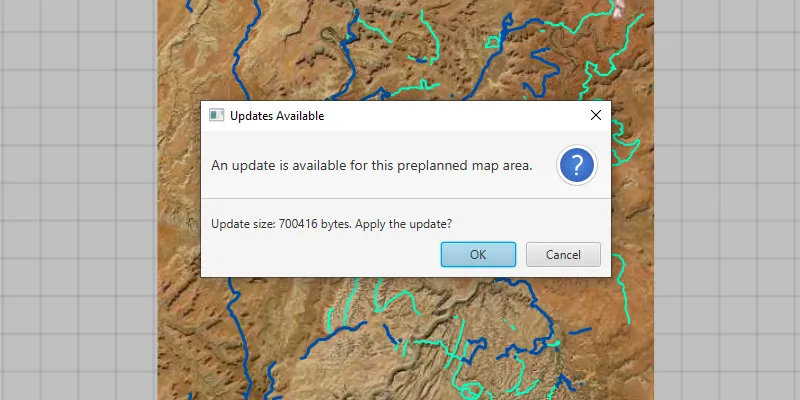
Start the app. It will display an offline map, check for available updates, and show an alert with update availability and size. Confirm to apply the updates to the local offline map and show the results.
How it works
- Create an
OfflineMapSyncTaskwith your offline map. - If desired, get
OfflineMapUpdatesInfofrom the task to check for update availability or update size. - Get a set of default
OfflineMapSyncParametersfor the task. - Set the parameters to download all available updates.
- Use the parameters to create an
OfflineMapSyncJob. - Start the job and get the results once it completes successfully.
- Check if the mobile map package needs to be reopened, and do so if necessary.
- Finally, display your offline map to see the changes.
Relevant API
- MobileMapPackage
- OfflineMapSyncJob
- OfflineMapSyncParameters
- OfflineMapSyncResult
- OfflineMapSyncTask
- OfflineMapUpdatesInfo
About the data
The data in this sample shows the roads and trails in the Canyonlands National Park, Utah. Data by U.S. National Parks Service. No claim to original U.S. Government works.
Additional information
Note: preplanned areas using the Scheduled Updates workflow are read-only. For preplanned areas that can be edited on the end-user device, see the Download preplanned map area sample. For more information about offline workflows, see Offline maps, scenes, and data in the ArcGIS Developers guide.
Tags
offline, pre-planned, preplanned, synchronize, update
Sample code
/* * Copyright 2019 Esri. * * Licensed under the Apache License, Version 2.0 (the "License"); you may not * use this file except in compliance with the License. You may obtain a copy of * the License at * * http://www.apache.org/licenses/LICENSE-2.0 * * Unless required by applicable law or agreed to in writing, software * distributed under the License is distributed on an "AS IS" BASIS, WITHOUT * WARRANTIES OR CONDITIONS OF ANY KIND, either express or implied. See the * License for the specific language governing permissions and limitations under * the License. */
package com.esri.samples.apply_scheduled_updates_to_preplanned_map_area;
import java.io.File;import java.nio.file.Files;import java.util.Optional;import java.util.concurrent.ExecutionException;
import javafx.application.Application;import javafx.scene.Scene;import javafx.scene.control.Alert;import javafx.scene.control.ButtonType;import javafx.scene.layout.StackPane;import javafx.stage.Stage;import org.apache.commons.io.FileUtils;
import com.esri.arcgisruntime.concurrent.Job;import com.esri.arcgisruntime.concurrent.ListenableFuture;import com.esri.arcgisruntime.loadable.LoadStatus;import com.esri.arcgisruntime.mapping.ArcGISMap;import com.esri.arcgisruntime.mapping.MobileMapPackage;import com.esri.arcgisruntime.mapping.view.MapView;import com.esri.arcgisruntime.tasks.offlinemap.OfflineMapSyncJob;import com.esri.arcgisruntime.tasks.offlinemap.OfflineMapSyncParameters;import com.esri.arcgisruntime.tasks.offlinemap.OfflineMapSyncResult;import com.esri.arcgisruntime.tasks.offlinemap.OfflineMapSyncTask;import com.esri.arcgisruntime.tasks.offlinemap.OfflineMapUpdatesInfo;import com.esri.arcgisruntime.tasks.offlinemap.OfflineUpdateAvailability;import com.esri.arcgisruntime.tasks.offlinemap.PreplannedScheduledUpdatesOption;
public class ApplyScheduledUpdatesToPreplannedMapAreaSample extends Application {
  private MapView mapView;  private MobileMapPackage mobileMapPackage;  private OfflineMapSyncTask offlineMapSyncTask;  private File tempMobileMapPackageDirectory;
  @Override  public void start(Stage stage) {    try {      // create stack pane and application scene      StackPane stackPane = new StackPane();      Scene scene = new Scene(stackPane);      scene.getStylesheets().add(getClass().getResource(        "/apply_scheduled_updates_to_preplanned_map_area/style.css").toExternalForm());
      // set title, size, and add scene to stage      stage.setTitle("Apply Scheduled Updates to Preplanned Map Area");      stage.setWidth(800);      stage.setHeight(700);      stage.setScene(scene);      stage.show();
      // add a map view to the stack pane      mapView = new MapView();      stackPane.getChildren().add(mapView);
      // create a temporary copy of the local offline map files, so that updating does not overwrite them permanently      tempMobileMapPackageDirectory = Files.createTempDirectory("canyonlands_offline_map").toFile();      tempMobileMapPackageDirectory.deleteOnExit();      File sourceDirectory = new File(System.getProperty("data.dir"), "./samples-data/canyonlands/");      FileUtils.copyDirectory(sourceDirectory, tempMobileMapPackageDirectory);
      // load the offline map as a mobile map package      mobileMapPackage = new MobileMapPackage(tempMobileMapPackageDirectory.toString());      mobileMapPackage.loadAsync();      mobileMapPackage.addDoneLoadingListener(() -> {        if (mobileMapPackage.getLoadStatus() == LoadStatus.LOADED && !mobileMapPackage.getMaps().isEmpty()) {
          // add the map from the mobile map package to the map view          ArcGISMap offlineMap = mobileMapPackage.getMaps().get(0);          mapView.setMap(offlineMap);
          // create an offline map sync task with the preplanned area          offlineMapSyncTask = new OfflineMapSyncTask(offlineMap);
          // check for available updates to the mobile map package          checkForScheduledUpdates();
        } else {          new Alert(Alert.AlertType.ERROR, "Failed to load the mobile map package.").show();        }      });
    } catch (Exception e) {      // on any error, display the stack trace.      e.printStackTrace();    }  }
  /**   * Checks for scheduled updates to the preplanned map area.   */  private void checkForScheduledUpdates() {
    // check for updates to the offline map    ListenableFuture<OfflineMapUpdatesInfo> offlineMapUpdatesInfoFuture = offlineMapSyncTask.checkForUpdatesAsync();    offlineMapUpdatesInfoFuture.addDoneListener(() -> {      try {        // get and check the results        OfflineMapUpdatesInfo offlineMapUpdatesInfo = offlineMapUpdatesInfoFuture.get();
        // update UI for available updates        if (offlineMapUpdatesInfo.getDownloadAvailability() == OfflineUpdateAvailability.AVAILABLE) {
          // get the update size          long updateSize = offlineMapUpdatesInfo.getScheduledUpdatesDownloadSize();
          // create a dialog to show the update information          var alert = new Alert(Alert.AlertType.CONFIRMATION, "Update size: " + updateSize + " bytes. Apply the update?");          alert.setTitle("Updates Available");          alert.setHeaderText("An update is available for this preplanned map area.");
          // show the dialog and wait for confirmation          Optional<ButtonType> result = alert.showAndWait();
          // apply the update if the dialog is confirmed          if (result.isPresent() && result.get() == ButtonType.OK) {            applyScheduledUpdates();          }
        } else {          // show a dialog that no updates are available          var alert = new Alert(Alert.AlertType.INFORMATION, "The preplanned map area is up to date.");          alert.setTitle("Up to Date");          alert.setHeaderText("No updates available.");          alert.show();        }
      } catch (Exception ex) {        new Alert(Alert.AlertType.ERROR, "Error checking for Scheduled Updates Availability.").show();      }    });  }
  /**   * Applies the scheduled updates to the preplanned map area.   */  private void applyScheduledUpdates() {
    // create default parameters for the sync task    ListenableFuture<OfflineMapSyncParameters> offlineMapSyncParametersFuture = offlineMapSyncTask.createDefaultOfflineMapSyncParametersAsync();    offlineMapSyncParametersFuture.addDoneListener(() -> {      try {        OfflineMapSyncParameters offlineMapSyncParameters = offlineMapSyncParametersFuture.get();
        // set the parameters to download all updates for the mobile map packages        offlineMapSyncParameters.setPreplannedScheduledUpdatesOption(PreplannedScheduledUpdatesOption.DOWNLOAD_ALL_UPDATES);        // set the map package to rollback to the old state should the sync job fail        offlineMapSyncParameters.setRollbackOnFailure(true);
        // create a sync job using the parameters        OfflineMapSyncJob offlineMapSyncJob = offlineMapSyncTask.syncOfflineMap(offlineMapSyncParameters);
        // start the job and get the results        offlineMapSyncJob.start();        offlineMapSyncJob.addJobDoneListener(() -> {          if (offlineMapSyncJob.getStatus() == Job.Status.SUCCEEDED) {            OfflineMapSyncResult offlineMapSyncResult = offlineMapSyncJob.getResult();
            // if mobile map package reopen is required, close the existing mobile map package            if (offlineMapSyncResult.isMobileMapPackageReopenRequired()) {              mobileMapPackage.close();              // create a new instance of the now updated mobile map package and load it              var updatedMobileMapPackage = new MobileMapPackage(tempMobileMapPackageDirectory.toString());              updatedMobileMapPackage.addDoneLoadingListener(() -> {                if (updatedMobileMapPackage.getLoadStatus() == LoadStatus.LOADED && !updatedMobileMapPackage.getMaps().isEmpty()) {                  // add the map from the updated mobile map package to the map view                  mapView.setMap(updatedMobileMapPackage.getMaps().get(0));                } else {                  new Alert(Alert.AlertType.ERROR, "Failed to load the mobile map package.").show();                }              });              updatedMobileMapPackage.loadAsync();            }
            // perform another check for updates, to make sure that the newest update was applied            checkForScheduledUpdates();
          } else {            new Alert(Alert.AlertType.ERROR, "Error syncing the offline map.").show();          }
        });      } catch (InterruptedException | ExecutionException ex) {        new Alert(Alert.AlertType.ERROR, "Error creating DefaultOfflineMapSyncParameters").show();      }    });  }
  /**   * Stops and releases all resources used in application.   */  @Override  public void stop() {
    if (mapView != null) {      mapView.dispose();    }  }
  /**   * Opens and runs application.   *   * @param args arguments passed to this application   */  public static void main(String[] args) {
    Application.launch(args);  }
}