Take a map offline using a preplanned map area.
Use case
Generating offline maps on demand for a specific area can be time consuming for users and a processing load on the server. If areas of interest are known ahead of time, a web map author can pre-create packages for these areas. This way, the generation only needs to happen once, making the workflow more efficient for users and servers.
An archaeology team could define preplanned map areas for dig sites which can be taken offline for field use.
How to use the sample
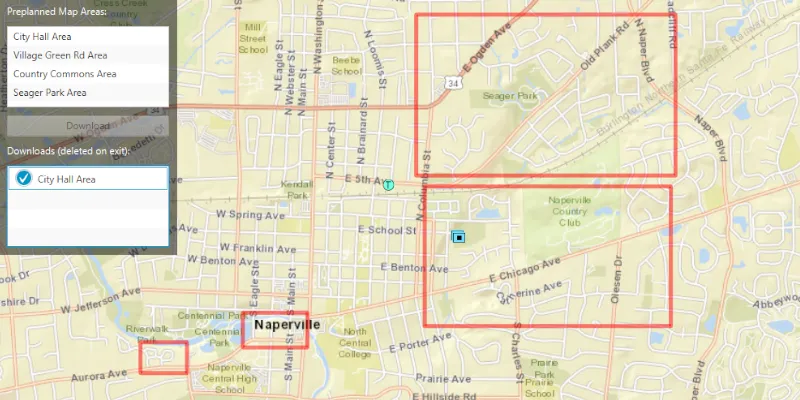
Select a map area from the Preplanned Map Areas list. Click the Download button to download the selected area. The download progress will be shown in the Downloads list. When a download is complete, select it to display the offline map in the map view.
How it works
- Open the online
ArcGISMapfrom aPortalItemand display it. - Create an
OfflineMapTaskusing the map. - Get the
PreplannedMapAreas from the task, and then load them. - To download a selected map area, create the default
DownloadPreplannedOfflineMapParametersfrom the task using the selected preplanned map area. - Set the update mode of the preplanned map area.
- Use the parameters and a download path to create a
DownloadPreplannedOfflineMapJobfrom the task. - Start the job. Once it has completed, get the
DownloadPreplannedOfflineMapResult. - Get the
ArcGISMapfrom the result and display it in theMapView.
Relevant API
- DownloadPreplannedOfflineMapJob
- DownloadPreplannedOfflineMapParameters
- DownloadPreplannedOfflineMapResult
- OfflineMapTask
- PreplannedMapArea
About the data
The Naperville stormwater network map is based on ArcGIS Solutions for Stormwater and provides a realistic depiction of a theoretical stormwater network.
Additional information
PreplannedUpdateMode can be used to set the way the preplanned map area receives updates in several ways:
NO_UPDATES- No updates will be performed.SYNC_WITH_FEATURE_SERVICES- Changes, including local edits, will be synced directly with the underlying feature services.DOWNLOAD_SCHEDULED_UPDATES- Scheduled, read-only updates will be downloaded from the online map area and applied to the local mobile geodatabases.
For more information about offline workflows, see Offline maps, scenes, and data in the ArcGIS Developers guide.
Tags
map area, offline, pre-planned, preplanned
Sample code
/* Copyright 2019 Esri * * Licensed under the Apache License, Version 2.0 (the "License"); * you may not use this file except in compliance with the License. * You may obtain a copy of the License at * *    http://www.apache.org/licenses/LICENSE-2.0 * * Unless required by applicable law or agreed to in writing, software * distributed under the License is distributed on an "AS IS" BASIS, * WITHOUT WARRANTIES OR CONDITIONS OF ANY KIND, either express or implied. * See the License for the specific language governing permissions and * limitations under the License. * */
package com.esri.samples.download_preplanned_map;
import com.esri.arcgisruntime.ArcGISRuntimeException;import com.esri.arcgisruntime.concurrent.Job;import com.esri.arcgisruntime.concurrent.ListenableFuture;import com.esri.arcgisruntime.data.FeatureTable;import com.esri.arcgisruntime.geometry.Envelope;import com.esri.arcgisruntime.geometry.GeometryEngine;import com.esri.arcgisruntime.layers.Layer;import com.esri.arcgisruntime.loadable.LoadStatus;import com.esri.arcgisruntime.mapping.ArcGISMap;import com.esri.arcgisruntime.mapping.Viewpoint;import com.esri.arcgisruntime.mapping.view.Graphic;import com.esri.arcgisruntime.mapping.view.GraphicsOverlay;import com.esri.arcgisruntime.mapping.view.MapView;import com.esri.arcgisruntime.portal.Portal;import com.esri.arcgisruntime.portal.PortalItem;import com.esri.arcgisruntime.security.AuthenticationManager;import com.esri.arcgisruntime.security.DefaultAuthenticationChallengeHandler;import com.esri.arcgisruntime.symbology.SimpleLineSymbol;import com.esri.arcgisruntime.symbology.SimpleRenderer;import com.esri.arcgisruntime.tasks.offlinemap.DownloadPreplannedOfflineMapJob;import com.esri.arcgisruntime.tasks.offlinemap.DownloadPreplannedOfflineMapParameters;import com.esri.arcgisruntime.tasks.offlinemap.DownloadPreplannedOfflineMapResult;import com.esri.arcgisruntime.tasks.offlinemap.OfflineMapTask;import com.esri.arcgisruntime.tasks.offlinemap.PreplannedMapArea;import com.esri.arcgisruntime.tasks.offlinemap.PreplannedUpdateMode;
import javafx.beans.value.ChangeListener;import javafx.beans.value.ObservableValue;import javafx.fxml.FXML;import javafx.scene.control.Alert;import javafx.scene.control.Button;import javafx.scene.control.ListView;import javafx.scene.paint.Color;
import java.io.IOException;import java.nio.file.Files;import java.nio.file.Path;import java.util.List;import java.util.Map;import java.util.concurrent.ExecutionException;
public class DownloadPreplannedMapController {
  @FXML private ListView<PreplannedMapArea> preplannedAreasListView;  @FXML private ListView<DownloadPreplannedOfflineMapJob> downloadJobsListView;  @FXML private MapView mapView;  @FXML private Button downloadButton;
  private ArcGISMap onlineMap;  private GraphicsOverlay areasOfInterestGraphicsOverlay;  private OfflineMapTask offlineMapTask;  private List<PreplannedMapArea> preplannedMapAreas; // keep loadable in scope to avoid garbage collection
  @FXML  private void initialize() {    try {
      // create a portal to ArcGIS Online      Portal portal = new Portal("https://www.arcgis.com/");
      // set the authentication manager to handle OAuth challenges when accessing the portal      AuthenticationManager.setAuthenticationChallengeHandler(new DefaultAuthenticationChallengeHandler());
      // create a portal item using the portal and the item id of a map service      PortalItem portalItem = new PortalItem(portal, "acc027394bc84c2fb04d1ed317aac674");
      // create a map with the portal item      onlineMap = new ArcGISMap(portalItem);
      // show the map      mapView.setMap(onlineMap);
      // create a graphics overlay to show the preplanned map areas extents (areas of interest)      areasOfInterestGraphicsOverlay = new GraphicsOverlay();      mapView.getGraphicsOverlays().add(areasOfInterestGraphicsOverlay);
      // create a red outline to mark the areas of interest of the preplanned map areas      SimpleLineSymbol areaOfInterestLineSymbol = new SimpleLineSymbol(SimpleLineSymbol.Style.SOLID,        Color.web("red", 0.8), 5.0f);      SimpleRenderer areaOfInterestRenderer = new SimpleRenderer();      areaOfInterestRenderer.setSymbol(areaOfInterestLineSymbol);      areasOfInterestGraphicsOverlay.setRenderer(areaOfInterestRenderer);
      // create an offline map task for the map      offlineMapTask = new OfflineMapTask(onlineMap);
      // use a cell factory which shows the preplanned area's title      preplannedAreasListView.setCellFactory(c -> new PreplannedMapAreaListCell());
      // get the preplanned map areas from the offline map task and show them in the list view      ListenableFuture<List<PreplannedMapArea>> preplannedMapAreasFuture = offlineMapTask.getPreplannedMapAreasAsync();      preplannedMapAreasFuture.addDoneListener(() -> {        try {          // get the preplanned areas and add them to the list view          preplannedMapAreas = preplannedMapAreasFuture.get();          preplannedAreasListView.getItems().addAll(preplannedMapAreas);
          // load each area and show a red border around their area of interest          preplannedMapAreas.forEach(preplannedMapArea -> {            preplannedMapArea.loadAsync();            preplannedMapArea.addDoneLoadingListener(() -> {              if (preplannedMapArea.getLoadStatus() == LoadStatus.LOADED) {                areasOfInterestGraphicsOverlay.getGraphics().add(new Graphic(preplannedMapArea.getAreaOfInterest()));              } else {                new Alert(Alert.AlertType.ERROR, "Failed to load preplanned map area").show();              }            });          });
        } catch (InterruptedException | ExecutionException e) {          new Alert(Alert.AlertType.ERROR, "Failed to get the Preplanned Map Areas from the Offline Map Task.").show();        }      });

      preplannedAreasListView.getSelectionModel().selectedItemProperty().addListener((o, p, n) -> {        PreplannedMapArea selectedPreplannedMapArea = preplannedAreasListView.getSelectionModel().getSelectedItem();        if (selectedPreplannedMapArea != null) {
          // clear the download jobs list view selection          downloadJobsListView.getSelectionModel().clearSelection();
          // show the online map with the areas of interest          mapView.setMap(onlineMap);          areasOfInterestGraphicsOverlay.setVisible(true);
          // set the viewpoint to the preplanned map area's area of interest          Envelope areaOfInterest = GeometryEngine.buffer(selectedPreplannedMapArea.getAreaOfInterest(), 100).getExtent();          mapView.setViewpointAsync(new Viewpoint(areaOfInterest), 0.5f);        }      });
      // disable the download button when no area is selected      downloadButton.disableProperty().bind(preplannedAreasListView.getSelectionModel().selectedItemProperty().isNull());
      // use a cell factory which shows the download preplanned offline map job's progress and title      downloadJobsListView.setCellFactory(c -> new DownloadPreplannedOfflineMapJobListCell());
      ChangeListener<DownloadPreplannedOfflineMapJob> selectedDownloadChangeListener = new ChangeListener<>() {        @Override        public void changed(ObservableValue<? extends DownloadPreplannedOfflineMapJob> observable, DownloadPreplannedOfflineMapJob oldValue, DownloadPreplannedOfflineMapJob newValue) {          DownloadPreplannedOfflineMapJob selectedJob = downloadJobsListView.getSelectionModel().getSelectedItem();          if (selectedJob != null) {
            // hide the preplanned map areas and clear the preplanned area list view's selection            areasOfInterestGraphicsOverlay.setVisible(false);            preplannedAreasListView.getSelectionModel().clearSelection();
            if (selectedJob.getStatus() == Job.Status.SUCCEEDED) {              DownloadPreplannedOfflineMapResult result = selectedJob.getResult();
              // check if the result has errors              if (result.hasErrors()) {
                // collect the layer and table errors into a single alert message                StringBuilder stringBuilder = new StringBuilder("Errors: ");
                Map<Layer, ArcGISRuntimeException> layerErrors = result.getLayerErrors();                layerErrors.forEach((layer, exception) ->                  stringBuilder.append("Layer: ").append(layer.getName()).append(". Exception: ").append(exception.getMessage()).append(". ")                );
                Map<FeatureTable, ArcGISRuntimeException> tableError = result.getTableErrors();                tableError.forEach((table, exception) ->                  stringBuilder.append("Table: ").append(table.getTableName()).append(". Exception: ").append(exception.getMessage()).append(". ")                );
                new Alert(Alert.AlertType.ERROR, "One or more errors occurred with the Offline Map Result: " + stringBuilder).show();              } else {                // show the offline map in the map view                ArcGISMap downloadedOfflineMap = result.getOfflineMap();                mapView.setMap(downloadedOfflineMap);              }
            } else {              // alert the user the job is still in progress if selected before the job is done              new Alert(Alert.AlertType.WARNING, "Job status: " + selectedJob.getStatus()).show();
              // when the job is done, re-trigger the listener to show the job's result if it is still selected              selectedJob.addJobDoneListener(() ->                this.changed(observable, oldValue, downloadJobsListView.getSelectionModel().getSelectedItem())              );            }          }        }      };
      downloadJobsListView.getSelectionModel().selectedItemProperty().addListener(selectedDownloadChangeListener);
    } catch (Exception e) {      // on any exception, print the stacktrace      e.printStackTrace();    }  }
  /**   * Download the selected preplanned map area from the list view to a temporary directory. The download job is tracked in another list view.   */  @FXML  private void handleDownloadPreplannedAreaButtonClicked() {    PreplannedMapArea selectedMapArea = preplannedAreasListView.getSelectionModel().getSelectedItem();    if (selectedMapArea != null) {
      // hide the preplanned areas and clear the selection      preplannedAreasListView.getSelectionModel().clearSelection();
      // create default download parameters from the offline map task      ListenableFuture<DownloadPreplannedOfflineMapParameters> downloadPreplannedOfflineMapParametersFuture = offlineMapTask.createDefaultDownloadPreplannedOfflineMapParametersAsync(selectedMapArea);      downloadPreplannedOfflineMapParametersFuture.addDoneListener(() -> {        try {          DownloadPreplannedOfflineMapParameters downloadPreplannedOfflineMapParameters = downloadPreplannedOfflineMapParametersFuture.get();
          // set the update mode to not receive updates          downloadPreplannedOfflineMapParameters.setUpdateMode(PreplannedUpdateMode.NO_UPDATES);
          // create a job to download the preplanned offline map to a temporary directory          Path path = Files.createTempDirectory(selectedMapArea.getPortalItem().getTitle());          path.toFile().deleteOnExit();          DownloadPreplannedOfflineMapJob downloadPreplannedOfflineMapJob = offlineMapTask.downloadPreplannedOfflineMap(downloadPreplannedOfflineMapParameters, path.toFile().getAbsolutePath());
          // start the job          downloadPreplannedOfflineMapJob.start();
          // track the job in the second list view          downloadJobsListView.getItems().add(downloadPreplannedOfflineMapJob);
        } catch (InterruptedException | ExecutionException e) {          new Alert(Alert.AlertType.ERROR, "Failed to generate default parameters for the download job.").show();        } catch (IOException e) {          new Alert(Alert.AlertType.ERROR, "Failed to create a temporary directory for the download").show();        }      });    }  }
  /**   * Stops and releases all resources used in application.   */  void terminate() {
    if (mapView != null) {      mapView.dispose();    }  }
}
/* Copyright 2019 Esri * * Licensed under the Apache License, Version 2.0 (the "License"); * you may not use this file except in compliance with the License. * You may obtain a copy of the License at * * http://www.apache.org/licenses/LICENSE-2.0 * * Unless required by applicable law or agreed to in writing, software * distributed under the License is distributed on an "AS IS" BASIS, * WITHOUT WARRANTIES OR CONDITIONS OF ANY KIND, either express or implied. * See the License for the specific language governing permissions and * limitations under the License. * */
package com.esri.samples.download_preplanned_map;
import javafx.application.Application;import javafx.fxml.FXMLLoader;import javafx.scene.Parent;import javafx.scene.Scene;import javafx.stage.Stage;
public class DownloadPreplannedMapSample extends Application {
private static DownloadPreplannedMapController controller;
@Override public void start(Stage stage) throws Exception { // set up the scene FXMLLoader loader = new FXMLLoader(getClass().getResource("/download_preplanned_map/main.fxml")); Parent root = loader.load(); controller = loader.getController(); Scene scene = new Scene(root);
// set up the stage stage.setTitle("Download Preplanned Map Sample"); stage.setWidth(800); stage.setHeight(700); stage.setScene(scene); stage.show(); }
/** * Stops and releases all resources used in application. */ @Override public void stop() { controller.terminate(); }
/** * Opens and runs application. * @param args arguments passed to this application */ public static void main(String[] args) {
Application.launch(args); }}package com.esri.samples.download_preplanned_map;
import com.esri.arcgisruntime.tasks.offlinemap.DownloadPreplannedOfflineMapJob;import javafx.scene.control.ListCell;import javafx.scene.control.ProgressIndicator;
/** * Convenience class for showing preplanned map jobs in a list view with their progress. */public class DownloadPreplannedOfflineMapJobListCell extends ListCell<DownloadPreplannedOfflineMapJob> {
@Override protected void updateItem(DownloadPreplannedOfflineMapJob downloadPreplannedOfflineMapJob, boolean empty) { super.updateItem(downloadPreplannedOfflineMapJob, empty);
if (downloadPreplannedOfflineMapJob != null) {
// show the job's progress with a progress indicator ProgressIndicator progressIndicator = new ProgressIndicator(downloadPreplannedOfflineMapJob.getProgress() / 100.0);
downloadPreplannedOfflineMapJob.addProgressChangedListener(() -> progressIndicator.setProgress(downloadPreplannedOfflineMapJob.getProgress() / 100.0) );
setGraphic(progressIndicator); setText(downloadPreplannedOfflineMapJob.getParameters().getPreplannedMapArea().getPortalItem().getTitle()); } else { setGraphic(null); setText(null); } }}/* Copyright 2019 Esri * * Licensed under the Apache License, Version 2.0 (the "License"); * you may not use this file except in compliance with the License. * You may obtain a copy of the License at * * http://www.apache.org/licenses/LICENSE-2.0 * * Unless required by applicable law or agreed to in writing, software * distributed under the License is distributed on an "AS IS" BASIS, * WITHOUT WARRANTIES OR CONDITIONS OF ANY KIND, either express or implied. * See the License for the specific language governing permissions and * limitations under the License. * */
package com.esri.samples.download_preplanned_map;
import javafx.scene.control.ListCell;
import com.esri.arcgisruntime.tasks.offlinemap.PreplannedMapArea;
/** * Shows the title of the PreplannedMapArea in the selection list view. */class PreplannedMapAreaListCell extends ListCell<PreplannedMapArea> {
@Override protected void updateItem(PreplannedMapArea preplannedMapArea, boolean empty) { super.updateItem(preplannedMapArea, empty); if (preplannedMapArea != null) {
setText(preplannedMapArea.getPortalItem().getTitle());
} else { setGraphic(null); setText(null); } }}