import "@arcgis/common-components/components/arcgis-histogram";- Inheritance:
- ArcgisHistogram→
PublicLitElement
- Since
- ArcGIS Maps SDK for JavaScript 5.0
Renders a histogram to visualize the spread of a dataset based on bins representing buckets, or sub-ranges, of data. Each bin is defined by a minimum and maximum value and a total count.
You can generate the underlying histogram's bins with the histogram module, then apply them to the component, as shown in the example below.
const params = {  layer: povLayer,  field: "POP_POVERTY",  normalizationField: "TOTPOP_CY",  numBins: 30};
const results = await histogram(params);const histogramElement = document.querySelector("arcgis-histogram");
histogramElement.bins = results.bins;histogramElement.min = results.minValue;histogramElement.max = results.maxValue;
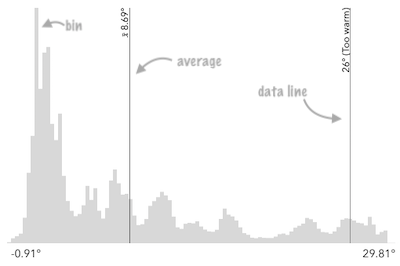
Other properties of this component allow you to display meaningful values on the histogram, such as the average, standardDeviation, and the dataLines properties.
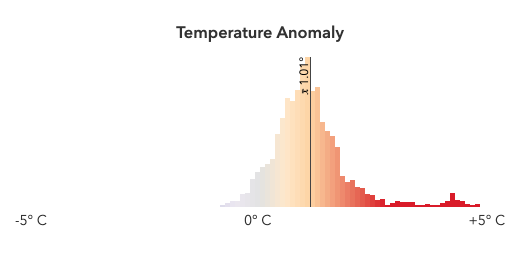
The layout property allows you to set the orientation of the histogram, and the colorStops property allows you to set a gradient or color scheme for the histogram bars.
See the image below for a summary of the configurable options available on the histogram.
The colorStops property may be used to define a color scheme for the histogram bars.
Demos
Properties
average
The statistical average of the data in the histogram. You would typically
get this value from the avg property of
SummaryStatisticsResult,
which is the result of the
summaryStatistics function.
When set, this value will render on the histogram with a symbol indicating it is the average.
- See also
- Attribute
- average
Examples
// sets result returned from a smart mapping method// to the histogramhistogram.average = response.statistics.avg;histogram.average = 34.5; bins
- Type
- HistogramBin[] | undefined
An array of objects representing each bin in the histogram. This information is typically returned from the histogram function.
Examples
// sets the bins of the histogram from the bins in the histogram() resulthistogram.bins = histogramResult.bins;// Creates a histogram with 7 bins.histogram.bins = [ { minValue: 0, maxValue: 10, count: 4 }, { minValue: 10.1, maxValue: 20, count: 14 }, { minValue: 20.1, maxValue: 30, count: 9 }, { minValue: 30.1, maxValue: 40, count: 34 }, { minValue: 40.1, maxValue: 50, count: 351 }, { minValue: 50.1, maxValue: 60, count: 100 }, { minValue: 60.1, maxValue: 70, count: 1 }]; colorBlendingEnabled
- Type
- boolean
When set to true, overlapping classed color stops will be blended together to create the color of the bar.
This allows to show a if a bar representing a bin overlaps with multiple classed color stops.
This property is only applicable when the colorStops property is set to classed color stops.
- Attribute
- color-blending-enabled
- Default value
- false
colorStops
- Type
- HistogramColorStops | undefined
An array of color stops used to define the color scheme for the histogram bars. There are two types of color stops:
- Continuous color stops: Each stop is defined by a
colorand a value. The color of the bar is determined by interpolating between the colors of the stops surrounding the value of the bin. - Classed color stops: Each stop is defined by a
colorand aminValueandmaxValue. The color of the bar is determined by the color of the stop that contains the value of the bin. If thecoloris omitted, the bar will be colored using the CSS variable--arcgis-histogram-stop-color.
When a bar is not covered by any color stop, it will be colored using the CSS variable --arcgis-histogram-bar-color.
Examples
// Define continuous color stops on the histogram.// The color of the bar is determined by interpolating between the colors of the stops surrounding the value of the bin.histogram.colorStops = [ { color: "#ff0000", value: 0 }, { color: "#ffff00", value: 50 }, { color: "#00ff00", value: 100 }];// Define classed color stops on the histogram.// The color of the bar is determined by the color of the stop that contains the value of the bin.histogram.colorStops = [ { color: "#ff0000", minValue: 0, maxValue: 50 }, { color: "#00ff00", minValue: 50, maxValue: 100 },]; dataLines
When set, renders lines on the histogram that indicate important or meaningful values to the end user.
Examples
// will render lines at the 25th, 50th, 75th, and 99th percentileshistogram.dataLines = [{ value: 30, label: "25 pctl"}, { value: 45, label: "50 pctl"}, { value: 65, label: "75 pctl"}, { value: 89, label: "99 pctl"}];// calculate standard deviations from mean using stats// returned from smart mapping statistic methodsconst stddevs = smartMappingUtils.getDeviationValues(stats.stddev, stats.avg, 2);histogram.dataLines = stddevs.map((stddev) => { return { value: stddev };}); icon
Icon which represents the component. Typically used when the component is controlled by another component (e.g. by the Expand component). Search Calcite Icons for possible values.
- Attribute
- icon
- Default value
- "graph-histogram"
layout
- Type
- HistogramLayout
Determines the orientation of the histogram.
- Attribute
- layout
- Default value
- "horizontal"
Example
histogram.layout = "vertical"; max
The maximum value or bound of the entire histogram. This should match the maximum bound of the last bins.
- Attribute
- max
Examples
histogram.max = 100;// sets result returned from a smart mapping method to the histogramhistogram.max = response.statistics.max; min
The minimum value or bound of the entire histogram. This should match the minimum bound of the first bins.
- Attribute
- min
Examples
histogram.min = 0;// sets result returned from a smart mapping method to the histogramhistogram.min = response.statistics.min; standardDeviation
The statistical standard deviation of the data in the histogram. You would typically
get this value from the stddev property of
SummaryStatisticsResult,
which is the result of the
summaryStatistics function.
When set, this value will render on the histogram with symbols indicating standard deviation intervals from the mean.
- See also
- Attribute
- standard-deviation
Example
// sets result returned from a smart mapping method// to the histogramhistogram.standardDeviation = response.statistics.stddev;Methods
| Method | Signature |
|---|---|
componentOnReady inherited | componentOnReady(): Promise<this> |
componentOnReady
- Signature
-
componentOnReady (): Promise<this>
Creates a promise that resolves once the component is fully loaded.
- Returns
- Promise<this>
Example
const arcgisHistogram = document.querySelector("arcgis-histogram");document.body.append(arcgisHistogram);await arcgisHistogram.componentOnReady();console.log("arcgis-histogram is ready to go!");Styles
| Name | Default | Description |
|---|---|---|
| Specifies the color of the histogram bars when the bin doesn't have a corresponding color stop. | |
| Specifies the default color for color stops. |