import Camera from "@arcgis/core/Camera.js";const Camera = await $arcgis.import("@arcgis/core/Camera.js");- Inheritance:
- Camera→
Accessor
- Since
- ArcGIS Maps SDK for JavaScript 4.0
The camera defines the position, tilt, and heading of the point from which the SceneView's visible extent is observed. It is not associated with device hardware. This class only applies to 3D SceneViews.
When a SceneView is created, it contains a camera property.
Constructors
Constructor
Parameters
| Parameter | Type | Description | Required |
|---|---|---|---|
| properties | | |
Properties
fov
- Type
- number
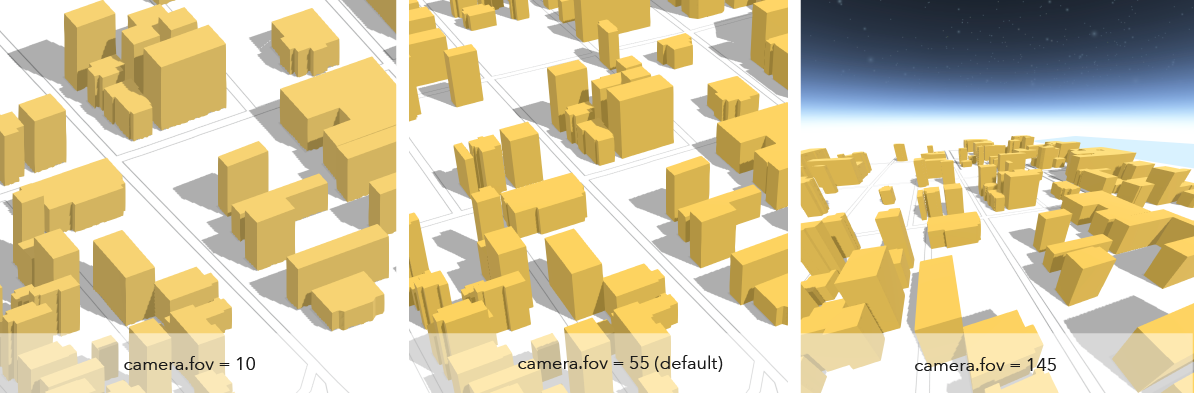
The diagonal field of view (fov) angle for the camera. The range of angles must be between 1 and 170 degrees, where smaller fov angles mimic a telephoto lens zooming in, and larger fov angles mimic a fish-eye lens zooming out. The default angle is 55 degrees.
- Default value
- 55
heading
- Type
- number
The compass heading of the camera in degrees. Heading is zero when north is the top of the screen. It increases as the view rotates clockwise. The angles are always normalized between 0 and 360 degrees.
- Default value
- 0
Examples
// Initialize the view with a specific cameraconst cam = new Camera({ heading: 90, // face due east tilt: 45, // looking from a bird's eye view position: [ -122, 38, 20000 ] // creates a point instance (x,y,z)});// Initialize the view with a specific cameraconst cam = new Camera({ heading: 90, // face due east tilt: 45, // looking from a bird's eye view position: { latitude: 38, longitude: -122, z: 20000, spatialReference: { wkid: 3857 } }});
view.camera = cam;// Set the heading of the view's camera to 180 degreesconst newCam = view.camera.clone();newCam.heading = 180;view.camera = newCam;// go to the pt geometry facing due southview.goTo({ target: pt, heading: 180 }); layout
- Type
- CameraLayout
The layout defines which sub-region of the camera is rendered.
It is intended for tiled display walls, where each display instance configures a different layout. This property is only supported in a 3D SceneView.
position
- Type
- Point
The position of the camera defined by a map point.
Z-values defined in a geographic or metric coordinate system are expressed in meters. However, in local scenes that use a projected coordinate system, vertical units are assumed to be the same as the horizontal units specified by the service.
Example
const cam = view.camera.clone();// the position is autocast as new Point()cam.position = { latitude: 38, longitude: -122, z: 50000 // altitude in meters}// go to the new cameraview.goTo(cam); tilt
- Type
- number
The tilt of the camera in degrees with respect to the surface as projected down from the camera position. Tilt is zero when looking straight down at the surface and 90 degrees when the camera is looking parallel to the surface.
- Default value
- 0
Examples
// Initialize the view with a specific cameraconst cam = new Camera({  heading: 90, // face due east  tilt: 45, // looking from a bird's eye view  position: {    latitude: 38,    longitude: -122,    spatialReference: { wkid: 3857 }  }});
view.camera = cam;
// go to the pt geometry facing directly downview.goTo({ target: pt, tilt: 0 });Methods
fromJSON
- Signature
-
fromJSON (json: any): any
Creates a new instance of this class and initializes it with values from a JSON object
generated from an ArcGIS product. The object passed into the input json
parameter often comes from a response to a query operation in the REST API or a
toJSON()
method from another ArcGIS product. See the Using fromJSON()
topic in the Guide for details and examples of when and how to use this function.
Parameters
| Parameter | Type | Description | Required |
|---|---|---|---|
| json | A JSON representation of the instance in the ArcGIS format. See the ArcGIS REST API documentation for examples of the structure of various input JSON objects. | |
- Returns
- any
Returns a new instance of this class.
clone
- Signature
-
clone (): this
Creates a deep clone of this object. Any properties that store values by reference will be assigned copies of the referenced values on the cloned instance.
- Returns
- this
A deep clone of the class instance that invoked this method.
toJSON
- Signature
-
toJSON (): any
Converts an instance of this class to its ArcGIS portal JSON representation. See the Using fromJSON() guide topic for more information.
- Returns
- any
The ArcGIS portal JSON representation of an instance of this class.