import Ground from "@arcgis/core/Ground.js";const Ground = await $arcgis.import("@arcgis/core/Ground.js");- Inheritance:
- Ground→
Accessor
- Since
- ArcGIS Maps SDK for JavaScript 4.0
The Ground class contains properties that specify how the ground surface is displayed in a SceneView. It contains a layers property, which is a collection of ElevationLayer that defines the elevation or terrain of the map's surface.
On a Map instance, a default ground surface using the World Elevation Service can conveniently be initialized through the Map.ground property:
let map = new Map({ basemap: "topo-vector", ground: "world-elevation"});When terrain and bathymetry values are needed, the TopoBathy 3D Service can be used:
let map = new Map({ basemap: "topo-vector", ground: "world-topobathymetry"});When no basemap is available, the Ground displays a grid by default:
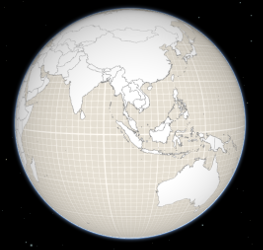
That can be changed by setting a color on the surfaceColor property:
map.ground.surfaceColor = '#004c73';
If the scene contains underground data, reduce the opacity of the ground to be able to see through the ground:
map.ground.opacity = 0.4;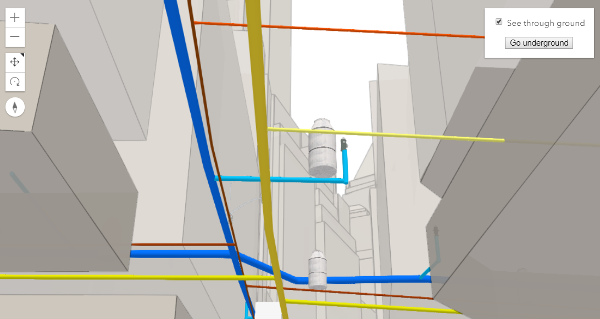
Constructors
Constructor
Parameters
| Parameter | Type | Description | Required |
|---|---|---|---|
| properties | | |
Properties
| Property | Type | Class |
|---|---|---|
declaredClass readonly inherited | ||
| | ||
loaded readonly | | |
loadError readonly inherited | ||
loadStatus readonly inherited | "not-loaded" | "loading" | "failed" | "loaded" | |
loadWarnings readonly inherited | any[] | |
| | ||
| | ||
| |
layers
A collection of ElevationLayers that define the elevation or terrain that makes up the ground surface. When elevation layers are added to the ground, the topographical variations of the surface are rendered in 3D as they would appear in the real world.
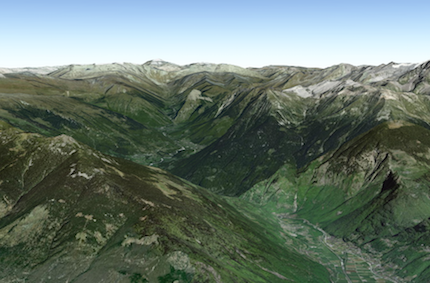
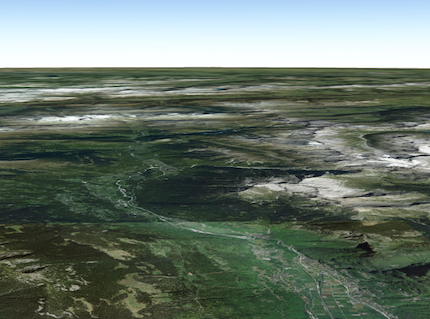
When the layers collection is empty, the ground surface is flat.
Example
// Adds the esri world elevation service to the groundlet layer = new ElevationLayer({ url: "//elevation3d.arcgis.com/arcgis/rest/services/WorldElevation3D/Terrain3D/ImageServer"});map.ground.layers.add(layer); loadError
The Error object returned if an error occurred while loading.
loadStatus
- Type
- "not-loaded" | "loading" | "failed" | "loaded"
Represents the status of a load() operation.
| Value | Description |
|---|---|
| not-loaded | The object's resources have not loaded. |
| loading | The object's resources are currently loading. |
| loaded | The object's resources have loaded without errors. |
| failed | The object's resources failed to load. See loadError for more details. |
- Default value
- "not-loaded"
loadWarnings
- Type
- any[]
A list of warnings which occurred while loading.
navigationConstraint
- Type
- NavigationConstraint | null | undefined
- Since
- ArcGIS Maps SDK for JavaScript 4.8
Specifies the user navigation constraints relative to the ground surface.
opacity
- Type
- number
- Since
- ArcGIS Maps SDK for JavaScript 4.8
Opacity of the ground, including surface default color and the basemap (without reference layers). This property can be used for a see-through ground effect.
- Default value
- 1
Methods
| Method | Signature | Class |
|---|---|---|
fromJSON inherited static | fromJSON(json: any): any | |
cancelLoad inherited | cancelLoad(): this | |
clone(): Ground | | |
createElevationSampler(extent: Extent, options?: CreateElevationSamplerOptions): Promise<ElevationSampler> | | |
destroy(): void | | |
isFulfilled inherited | isFulfilled(): boolean | |
isRejected inherited | isRejected(): boolean | |
isResolved inherited | isResolved(): boolean | |
load inherited | load(options?: AbortOptions | null | undefined): Promise<this> | |
loadAll(): Promise<this> | | |
queryElevation(geometry: Point, options?: ElevationQueryOptions): Promise<ElevationQueryResult<Point>> | | |
queryElevation(geometry: Multipoint, options?: ElevationQueryOptions): Promise<ElevationQueryResult<Multipoint>> | | |
queryElevation(geometry: Polyline, options?: ElevationQueryOptions): Promise<ElevationQueryResult<Polyline>> | | |
queryElevation(geometry: ElevationQueryGeometry, options?: ElevationQueryOptions): Promise<ElevationQueryResult<ElevationQueryGeometry>> | | |
toJSON inherited | toJSON(): any | |
when inherited | when<TResult1 = this, TResult2 = never>(onFulfilled?: OnFulfilledCallback<this, TResult1> | null | undefined, onRejected?: OnRejectedCallback<TResult2> | null | undefined): Promise<TResult1 | TResult2> |
fromJSON
- Signature
-
fromJSON (json: any): any
Creates a new instance of this class and initializes it with values from a JSON object
generated from an ArcGIS product. The object passed into the input json
parameter often comes from a response to a query operation in the REST API or a
toJSON()
method from another ArcGIS product. See the Using fromJSON()
topic in the Guide for details and examples of when and how to use this function.
Parameters
| Parameter | Type | Description | Required |
|---|---|---|---|
| json | A JSON representation of the instance in the ArcGIS format. See the ArcGIS REST API documentation for examples of the structure of various input JSON objects. | |
- Returns
- any
Returns a new instance of this class.
cancelLoad
- Signature
-
cancelLoad (): this
Cancels a load() operation if it is already in progress.
- Returns
- this
createElevationSampler
- Signature
-
createElevationSampler (extent: Extent, options?: CreateElevationSamplerOptions): Promise<ElevationSampler>
- Since
- ArcGIS Maps SDK for JavaScript 4.7
Creates an elevation sampler for the given extent by querying the ground layers for elevation data and caching it so values may be sampled quickly afterwards. The sampler uses the elevation data from the first layer that has data available. For getting elevation data from a specific layer use ElevationLayer.createElevationSampler().
Parameters
| Parameter | Type | Description | Required |
|---|---|---|---|
| extent | The extent for which to create the sampler. | | |
| options | Additional sampler options. | |
- Returns
- Promise<ElevationSampler>
An elevation sampler.
destroy
- Signature
-
destroy (): void
- Since
- ArcGIS Maps SDK for JavaScript 4.17
Destroys the ground and its layers.
These can no longer be used once the ground has been destroyed. To prevent the layers from being destroyed,
remove them from the ground before calling destroy().
// prevent the layers from being destroyed by removing them from the groundconst layers = ground.layers.removeAll();
// destroy the ground and any remaining associated resourcesground.destroy();- Returns
- void
isFulfilled
- Signature
-
isFulfilled (): boolean
isFulfilled() may be used to verify if creating an instance of the class is fulfilled (either resolved or rejected).
If it is fulfilled, true will be returned.
- Returns
- boolean
Indicates whether creating an instance of the class has been fulfilled (either resolved or rejected).
isRejected
- Signature
-
isRejected (): boolean
isRejected() may be used to verify if creating an instance of the class is rejected.
If it is rejected, true will be returned.
- Returns
- boolean
Indicates whether creating an instance of the class has been rejected.
isResolved
- Signature
-
isResolved (): boolean
isResolved() may be used to verify if creating an instance of the class is resolved.
If it is resolved, true will be returned.
- Returns
- boolean
Indicates whether creating an instance of the class has been resolved.
load
- Signature
-
load (options?: AbortOptions | null | undefined): Promise<this>
Loads the resources referenced by this class. This method automatically executes for a View and all of the resources it references in Map if the view is constructed with a map instance.
This method must be called by the developer when accessing a resource that will not be loaded in a View.
The load() method only triggers the loading of the resource the first time it is called. The subsequent calls return the same promise.
It's possible to provide a signal to stop being interested into a Loadable instance load status.
When the signal is aborted, the instance does not stop its loading process, only cancelLoad() can abort it.
loadAll
- Signature
-
loadAll (): Promise<this>
- Since
- ArcGIS Maps SDK for JavaScript 4.9
Loads all the externally loadable resources associated with the ground. For the ground this will load all the layers.
- See also
Example
// Load all resources but ignore if one or more of them failed to loadground.loadAll() .catch(function(error) { // Ignore any failed resources }) .then(function() { console.log("All loaded"); }); queryElevation
- Signature
-
queryElevation (geometry: Point, options?: ElevationQueryOptions): Promise<ElevationQueryResult<Point>>
Parameters
| Parameter | Type | Description | Required |
|---|---|---|---|
| geometry | | | |
| options | | |
- Returns
- Promise<ElevationQueryResult<Point>>
queryElevation
- Signature
-
queryElevation (geometry: Multipoint, options?: ElevationQueryOptions): Promise<ElevationQueryResult<Multipoint>>
Parameters
| Parameter | Type | Description | Required |
|---|---|---|---|
| geometry | | | |
| options | | |
- Returns
- Promise<ElevationQueryResult<Multipoint>>
queryElevation
- Signature
-
queryElevation (geometry: Polyline, options?: ElevationQueryOptions): Promise<ElevationQueryResult<Polyline>>
Parameters
| Parameter | Type | Description | Required |
|---|---|---|---|
| geometry | | | |
| options | | |
- Returns
- Promise<ElevationQueryResult<Polyline>>
queryElevation
- Signature
-
queryElevation (geometry: ElevationQueryGeometry, options?: ElevationQueryOptions): Promise<ElevationQueryResult<ElevationQueryGeometry>>
Query the ground layer services for elevation values for the given geometry.
The returned result contains a copy of the geometry with z-values sampled from elevation data from the first layer
that has data available. The resolution from which the elevation is queried can be set using the demResolution
option. In many cases, auto demResolution can be used to get high quality elevation samples without the need to
know exactly where the data in the service is located. This is particularly useful for services which combine
elevation data from many sources (such as the world elevation service). If more control, or higher quality samples
are required, use either finest-contiguous or a fixed {number} resolution.
Parameters
| Parameter | Type | Description | Required |
|---|---|---|---|
| geometry | The geometry to sample. | | |
| options | Additional query options. | |
- Returns
- Promise<ElevationQueryResult<ElevationQueryGeometry>>
Resolves to an object with the sampled geometry, resolution information, and no data value.
Example
const [Map, Multipoint] = await $arcgis.import(["@arcgis/core/Map.js", "@arcgis/core/geometry/Multipoint.js"]);const map = new Map({  ground: "world-elevation"});
// Various points across a ridge of the mount everestconst points = [   [ 86.9252, 27.9883 ],   [ 86.9265, 27.9894 ],   [ 86.9292, 27.9923 ],   [ 86.9324, 27.9960 ],   [ 86.9359, 27.9992 ]];
map.ground.queryElevation(new Multipoint({ points }), { returnSampleInfo: true })
  // Successfully sampled all points  .then(function(result) {    // Print result of each sampled point to the console    result.geometry.points.forEach(function(point, index) {      const elevation = Math.round(point[2]);      const resolution = result.sampleInfo[index].demResolution;
      const coordinateText = "(" + point[0] + ", " + point[1] + ")";      const resolutionText = Math.round(resolution) + " meter resolution";
      console.log("Sampled " + coordinateText + ": " + elevation + " at " + resolutionText);    });  })
  // Failed to sample (e.g. service unavailable)  .catch(function(error) {    console.error("Failed to query elevation:", error);  });
toJSON
- Signature
-
toJSON (): any
Converts an instance of this class to its ArcGIS portal JSON representation. See the Using fromJSON() guide topic for more information.
- Returns
- any
The ArcGIS portal JSON representation of an instance of this class.
when
- Signature
-
when <TResult1 = this, TResult2 = never>(onFulfilled?: OnFulfilledCallback<this, TResult1> | null | undefined, onRejected?: OnRejectedCallback<TResult2> | null | undefined): Promise<TResult1 | TResult2>
- Since
- ArcGIS Maps SDK for JavaScript 4.6
when() may be leveraged once an instance of the class is created. This method takes two input parameters: an onFulfilled function and an onRejected function.
The onFulfilled executes when the instance of the class loads. The
onRejected executes if the instance of the class fails to load.
Parameters
| Parameter | Type | Description | Required |
|---|---|---|---|
| onFulfilled | OnFulfilledCallback<this, TResult1> | null | undefined | The function to call when the promise resolves. | |
| onRejected | The function to execute when the promise fails. | |
- Returns
- Promise<TResult1 | TResult2>
Returns a new promise for the result of
onFulfilledthat may be used to chain additional functions.
Example
// Although this example uses MapView, any class instance that is a promise may use when() in the same waylet view = new MapView();view.when(function(){ // This function will execute once the promise is resolved}, function(error){ // This function will execute if the promise is rejected due to an error});