import { getThemes, getSchemes, getSchemeByName, getSchemesByTag, cloneScheme } from "@arcgis/core/smartMapping/symbology/flow.js";const { getThemes, getSchemes, getSchemeByName, getSchemesByTag, cloneScheme } = await $arcgis.import("@arcgis/core/smartMapping/symbology/flow.js");- Since
- ArcGIS Maps SDK for JavaScript 4.23
Object containing helper methods for generating optimal settings for FlowRenderer. The getSchemes() method is used to generate renderer properties best suited to the basemap and theme.
- See also
Functions
getThemes
Returns metadata for the available themes. If a basemap is provided, returns themes that work best with the given basemap.
- Signature
-
getThemes (basemap?: Basemap | string): Theme[]
Parameters
| Parameter | Type | Description | Required |
|---|---|---|---|
| basemap | The Esri basemap string or basemap object that will be used with the returned theme(s). | |
- Returns
- Theme[]
Returns an object containing information about the available themes for the given basemap.
getSchemes
Returns a primary scheme and secondary schemes defining properties for
flow visualizations in
a ImageryLayer and ImageryTileLayer.
The basemap parameter determines the appropriate color schemes used to visualize flow lines.
- Signature
-
getSchemes (params: GetSchemesParameters): FlowSchemes | null | undefined
Parameters
| Parameter | Type | Description | Required |
|---|---|---|---|
| params | The function parameters. | |
- Returns
- FlowSchemes | null | undefined
Returns an object containing the primary flow scheme to use for the given basemap. Secondary schemes are also provided.
Example
// gets the primary scheme for the features of the given geometry type and basemapconst schemes = flowSchemes.getSchemes({  basemapTheme: "dark",  theme: "wave-front"});
// the suggested default scheme for the layer, basemap, and themelet primaryScheme = schemes.primaryScheme;
getSchemeByName
Returns the flow scheme with the given name.
- Signature
-
getSchemeByName (params: GetSchemesByNameParameters): FlowScheme | null | undefined
Parameters
| Parameter | Type | Description | Required |
|---|---|---|---|
| params | The function parameters. | |
- Returns
- FlowScheme | null | undefined
Returns the scheme matching the given name.
Example
// Constructs the scheme using the Perfect Pigtails color ramp.const schemes = flowSchemes.getSchemeByName({ name: "Perfect Pigtails", basemapTheme: "dark", theme: "wave-front"}); getSchemesByTag
Returns the flow schemes filtered by tags included and excluded from the paramters.
- Signature
-
getSchemesByTag (params: GetSchemesByTagParameters): FlowScheme[]
Parameters
| Parameter | Type | Description | Required |
|---|---|---|---|
| params | The function parameters. | |
- Returns
- FlowScheme[]
Returns an array of flow schemes with the given tags included in the search and excluding the given tags excluded from the search.
Example
// returns colorblind friendly red color schemesconst schemes = flowSchemes.getSchemesByTag({ basemapTheme: "dark", theme: "wave-front", includedTags: [ "reds", "colorblind-friendly" ]}); cloneScheme
Clones a flow scheme object.
- Signature
-
cloneScheme (scheme: FlowScheme | null | undefined): FlowScheme | null | undefined
Parameters
| Parameter | Type | Description | Required |
|---|---|---|---|
| scheme | FlowScheme | null | undefined | The flow scheme object to clone. | |
- Returns
- FlowScheme | null | undefined
Returns a clone of the given color scheme object.
Example
// clones the primary scheme returned from the getSchemes() methodlet flowScheme = primaryScheme.clone();Type definitions
GetSchemesParameters
basemap
The Esri basemap to pair with the visualization. This
value indicates the best colors for visualizing flow lines against the given basemap. If you have a
non-Esri basemap (e.g. a VectorTileLayer basemap with a custom style) or no basemap at all, then use the basemapTheme parameter
instead of this parameter.
theme
Determines how flow lines will render. Possible values are listed below.
| Value | Description | Example |
|---|---|---|
| flow-line | Renders the uv and magnitude data as animated flow lines. This is ideal for representing wind and other atmospheric data. |  |
| wave-front | Renders UV and magnitude data in a wave-like animation. This theme works well for ocean data. | 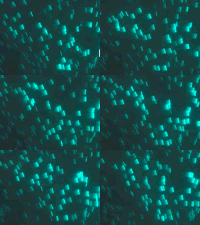 |
Known Limitations
The wave-front flow theme is not supported in 3D SceneView.
- Default value
- "flow-line"
basemapTheme
- Type
- BasemapTheme | null | undefined
If you have a
non-Esri basemap (e.g. a VectorTileLayer basemap with a custom style) or no basemap at all, use this parameter to indicate
whether the background of the visualization is light or dark.
GetSchemesByTagParameters
- Supertypes
- GetSchemesParameters