import WebScene from "@arcgis/core/WebScene.js";const WebScene = await $arcgis.import("@arcgis/core/WebScene.js");- Since
- ArcGIS Maps SDK for JavaScript 4.0
The web scene is the core element of 3D mapping across ArcGIS. It defines the content, style, environment, and slides of your scene and it can be shared across multiple ArcGIS web and desktop applications. Web scenes can be created, published, and consumed in ArcGIS Pro and ArcGIS Online with the Scene Viewer. The web scene is saved as a JSON document that can be consumed by the ArcGIS Maps SDK for JavaScript via the WebScene class to easily create compelling 3D applications. The JSON document is written according to the web scene specification.
Although you can easily create your own scenes, there are thousands of publicly available web scenes in ArcGIS Online that you can use to get started with the API. You may modify or add new content to these scenes.
To load a WebScene into a SceneView, you need to simply reference the ID of the web scene item in ArcGIS Online via the portalItem property of this class.
const scene = new WebScene({ portalItem: { // autocasts as new PortalItem() id: "affa021c51944b5694132b2d61fe1057" // ID of the WebScene on arcgis.com }});To load a WebScene from an on-premise portal, set the portal url in esriConfig.portalurl.
esriConfig.portalUrl = "https://myHostName.esri.com/arcgis";
const scene = new WebScene({  portalItem: { // autocasts as new PortalItem()    id: "0614ea1f9dd043e9ba157b9c20d3c538" // ID of the WebScene on the on-premise portal  }});
Then you must reference the WebScene instance in the SceneView.map property of a SceneView.
const view = new SceneView({ map: scene, // The WebScene instance created above container: "viewDiv"});This will start loading all layers and scene options into the 3D SceneView. The when() method on the WebScene instance can be called to execute processes that may only run after the WebScene is loaded.
scene.when(function() { // All layers and the basemap have been created});view.when(function() { // All layer and basemap resources have been loaded and are ready to be displayed});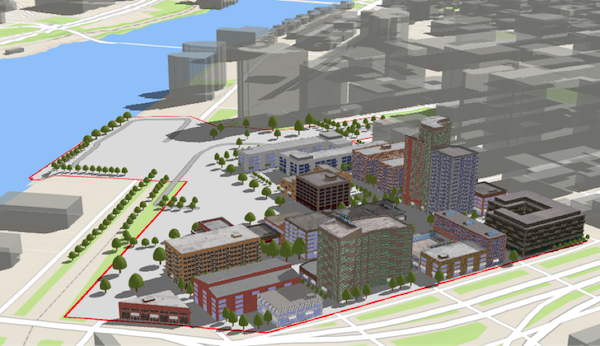
The WebScene defines the content of your scene and how the scene looks when it is loaded in your application. There are several common properties of a web scene that you will likely interact with when using this class:
- layers: defines the content and styling of the web scene, as well as popups, labels, legend and other settings.
- basemap: defines the basemap layers of the web scene.
- ground: defines the elevation layers of the web scene.
- presentation: contains the web scene slides.
- initialViewProperties
- InitialViewProperties.environment: configures lighting, shadows and atmosphere of the scene.
- InitialViewProperties.viewpoint: configures the initial viewpoint.
- InitialViewProperties.viewingMode: defines if the web scene is global or local.
For more information on properties of a web scene, please consult the web scene specification.
There are two types of web scenes: global or local. Global scenes render the earth as a sphere
while Local scenes render the earth on a flat plane. Global web scenes can be created with a WebMercator,
WGS84, CGCS2000, Mars_2000_(Sphere), GCS_Mars_2000 and GCS_Moon_2000. Local web scenes
can be created with WGS84, CGCS2000 or any projected coordinate system. Read the ArcGIS Online help to learn more about
choosing global or local scenes.
Slides store a snapshot of a visualization state of the scene that can be re-applied to the scene at a later time. Slides contain properties for viewpoint, layer visibilities, basemap and environment (as well as a title and thumbnail) so that users of a 3D application can easily navigate the scene and accurately recreate a stored view of that scene.
Web scenes can be saved to ArcGIS Online or Portal using saveAs() or save(). Define the portal and once it is loaded, save the web scene.
const portal = new Portal({ url: "https://myportal.arcgis.com/", // the url of the portal authMode: "immediate" // user authenticates by signing in when the Portal is loaded});// once the portal is loaded save the web scene to the portal as a new web sceneportal.load().then(function() { webscene.saveAs({ title: "My Scene", portal: portal }) .then(function() { console.log("Scene was saved"); }) .catch(function(err) { console.log(err); });})It's important to note that GraphicsLayer, ImageryLayer, MediaLayer and StreamLayer can't be saved to a web scene. A cached image service can be saved to a web scene, by declaring it as a TileLayer. An OpenStreetMapLayer can be saved as a baseLayer. For more information on types of layers that can be saved in a web scene, see the web scene specification.
Constructors
Constructor
Parameters
| Parameter | Type | Description | Required |
|---|---|---|---|
| properties | | |
Examples
// Typical usageconst scene = new WebScene({ portalItem: { id: "affa021c51944b5694132b2d61fe1057" }});// Typical usageconst map = new Map({ basemap: "topo-vector"});Properties
| Property | Type | Class |
|---|---|---|
version readonly static | | |
allLayers readonly inherited | ||
allTables readonly inherited | ||
| | ||
| | ||
| | ||
basemap inherited | ||
| | ||
| | ||
declaredClass readonly inherited | ||
editableLayers readonly inherited | ||
| | ||
focusAreas inherited | ||
ground inherited | ||
| | ||
| | ||
layers inherited | ||
loaded readonly | | |
loadError readonly inherited | ||
loadStatus readonly inherited | "not-loaded" | "loading" | "failed" | "loaded" | |
loadWarnings readonly inherited | any[] | |
PortalItem | null | undefined | | |
| | ||
sourceVersion readonly | | |
tables inherited | ||
| | ||
| |
allLayers
- Type
- ReadonlyCollection<Layer>
A flattened collection of all layers in the map. This collection contains basemap layers, operational layers and ground layers. Group Layers and their children layers are also part of this collection. Reference layers in the basemap will always be included at the end of the collection.
Layers should not be added directly to this collection. They must only be added via the layers, basemap or ground properties.
To access a flattened collection of tables, use the allTables property instead.
Example
// Find a layer with title "US Counties"const foundLayer = map.allLayers.find(function(layer) { return layer.title === "US Counties";});
// Create a filtered collection of the non-group layersconst nonGroupLayers = map.allLayers.filter(function(layer) { return !foundLayer.layers;});
// Listen for any layer being added or removed in the Mapmap.allLayers.on("change", function(event) { console.log("Layer added: ", event.added); console.log("Layer removed: ", event.removed); console.log("Layer moved: ", event.moved);});
// Watching for changes to the visible layers in the MapreactiveUtils.watch(  () => view.map.allLayers.filter((layer) => layer.visible),  (newVisibleLayers, oldVisibleLayers) => {    const added = newVisibleLayers.filter(      (layer) => !oldVisibleLayers.includes(layer)    );    const removed = oldVisibleLayers.filter(      (layer) => !newVisibleLayers.includes(layer)    );    added.forEach((layer) => console.log(layer.title, "is visible"));    removed.forEach((layer) => console.log(layer.title, "is not visible"));  });
allTables
- Type
- ReadonlyCollection<Layer>
- Since
- ArcGIS Maps SDK for JavaScript 4.17
A flattened collection of tables anywhere in the map's hierarchy. This will contain
individual tables within the map's tables, in addition to any
group layer tables. In order for the
table(s) to be recognized as such, the FeatureLayer.isTable property
must return true.
Currently, only feature layer tables are recognized. To access spatial layers, use the allLayers property instead.
Example
// A feature layer where isTable = true.const foundTable = map.allTables.find(function(table) { // Find a table with title "US Counties" return table.title === "US Counties";}); applicationProperties
- Type
- ApplicationProperties | null | undefined
- Since
- ArcGIS Maps SDK for JavaScript 4.7
Configuration of application and UI elements.
authoringApp
- Type
- string
- Since
- ArcGIS Maps SDK for JavaScript 4.14
The name of the application that authored the WebScene.
authoringAppVersion
- Type
- string
- Since
- ArcGIS Maps SDK for JavaScript 4.14
The version of the application that authored the WebScene.
basemap
Specifies a basemap for the map. The basemap is a set of layers that give geographic context to the MapView or SceneView and the other operational layers in the map.
The basemap can be created in a variety of ways:
- From the basemap styles service (v2)
- From an instance of the Basemap class
- From a basemap id
Use of these basemaps requires either an ArcGIS Location Platform account, ArcGIS Online organizational subscription, or an ArcGIS Enterprise license.
To authenticate basemap requests, you may need an access token. You can use an API key or OAuth 2.0. When using an API key, the key must have privileges to access the appropriate location service.
Basemap Id
Basemap Styles
Since version 4.28
Basemaps from the Basemap Styles service can be accessed using the id of the basemap style, in form of {provider}/{style}, for example arcgis/navigation. See Basemap styles -> Requests for the full list of available styles.
map.basemap = "arcgis/topographic"; // sets the basemap to the ArcGIS topographic style3D Basemaps
Since version 4.28
The 3D Basemaps can be accessed using the basemap id in the table below. They are designed to be used as basemaps in SceneView.
| Value | Source |
|---|---|
topo-3d | Topographic |
navigation-3d | Navigation |
navigation-dark-3d | Navigation (Dark) |
osm-3d | OpenStreetMap |
gray-3d | Light Gray Canvas |
dark-gray-3d | Dark Gray Canvas |
streets-3d | Streets |
streets-dark-3d | Streets (Dark) |
Known Limitations
3D Basemaps can only be used in SceneView.
2D (legacy)
Since version 4.0
The legacy basemaps can be accessed using the basemap id in the table below. These are references to enhanced basemap endpoints.
Read More
| Value | Source |
|---|---|
satellite | World Imagery |
hybrid | Hybrid Reference Layer and World Imagery |
oceans | World Ocean Reference and World Ocean Base |
osm | OpenStreetMapLayer |
terrain | World Reference Overlay and World Hillshade |
dark-gray / dark-gray-vector | Dark Gray Canvas |
gray / gray-vector | Light Gray Canvas |
streets / streets-vector | World Street Map |
streets-night-vector | World Street Map (Night) |
streets-navigation-vector | World Navigation Map |
topo / topo-vector | World Hillshade and World Topographic Map |
streets-relief-vector | World Hillshade and World Street Map (with Relief) |
Examples
// create the basemap from a string id representing the basemap styleconst map = new Map({  basemap: "arcgis/topographic"});
// create the basemap from a BasemapStyle objectconst map = new Map({ basemap: {  style: {   id:  "arcgis/outdoor",   language: "es" // place labels will be displayed in spanish  } }});
// Set the basemap from a string ID in the constructorconst map = new Map({ basemap: "dark-gray-3d"});
// Set the basemap after the map instance is createdmap.basemap = "topo-3d";// Create a VectorTileLayer from a style URLconst mapBaseLayer = new VectorTileLayer({ url: "https://arcgis.com/sharing/rest/content/items/b5676525747f499687f12746441101ef/resources/styles/root.json"});
// Create a Basemap with the VectorTileLayerconst customBasemap = new Basemap({ baseLayers: [mapBaseLayer], title: "Terrain"});
// Set the basemap to the customBasemapconst map = new Map({ basemap: customBasemap}); clippingArea
This property only applies to local scenes. Represents an optional clipping area used to define the bounds or Extent of a local scene. If defined, only data (including the basemap) within the area will be displayed.
Set the clippingEnabled property to true
to apply the specified clippingArea to the view.
- See also
clippingEnabled
- Type
- boolean
This property only applies to local scenes. Determines whether clipping using the clippingArea is enabled.
- See also
- Default value
- false
editableLayers
- Since
- ArcGIS Maps SDK for JavaScript 4.20
A collection of editable layers. Layers are considered editable if they have editing capabilities, and if the authenticated user has the necessary privileges needed to edit the layers.
floorInfo
- Type
- MapFloorInfo | null | undefined
- Since
- ArcGIS Maps SDK for JavaScript 4.19
When a web scene is configured as floor-aware, it has a floorInfo property defined. A floor-aware scene is a scene that contains indoor GIS data representing features that can be located on a specific floor of a building. The floor info must contain MapFloorInfo.levelLayer and MapFloorInfo.facilityLayer properties at a minimum. A MapFloorInfo.siteLayer property is optional.
focusAreas
- Type
- FocusAreas
A container of all focus areas present in the map.
Known Limitations
Focus areas are only supported in SceneView.
- See also
ground
- Type
- Ground
Specifies the surface properties for the map. In MapView, this property is used by the ElevationProfileAnalysis when the profile contains an ElevationProfileLineGround. In 3D SceneView, it renders the terrain or topographical variations in the real world on the map's surface with a collection of ElevationLayers.
This value can be an instance of Ground, or one of the following strings:
world-elevationfor a default instance of ground using the Terrain3D Service.world-topobathymetryfor an instance of ground that combines surface elevation and bathymetry using the TopoBathy3D Service.
The ground may not be set to null or undefined, it is guaranteed to always
contain an instance of type Ground. The elevation can be removed from the ground
by setting the ground property to a new empty Ground instance or by removing all
the ground layers.
- See also
Examples
// Use the world elevation serviceconst map = new Map({ basemap: "topo-vector", ground: "world-elevation"});// Create a map with the world elevation layer overlaid by a custom elevation layerconst worldElevation = new ElevationLayer({ url: "//elevation3d.arcgis.com/arcgis/rest/services/WorldElevation3D/Terrain3D/ImageServer"});const customElevation = new ElevationLayer({ url: "https://my.server.com/arcgis/rest/service/MyElevationService/ImageServer"});const map = new Map({ basemap: "topo-vector", ground: new Ground({ layers: [ worldElevation, customElevation ] })}); heightModelInfo
- Type
- HeightModelInfo | null | undefined
initialViewProperties
The initial view of the WebScene. This object may contain the following properties: InitialViewProperties.environment, InitialViewProperties.spatialReference, InitialViewProperties.viewingMode, and InitialViewProperties.viewpoint.
These properties will be applied to the SceneView when the scene loads.
layers
- Type
- Collection<Layer>
A collection of operational layers. This property contains the operational layers, such as FeatureLayers, WebTileLayers and GraphicsLayers that may be queried, assigned different renderers, analyzed, etc. It does not include basemaps.
A Layer is a collection of one or more features, or graphics, that represent real-world phenomena. Each feature contains a Symbol and geographic data that allows it to be rendered on the map as a graphic with spatial context. Features within the layer may also contain data attributes that provide additional information that may be viewed in popup windows and used for rendering the layer.
Layers may be added in the constructor, with the add() or addMany() methods, or directly to the layers collection using Collection.add() or Collection.addMany().
In 3D, for layers that are rendered on the terrain, the order of the layers also depends on the
type of layer. Tiled layers (BaseTileLayer, ImageryTileLayer,
OpenStreetMapLayer, TileLayer, VectorTileLayer, WCSLayer,
WebTileLayer and WMTSLayer) are always drawn first in the same order as specified in the layer collection.
Dynamic layers (MapImageLayer, ImageryLayer, WMSLayer, and
feature based layers with elevation mode on-the-ground) are rendered
on top using the order from the layer collection.
A Layer may only be added to one parent. Adding the same layer to multiple Maps or GroupLayers is not possible. If you attempt to do so, the layer will automatically be removed from its current parent and placed in the new parent.
let layer = new GraphicsLayer();// The layer belongs to map1map1.layers.add(layer);// The layer now belongs to map2// and implicitly does: map1.layers.remove(layer)map2.layers.add(layer);To access tables from feature layers, use
the tables property in either Map.tables or WebMap.tables classes.
Example
// Add layers in the constructor of Map using an arraylet fl = new FeatureLayer(url);let gl = new GraphicsLayer();let map = new Map({  layers: [fl, gl]});
// Add layers using add()map.addMany([fl, gl]);
// Add layers using layers collectionmap.layers.addMany([fl, gl]);
// Add layers using layers collection's push methodmap.layers.push(fl, gl); loadError
The Error object returned if an error occurred while loading.
loadStatus
- Type
- "not-loaded" | "loading" | "failed" | "loaded"
Represents the status of a load() operation.
| Value | Description |
|---|---|
| not-loaded | The object's resources have not loaded. |
| loading | The object's resources are currently loading. |
| loaded | The object's resources have loaded without errors. |
| failed | The object's resources failed to load. See loadError for more details. |
- Default value
- "not-loaded"
loadWarnings
- Type
- any[]
A list of warnings which occurred while loading.
portalItem
- Type
- PortalItem | null | undefined
The portal item from which the WebScene is loaded.
presentation
- Type
- Presentation
Provides a Collection of slides that act as bookmarks for saving predefined viewpoints and visible layers.
- See also
tables
- Type
- Collection<Layer>
A collection of Layer instances that are tables
saved in a Map and/or a WebMap.
In order for the table(s) to be recognized as such, the FeatureLayer's FeatureLayer.isTable
property must return true. A table can be created via one of the options below:
- Referencing the URL to a table in a feature service.
- Create a feature layer using the Layer.fromArcGISServerUrl() method and confirm that it is a table using feature layer's FeatureLayer.isTable property. This can be either a feature service or feature collection.
- Create a feature layer using the Layer.fromPortalItem() method and confirm that it is a table using feature layer's FeatureLayer.isTable property. This can be either a feature service or feature collection.
- Create an in-memory, non-spatial, client-side feature layer.
Beginning with 4.17, it is possible to persist non-spatial, tables in a feature service to a WebMap, although in-memory (feature collection) tables are not yet supported.
Persisting tables within a GroupLayer.tables is not yet supported. If this is needed, add them to the Map.tables and/or WebMap.tables.
Currently, only feature service feature layers are recognized.
To access spatial layers, use the layers property in either Map.layers
or WebMap.layers classes
Examples
// This snippet shows how to add a table to a map's table collection.
// FeatureLayer.isTable = falseconst featureLayer = new FeatureLayer({  url: "https://sampleserver6.arcgisonline.com/arcgis/rest/services/SF311/FeatureServer/0"});// Add featureLayer to the mapmap.add(featureLayer);
// FeatureLayer.isTable = trueconst table = new FeatureLayer({  url: "https://sampleserver6.arcgisonline.com/arcgis/rest/services/SF311/FeatureServer/1"});
// In order for the table to be stored within// the map's table collection, load it and confirm it is the right type.
table.load().then(() => {  // Add the table to the collection  map.tables.add(table);  console.log("Table is added to map's table collection");});
// This snippet shows how to persist a table to an existing web map
// FeatureLayer.isTable = trueconst table = new FeatureLayer({ url: "https://services.arcgis.com/V6ZHFr6zdgNZuVG0/arcgis/rest/services/Crash_details_table/FeatureServer/0"});
// Create Webmap instanceconst webmap = new WebMap({ portalItem: { id: webmapId }});
// When web map is ready, load the table and add it to the web mapwebmap.when(() => { table.load().then(() => { console.log("Adding table"); // Add table to the webmap's table collection webmap.tables.add(table); });});
// Call updateFrom on webmap and pass in the existing viewwebmap.updateFrom(view).then(() => { // Call saveAs (or save) on the web map webmap.saveAs({ // autocasts as new PortalItem() title: "New WebMap" });});// This snippet shows how to add an in-memory table to a map
// Create the array of objects containing field infoconst fields = [{ name: "ObjectID", alias: "ObjectID", type: "oid"},{ name: "tree_type", alias: "Tree type", type: "string"},{ name: "species", alias: "Species", type: "string"}];
// Create the array of graphics holding attribute infoconst graphics = [{ attributes: { "tree_type": "deciduous", "species": "maple", "ObjectID": 2 }}, { attributes: { "tree_type": "coniferous", "species": "pine", "ObjectID": 3 }}];
// Create the feature layer (feature collection) tableconst table = new FeatureLayer({ fields: fields, objectIdField: "ObjectID", source: graphics});
// Check when map is ready and load the tablemap.when(() => { table.load().then(() => { console.log("Adding table"); map.tables.add(table); });}); thumbnailUrl
- Since
- ArcGIS Maps SDK for JavaScript 4.9
The URL to the thumbnail used for the web scene. The thumbnail will by default be the thumbnail URL from the portal item associated to the web scene. The thumbnail of the web scene may be updated by changing the thumbnail URL and saving the web scene. Use updateFrom() to update the thumbnail automatically from a specified view.
Example
scene.updateFrom(view) .then(function() { return scene.save(); }) .then(function(portalItem) { console.log("Saved to portal", portalItem.id); }) .catch(function(error) { console.error("Error saving to portal", error); });Methods
| Method | Signature | Class |
|---|---|---|
fromJSON static | fromJSON(json: any): WebScene | |
add inherited | add(layer: Layer | PromiseLike<Layer>, index?: number): void | |
addMany inherited | addMany(layers: Layer[], index?: number): void | |
cancelLoad inherited | cancelLoad(): this | |
destroy(): void | | |
emit inherited | emit<Type extends EventNames<this>>(type: Type, event?: this["@eventTypes"][Type]): boolean | |
findLayerById inherited | findLayerById(layerId: string): Layer | null | undefined | |
findTableById inherited | findTableById(tableId: string): Layer | null | undefined | |
hasEventListener inherited | hasEventListener<Type extends EventNames<this>>(type: Type): boolean | |
isFulfilled inherited | isFulfilled(): boolean | |
isRejected inherited | isRejected(): boolean | |
isResolved inherited | isResolved(): boolean | |
load(options?: AbortOptions | null | undefined): Promise<this> | | |
loadAll(): Promise<this> | | |
on inherited | on<Type extends EventNames<this>>(type: Type, listener: EventedCallback<this["@eventTypes"][Type]>): ResourceHandle | |
remove inherited | remove(layer: Layer): Layer | null | undefined | |
removeAll inherited | removeAll(): Layer[] | |
removeMany inherited | removeMany(layers: Layer[]): Layer[] | |
reorder inherited | reorder(layer: Layer, index?: number): Layer | null | undefined | |
save(options?: SaveOptions): Promise<PortalItem> | | |
saveAs(portalItem: PortalItemProperties, options?: SaveAsOptions): Promise<PortalItem> | | |
toJSON(): Record<string, any> | null | undefined | | |
updateFrom(view: SceneView, options?: WebSceneUpdateFromOptions): Promise<void> | | |
updateThumbnail(view: SceneView, options?: WebSceneUpdateThumbnailOptions): Promise<void> | | |
when inherited | when<TResult1 = this, TResult2 = never>(onFulfilled?: OnFulfilledCallback<this, TResult1> | null | undefined, onRejected?: OnRejectedCallback<TResult2> | null | undefined): Promise<TResult1 | TResult2> |
fromJSON
- Signature
-
fromJSON (json: any): WebScene
Creates a new instance of this class and initializes it with values from a JSON object
generated from an ArcGIS product. The object passed into the input json
parameter often comes from a response to a query operation in the REST API or a
toJSON()
method from another ArcGIS product. If the WebScene is used outside of a view, you must call load()
explicitly to interact with its resources. See the Using fromJSON()
topic in the Guide for details and examples of when and how to use this function.
Parameters
| Parameter | Type | Description | Required |
|---|---|---|---|
| json | A JSON representation of the instance in the ArcGIS format. See the web scene specification for more detailed information on serializing web scenes to JSON. | |
- Returns
- WebScene
Returns a new instance of this class.
Example
// Retrieve a WebScene JSON by url and deserialize it into a WebScene API instanceconst [esriRequest, WebScene] = await $arcgis.import("@arcgis/core/request.js", "@arcgis/ccore/WebScene.js");esriRequest("http://domain/url/to/webscene.json").then(function(json) {  const scene = WebScene.fromJSON(json);
  const view = new SceneView({    map: scene,    container: "viewDiv"  });});
add
- Signature
-
add (layer: Layer | PromiseLike<Layer>, index?: number): void
Adds a layer to the layers collection. The Collection.@before-changes, Collection.@before-add, Collection.@after-add, Collection.@after-changes and Collection.@change events will be emitted when this method is called.
- See also
Parameters
| Parameter | Type | Description | Required |
|---|---|---|---|
| layer | Layer or a promise that resolves to a layer to add to the layers collection. | | |
| index | A layer can be added at a specified index in the layers collection. If no index is specified or the index specified is greater than the current number of layers, the layer is automatically appended to the list of layers in the layers collection and the index is normalized. | |
- Returns
- void
Example
// add() and push methods can be used// to add a layer to layers collection
// add a layer to layers collection using addmap.add(layer);
// add a layer at the end of layers collectionmap.layers.push(layer);
addMany
- Signature
-
addMany (layers: Layer[], index?: number): void
Adds a layer or an array of layers to the layers collection. The Collection.@before-changes, Collection.@before-add, Collection.@after-add, Collection.@after-changes and Collection.@change events will be emitted when this method is called.
The Collection.push() method on the layers collection also can be used to add a layer or layers.
- See also
Parameters
| Parameter | Type | Description | Required |
|---|---|---|---|
| layers | Layer[] | Layer(s) to be added to the layers collection. | |
| index | A layer can be added at a specified index in the layers collection. If no index is specified or the index specified is greater than the current number of layers, the layer is automatically appended to the list of layers in the layers collection and the index is normalized. | |
- Returns
- void
Example
// addMany and push methods can be used// to add layers to layers collection
// add an array of layers to layers collection using addManymap.addMany([layer, layer2]);
// add layers to layers collection using push methodmap.layers.push(layer, layer2);
cancelLoad
- Signature
-
cancelLoad (): this
Cancels a load() operation if it is already in progress.
- Returns
- this
destroy
- Signature
-
destroy (): void
- Since
- ArcGIS Maps SDK for JavaScript 4.17
Destroys the webscene, and any associated resources, including its layers, basemap,
ground, and portalItem.
These can no longer be used once the map has been destroyed. To prevent these objects from being destroyed,
remove them from the webscene before calling destroy().
// prevent the layers from being destroyed by removing them from the websceneconst layers = webscene.layers.removeAll();
// unset basemap from the webscene so that it is not destroyedconst basemap = webscene.basemap;webscene.basemap = null;
// remove ground layers from the map so that they aren't destroyedconst groundLayers = map.ground.removeAll();
// unset portalItem from the webscene so that it is not destroyedconst portalItem = webscene.portalItem;webscene.portalItem = null;
// destroy the webscene and any remaining associated resourceswebscene.destroy();- Returns
- void
emit
- Signature
-
emit <Type extends EventNames<this>>(type: Type, event?: this["@eventTypes"][Type]): boolean
- Type parameters
- <Type extends EventNames<this>>
- Since
- ArcGIS Maps SDK for JavaScript 4.5
Emits an event on the instance. This method should only be used when creating subclasses of this class.
findLayerById
- Signature
-
findLayerById (layerId: string): Layer | null | undefined
Returns a layer based on the given layer ID.
findTableById
- Signature
-
findTableById (tableId: string): Layer | null | undefined
- Since
- ArcGIS Maps SDK for JavaScript 4.18
Returns a table based on the given table ID.
hasEventListener
- Signature
-
hasEventListener <Type extends EventNames<this>>(type: Type): boolean
- Type parameters
- <Type extends EventNames<this>>
Indicates whether there is an event listener on the instance that matches the provided event name.
Parameters
| Parameter | Type | Description | Required |
|---|---|---|---|
| type | Type | The name of the event. | |
- Returns
- boolean
Returns true if the class supports the input event.
isFulfilled
- Signature
-
isFulfilled (): boolean
isFulfilled() may be used to verify if creating an instance of the class is fulfilled (either resolved or rejected).
If it is fulfilled, true will be returned.
- Returns
- boolean
Indicates whether creating an instance of the class has been fulfilled (either resolved or rejected).
isRejected
- Signature
-
isRejected (): boolean
isRejected() may be used to verify if creating an instance of the class is rejected.
If it is rejected, true will be returned.
- Returns
- boolean
Indicates whether creating an instance of the class has been rejected.
isResolved
- Signature
-
isResolved (): boolean
isResolved() may be used to verify if creating an instance of the class is resolved.
If it is resolved, true will be returned.
- Returns
- boolean
Indicates whether creating an instance of the class has been resolved.
load
- Signature
-
load (options?: AbortOptions | null | undefined): Promise<this>
Triggers the loading of the WebScene instance.
A WebScene is considered loaded when its operational layers, basemap and
ground are fully created. When created with a portalItem, load() will first fetch its
data to create the content, otherwise it resolves immediately.
The SceneView automatically calls the load() method when a WebScene instance is added
to its SceneView.map property so it can display in the view and load each individual
layer. If the WebScene is used outside of a view, for example to preload it, you must call load() explicitly to
interact with its resources.
- See also
Parameters
| Parameter | Type | Description | Required |
|---|---|---|---|
| options | Additional options. | |
Example
// programmatically load all the layersconst WebScene = await $arcgis.import("@arcgis/core/WebScene.js");const scene = new WebScene({  portalItem: {    id: "affa021c51944b5694132b2d61fe1057"  }});
scene.load()  .then(function() {    // load the basemap to get its layers created    return scene.basemap.load();  })  .then(function() {    // grab all the layers and load them    const allLayers = scene.allLayers;    const promises = allLayers.map(function(layer) {      return layer.load();    });    return Promise.all(promises.toArray());  })  .then(function(layers) {    // each layer load promise resolves with the layer    console.log("all " + layers.length + " layers loaded");  })  .catch(function(error) {    console.error(error);  });
loadAll
- Signature
-
loadAll (): Promise<this>
- Since
- ArcGIS Maps SDK for JavaScript 4.9
Loads all the externally loadable resources associated with the webscene. For the webscene this will load the ground, basemap, layers and slide basemaps.
- See also
Example
// Load all resources but ignore if one or more of them failed to loadwebscene.loadAll() .catch(function(error) { // Ignore any failed resources }) .then(function() { console.log("All loaded"); }); on
- Signature
-
on <Type extends EventNames<this>>(type: Type, listener: EventedCallback<this["@eventTypes"][Type]>): ResourceHandle
- Type parameters
- <Type extends EventNames<this>>
Registers an event handler on the instance. Call this method to hook an event with a listener.
Parameters
| Parameter | Type | Description | Required |
|---|---|---|---|
| type | Type | An event or an array of events to listen for. | |
| listener | EventedCallback<this["@eventTypes"][Type]> | The function to call when the event fires. | |
- Returns
- ResourceHandle
Returns an event handler with a
remove()method that should be called to stop listening for the event(s).Property Type Description remove Function When called, removes the listener from the event.
Example
view.on("click", function(event){ // event is the event handle returned after the event fires. console.log(event.mapPoint);}); remove
- Signature
-
remove (layer: Layer): Layer | null | undefined
Removes the specified layer from the layers collection. The Collection.@before-changes, Collection.@before-remove, Collection.@after-remove, Collection.@after-changes and Collection.@change events will be emitted when this method is called.
removeAll
- Signature
-
removeAll (): Layer[]
Removes all layers. The Collection.@before-changes, Collection.@before-remove, Collection.@after-remove, Collection.@after-changes and Collection.@change events will be emitted when this method is called.
- Returns
- Layer[]
Returns the layers removed from the layers collection.
removeMany
- Signature
-
removeMany (layers: Layer[]): Layer[]
Removes the specified layers. The Collection.@before-changes, Collection.@before-remove, Collection.@after-remove, Collection.@after-changes and Collection.@change events will be emitted when this method is called.
reorder
- Signature
-
reorder (layer: Layer, index?: number): Layer | null | undefined
Changes the layer order. The first layer added is always the base layer, even if its order is changed. The Collection.@change event will be emitted when this method is called.
In 3D, for layers that are rendered on the terrain, the order of the layers also depends on the
type of layer. Tiled layers (BaseTileLayer, ImageryTileLayer,
OpenStreetMapLayer, TileLayer, VectorTileLayer, WCSLayer,
WebTileLayer and WMTSLayer) are always drawn first in the same order as specified in the layer collection.
Dynamic layers (MapImageLayer, ImageryLayer, WMSLayer, and
feature based layers with elevation mode on-the-ground) are rendered
on top using the order from the layer collection.
save
- Signature
-
save (options?: SaveOptions): Promise<PortalItem>
- Since
- ArcGIS Maps SDK for JavaScript 4.1
Saves the webscene to its associated portal item. The portal item to save to must already exist and be valid. This is a convenience method that will use PortalItem.update() to store the webscene in the item. The web scene is saved according to web scene specification standards.
If the scene is displayed in a view, use updateFrom() to store the current view properties in the webscene before saving it.
const scene = new WebScene({  portalItem: {    id: "3a9976baef9240ab8645ee25c7e9c096"  }});
const view = new SceneView({  container: "viewDiv",  map: scene});
scene.updateFrom(view).then(function() {  scene.save();});
Note that this saves the webscene to its existing item. Depending on how the scene is shared, users that do not own the scene may modify it. To save an existing scene as a new item owned by the user signed into the portal instance, use saveAs().
Wait until each save() operation has resolved before starting a new save() operation to avoid a potential abort-error.
The webscene will be automatically loaded if it is not already before saving.
Parameters
| Parameter | Type | Description | Required |
|---|---|---|---|
| options | Additional options. | |
- Returns
- Promise<PortalItem>
A promise that resolves with the PortalItem instance when the item has successfully been saved, or rejects otherwise.
saveAs
- Signature
-
saveAs (portalItem: PortalItemProperties, options?: SaveAsOptions): Promise<PortalItem>
- Since
- ArcGIS Maps SDK for JavaScript 4.1
Saves the webscene to a new portal item. If saving has completed successfully, then the saved portal item will be set in the portalItem property of the WebScene. This is a convenience method that will create a new PortalItem and use PortalUser.addItem() to store the webscene in a Portal.
Use updateFrom() to store the current view properties in the webscene before saving it.
Note that this always saves the webscene as a new portal item owned by the user
performing the edits and executing the saveAs() method. If you want to modify
the existing item without changing its ownership use save().
Wait until each saveAs() operation has resolved before starting a new saveAs() operation to avoid a potential abort-error.
The webscene will be automatically loaded if it is not already before saving.
Parameters
| Parameter | Type | Description | Required |
|---|---|---|---|
| portalItem | The new portal item to which the scene will be saved. Portal item properties such as the title or description need to be explicitly set on the item and will not be automatically copied from the current associated scene portal item (if any). | | |
| options | additional save options. | |
- Returns
- Promise<PortalItem>
a promise that resolves with the PortalItem instance when the item has successfully been saved, or rejects otherwise.
Examples
const scene = new WebScene();scene.saveAs({ // autocasts as new PortalItem() title: "New WebScene"});const scene = new WebScene({ basemap: "topo-vector"});
const view = new SceneView({ container: "viewDiv", map: scene});
// use updateFrom in case the webscene is displayed in a view// to store the current view properties in the scenescene.updateFrom(view).then(function() { scene.saveAs({ // autocasts as new PortalItem() title: "New WebScene" });}); toJSON
- Signature
-
toJSON (): Record<string, any> | null | undefined
Converts an instance of this class to its ArcGIS portal JSON representation. See the Using fromJSON() topic in the Guide and the web scene specification for more information.
updateFrom
- Signature
-
updateFrom (view: SceneView, options?: WebSceneUpdateFromOptions): Promise<void>
Update properties of the WebScene related to the view.
This should usually be called just before saving a scene. The following properties are updated from the view:
initialViewProperties.spatialReferenceinitialViewProperties.viewingModeinitialViewProperties.timeExtentinitialViewProperties.analysesclippingAreaheightModelInfo
Depending on the provided options, the following properties are also updated:
initialViewProperties.environmentinitialViewProperties.viewpointthumbnailwidgets
Parameters
| Parameter | Type | Description | Required |
|---|---|---|---|
| view | The view to update from. | | |
| options | Update options. | |
updateThumbnail
- Signature
-
updateThumbnail (view: SceneView, options?: WebSceneUpdateThumbnailOptions): Promise<void>
Update the thumbnail of the WebScene by taking a screenshot of the view. Note that this is automatically called from updateFrom() unless explicitly disabled. Updating the thumbnail separate can be useful if you want to show a screenshot from a different viewpoint than what is stored in the webscene initial state.
- See also
Parameters
| Parameter | Type | Description | Required |
|---|---|---|---|
| view | The view to update from. | | |
| options | Update options. | |
when
- Signature
-
when <TResult1 = this, TResult2 = never>(onFulfilled?: OnFulfilledCallback<this, TResult1> | null | undefined, onRejected?: OnRejectedCallback<TResult2> | null | undefined): Promise<TResult1 | TResult2>
- Since
- ArcGIS Maps SDK for JavaScript 4.6
when() may be leveraged once an instance of the class is created. This method takes two input parameters: an onFulfilled function and an onRejected function.
The onFulfilled executes when the instance of the class loads. The
onRejected executes if the instance of the class fails to load.
Parameters
| Parameter | Type | Description | Required |
|---|---|---|---|
| onFulfilled | OnFulfilledCallback<this, TResult1> | null | undefined | The function to call when the promise resolves. | |
| onRejected | The function to execute when the promise fails. | |
- Returns
- Promise<TResult1 | TResult2>
Returns a new promise for the result of
onFulfilledthat may be used to chain additional functions.
Example
// Although this example uses MapView, any class instance that is a promise may use when() in the same waylet view = new MapView();view.when(function(){ // This function will execute once the promise is resolved}, function(error){ // This function will execute if the promise is rejected due to an error});