import DirectLineMeasurementAnalysis from "@arcgis/core/analysis/DirectLineMeasurementAnalysis.js";const DirectLineMeasurementAnalysis = await $arcgis.import("@arcgis/core/analysis/DirectLineMeasurementAnalysis.js");- Since
- ArcGIS Maps SDK for JavaScript 4.23
DirectLineMeasurementAnalysis computes the distance between two points and displays the measurement in a 3D SceneView.
To display a distance measurement between two points, create a new instance of DirectLineMeasurementAnalysis, add it to SceneView.analyses and set the startPoint and endPoint properties.
Use the DirectLineMeasurementAnalysisView3D to retrieve analysis results.
// create analysisconst directLineMeasurement = new DirectLineMeasurementAnalysis({  startPoint: new Point({ }),  endPoint: new Point({ }),  unit: "imperial"});
// add to the scene viewview.analyses.add(directLineMeasurement);
// retrieve measured results from analysis view once availableconst analysisView = await view.whenAnalysisView(directLineMeasurement);await reactiveUtils.whenOnce(() => analysisView.result);
const result = analysisView.result;
To place the start and end points interactively, use the DirectLineMeasurementAnalysisView3D.place() method.
const abortController = new AbortController();
try {  await analysisView.place({ signal: abortController.signal });} catch (error) {  if (error.name === "AbortError") {    console.log("Placement operation was cancelled.");  }}
// cancel the placement operation at some later pointabortController.abort();
How distances are computed depends on the scene's spatial reference.
In geographic coordinate systems (GCS) and in Web Mercator:
- Direct distance is computed in a Euclidean manner, in an ECEF coordinate system (or equivalent on other planets);
- Horizontal distance is computed geodetically, taking into consideration the curvature of the planet;
- Vertical distance is computed as an elevation difference.
In projected coordinate systems (PCS), apart from Web Mercator, all three distances (direct, horizontal, and vertical) are computed in a Euclidean manner (in their respective PCS).
DirectLineMeasurementAnalysis visualizes and labels the direct, horizontal, and vertical distances When the distance between the points is greater than 100 kilometers, the measurement visualization is simplified, and in the analysis results only the horizontal and vertical distances are calculated.
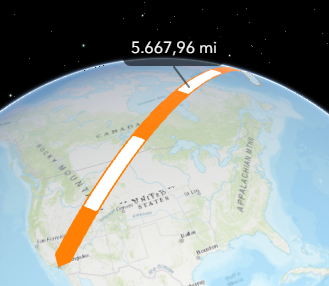
Use the Direct Line Measurement 3D component to display a user interface for the direct line measurement analysis.
Known Limitation
This analysis is only supported in a 3D SceneView.
Constructors
Constructor
Parameters
| Parameter | Type | Description | Required |
|---|---|---|---|
| properties | | |
Properties
origin
- Type
- AnalysisOriginWebScene | null | undefined
The origin of the analysis. The origin can be of type web-scene when the analysis was applied from the
WebScene.initialViewProperties or a
Slide.
uid
- Type
- string
- Since
- ArcGIS Maps SDK for JavaScript 4.33
An automatically generated unique identifier assigned to the instance. The unique id is generated each time the application is loaded.
unit
- Type
- SystemOrLengthUnit | null | undefined
Unit system (imperial, metric) or specific unit used for computing the distance.
valid
- Type
- boolean
- Since
- ArcGIS Maps SDK for JavaScript 4.33
Indicates whether the analysis is ready to be computed and interacted with in the view. It requires both the startPoint and endPoint to be set.
Methods
fromJSON
- Signature
-
fromJSON (json: any): any
Creates a new instance of this class and initializes it with values from a JSON object
generated from an ArcGIS product. The object passed into the input json
parameter often comes from a response to a query operation in the REST API or a
toJSON()
method from another ArcGIS product. See the Using fromJSON()
topic in the Guide for details and examples of when and how to use this function.
Parameters
| Parameter | Type | Description | Required |
|---|---|---|---|
| json | A JSON representation of the instance in the ArcGIS format. See the ArcGIS REST API documentation for examples of the structure of various input JSON objects. | |
- Returns
- any
Returns a new instance of this class.
clear
- Signature
-
clear (): void
- Since
- ArcGIS Maps SDK for JavaScript 5.0
Clears the analysis by resetting the startPoint and endPoint properties.
- Returns
- void
clone
- Signature
-
clone (): this
Creates a deep clone of this object. Any properties that store values by reference will be assigned copies of the referenced values on the cloned instance.
- Returns
- this
A deep clone of the class instance that invoked this method.
equals
- Signature
-
equals (other: this): boolean
- Since
- ArcGIS Maps SDK for JavaScript 5.0
Compares this analysis with another analysis to determine whether they are equivalent.
toJSON
- Signature
-
toJSON (): any
Converts an instance of this class to its ArcGIS portal JSON representation. See the Using fromJSON() guide topic for more information.
- Returns
- any
The ArcGIS portal JSON representation of an instance of this class.