import SliceAnalysis from "@arcgis/core/analysis/SliceAnalysis.js";const SliceAnalysis = await $arcgis.import("@arcgis/core/analysis/SliceAnalysis.js");- Since
- ArcGIS Maps SDK for JavaScript 4.23
SliceAnalysis can be used to programmatically create a plane that slices through 3D features in a 3D SceneView.
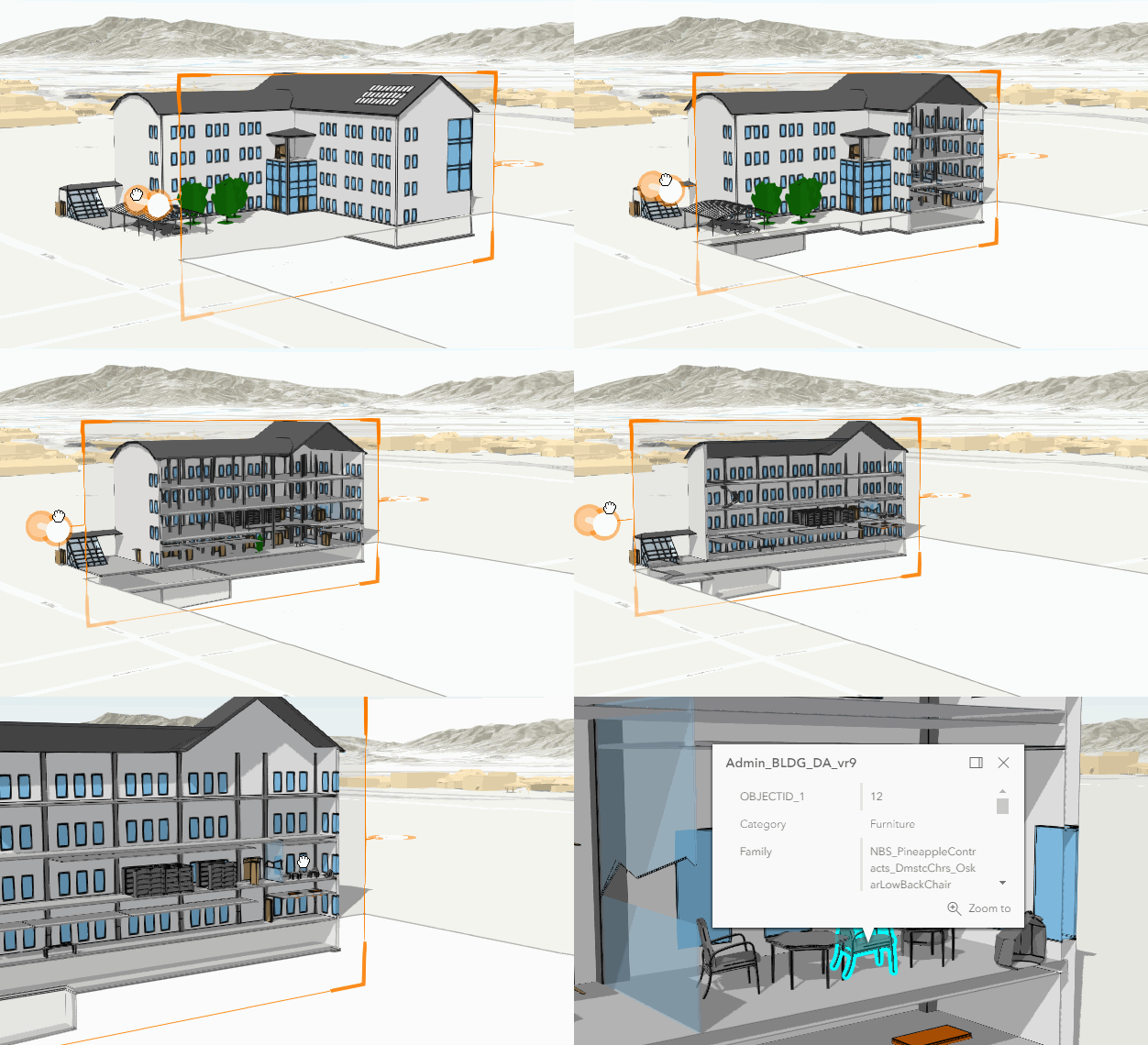
A slice takes a SlicePlane
as an input, which can be set through the shape property. If the shape has a tilt angle other than 0, the angle
is only considered if the tiltEnabled property is set to true.
const sliceAnalysis = new SliceAnalysis({  shape: new SlicePlane({    position: new Point({ }),    width: 50,    height: 50,    tilt: 45  }),  tiltEnabled: true});
view.analyses.add(sliceAnalysis);
SceneView.analyses can contain multiple slice analyses, but only one of
them can be active at a time. When working with multiple slices, set the SliceAnalysisView3D.active
property of a slice analysis view to true to occlude the parts of the 3D features that are in front of the slice
plane. When a slice analysis view is activated, all other slice analysis views are automatically deactivated.
const sliceAnalysisView = await view.whenAnalysisView(sliceAnalysis);
// make the slice active in the view (only one slice can be active at a time)sliceAnalysisView.active = true;
To place a slice interactively, use the SliceAnalysisView3D.place() method.
const abortController = new AbortController();
try {  await analysisView.place({ signal: abortController.signal });} catch (error) {  if (error.name === "AbortError") {    console.log("Placement operation was cancelled.");  }}
// cancel the placement operation at some later pointabortController.abort();
Similarly, to interactively exclude layers from the slicing, use the SliceAnalysisView3D.pickLayerToExclude() method.
const abortController = new AbortController();
try {  await analysisView.pickLayerToExclude({ signal: abortController.signal });} catch (error) {  if (error.name === "AbortError") {    console.log("Picking excluded layers operation was cancelled.");  }}
// cancel the operation at some later pointabortController.abort();
Use the Slice component to display a user interface for the slice analysis. The component allows users to interactively place a slice and exclude layers from the analysis.
Known Limitations
This analysis is only supported in a 3D SceneView.
Constructors
Constructor
Parameters
| Parameter | Type | Description | Required |
|---|---|---|---|
| properties | | |
Properties
| Property | Type | Class |
|---|---|---|
declaredClass readonly inherited | ||
| | ||
| | ||
id readonly inherited | ||
origin inherited | ||
SlicePlane | null | undefined | | |
| | ||
type readonly | "slice" | |
uid readonly inherited | ||
valid readonly | |
excludedLayers
- Type
- Collection<SliceableLayer>
- Since
- ArcGIS Maps SDK for JavaScript 4.33
A collection of layers that should be excluded from the slice analysis.
excludeGroundSurface
- Type
- boolean
- Since
- ArcGIS Maps SDK for JavaScript 4.33
A flag that indicates whether the ground surface should be excluded from the slice analysis.
- Default value
- false
origin
- Type
- AnalysisOriginWebScene | null | undefined
The origin of the analysis. The origin can be of type web-scene when the analysis was applied from the
WebScene.initialViewProperties or a
Slide.
shape
- Type
- SlicePlane | null | undefined
The shape used to slice elements in a 3D scene. Currently the only supported shape is a plane.
tiltEnabled
- Type
- boolean
Whether the shape supports a tilt angle or not. If set to true, the SlicePlane.tilt angle is respected. By default it is set to false, so the tilt value of the shape is not taken into consideration.
- Default value
- false
uid
- Type
- string
- Since
- ArcGIS Maps SDK for JavaScript 4.33
An automatically generated unique identifier assigned to the instance. The unique id is generated each time the application is loaded.
Methods
fromJSON
- Signature
-
fromJSON (json: any): any
Creates a new instance of this class and initializes it with values from a JSON object
generated from an ArcGIS product. The object passed into the input json
parameter often comes from a response to a query operation in the REST API or a
toJSON()
method from another ArcGIS product. See the Using fromJSON()
topic in the Guide for details and examples of when and how to use this function.
Parameters
| Parameter | Type | Description | Required |
|---|---|---|---|
| json | A JSON representation of the instance in the ArcGIS format. See the ArcGIS REST API documentation for examples of the structure of various input JSON objects. | |
- Returns
- any
Returns a new instance of this class.
clone
- Signature
-
clone (): this
Creates a deep clone of this object. Any properties that store values by reference will be assigned copies of the referenced values on the cloned instance.
- Returns
- this
A deep clone of the class instance that invoked this method.
equals
- Signature
-
equals (other: this): boolean
- Since
- ArcGIS Maps SDK for JavaScript 5.0
Compares this analysis with another analysis to determine whether they are equivalent.
toJSON
- Signature
-
toJSON (): any
Converts an instance of this class to its ArcGIS portal JSON representation. See the Using fromJSON() guide topic for more information.
- Returns
- any
The ArcGIS portal JSON representation of an instance of this class.