import FocusAreas from "@arcgis/core/effects/FocusAreas.js";const FocusAreas = await $arcgis.import("@arcgis/core/effects/FocusAreas.js");- Inheritance:
- FocusAreas→
Accessor
- Since
- ArcGIS Maps SDK for JavaScript 4.33
A collection of focus areas in a Map.
A focus area highlights a region of the map by de-emphasizing parts outside the area of interest. Two predefined styles, dark or bright are available, to choose a visualization with good contrast for scenes with different coloring. A focus area can have a colored outline, which is helpful to distinguish different focus areas in a map. Focus areas can be captured in slides and shared as part of a webscene.
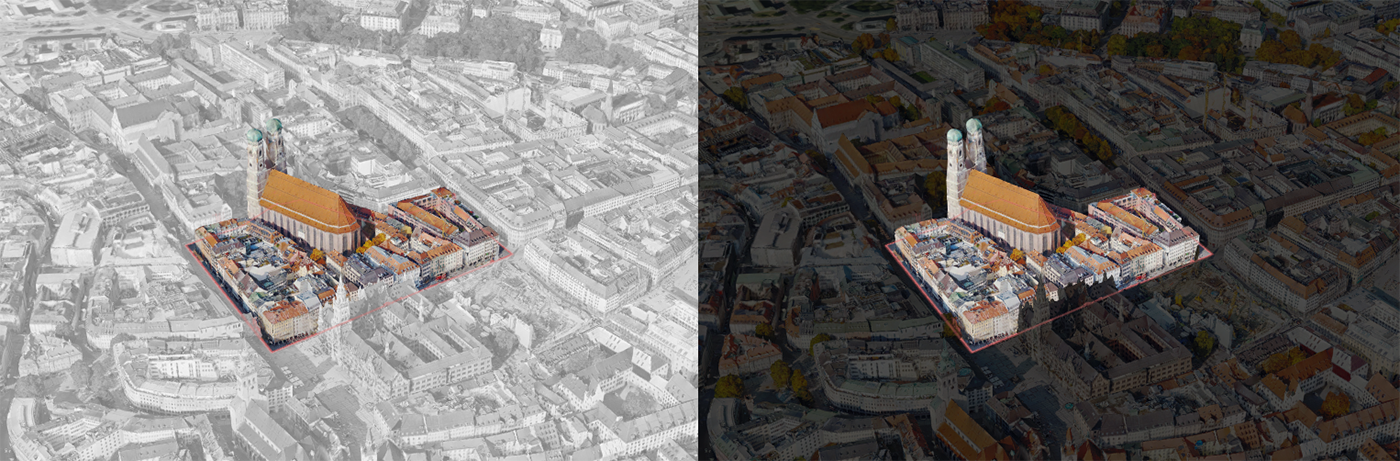
Known Limitations
Focus areas are only supported in SceneView.
Example
// Adding a focus area to map.const focusAreaPolygon = new Polygon({ spatialReference: { wkid: 102100 }, rings: [[  [1288603, 6130075],  [1288415, 6130021],  [1288459, 6130133],  [1288603, 6130075], ]],});
const focusArea = new FocusArea({ outline: { color: [255, 128, 128, 0.55] }, geometries: new Collection([focusAreaPolygon]),});
map.focusAreas.areas.add(focusArea);map.focusAreas.style = "dark";
Constructors
Constructor
Parameters
| Parameter | Type | Description | Required |
|---|---|---|---|
| properties | | |
Properties
| Property | Type | Class |
|---|---|---|
| | ||
declaredClass readonly inherited | ||
| |
style
- Type
- FocusAreaStyle
The rendering style of the map, applied outside of all enabled focus areas.
This property can be either "bright" or "dark", with the default value set to "bright". When there is no enabled focus area on the map, the view renders normally.
- Default value
- "bright"
Methods
fromJSON
- Signature
-
fromJSON (json: any): any
Creates a new instance of this class and initializes it with values from a JSON object
generated from an ArcGIS product. The object passed into the input json
parameter often comes from a response to a query operation in the REST API or a
toJSON()
method from another ArcGIS product. See the Using fromJSON()
topic in the Guide for details and examples of when and how to use this function.
Parameters
| Parameter | Type | Description | Required |
|---|---|---|---|
| json | A JSON representation of the instance in the ArcGIS format. See the ArcGIS REST API documentation for examples of the structure of various input JSON objects. | |
- Returns
- any
Returns a new instance of this class.
clone
- Signature
-
clone (): this
Creates a deep clone of this object. Any properties that store values by reference will be assigned copies of the referenced values on the cloned instance.
- Returns
- this
A deep clone of the class instance that invoked this method.
toJSON
- Signature
-
toJSON (): any
Converts an instance of this class to its ArcGIS portal JSON representation. See the Using fromJSON() guide topic for more information.
- Returns
- any
The ArcGIS portal JSON representation of an instance of this class.