import IntegratedMeshLayer from "@arcgis/core/layers/IntegratedMeshLayer.js";const IntegratedMeshLayer = await $arcgis.import("@arcgis/core/layers/IntegratedMeshLayer.js");- Since
- ArcGIS Maps SDK for JavaScript 4.1
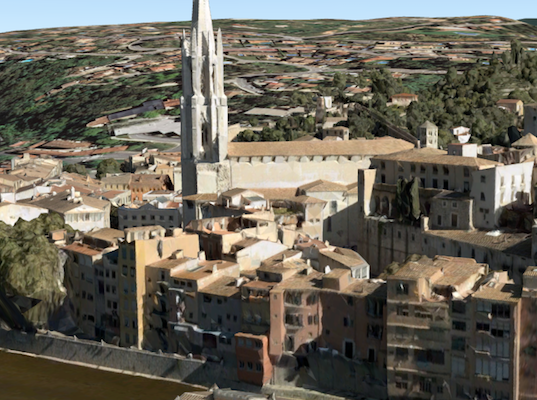
The IntegratedMeshLayer is designed for visualizing accurate representations of built and natural environments in a SceneView.
Integrated mesh data is typically captured by an automated process for constructing 3D objects from large sets of overlapping imagery. The result integrates the original input image information as a realistic textured mesh and can include elevation information and 3D objects, such as buildings and trees. Integrated mesh layers are generally created for citywide 3D mapping; they are often captured by drone and cannot be restyled.
The Scene Service is identified by the URL of the ArcGIS Server REST resource:
const integratedMeshLayer = new IntegratedMeshLayer({ url: "https://tiles.arcgis.com/tiles/u0sSNqDXr7puKJrF/arcgis/rest/services/Frankfurt2017_v17/SceneServer/layers/0"});If the service is requested from a different domain, a CORS enabled server or a proxy is required.
Constructors
Constructor
Parameters
| Parameter | Type | Description | Required |
|---|---|---|---|
| properties | | |
Properties
| Property | Type | Class |
|---|---|---|
apiKey inherited | ||
copyright inherited | ||
customParameters inherited | ||
declaredClass readonly inherited | ||
| | ||
fullExtent inherited | ||
id inherited | ||
layerId inherited | ||
listMode inherited | ||
loaded readonly inherited | ||
loadError readonly inherited | ||
loadStatus readonly inherited | "not-loaded" | "loading" | "failed" | "loaded" | |
loadWarnings readonly inherited | any[] | |
maxScale inherited | ||
minScale inherited | ||
| | ||
opacity inherited | ||
parent inherited | Map | Basemap | Ground | GroupLayer | CatalogDynamicGroupLayer | CatalogLayer | null | undefined | |
persistenceEnabled inherited | ||
portalItem inherited | PortalItem | null | undefined | |
spatialReference inherited | ||
| | ||
type readonly | "integrated-mesh" | |
uid readonly inherited | ||
url inherited | ||
version readonly inherited | ||
visibilityTimeExtent inherited | TimeExtent | null | undefined | |
visible inherited |
apiKey
- Since
- ArcGIS Maps SDK for JavaScript 4.20
An authorization string used to access a resource or service. This property will append the API key to all requests made by the layer to the service. API keys are generated and managed in the portal. An API key is tied explicitly to an ArcGIS account; it is also used to monitor service usage. Setting a fine-grained API key on a specific class overrides the global API key.
If loading a secure layer with API authentication via a PortalItem, the API key needs to be set on the layer's portalItem property.
Example
// set the api key to access a protected serviceconst layer = new FeatureLayer({ url: serviceUrl, apiKey: "YOUR_API_KEY"}); copyright
The copyright text as defined by the scene service.
customParameters
- Type
- CustomParameters | null | undefined
- Since
- ArcGIS Maps SDK for JavaScript 4.18
A list of custom parameters appended to the URL of all resources fetched by the layer.
It's an object with key-value pairs where value is a string.
The layer's refresh() method needs to be called if the customParameters are updated at runtime.
Example
// send a custom parameter to your special servicelet layer = new MapImageLayer({ url: serviceUrl, customParameters: { "key": "my-special-key" }}); elevationInfo
- Type
- ElevationInfo | null | undefined
- Since
- ArcGIS Maps SDK for JavaScript 4.5
Specifies how the mesh is placed on the vertical axis (z). This property may only be used in a SceneView. See the ElevationInfo sample for an example of how this property may be used.
This property only affects IntegratedMeshLayers when using the absolute-height mode.
ElevationInfo.featureExpressionInfo is not supported when the elevation info is specified for this class.
Integrated mesh 3D Tiles layers always render in front of the ground surface, so setting negative offset values will not render them below the ground.
If the elevation info is not specified, the effective elevation depends on the context and could vary per point.
fullExtent
The full extent of the layer. By default, this is worldwide. This property may be used to set the extent of the view to match a layer's extent so that its features appear to fill the view. See the sample snippet below.
The fullExtent property is always null for GroupLayer.
Example
// Once the layer loads, set the view's extent to the layer's full extentlayer.when(function(){ view.extent = layer.fullExtent;}); layerId
- Type
- number
The layer ID, or layer index, of a Scene Service layer. This is particularly useful when loading a single layer with the portalItem property from a service containing multiple layers. You can specify this value in one of two scenarios:
- When loading the layer via the portalItem property.
- When pointing the layer url directly to the Scene Service.
If a layerId is not specified in either of the above scenarios, then the first layer
in the service (layerId = 0) is selected.
Examples
// while these examples use a SceneLayer, the same pattern can be// used for other layers that may be loaded from portalItem ids
// loads the third layer in the given Portal Itemlet layer = new SceneLayer({  portalItem: {    id: "73df987984b24094b848d580eb83b0fb"  },  layerId: 2});
// If not specified, the first layer (layerId: 0) will be returnedlet layer = new SceneLayer({ portalItem: { id: "73df987984b24094b848d580eb83b0fb" }});// Can also be used if URL points to service and not layerlet layer = new SceneLayer({ url: "https://scenesampleserverdev.arcgis.com/arcgis/rest/services/Hosted/DevA_Trees/SceneServer", layerId: 0 // Notice that the url doesn't end with /2});// This code returns the same layer as the previous snippetlet layer = new SceneLayer({ url: "https://scenesampleserverdev.arcgis.com/arcgis/rest/services/Hosted/DevA_Trees/SceneServer/layers/0", // The layer id is specified in the URL}); listMode
- Type
- LayerListMode
Indicates how the layer should display in the Layer List component. The possible values are listed below.
| Value | Description |
|---|---|
| show | The layer is visible in the table of contents. |
| hide | The layer is hidden in the table of contents. |
| hide-children | If the layer is a GroupLayer, BuildingSceneLayer, KMLLayer, MapImageLayer, SubtypeGroupLayer, TileLayer, or WMSLayer, hide the children layers from the table of contents. |
- Default value
- "show"
loadError
The Error object returned if an error occurred while loading.
loadStatus
- Type
- "not-loaded" | "loading" | "failed" | "loaded"
Represents the status of a load() operation.
| Value | Description |
|---|---|
| not-loaded | The object's resources have not loaded. |
| loading | The object's resources are currently loading. |
| loaded | The object's resources have loaded without errors. |
| failed | The object's resources failed to load. See loadError for more details. |
- Default value
- "not-loaded"
loadWarnings
- Type
- any[]
A list of warnings which occurred while loading.
maxScale
- Type
- number
The maximum scale (most zoomed in) at which the layer is visible in the view.
If the map is zoomed in beyond this scale, the layer will not be visible.
A value of 0 means the layer does not have a maximum scale.
The maxScale value should always be smaller than the minScale value,
and greater than or equal to the service specification.
- Default value
- 0
Examples
// The layer will not be visible when the view is zoomed in beyond a scale of 1:1,000layer.maxScale = 1000;// The layer's visibility is not restricted to a maximum scale.layer.maxScale = 0; minScale
- Type
- number
The minimum scale (most zoomed out) at which the layer is visible in the view.
If the map is zoomed out beyond this scale, the layer will not be visible.
A value of 0 means the layer does not have a minimum scale.
The minScale value should always be larger than the maxScale value,
and lesser than or equal to the service specification.
- Default value
- 0
Examples
// The layer will not be visible when the view is zoomed out beyond a scale of 1:3,000,000layer.minScale = 3000000;// The layer's visibility is not restricted to a minimum scale.layer.minScale = 0; modifications
- Type
- SceneModifications | null | undefined
- Since
- ArcGIS Maps SDK for JavaScript 4.16
A SceneModification collection used to apply client-side modifications to the layer. These modifications are not affected by the offset from elevationInfo. Modifications are persisted when using WebScene.save(), which allows you to share the modified integrated mesh through web scenes. The following types of modifications can be applied to the integrated mesh:
| Illustration | Modification | Description |
|---|---|---|
 | clip - removes selected area | Clip-out portions of the integrated mesh to see features below. For example, utility work on gas or water lines in an area. Planners can create a scene in which the integrated mesh is clipped out at a site to expose the water or gas lines below it. |
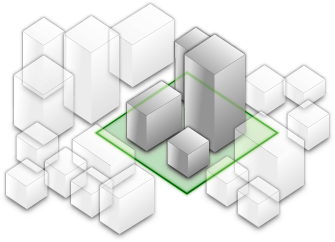 | mask - displays only selected area | Define an area of interest. Use a polygon and draw only parts of the integrated mesh inside that polygon. For example, if you want to show only a portion of an integrated mesh within the boundaries of a city. |
 | replace - flattens selected area | Replace an area of an integrated mesh based on a 3D polygon. For example, to add constructed buildings, flatten the integrated mesh at the footprint of a building so the new building can be visualized. Create different scenarios of the new construction area and share the scenarios as a web scene to discuss with stakeholders. The integrated mesh flattens to the minimum z-vertex of the modification polygon. |
Scene modifications need to be in the same spatial reference as the layer they modify. Reprojection between WGS84 and WebMercator will be done automatically. Reprojection of the geometry to other spatial references can be done with the projectOperator.
Example
// create the IntegratedMeshLayerconst layer = new IntegratedMeshLayer({ ... })
// create a polygonconst polygon = new Polygon({ ... });
// create the modificationslet modifications = new SceneModifications(  [    new SceneModification({geometry: polygon, type: 'replace'})  ]);
// add the modification to the IntegratedMeshlayer.modifications = modifications;
opacity
- Type
- number
The opacity of the layer. This value can range between 1 and 0, where 0 is 100 percent
transparent and 1 is completely opaque.
Known Limitations
In a 3D SceneView, modifying opacity is not supported for DimensionLayer, GaussianSplatLayer, IntegratedMesh3DTilesLayer, IntegratedMeshLayer, LineOfSightLayer, PointCloudLayer, ViewshedLayer, and VoxelLayer.
- Default value
- 1
Example
// Makes the layer 50% transparentlayer.opacity = 0.5; parent
- Type
- Map | Basemap | Ground | GroupLayer | CatalogDynamicGroupLayer | CatalogLayer | null | undefined
- Since
- ArcGIS Maps SDK for JavaScript 4.27
The parent to which the layer belongs.
persistenceEnabled
- Type
- boolean
- Default value
- true
portalItem
- Type
- PortalItem | null | undefined
The portal item from which the layer is loaded. If the portal item references
a feature or scene service, then you can specify a single layer
to load with the layer's layerId property.
Loading non-spatial tables
Non-spatial tables can be loaded from service items hosted in ArcGIS Online and ArcGIS Enterprise. This only applies to:
- FeatureLayer if the layer's isTable returns
trueat version 4.17. - SubtypeGroupLayer if the layer's isTable returns
trueat version 4.32.
Examples
// While this example uses FeatureLayer, this same pattern can be// used for other layers that may be loaded from portalItem ids.const layer = new FeatureLayer({ portalItem: { // autocasts as new PortalItem() id: "caa9bd9da1f4487cb4989824053bb847" } // the first layer in the service is returned});// Set hostname when using an on-premise portal (default is ArcGIS Online)// esriConfig.portalUrl = "http://myHostName.esri.com/arcgis";
// While this example uses FeatureLayer, this same pattern can be// used for SceneLayers.const layer = new FeatureLayer({ portalItem: { // autocasts as new PortalItem() id: "8d26f04f31f642b6828b7023b84c2188" }, // loads the third item in the given feature service layerId: 2});// Initialize GeoJSONLayer by referencing a portalItem id pointing to geojson file.const layer = new GeoJSONLayer({ portalItem: new PortalItem({ id: "81e769cd7031482797e1b0768f23c7e1", // optionally define the portal, of the item. // if not specified, the default portal defined is used. // see https://developers.arcgis.com/javascript/latest/references/core/config/#portalUrl portal: new Portal({ url: "https://jsapi.maps.arcgis.com/" }) }});// This snippet loads a table hosted in ArcGIS Online.const table = new FeatureLayer({ portalItem: { // autocasts as esri/portal/PortalItem id: "123f4410054b43d7a0bacc1533ceb8dc" }});
// Before adding the table to the map, it must first be loaded and confirm it is the right type.table.load().then(() => { if (table.isTable) { map.tables.add(table); }});// While this example uses FeatureLayer, this same pattern can be// used for other layers that may be loaded from portalItem ids.const layer = new FeatureLayer({ portalItem: { // autocasts as esri/portal/PortalItem id: "caa9bd9da1f4487cb4989824053bb847", // Set an API key to access a secure portal item configured with API key authentication. apiKey: "APIKEY" }}); spatialReference
- Type
- SpatialReference
The spatial reference of the layer.
title
The title of the layer used to identify it in places such as the LayerList widget.
When loading a layer by service url, the title is derived from the service name. If the service has several layers, then the title of each layer will be the concatenation of the service name and the layer name. When the layer is loaded from a portal item, the title of the portal item will be used instead. Finally, if a layer is loaded as part of a webmap or a webscene, then the title of the layer as stored in the webmap/webscene will be used.
uid
- Type
- string
- Since
- ArcGIS Maps SDK for JavaScript 4.33
An automatically generated unique identifier assigned to the instance. The unique id is generated each time the application is loaded.
url
The URL of the REST endpoint of the layer or scene service. The URL may either point to a resource on ArcGIS Enterprise or ArcGIS Online.
The layer may be specified using the layerId property when the url points directly to a service and not a specific layer. If layerId is not specified, then it will default to the first layer in the service.
Examples
// Layer from Scene Service on ArcGIS Serverlet sceneLayer = new SceneLayer({ url: "https://services.arcgis.com/V6ZHFr6zdgNZuVG0/arcgis/rest/services/Paris_3D_Local_WSL2/SceneServer/layers/0"});// Can also be used if URL points to service and not layerlet layer = new SceneLayer({ // Notice that the url doesn't end with /0 url: "https://scenesampleserverdev.arcgis.com/arcgis/rest/services/Hosted/DevA_Trees/SceneServer", layerId: 0}); version
- Type
- SceneServiceVersion
The version of the scene service specification used for this service.
- See also
Example
// Prints the version to the console - e.g. 1.4, 1.5, etc.console.log(layer.version.versionString); visibilityTimeExtent
- Type
- TimeExtent | null | undefined
- Since
- ArcGIS Maps SDK for JavaScript 4.30
Specifies a fixed time extent during which a layer should be visible. This property can be used to configure a layer that does not have time values stored in an attribute field to work with time. Once configured, the TimeSlider widget will display the layer within the set time extent. In the case that only one of the TimeExtent.start or TimeExtent.end date values are available, the layer remains visible indefinitely in the direction where there is no time value.
Aerial imagery can capture seasonal variations in vegetation, water bodies, and land use patterns. For example, in agricultural regions, aerial imageries taken during different growing seasons provide insights into crop health and productivity. Defining a fixed time extent on imageries from specific time periods provides temporal context and facilitates focused analysis based on specific time periods or events.
visible
- Type
- boolean
Indicates if the layer is visible in the View. When false,
the layer may still be added to a Map
instance that is referenced in a view, but its features will not be visible in the view.
- Default value
- true
Example
// The layer is no longer visible in the viewlayer.visible = false;
// Watch for changes in the layer's visibility// and set the visibility of another layer when it changesreactiveUtils.watch(  () => layer.visible,  (visible) => {    if (visible) {      anotherLayer.visible = true;    } else {      anotherLayer.visible = false;    }  });
Methods
| Method | Signature | Class |
|---|---|---|
fromArcGISServerUrl inherited static | fromArcGISServerUrl(params: string | FromArcGISServerUrlParameters): Promise<Layer> | |
fromPortalItem inherited static | fromPortalItem(params: LayerFromPortalItemParameters): Promise<Layer> | |
cancelLoad inherited | cancelLoad(): this | |
clone inherited | clone(): this | |
createLayerView inherited | createLayerView<T extends LayerView = LayerView>(view: View<T>, options?: AbortOptions): Promise<T> | |
destroy inherited | destroy(): void | |
emit inherited | emit<Type extends EventNames<this>>(type: Type, event?: this["@eventTypes"][Type]): boolean | |
fetchAttributionData inherited | fetchAttributionData(): Promise<any> | |
hasEventListener inherited | hasEventListener<Type extends EventNames<this>>(type: Type): boolean | |
isFulfilled inherited | isFulfilled(): boolean | |
isRejected inherited | isRejected(): boolean | |
isResolved inherited | isResolved(): boolean | |
load inherited | load(options?: AbortOptions | null | undefined): Promise<this> | |
on inherited | on<Type extends EventNames<this>>(type: Type, listener: EventedCallback<this["@eventTypes"][Type]>): ResourceHandle | |
save(): Promise<PortalItem> | | |
saveAs(portalItem: PortalItem, options?: SaveAsOptions): Promise<PortalItem> | | |
when inherited | when<TResult1 = this, TResult2 = never>(onFulfilled?: OnFulfilledCallback<this, TResult1> | null | undefined, onRejected?: OnRejectedCallback<TResult2> | null | undefined): Promise<TResult1 | TResult2> |
fromArcGISServerUrl
- Signature
-
fromArcGISServerUrl (params: string | FromArcGISServerUrlParameters): Promise<Layer>
Creates a new layer instance from an ArcGIS Server URL. Depending on the URL, the returned layer type may be a BuildingSceneLayer, CatalogLayer, ElevationLayer, FeatureLayer, GroupLayer, ImageryLayer, ImageryTileLayer, IntegratedMeshLayer, KnowledgeGraphLayer, MapImageLayer, OrientedImageryLayer, PointCloudLayer, SceneLayer, StreamLayer, SubtypeGroupLayer, TileLayer, or VideoLayer.
This is useful when you work with various ArcGIS Server URLs, but you don't necessarily know which layer type(s) they create. This method creates the appropriate layer type for you. In case of a feature service or a scene service, when the URL points to the service and the service has multiple layers, the returned promise will resolve to a GroupLayer.
Beginning with version 4.17, it is possible to load tables from hosted feature services.
This only applies to feature layers, and will successfully load if FeatureLayer.isTable returns true.
The following table details what is returned when loading specific URL types.
| URL | Returns |
|---|---|
| Feature service with one layer | FeatureLayer where FeatureLayer.isTable returns false. |
| Feature service with one table | FeatureLayer where FeatureLayer.isTable returns true. |
| Feature service with more than one layer(s)/table(s) | GroupLayer with layers and tables. |
| Layers with type other than "Feature Layer" are discarded, e.g. Utility Network Layers | N/A |
- See also
Parameters
| Parameter | Type | Description | Required |
|---|---|---|---|
| params | Input parameters for creating the layer. | |
Examples
// This snippet shows how to add a feature layer from an ArcGIS Server URL// Get an ArcGIS Server URL from a custom functionconst arcgisUrl = getLayerUrl();
Layer.fromArcGISServerUrl({  url: arcgisUrl,  properties: {    // set any layer properties here    popupTemplate: new PopupTemplate()  }}).then(function(layer){  // add the layer to the map  map.add(layer);});
// This snippet shows how to add a table from an ArcGIS Server URL// Get an ArcGIS Server URL from a custom functionconst arcgisUrl = getLayerUrl();
Layer.fromArcGISServerUrl({ url: arcgisUrl}).then(function(layer){ // Load the table before it can be used layer.load().then(function() { // Check that it is the right type if (layer.isTable) { // Add table to map's tables collection map.tables.add(layer); } });}); fromPortalItem
- Signature
-
fromPortalItem (params: LayerFromPortalItemParameters): Promise<Layer>
Creates a new layer instance of the appropriate layer class from an ArcGIS Online or ArcGIS Enterprise portal item. If the item points to a feature service with multiple layers, then a GroupLayer is created. If the item points to a service with a single layer, then it resolves to a layer of the same type of class as the service.
Note
- At version 4.29, MediaLayer can be loaded from portal items.
- At version 4.28, GroupLayer and OrientedImageryLayer can be loaded from portal items.
- At version 4.25, CSVLayer and GeoJSONLayer can be loaded from CSV and GeoJSON portal items respectively.
- At version 4.17, it is possible to load tables from feature service items hosted in ArcGIS Online and ArcGIS Enterprise.
This only applies to feature layers, and will successfully load
if FeatureLayer.isTable returns
true.
The following table details what is returned when loading specific item types.
| Item(s) | Returns |
|---|---|
| Feature service with one layer | FeatureLayer where FeatureLayer.isTable returns false. |
| Feature service with one table | FeatureLayer where FeatureLayer.isTable returns true. |
| Feature service with more than one layer(s)/table(s) | GroupLayer with layers and tables. |
| Feature collection with one layer | FeatureLayer where FeatureLayer.isTable returns false. |
| Feature collection with one table | FeatureLayer where FeatureLayer.isTable returns true. |
| Feature collection with more than one layer(s)/table(s) | GroupLayer with layers and tables. |
Known Limitations
- This method does not currently work with OGCFeatureServer portal items.
Parameters
| Parameter | Type | Description | Required |
|---|---|---|---|
| params | The parameters for loading the portal item. | |
Examples
// Create a layer from a specified portal item and add to the mapLayer.fromPortalItem({ portalItem: { // autocasts new PortalItem() id: "8444e275037549c1acab02d2626daaee" }}).then(function(layer){ // add the layer to the map map.add(layer);});// Create a table from a specified portal item and add it to the map's tables collectionLayer.fromPortalItem({ portalItem: { // autocasts new PortalItem() id: "123f4410054b43d7a0bacc1533ceb8dc" // This is a hosted table stored in a feature service }}).then(function(layer) { // Necessary to load the table in order for it to be read correctly layer.load().then(function() { // Confirm this reads as a table if (layer.isTable) { // Add the new table to the map's table collection map.tables.add(layer); } });}); cancelLoad
- Signature
-
cancelLoad (): this
Cancels a load() operation if it is already in progress.
- Returns
- this
clone
- Signature
-
clone (): this
Creates a deep clone of this object. Any properties that store values by reference will be assigned copies of the referenced values on the cloned instance.
- Returns
- this
A deep clone of the class instance that invoked this method.
createLayerView
- Signature
-
createLayerView <T extends LayerView = LayerView>(view: View<T>, options?: AbortOptions): Promise<T>
Called by the views, such as MapView and SceneView, when the layer is added to the Map.layers collection and a layer view must be created for it. This method is used internally and there is no use case for invoking it directly.
- See also
Parameters
| Parameter | Type | Description | Required |
|---|---|---|---|
| view | The parent view. | | |
| options | An object specifying additional options. See the object specification table below for the required properties of this object. | |
destroy
- Signature
-
destroy (): void
- Since
- ArcGIS Maps SDK for JavaScript 4.17
Destroys the layer and any associated resources (including its portalItem, if it is a property on the layer). The layer can no longer be used once it has been destroyed.
The destroyed layer will be removed from its parent object like Map, WebMap, WebScene, Basemap, Ground, or GroupLayer.
- Returns
- void
emit
- Signature
-
emit <Type extends EventNames<this>>(type: Type, event?: this["@eventTypes"][Type]): boolean
- Type parameters
- <Type extends EventNames<this>>
- Since
- ArcGIS Maps SDK for JavaScript 4.5
Emits an event on the instance. This method should only be used when creating subclasses of this class.
hasEventListener
- Signature
-
hasEventListener <Type extends EventNames<this>>(type: Type): boolean
- Type parameters
- <Type extends EventNames<this>>
Indicates whether there is an event listener on the instance that matches the provided event name.
Parameters
| Parameter | Type | Description | Required |
|---|---|---|---|
| type | Type | The name of the event. | |
- Returns
- boolean
Returns true if the class supports the input event.
isFulfilled
- Signature
-
isFulfilled (): boolean
isFulfilled() may be used to verify if creating an instance of the class is fulfilled (either resolved or rejected).
If it is fulfilled, true will be returned.
- Returns
- boolean
Indicates whether creating an instance of the class has been fulfilled (either resolved or rejected).
isRejected
- Signature
-
isRejected (): boolean
isRejected() may be used to verify if creating an instance of the class is rejected.
If it is rejected, true will be returned.
- Returns
- boolean
Indicates whether creating an instance of the class has been rejected.
isResolved
- Signature
-
isResolved (): boolean
isResolved() may be used to verify if creating an instance of the class is resolved.
If it is resolved, true will be returned.
- Returns
- boolean
Indicates whether creating an instance of the class has been resolved.
load
- Signature
-
load (options?: AbortOptions | null | undefined): Promise<this>
Loads the resources referenced by this class. This method automatically executes for a View and all of the resources it references in Map if the view is constructed with a map instance.
This method must be called by the developer when accessing a resource that will not be loaded in a View.
The load() method only triggers the loading of the resource the first time it is called. The subsequent calls return the same promise.
It's possible to provide a signal to stop being interested into a Loadable instance load status.
When the signal is aborted, the instance does not stop its loading process, only cancelLoad() can abort it.
on
- Signature
-
on <Type extends EventNames<this>>(type: Type, listener: EventedCallback<this["@eventTypes"][Type]>): ResourceHandle
- Type parameters
- <Type extends EventNames<this>>
Registers an event handler on the instance. Call this method to hook an event with a listener.
Parameters
| Parameter | Type | Description | Required |
|---|---|---|---|
| type | Type | An event or an array of events to listen for. | |
| listener | EventedCallback<this["@eventTypes"][Type]> | The function to call when the event fires. | |
- Returns
- ResourceHandle
Returns an event handler with a
remove()method that should be called to stop listening for the event(s).Property Type Description remove Function When called, removes the listener from the event.
Example
view.on("click", function(event){ // event is the event handle returned after the event fires. console.log(event.mapPoint);}); save
- Signature
-
save (): Promise<PortalItem>
- Since
- ArcGIS Maps SDK for JavaScript 4.31
Saves the layer to its existing portal item in the Portal authenticated within the user's current session. If the layer is not saved to a PortalItem, then you should use saveAs().
- See also
- Returns
- Promise<PortalItem>
When resolved, returns the portal item to which the layer is saved.
Example
const portalItem = await layer.save(); saveAs
- Signature
-
saveAs (portalItem: PortalItem, options?: SaveAsOptions): Promise<PortalItem>
- Since
- ArcGIS Maps SDK for JavaScript 4.31
Saves the layer to a new portal item in the Portal authenticated within the user's current session.
- See also
Parameters
| Parameter | Type | Description | Required |
|---|---|---|---|
| portalItem | The portal item to which the layer will be saved. | | |
| options | additional save options | |
- Returns
- Promise<PortalItem>
When resolved, returns the portal item to which the layer is saved.
Example
const portalItem = new PortalItem();await layer.saveAs(portalItem); when
- Signature
-
when <TResult1 = this, TResult2 = never>(onFulfilled?: OnFulfilledCallback<this, TResult1> | null | undefined, onRejected?: OnRejectedCallback<TResult2> | null | undefined): Promise<TResult1 | TResult2>
- Since
- ArcGIS Maps SDK for JavaScript 4.6
when() may be leveraged once an instance of the class is created. This method takes two input parameters: an onFulfilled function and an onRejected function.
The onFulfilled executes when the instance of the class loads. The
onRejected executes if the instance of the class fails to load.
Parameters
| Parameter | Type | Description | Required |
|---|---|---|---|
| onFulfilled | OnFulfilledCallback<this, TResult1> | null | undefined | The function to call when the promise resolves. | |
| onRejected | The function to execute when the promise fails. | |
- Returns
- Promise<TResult1 | TResult2>
Returns a new promise for the result of
onFulfilledthat may be used to chain additional functions.
Example
// Although this example uses MapView, any class instance that is a promise may use when() in the same waylet view = new MapView();view.when(function(){ // This function will execute once the promise is resolved}, function(error){ // This function will execute if the promise is rejected due to an error});Events
| Name | Type |
|---|---|
layerview-create inherited | |
layerview-create-error inherited | |
layerview-destroy inherited |
layerview-create
layerview-create: CustomEvent<LayerLayerviewCreateEvent> Fires after the layer's LayerView is created and rendered in a view.
- See also
Example
// This function will fire each time a layer view is created for this// particular view.layer.on("layerview-create", function(event){ // The LayerView for the layer that emitted this event event.layerView;}); layerview-create-error
layerview-create-error: CustomEvent<LayerLayerviewCreateErrorEvent> Fires when an error emits during the creation of a LayerView after a layer has been added to the map.
- See also
Example
// This function fires when an error occurs during the creation of the layer's layerviewlayer.on("layerview-create-error", function(event) { console.error("LayerView failed to create for layer with the id: ", layer.id, " in this view: ", event.view);}); layerview-destroy
layerview-destroy: CustomEvent<LayerLayerviewDestroyEvent> Fires after the layer's LayerView is destroyed and no longer renders in a view.