import SceneModification from "@arcgis/core/layers/support/SceneModification.js";const SceneModification = await $arcgis.import("@arcgis/core/layers/support/SceneModification.js");- Inheritance:
- SceneModification→
Accessor
- Since
- ArcGIS Maps SDK for JavaScript 4.16
A SceneModification is used to perform a client-side geometric modification. Clip, mask, and replace are supported modification types. A collection of SceneModifications can be applied to an IntegratedMeshLayer.modifications or IntegratedMesh3DTilesLayer.modifications.
Scene modifications need to be projectable to the spatial reference of the layer they modify without using the client-side projectOperator (see supported coordinate systems). Reprojection of the geometry to other spatial references can be done with the projectOperator.
Constructors
Constructor
Parameters
| Parameter | Type | Description | Required |
|---|---|---|---|
| properties | | |
Properties
geometry
The geometry representing the location of the modification. Only polygon geometries are currently supported.
Known Limitations
The polygon geometry must be simple.
Polygon geometries can be inspected and simplified before they are used as modifications. Use the simplifyOperator to make sure that modifications are applied correctly.
type
- Type
- "clip" | "mask" | "replace"
The type of modification to perform.
| Illustration | Modification | Description |
|---|---|---|
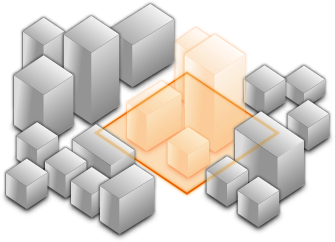 | clip - removes selected area | Clip-out portions of the integrated mesh to see features below. For example, utility work on gas or water lines in an area. Planners can create a scene in which the integrated mesh is clipped out at a site to expose the water or gas lines below it. |
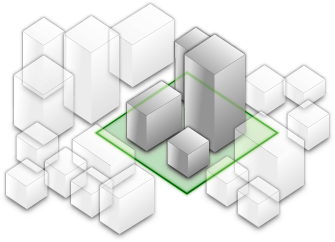 | mask - displays only selected area | Define an area of interest. Use a polygon and draw only parts of the integrated mesh inside that polygon. For example, if you want to show only a portion of an integrated mesh within the boundaries of a city. |
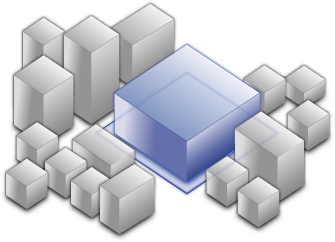 | replace - flattens selected area | Replace an area of an integrated mesh based on a 3D polygon. For example, to add constructed buildings, flatten the integrated mesh at the footprint of a building so the new building can be visualized. Create different scenarios of the new construction area and share the scenarios as a web scene to discuss with stakeholders. The integrated mesh flattens to the minimum z-vertex of the modification polygon. |
- Default value
- "clip"
Methods
fromJSON
- Signature
-
fromJSON (json: any): any
Creates a new instance of this class and initializes it with values from a JSON object
generated from an ArcGIS product. The object passed into the input json
parameter often comes from a response to a query operation in the REST API or a
toJSON()
method from another ArcGIS product. See the Using fromJSON()
topic in the Guide for details and examples of when and how to use this function.
Parameters
| Parameter | Type | Description | Required |
|---|---|---|---|
| json | A JSON representation of the instance in the ArcGIS format. See the ArcGIS REST API documentation for examples of the structure of various input JSON objects. | |
- Returns
- any
Returns a new instance of this class.
clone
- Signature
-
clone (): SceneModification
Creates a clone of this object.
- Returns
- SceneModification
A clone of the SceneModification instance that invoked this method.
toJSON
- Signature
-
toJSON (): any
Converts an instance of this class to its ArcGIS portal JSON representation. See the Using fromJSON() guide topic for more information.
- Returns
- any
The ArcGIS portal JSON representation of an instance of this class.