import RelationshipContent from "@arcgis/core/popup/content/RelationshipContent.js";const RelationshipContent = await $arcgis.import("@arcgis/core/popup/content/RelationshipContent.js");- Since
- ArcGIS Maps SDK for JavaScript 4.25
A RelationshipContent popup element represents a relationship element associated with a feature.
This can only be configured if the related layer or table is added to the map.
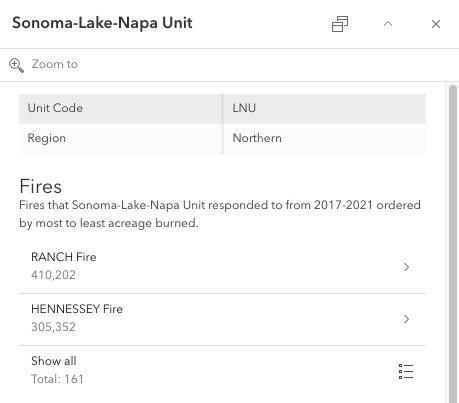
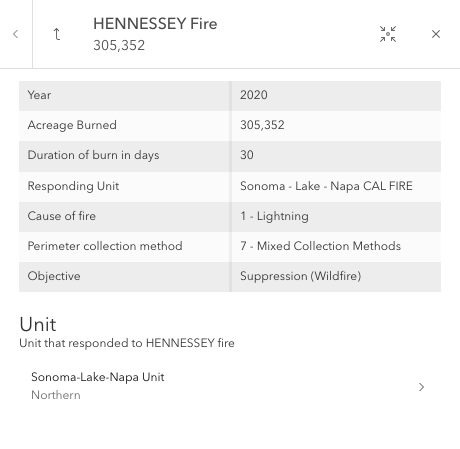
RelationshipContent provides a way to browse related records of the current selected feature within its popup, as shown in the images below.
The Origin Feature image shows a popup template configured with RelationshipContent.
When selecting one of the related features in the list, the popup template for the chosen related destination feature displays.
The Related Destination Feature image shows the destination popup template content with
FieldsContent and RelationshipContent configured.
When exploring a related feature's RelationshipContent, one could navigate into that feature's related records or
exit the origin feature's related record exploration with the arrow button.
| Origin Feature | Related Destination Feature |
|---|---|
 |  |
Note
The related layer or table must also be added to the map to be able to configure RelationshipContent.
For feature services, viewing related records is only supported for ArcGIS Online and ArcGIS Enterprise version 11.2 or higher.
For map services, viewing related records is only supported for ArcGIS Online and ArcGIS Enterprise version 11.3 or higher.
Starting at version 4.32, RelationshipContent can be configured on SubtypeSublayer popup templates when both the origin and destination features belong to a SubtypeGroupLayer.
Examples
// Create the RelationshipContent popup elementconst relationshipContent = new RelationshipContent({ relationshipId: 3, title: "Cities in {COUNTY_NAME}", description: "All the cities that reside in {COUNTY_NAME}.", displayCount: 3, // Autocasts as new array of RelatedRecordsInfoFieldOrder objects orderByFields: [{ field: "CITY", order: "asc" }]});// Create the RelationshipContent popup element// and add it to the popup template content for the layer.layer.popupTemplate.content = [{ // Autocasts as new RelationshipContent object type: "relationship", relationshipId: 1, title: "Hydrant Maintenance Inspections", description: "Hydrant maintenance inspections for {expression/asset}", displayCount: 5, // Autocasts as new array of RelatedRecordsInfoFieldOrder objects orderByFields: [{ field: "INSTALLDATE", order: "desc" }]}];Constructors
Constructor
Parameters
| Parameter | Type | Description | Required |
|---|---|---|---|
| properties | | |
Properties
| Property | Type | Class |
|---|---|---|
declaredClass readonly inherited | ||
| | ||
| | ||
"list" | | |
| | ||
| | ||
| | ||
type readonly | "relationship" | |
displayCount
- Type
- number
A numeric value indicating the maximum number of related features to display in the list of related records.
The maximum number of related records to display in the list of related records is 10.
If no value is specified, the Show all button will be available to display all related records.
orderByFields
- Type
- RelatedRecordsInfoFieldOrder[] | null | undefined
An array of RelatedRecordsInfoFieldOrder indicating the display order for the related records, and whether they should be sorted in ascending asc or descending desc order.
relationshipId
- Type
- number
The numeric id value for the defined relationship. This value can be found on the service itself or on the service's relationships resource if supportsRelationshipResource is true.
Methods
fromJSON
- Signature
-
fromJSON (json: any): any
Creates a new instance of this class and initializes it with values from a JSON object
generated from an ArcGIS product. The object passed into the input json
parameter often comes from a response to a query operation in the REST API or a
toJSON()
method from another ArcGIS product. See the Using fromJSON()
topic in the Guide for details and examples of when and how to use this function.
Parameters
| Parameter | Type | Description | Required |
|---|---|---|---|
| json | A JSON representation of the instance in the ArcGIS format. See the ArcGIS REST API documentation for examples of the structure of various input JSON objects. | |
- Returns
- any
Returns a new instance of this class.
clone
- Signature
-
clone (): this
Creates a deep clone of this object. Any properties that store values by reference will be assigned copies of the referenced values on the cloned instance.
- Returns
- this
A deep clone of the class instance that invoked this method.
toJSON
- Signature
-
toJSON (): any
Converts an instance of this class to its ArcGIS portal JSON representation. See the Using fromJSON() guide topic for more information.
- Returns
- any
The ArcGIS portal JSON representation of an instance of this class.