import ExtrudeSymbol3DLayer from "@arcgis/core/symbols/ExtrudeSymbol3DLayer.js";const ExtrudeSymbol3DLayer = await $arcgis.import("@arcgis/core/symbols/ExtrudeSymbol3DLayer.js");- Inheritance:
- ExtrudeSymbol3DLayer→
Symbol3DLayer→ Accessor
- Since
- ArcGIS Maps SDK for JavaScript 4.0
ExtrudeSymbol3DLayer is used to render Polygon geometries by extruding them upward from the ground, creating a 3D volumetric object. This is done with a PolygonSymbol3D in a SceneView. MapView does not support 3D symbols.
The color of the symbol is set in the material property. The height of the extrusion is always defined in meters with the size property. Extrusion height and color can also be data-driven by adding size and/or color visual variables to any Renderer that uses this symbol layer.
An ExtrudeSymbol3DLayer must be added to the symbolLayers property of
a PolygonSymbol3D. Multiple symbol layers may be used in a single symbol.
The image below depicts a polygon FeatureLayer representing
building footprints. The features are
symbolized with a PolygonSymbol3D containing an ExtrudeSymbol3DLayer.
The extrusion is based on the height of buildings.
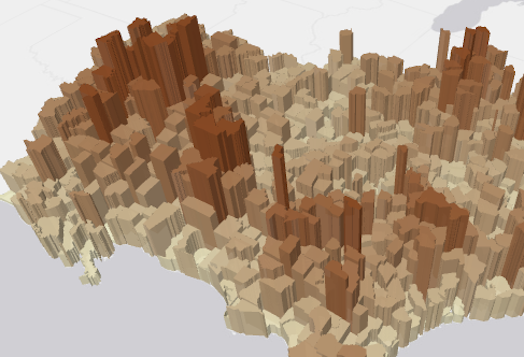
See Symbol3DLayer and Symbol3D to read more general information about 3D symbols, symbol layers and how they relate to one another.
Example
let symbol = { type: "polygon-3d", // autocasts as new PolygonSymbol3D() symbolLayers: [{ type: "extrude", // autocasts as new ExtrudeSymbol3DLayer() size: 100000, // 100,000 meters in height material: { color: "red" } }]};Constructors
Constructor
Parameters
| Parameter | Type | Description | Required |
|---|---|---|---|
| properties | | |
Properties
castShadows
- Type
- boolean
- Since
- ArcGIS Maps SDK for JavaScript 4.11
Indicates whether the symbol layer geometry casts shadows in the scene. Setting this property to false will
disable shadows for the symbol layer even if direct shadows are enabled in SceneView.environment.
- Default value
- true
Example
// disables shadow castingsymbolLayer.castShadows = false; edges
- Since
- ArcGIS Maps SDK for JavaScript 4.7
Sets the contour edges on polygons symbolized with ExtrudeSymbol3DLayer.
Example
let symbol = { type: "polygon-3d", // autocasts as new PolygonSymbol3D() symbolLayers: [{ type: "extrude", // autocasts as new ExtrudeSymbol3DLayer() material: { color: [244, 247, 134] }, edges: { type: "solid", // autocasts as new SolidEdges3D() color: [50, 50, 50, 0.5] } }]}; material
- Type
- Symbol3DMaterial | null | undefined
The material used to shade the extrusion. This property defines the extrusion's color and emissive properties.
Examples
// CSS color stringsymbolLayer.material = { color: "dodgerblue"};// HEX stringsymbolLayer.material = { color: "#33cc33";};// array of RGBA valuessymbolLayer.material = { color: [51, 204, 51, 0.3];};// object with rgba propertiessymbolLayer.material = { color: { r: 51, g: 51, b: 204, a: 0.7 }};// object with emissive properties and colorsymbolLayer.material: { color: "#00E9FF", emissive: { strength: 1, source: "color" },}; size
- Type
- number
The height of the extrusion in meters. Negative values will extrude the polygon surface downward towards or below the ground.
- Default value
- 1
Example
// polygon is extruded 50,000 meterssymbolLayer.size = 50000;Methods
fromJSON
- Signature
-
fromJSON (json: any): any
Creates a new instance of this class and initializes it with values from a JSON object
generated from an ArcGIS product. The object passed into the input json
parameter often comes from a response to a query operation in the REST API or a
toJSON()
method from another ArcGIS product. See the Using fromJSON()
topic in the Guide for details and examples of when and how to use this function.
Parameters
| Parameter | Type | Description | Required |
|---|---|---|---|
| json | A JSON representation of the instance in the ArcGIS format. See the ArcGIS REST API documentation for examples of the structure of various input JSON objects. | |
- Returns
- any
Returns a new instance of this class.
clone
- Signature
-
clone (): ExtrudeSymbol3DLayer
Creates a deep clone of the symbol layer.
- Returns
- ExtrudeSymbol3DLayer
A deep clone of the object that invoked this method.
Example
// Creates a deep clone of the graphic's first symbol layerlet symLyr = graphic.symbol.symbolLayers.at(0).clone(); toJSON
- Signature
-
toJSON (): any
Converts an instance of this class to its ArcGIS portal JSON representation. See the Using fromJSON() guide topic for more information.
- Returns
- any
The ArcGIS portal JSON representation of an instance of this class.