import IconSymbol3DLayer from "@arcgis/core/symbols/IconSymbol3DLayer.js";const IconSymbol3DLayer = await $arcgis.import("@arcgis/core/symbols/IconSymbol3DLayer.js");- Inheritance:
- IconSymbol3DLayer→
Symbol3DLayer→ Accessor
- Since
- ArcGIS Maps SDK for JavaScript 4.0
IconSymbol3DLayer is used to render Point geometries using a flat 2D icon (e.g. a circle) with a PointSymbol3D in a SceneView. MapView does not support 3D symbols. Polygon features may also be rendered with IconSymbol3DLayers, but the icon symbol layer must be contained within a PolygonSymbol3D, not a PointSymbol3D in that scenario.
The shape of the icon is set in the resource property and the color is set in the material property. Size may be defined in points or pixels with the size property. The angle property allows to rotate the icons clockwise by specifying a number in degree.
Icon color, angle and size can also be
data-driven by adding color visual variables, rotation visual variables
and/or size visual variables
to any Renderer that uses this symbol layer.
IconSymbol3DLayers must be added to the symbolLayers property of
either the PointSymbol3D.symbolLayers or
PolygonSymbol3D.symbolLayers symbols.
Multiple symbol layers may be used in a single symbol.
Because icon symbol layers are defined in screen space (pixels/points), they can either be draped on the terrain, or billboarded in the view. Billboarded icons allow the symbol to face the user at all times as long as it is visible in to the SceneView.camera. This is particularly apparent with tilted views. Draped icons drape the symbols on the surface of the terrain.
| Draped icons | Billboarded icons |
|---|---|
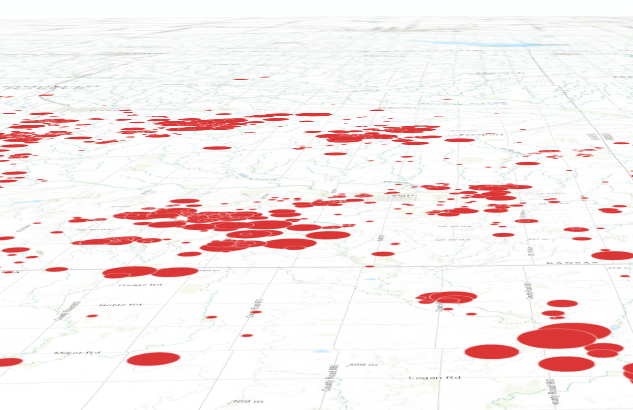 | 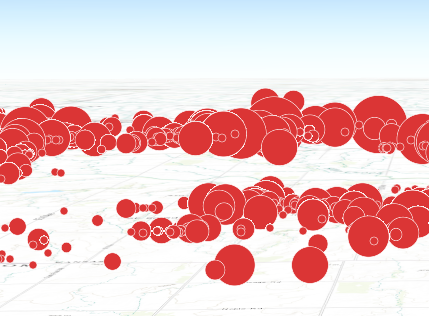 |
The ability to drape and billboard icons is controlled in the
FeatureLayer.elevationInfo property of the
FeatureLayer.
Setting the mode to on-the-ground drapes the icons, whereas setting it
to relative-to-ground billboards them.
See Symbol3DLayer and Symbol3D to read more general information about 3D symbols, symbol layers and how they relate to one another.
Example
let symbol = { type: "point-3d", // autocasts as new PointSymbol3D() symbolLayers: [{ type: "icon", // autocasts as new IconSymbol3DLayer() angle: 90, // degree size: 8, // points resource: { primitive: "circle" }, material: { color: "red" } }]};Constructors
Constructor
Parameters
| Parameter | Type | Description | Required |
|---|---|---|---|
| properties | | |
Properties
| Property | Type | Class |
|---|---|---|
| | ||
| | ||
| | ||
declaredClass readonly inherited | ||
| | ||
| | ||
| | ||
| | ||
| | ||
type readonly | "icon" | |
anchorPosition
- Since
- ArcGIS Maps SDK for JavaScript 4.11
Defines the anchor relative to the center of the icon. It is specified as a ratio of the icon's dimensions.
For example, a value of { x: 0, y: 0 } designates the center of the icon, while a value of { x: -0.5, y: -0.5 }
causes the top-left corner of the icon to coincide with the feature geometry.
This property only applies when anchor is set to relative.
Examples
symbolLayer.anchor = "relative";symbolLayer.anchorPosition = { x: 0, y: 0.5 }; // equivalent to `anchor: "bottom"`symbolLayer.anchor = "relative";symbolLayer.anchorPosition = { x: 1.5, y: 1 }; // the anchor can be placed outside of the icon angle
- Type
- number
- Since
- ArcGIS Maps SDK for JavaScript 4.31
The clockwise rotation angle of the icon in degrees.
In a SceneView, icon rotation can be either screen-aligned (icons maintain a constant orientation relative to the screen, regardless of map movements) or map-aligned (icons rotate in conjunction with the map). For example, a map-aligned arrow icon placed on a road will consistently point along the road's direction, even as the map is rotated or tilted.
This behavior depends on the mode property within the
FeatureLayer.elevationInfo.
When set to on-the-ground, icons are draped onto the terrain, resulting in map-aligned rotation.
Otherwise, icons are billboarded, maintaining a screen-aligned rotation.
- Default value
- 0
Example
// rotation angle in degreesymbolLayer.angle = 45; material
- Type
- Symbol3DMaterial | null | undefined
The material used to shade the icon. This property defines the icon's color.
Examples
// CSS color stringsymbolLayer.material = { color: "dodgerblue"};// HEX stringsymbolLayer.material = { color: "#33cc33";}// array of RGBA valuessymbolLayer.material = { color: [51, 204, 51, 0.3];}// object with rgba propertiessymbolLayer.material = { color: { r: 51, g: 51, b: 204, a: 0.7 }}; occludedVisibility
- Type
- OccludedVisibility | null | undefined
- Since
- ArcGIS Maps SDK for JavaScript 5.0
Defines the occluded visibility mode of the icon.
outline
- Type
- Symbol3DIconOutline | null | undefined
The outline of the icon. The color property of this object directly modifies the overall
color of IconSymbol3DLayer defined with the cross or x primitive.
Example
symbolLayer.outline = { color: "blue", size: "0.5px"}; resource
- Type
- IconSymbol3DLayerResource | null | undefined
The shape (primitive) or image URL (href) used to visualize the features. If both
properties are present, href takes precedence and primitive is ignored.
- Default value
- { primitive: "circle" }
Example
symbolLayer.resource = { primitive: "triangle"}; size
- Type
- number
The size of the icon in points. This value may be autocast with a string
expressing size in points or pixels (e.g. 12px).
- Default value
- 12
Examples
// size in pointssymbolLayer.size = 14;// size in pixelssymbolLayer.size = "20px"; // autocasts to number// size in pointssymbolLayer.size = "14pt"; // autocasts to numberMethods
fromJSON
- Signature
-
fromJSON (json: any): any
Creates a new instance of this class and initializes it with values from a JSON object
generated from an ArcGIS product. The object passed into the input json
parameter often comes from a response to a query operation in the REST API or a
toJSON()
method from another ArcGIS product. See the Using fromJSON()
topic in the Guide for details and examples of when and how to use this function.
Parameters
| Parameter | Type | Description | Required |
|---|---|---|---|
| json | A JSON representation of the instance in the ArcGIS format. See the ArcGIS REST API documentation for examples of the structure of various input JSON objects. | |
- Returns
- any
Returns a new instance of this class.
clone
- Signature
-
clone (): IconSymbol3DLayer
Creates a deep clone of the symbol layer.
- Returns
- IconSymbol3DLayer
A deep clone of the object that invoked this method.
Example
// Creates a deep clone of the graphic's first symbol layerlet symLyr = graphic.symbol.symbolLayers.at(0).clone(); toJSON
- Signature
-
toJSON (): any
Converts an instance of this class to its ArcGIS portal JSON representation. See the Using fromJSON() guide topic for more information.
- Returns
- any
The ArcGIS portal JSON representation of an instance of this class.