import LabelSymbol3D from "@arcgis/core/symbols/LabelSymbol3D.js";const LabelSymbol3D = await $arcgis.import("@arcgis/core/symbols/LabelSymbol3D.js");- Since
- ArcGIS Maps SDK for JavaScript 4.0
LabelSymbol3D is used to render labels for features from a FeatureLayer in a 3D SceneView. This symbol type is not supported in 2D MapViews.
A LabelSymbol3D must include at least one symbol layer for it to render in the view. One or more of the following symbol layer types my be used to define a 3D label symbol:
| Symbol3DLayer Type | Flat/Volumetric | Size Units | Example |
|---|---|---|---|
| TextSymbol3DLayer | flat | points |  |
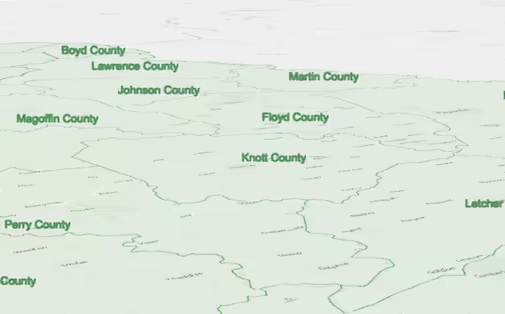
The image below depicts a FeatureLayer with labels defined by LabelSymbol3D.
- Example
- let labelClass = new LabelClass({labelExpressionInfo: {expression: "$feature.COUNTY" // Text for labels comes from COUNTY field},symbol: {type: "label-3d", // autocasts as new LabelSymbol3D()symbolLayers: [{type: "text", // autocasts as new TextSymbol3DLayer()material: { color: [ 49,163,84 ] },size: 12 // Defined in points}]}});// Add labels to the feature layerfeatureLayer.labelsVisible = true;featureLayer.labelingInfo = [ labelClass ];
Constructors
Constructor
Parameters
| Parameter | Type | Description | Required |
|---|---|---|---|
| properties | | |
Properties
| Property | Type | Class |
|---|---|---|
| | ||
| inherited | ||
| readonly inherited | ||
| inherited | StyleOrigin | null | undefined | |
| | ||
| readonly | "label-3d" | |
| |
callout
- Since
- ArcGIS Maps SDK for JavaScript 4.4
Settings for adding a callout visualization to the symbol. Callouts are drawn from the point feature location that is being symbolized,
to the vertical offset of the symbol. This property has no effect if verticalOffset is not set. At the moment only callouts of type line are
supported. See LineCallout3D.
- Example
- let symbol = {type: "label-3d", // autocasts as new LabelSymbol3D()symbolLayers: [...],verticalOffset: ...,callout: {type: "line", // autocasts as new LineCallout3D()size: 1.5,color: [150, 150, 150],border: {color: [50, 50, 50]}}};
color
3D symbols do not support colors on the symbol level. Colors may be set on individual symbol layer materials instead. Setting the color property on a 3D symbol will not have any effect. The color property is present for consistency with other symbol types.
- Examples
- // CSS color stringsymbol.color = "dodgerblue";// HEX stringsymbol.color = "#33cc33";// array of RGBA valuessymbol.color = [51, 204, 51, 0.3];// object with rgba propertiessymbol.color = {r: 51,g: 51,b: 204,a: 0.7};
styleOrigin
- Type
- StyleOrigin | null | undefined
The origin of the style from which the symbol was originally referenced.
A reference to the style origin can be either by styleName or by styleUrl (but not both). This information is part of the WebScene persistence model and may be used to understand where a symbol was originally sourced from. It does not affect actual appearance or rendering of the symbol.
symbolLayers
- Type
- Collection<TextSymbol3DLayer>
A Collection of Symbol3DLayer objects
used to visualize the graphic or feature. Individual symbol layers
may be autocast as objects and specified using the type property.
verticalOffset
- Type
- Symbol3DVerticalOffset | null | undefined
- Since
- ArcGIS Maps SDK for JavaScript 4.4
Shifts the symbol along the vertical world axis by a given height. The height is set in screen space units like points or pixels.
For points displayed with a callout verticalOffset should be set.
- Example
- let symbol = {type: "label-3d", // autocasts as new LabelSymbol3D()symbolLayers: [...],verticalOffset: {screenLength: 40,maxWorldLength: 100,minWorldLength: 20},callout: ...};
Methods
| Method | Signature | Class |
|---|---|---|
| inherited static | fromJSON(json: any): any | |
| clone(): LabelSymbol3D | | |
| inherited | toJSON(): any |
fromJSON
- Signature
-
fromJSON (json: any): any
Creates a new instance of this class and initializes it with values from a JSON object
generated from an ArcGIS product. The object passed into the input json
parameter often comes from a response to a query operation in the REST API or a
toJSON()
method from another ArcGIS product. See the Using fromJSON()
topic in the Guide for details and examples of when and how to use this function.
Parameters
| Parameter | Type | Description | Required |
|---|---|---|---|
| json | A JSON representation of the instance in the ArcGIS format. See the ArcGIS REST API documentation for examples of the structure of various input JSON objects. | |
- Returns
- any
Returns a new instance of this class.
clone
- Signature
-
clone (): LabelSymbol3D
Creates a deep clone of the symbol.
- Returns
- LabelSymbol3D
A deep clone of the object that invoked this method.
- Example
- // Creates a deep clone of the graphic's symbollet symLyr = graphic.symbol.clone();
toJSON
- Signature
-
toJSON (): any
Converts an instance of this class to its ArcGIS portal JSON representation. See the Using fromJSON() guide topic for more information.
- Returns
- any
The ArcGIS portal JSON representation of an instance of this class.