import PathSymbol3DLayer from "@arcgis/core/symbols/PathSymbol3DLayer.js";const PathSymbol3DLayer = await $arcgis.import("@arcgis/core/symbols/PathSymbol3DLayer.js");- Inheritance:
- PathSymbol3DLayer→
Symbol3DLayer→ Accessor
- Since
- ArcGIS Maps SDK for JavaScript 4.0
PathSymbol3DLayer renders Polyline geometries
by extruding a 2D profile along the line. A PathSymbol3DLayer must be added to the symbolLayers property of
a LineSymbol3D. This is a 3D symbol, therefore it is only supported in a
SceneView.
Different styles can be created by combining the profile, width
and height properties.
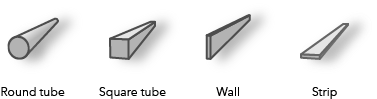
A path can have a circle profile that displays the path as a tube and can be used for visualizations of
pipelines or any other tube-like features.
Setting the profile to quad displays the path with a rectangular shape. By varying height and width different
styles can be created like a wall or a strip.
Below are some of the path visualizations that could be created by combining these properties:
The color of the path is set in the material property. The color can be data-driven by adding color visual variables to any Renderer that uses this symbol layer. The width and the height can also be driven with size visual variable.
More properties like cap, join and profileRotation can be set to enhance the PathSymbol3DLayer visualization.
In the image below the FeatureLayer depicts transit lines in a city. The polyline features are visualized with PathSymbol3DLayer set on a LineSymbol3D.
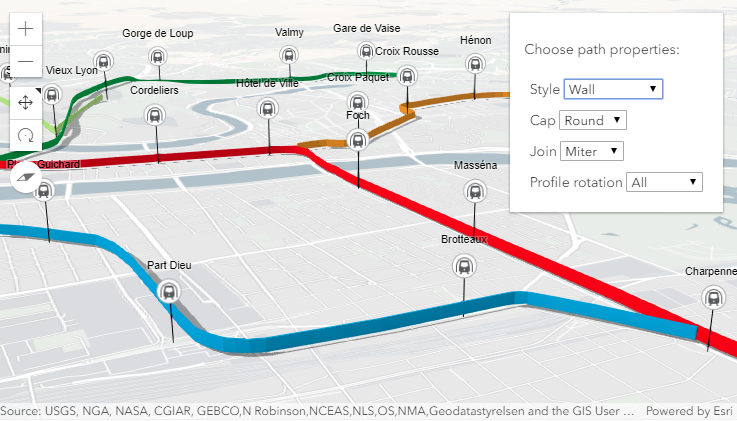
Path visualization in 3D sample shows how the different properties change the style of the PathSymbol3DLayer.
Example
// create a PathSymbol3DLayer with a strip stylelet stripPath = {  type: "line-3d",  // autocasts as new LineSymbol3D()  symbolLayers: [{    type: "path",  // autocasts as new PathSymbol3DLayer()    profile: "quad",  // creates a rectangular shape    width: 20,  // path width in meters    height: 5,  // path height in meters    material: { color: "#ff7380" },    cap: "square",    profileRotation: "heading"  }]};
// create a PathSymbol3DLayer with a pipe stylelet pipePath = {  type: "line-3d",  // autocasts as new LineSymbol3D()  symbolLayers: [{    type: "path",  // autocasts as new PathSymbol3DLayer()    profile: "circle",  // creates a rectangular shape    width: 20,  // path width will also set the height to the same value    material: { color: "#ff7380" },    cap: "round"  }]};
Constructors
Constructor
Parameters
| Parameter | Type | Description | Required |
|---|---|---|---|
| properties | | |
Properties
| Property | Type | Class |
|---|---|---|
| | ||
| | ||
| | ||
declaredClass readonly inherited | ||
| | ||
| | ||
| | ||
| | ||
| | ||
type readonly | "path" | |
| |
anchor
- Since
- ArcGIS Maps SDK for JavaScript 4.12
Defines offset of the path cross section relative to the Polyline geometry.
| Possible Value | Example |
|---|---|
| center |  |
| bottom |  |
| top |  |
- Default value
- "center"
cap
- Type
- PathSymbol3DLayerCap
- Since
- ArcGIS Maps SDK for JavaScript 4.12
Controls the shape at the start and end point of the path. none will not render
the faces that close the path.
See the table below for possible values.
| Possible Value | Example |
|---|---|
| butt |  |
| round |  |
| square |  |
| none |  |
- Default value
- "butt"
castShadows
- Type
- boolean
- Since
- ArcGIS Maps SDK for JavaScript 4.11
Indicates whether the symbol layer geometry casts shadows in the scene.
Setting this property to false will disable shadows for the symbol layer
even if direct shadows are enabled in
SceneView.environment.
- Default value
- true
Example
// disables shadow castingsymbolLayer.castShadows = false; height
- Since
- ArcGIS Maps SDK for JavaScript 4.12
The vertical dimension of the cross-section of the path in meters. If only the width is set, then the height is set to the same value as the width. If neither width nor height are set, then the path is not displayed.
Examples
// create a path with a wall stylelet wallPath = { type: "line-3d", // autocasts as new LineSymbol3D() symbolLayers: [{ type: "path", // autocasts as new PathSymbol3DLayer() profile: "quad", // creates a rectangular shape width: 1, // path width in meters height: 20, // path height in meters material: { color: "#a382cc" } }]};// create a path with a pipe stylelet wallPath = { type: "line-3d", // autocasts as new LineSymbol3D() symbolLayers: [{ type: "path", // autocasts as new PathSymbol3DLayer() profile: "circle", height: 20, // path width in meters this also sets the width to 20 meters material: { color: "##a382cc" } }]};


material
- Type
- Symbol3DMaterial | null | undefined
The material used to shade the path. This property defines the paths's color and emissive properties.
Examples
// CSS color stringsymbolLayer.material = { color: "dodgerblue"};// HEX stringsymbolLayer.material = { color: "#33cc33";};// array of RGBA valuessymbolLayer.material = { color: [51, 204, 51, 0.3];};// object with rgba propertiessymbolLayer.material = { color: { r: 51, g: 51, b: 204, a: 0.7 }};// object with emissive properties and colorsymbolLayer.material: { color: "#00E9FF", emissive: { strength: 1, source: "color" },}; profileRotation
- Since
- ArcGIS Maps SDK for JavaScript 4.12
Defines how the profile is rotated as it is extruded along the Polyline geometry.
The rotation axes (heading, tilt, roll) can be limited to constrain the orientation of the profile in the scene.
Setting profileRotation to all minimizes the twist along the line and ensures that the diameter of the
resulting visualization corresponds to width and height. Setting profileRotation to
"heading" ensures that the profile stays upright (no tilt or twist).
Typically, all is used for circle profiles and heading is used for quad profiles.
As an example, when setting heading on a path with a quad profile the path is oriented upright:
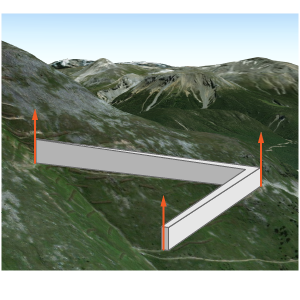
The same path with profileRotation set to all will rotate in all three degrees of freedom:
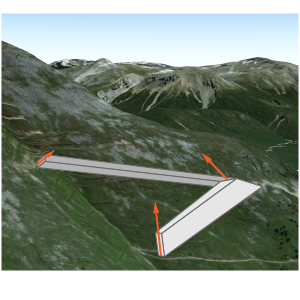
- Default value
- "all"
width
- Since
- ArcGIS Maps SDK for JavaScript 4.12
The horizontal dimension of the cross-section of the path in meters. If only the height is set, then the width is set to the same value as the height. If neither width nor height are set, then the path is not displayed.
Examples
// create a path with a strip stylelet wallPath = { type: "line-3d", // autocasts as new LineSymbol3D() symbolLayers: [{ type: "path", // autocasts as new PathSymbol3DLayer() profile: "quad", // creates a rectangular shape width: 20, // path width in meters height: 1, // path height in meters material: { color: "#a382cc" } }]};// create a path with a square stylelet wallPath = { type: "line-3d", // autocasts as new LineSymbol3D() symbolLayers: [{ type: "path", // autocasts as new PathSymbol3DLayer() profile: "quad", // creates a rectangular shape width: 20, // this property also sets the height to 20 meters material: { color: "#a382cc" } }]};Methods
fromJSON
- Signature
-
fromJSON (json: any): any
Creates a new instance of this class and initializes it with values from a JSON object
generated from an ArcGIS product. The object passed into the input json
parameter often comes from a response to a query operation in the REST API or a
toJSON()
method from another ArcGIS product. See the Using fromJSON()
topic in the Guide for details and examples of when and how to use this function.
Parameters
| Parameter | Type | Description | Required |
|---|---|---|---|
| json | A JSON representation of the instance in the ArcGIS format. See the ArcGIS REST API documentation for examples of the structure of various input JSON objects. | |
- Returns
- any
Returns a new instance of this class.
clone
- Signature
-
clone (): PathSymbol3DLayer
Creates a deep clone of the symbol layer.
- Returns
- PathSymbol3DLayer
A deep clone of the object that invoked this method.
Example
// Creates a deep clone of the graphic's first symbol layerlet symLyr = graphic.symbol.symbolLayers.at(0).clone(); toJSON
- Signature
-
toJSON (): any
Converts an instance of this class to its ArcGIS portal JSON representation. See the Using fromJSON() guide topic for more information.
- Returns
- any
The ArcGIS portal JSON representation of an instance of this class.