import SimpleFillSymbol from "@arcgis/core/symbols/SimpleFillSymbol.js";const SimpleFillSymbol = await $arcgis.import("@arcgis/core/symbols/SimpleFillSymbol.js");- Inheritance:
- SimpleFillSymbol→
FillSymbol→ Symbol→ Accessor
- Since
- ArcGIS Maps SDK for JavaScript 4.0
SimpleFillSymbol is used for rendering 2D polygons in either a MapView or a SceneView. It can be filled with a solid color, or a pattern. In addition, the symbol can have an optional outline, which is defined by a SimpleLineSymbol.
SimpleFillSymbols may be applied to polygon features in a FeatureLayer or an individual Graphic.
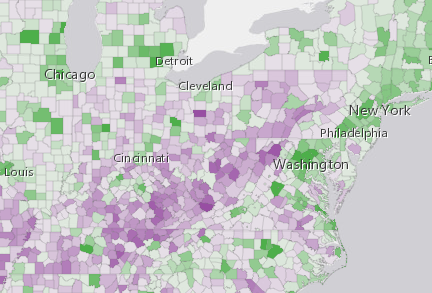
Fill symbols may also be used to symbolize 2D polygon features in a 3D SceneView. However, it is recommended you use PolygonSymbol3D instead. The image below depicts a FeatureLayer whose graphics are styled with a SimpleFillSymbol.
Example
let symbol = { type: "simple-fill", // autocasts as new SimpleFillSymbol() color: [ 51,51, 204, 0.9 ], style: "solid", outline: { // autocasts as new SimpleLineSymbol() color: "white", width: 1 }};Constructors
Constructor
Parameters
| Parameter | Type | Description | Required |
|---|---|---|---|
| properties | | |
Properties
| Property | Type | Class |
|---|---|---|
| | ||
declaredClass readonly inherited | ||
outline inherited | ||
| | ||
type readonly | "simple-fill" | |
color
- Type
- Color
The color of the symbol.
This can be autocast with an array of rgb(a) values, named string, hex string or an hsl(a) string,
an object with r, g, b, and a properties, or a Color object.
- Default value
- [0, 0, 0, 0.25] - black, semitransparent
Examples
// CSS color stringsymbol.color = "dodgerblue";// HEX stringsymbol.color = "#33cc33";// array of RGBA valuessymbol.color = [51, 204, 51, 0.3];// object with rgba propertiessymbol.color = { r: 51, g: 51, b: 204, a: 0.7};// CSS color stringsymbol.color = "dodgerblue";// HEX stringsymbol.color = "#33cc33";// array of RGBA valuessymbol.color = [51, 204, 51, 0.3];// object with rgba propertiessymbol.color = { r: 51, g: 51, b: 204, a: 0.7}; outline
- Type
- SimpleLineSymbol | null | undefined
The outline of the polygon.
Example
let sym = { type: "simple-fill", // autocasts as new SimpleFillSymbol() color: "red", outline: { // autocasts as new SimpleLineSymbol() color: [128, 128, 128, 0.5], width: "0.5px" }}; style
- Type
- FillStyle
The fill style. Possible values are listed in the table below:
| Value | Description |
|---|---|
| backward-diagonal |  |
| cross |  |
| diagonal-cross |  |
| forward-diagonal |  |
| horizontal |  |
| none | The polygon has no fill. |
| solid |  |
| vertical |  |
- Default value
- "solid"
Methods
fromJSON
- Signature
-
fromJSON (json: any): any
Creates a new instance of this class and initializes it with values from a JSON object
generated from an ArcGIS product. The object passed into the input json
parameter often comes from a response to a query operation in the REST API or a
toJSON()
method from another ArcGIS product. See the Using fromJSON()
topic in the Guide for details and examples of when and how to use this function.
Parameters
| Parameter | Type | Description | Required |
|---|---|---|---|
| json | A JSON representation of the instance in the ArcGIS format. See the ArcGIS REST API documentation for examples of the structure of various input JSON objects. | |
- Returns
- any
Returns a new instance of this class.
clone
- Signature
-
clone (): SimpleFillSymbol
Creates a deep clone of the symbol.
- Returns
- SimpleFillSymbol
A deep clone of the object that invoked this method.
Example
// Creates a deep clone of the graphic's symbollet symLyr = graphic.symbol.clone(); toJSON
- Signature
-
toJSON (): any
Converts an instance of this class to its ArcGIS portal JSON representation. See the Using fromJSON() guide topic for more information.
- Returns
- any
The ArcGIS portal JSON representation of an instance of this class.