import TextSymbol3DLayer from "@arcgis/core/symbols/TextSymbol3DLayer.js";const TextSymbol3DLayer = await $arcgis.import("@arcgis/core/symbols/TextSymbol3DLayer.js");- Inheritance:
- TextSymbol3DLayer→
Symbol3DLayer→ Accessor
- Since
- ArcGIS Maps SDK for JavaScript 4.0
TextSymbol3DLayer is used to draw text labels for features of any geometry type. This is typically done by adding it to a LabelSymbol3D in a 3D SceneView. MapView does not support 3D symbols.
The color of the symbol is set in the material property. The size of the text is always defined in points or pixels via the size property.
A TextSymbol3DLayer may be added to the symbolLayers property of any
3D symbol. Labeling the features of a
FeatureLayer is usually done by adding a TextSymbol3DLayer
to a LabelSymbol3D, which is then added to a
LabelClass in the
FeatureLayer.labelingInfo property of the layer.
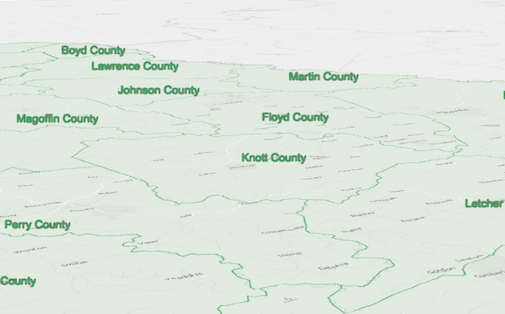
The image below depicts a FeatureLayer with labels defined
by a LabelSymbol3D that contains a TextSymbol3DLayer.
Example
let labelClass = new LabelClass({ labelExpressionInfo: { expression: "$feature.COUNTY" // Text for labels comes from COUNTY field }, symbol: { type: "label-3d", // autocasts as new LabelSymbol3D() symbolLayers: [{ type: "text", // autocasts as new TextSymbol3DLayer() material: { color: [ 49,163,84 ] }, size: 12 // points }] }});// Add labels to the feature layerfeatureLayer.labelsVisible = true;featureLayer.labelingInfo = [ labelClass ];Constructors
Constructor
Parameters
| Parameter | Type | Description | Required |
|---|---|---|---|
| properties | | |
Properties
| Property | Type | Class |
|---|---|---|
| | ||
declaredClass readonly inherited | ||
| | ||
| | ||
| | ||
| | ||
| | ||
| | ||
| | ||
| | ||
type readonly | "text" | |
| |
background
- Type
- Symbol3DTextBackground | null | undefined
The background of the text. The background can be used to define a background color for the text to improve readability by increasing contrast with the background. Setting a background will add additional padding to the text and display using rounded corners.
Example
symbolLayer.background = { color: [0, 0, 0, 0.75] }; halo
- Type
- Symbol3DHalo | null | undefined
- Since
- ArcGIS Maps SDK for JavaScript 4.4
The halo surrounding the text.
Example
symbolLayer.halo = { color: [255, 255, 255, 0.8], // autocasts as Color size: 2} horizontalAlignment
- Since
- ArcGIS Maps SDK for JavaScript 4.23
Adjusts the horizontal alignment of the text in multi-lines.
Known Limitations
This property only applies when the symbol layer is not used for labeling purposes. The horizontalAlignment for labels
is inferred from the LabelClass.labelPlacement value.
If the symbol layer is added to a symbol with a line callout
or vertical offset, then only center is supported.
- Default value
- "center"
lineHeight
- Type
- number
- Since
- ArcGIS Maps SDK for JavaScript 4.23
The height of the space between each line of text. Only applies to multiline text.
This property can be considered as a multiplier of the default value of 1.0 (e.g. a value of 2.0 will be two times the height of the default height). The range of possible values is: 0.1 - 4.0. If a value of 0 is specified, the default value of 1.0 will be used.
- Default value
- 1.0
material
- Type
- Symbol3DMaterial | null | undefined
The material used to color the text.
Examples
// CSS color stringsymbolLayer.material = { color: "dodgerblue"};// HEX stringsymbolLayer.material = { color: "#33cc33";}// array of RGBA valuessymbolLayer.material = { color: [51, 204, 51, 0.3];}// object with rgba propertiessymbolLayer.material = { color: { r: 51, g: 51, b: 204, a: 0.7 }}; occludedVisibility
- Type
- OccludedVisibility | null | undefined
- Since
- ArcGIS Maps SDK for JavaScript 5.0
Defines the occluded visibility mode of the text.
size
- Type
- number
Size of the text label in points. This value may be autocast with a string
expressing size in points or pixels (e.g. 12px). When set, this property
overrides the Font.size property.
- Default value
- 9
Examples
// size in pointssymbolLayer.size = 14;// size in pixelssymbolLayer.size = "20px"; // autocasts as number// size in pointssymbolLayer.size = "14pt"; // autocasts as number verticalAlignment
- Since
- ArcGIS Maps SDK for JavaScript 4.23
Adjusts the vertical alignment of the text.
Known Limitations
This property only applies when the symbol layer is not used for labeling purposes. The verticalAlignment for labels
is inferred from the LabelClass.labelPlacement value.
- Default value
- "baseline"
Methods
fromJSON
- Signature
-
fromJSON (json: any): any
Creates a new instance of this class and initializes it with values from a JSON object
generated from an ArcGIS product. The object passed into the input json
parameter often comes from a response to a query operation in the REST API or a
toJSON()
method from another ArcGIS product. See the Using fromJSON()
topic in the Guide for details and examples of when and how to use this function.
Parameters
| Parameter | Type | Description | Required |
|---|---|---|---|
| json | A JSON representation of the instance in the ArcGIS format. See the ArcGIS REST API documentation for examples of the structure of various input JSON objects. | |
- Returns
- any
Returns a new instance of this class.
clone
- Signature
-
clone (): TextSymbol3DLayer
Creates a deep clone of the symbol layer.
- Returns
- TextSymbol3DLayer
A deep clone of the object that invoked this method.
Example
// Creates a deep clone of the graphic's first symbol layerconst symbolLayer = graphic.symbol.symbolLayers.at(0).clone(); toJSON
- Signature
-
toJSON (): any
Converts an instance of this class to its ArcGIS portal JSON representation. See the Using fromJSON() guide topic for more information.
- Returns
- any
The ArcGIS portal JSON representation of an instance of this class.