import WaterSymbol3DLayer from "@arcgis/core/symbols/WaterSymbol3DLayer.js";const WaterSymbol3DLayer = await $arcgis.import("@arcgis/core/symbols/WaterSymbol3DLayer.js");- Inheritance:
- WaterSymbol3DLayer→
Symbol3DLayer→ Accessor
- Since
- ArcGIS Maps SDK for JavaScript 4.12
WaterSymbol3DLayer is used to render Polygon geometries as realistic, animated water surfaces, therefore it can only be used inside a PolygonSymbol3D.
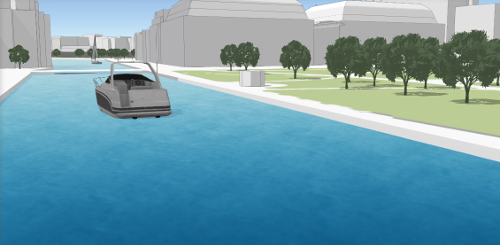
Various properties can be set to enhance the realistic effect of this symbol layer. The waveStrength can be set to show the magnitude of the waves and waveDirection indicates the direction in which the waves travel. The waterbodySize can be set to specify how large the waterbody is. The dominant color of the water can be used to change the appearance of the water.
This symbol layer is not supported in a MapView.
Example
const waterLayer = new FeatureLayer({ ..., renderer: { type: "simple", symbol: { type: "polygon-3d", symbolLayers: [{ type: "water", waveDirection: 180, color: "#5975a3", waveStrength: "moderate", waterbodySize: "small" }] } }});Constructors
Constructor
Parameters
| Parameter | Type | Description | Required |
|---|---|---|---|
| properties | | |
Properties
| Property | Type | Class |
|---|---|---|
| | ||
declaredClass readonly inherited | ||
type readonly | "water" | |
| | ||
| | ||
| |
color
- Type
- Color
The dominant color used to shade the water. The water has different shades of the dominant color based on the reflection of the light. The image below shows how different types of water can be represented with different colors. For example for deep water the dominant color could be navy blue.

The color can be autocast with an array of rgb(a) values, named string, hex string or an hsl(a) string,
an object with r, g, b, and a properties, or a Color object.
- Default value
- "#0077be"
Example
// a new color by a HEX stringsymbolLayer.color = "#005b66"; waterbodySize
- Type
- WaterBodySize
Indicates the size of the waterbody which is represented by the
symbol layer. small can be set for small lakes,
rivers or swimming pools, medium can be set for large lakes,
whereas large is recommended for ocean and sea waterbodies.
- Default value
- "medium"
Example
// sets the waterBodySize for an ocean like waterbody.symbolLayer.waterbodySize = "large"; waveDirection
Indicates the direction in which the waves travel. This value represents the geographic rotation in degrees and it ranges from 0 to 360 degrees. A value of 0 degrees corresponds to geographic north, which means that the wave travels from south to north.
The default is set to null, which will display the waves without a distinct direction.
Example
// sets the wave direction to 215 degreessymbolLayer.waveDirection = 215; waveStrength
- Type
- WaveStrength
Indicates the shape and intensity of the waves. Currently only calm to moderate waterbodies can be represented.
A calm wave strength represents water without waves, acting almost like a mirror. A water with rippled wave strength
has very small and short waves. slight wave strength displays the waves with a more pronounced form, but they are still quite short.
Choosing moderate will display waves with a longer form and a slightly increased intensity.
- Default value
- "moderate"
Example
// sets the wave strength to small wavessymbolLayer.waveStrength = "slight";Methods
fromJSON
- Signature
-
fromJSON (json: any): any
Creates a new instance of this class and initializes it with values from a JSON object
generated from an ArcGIS product. The object passed into the input json
parameter often comes from a response to a query operation in the REST API or a
toJSON()
method from another ArcGIS product. See the Using fromJSON()
topic in the Guide for details and examples of when and how to use this function.
Parameters
| Parameter | Type | Description | Required |
|---|---|---|---|
| json | A JSON representation of the instance in the ArcGIS format. See the ArcGIS REST API documentation for examples of the structure of various input JSON objects. | |
- Returns
- any
Returns a new instance of this class.
clone
- Signature
-
clone (): WaterSymbol3DLayer
Creates a deep clone of the symbol layer.
- Returns
- WaterSymbol3DLayer
A deep clone of the object that invoked this method.
Example
// Creates a deep clone of the graphic's first symbol layerlet symLyr = graphic.symbol.symbolLayers.at(0).clone(); toJSON
- Signature
-
toJSON (): any
Converts an instance of this class to its ArcGIS portal JSON representation. See the Using fromJSON() guide topic for more information.
- Returns
- any
The ArcGIS portal JSON representation of an instance of this class.