import LineCallout3D from "@arcgis/core/symbols/callouts/LineCallout3D.js";const LineCallout3D = await $arcgis.import("@arcgis/core/symbols/callouts/LineCallout3D.js");- Since
- ArcGIS Maps SDK for JavaScript 4.4
This type of callout displays a line to connect a symbol or a label with its actual location in the scene. For example when displaying points of interest in a city, visualizing them with a callout line helps to understand where the points are actually located:

This visualization can be created on a PointSymbol3D or a LabelSymbol3D. After defining the PointSymbol3D.symbolLayers, an offset should be defined by setting the PointSymbol3D.verticalOffset property. The symbols are now shifted vertically, but we still need to add the callout, otherwise it can be very confusing to understand where the points are located:

Setting the callout property of type line on the symbol will create the line that connects the symbol with its actual position:
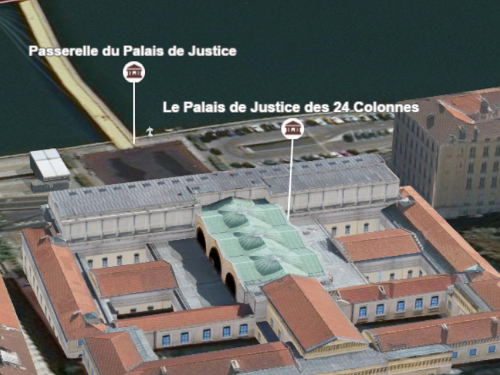
Example
let symbol = { type: "point-3d", // autocasts as new PointSymbol3D() symbolLayers: [{ type: "icon", // autocasts as new IconSymbol3DLayer() resource: { href: "CityHall.svg" }, size: 20 }], verticalOffset: { screenLength: 40, maxWorldLength: 100, minWorldLength: 20 }, callout: { type: "line", // autocasts as new LineCallout3D() size: 1.5, color: "white", border: { color: "black" } }});Constructors
Constructor
Parameters
| Parameter | Type | Description | Required |
|---|---|---|---|
| properties | | |
Properties
border
- Type
- LineCallout3DBorder | null | undefined
The border settings of the callout line. The border of the callout line can be used
to improve the contrast of the callout line color against various background colors. If the border is null,
then no border will be visible.
Methods
fromJSON
- Signature
-
fromJSON (json: any): any
Creates a new instance of this class and initializes it with values from a JSON object
generated from an ArcGIS product. The object passed into the input json
parameter often comes from a response to a query operation in the REST API or a
toJSON()
method from another ArcGIS product. See the Using fromJSON()
topic in the Guide for details and examples of when and how to use this function.
Parameters
| Parameter | Type | Description | Required |
|---|---|---|---|
| json | A JSON representation of the instance in the ArcGIS format. See the ArcGIS REST API documentation for examples of the structure of various input JSON objects. | |
- Returns
- any
Returns a new instance of this class.
clone
- Signature
-
clone (): LineCallout3D
Creates a deep clone of the callout.
- Returns
- LineCallout3D
A deep clone of the object that invoked this method.
toJSON
- Signature
-
toJSON (): any
Converts an instance of this class to its ArcGIS portal JSON representation. See the Using fromJSON() guide topic for more information.
- Returns
- any
The ArcGIS portal JSON representation of an instance of this class.