import { toRenderCoordinates, fromRenderCoordinates, renderCoordinateTransformAt, fromRenderCamera, toRenderCamera } from "@arcgis/core/views/3d/webgl.js";const { toRenderCoordinates, fromRenderCoordinates, renderCoordinateTransformAt, fromRenderCamera, toRenderCamera } = await $arcgis.import("@arcgis/core/views/3d/webgl.js");- Since
- ArcGIS Maps SDK for JavaScript 4.29
This module contains convenience functions and typings to work with RenderNode.
- See also
Type definitions
RenderNodeOutput
- Since
- ArcGIS Maps SDK for JavaScript 5.0
Describes a specific RenderNodeOutput.
| RenderNodeOutput | Description | Available RenderNodeInput FBOs | FBO attachments |
|---|---|---|---|
| opaque-color | Contains the rendered image after all opaque geometries have been drawn. | opaque-color, normals | color0, depth, color1(emissive) |
| transparent-color | Contains the rendered image after all opaque and transparent geometries have been drawn. | transparent-color, normals | color0, depth, color1(emissive) |
| composite-color | Contains the rendered image without any post processes applied. | composite-color, normals, highlights (if scene has highlights) | color0, depth, color1(emissive) |
| final-color | Contains the rendered image including post processes. | final-color, normals, highlights (if scene has highlights) | color0, depth, color1(emissive) |
Emissive attachments are only available when at least one object with Symbol3DEmissive is added to the SceneView.
- Type
- "opaque-color" | "transparent-color" | "composite-color" | "final-color"
RenderNodeInput
- Since
- ArcGIS Maps SDK for JavaScript 5.0
Describes a specific RenderNodeInput.
| RenderNodeInput | Description | FBO attachments |
|---|---|---|
| normals | Contains the normals in camera space for the front-most visible content in the SceneView per pixel stored in RGB. | color0 |
| highlights | Contains the currently selected highlights in the SceneView. Only available when the scene has highlights. | color0 |
Furthermore all RenderNodeOutput framebuffers may also be used as an input.
Normals encoding
The normals color0 attachment is an rgba texture, where the rgb components encode the normal. To get the normal in camera space, the following glsl code can be used:
vec3 normal = 2.0 * texture(normalsTexture, uv).xyz - vec3(1.0);Using the normals for a custom RenderNode can have measurable performance impact in some settings due to the additional render tasks necessary to provide the normal information.
Highlight encoding
The highlights color0 attachment uses only the red channel to encode a bit field as follows:
- Fragments with bit 0 of the red channel set are highlighted
- Fragments with bit 1 of the red channel set are highlighted but hidden behind other (not highlighted) geometry
The other bits and channels should not be set. Fragments always contain the front-most highlight only.
Usage example:
uint bits = uint(texelFetch(highlightTexture, uv, 0).r * 255.0);bool isHighlit = (bits & 1u) == 1u;bool isOccluded = (bits & 3u) == 3u;- Type
- RenderNodeOutput | "normals" | "highlights"
ConsumedNodes
- Since
- ArcGIS Maps SDK for JavaScript 5.0
Describes the input framebuffer objects of a custom RenderNode.
required
- Type
- RenderNodeInput[]
- Since
- ArcGIS Maps SDK for JavaScript 5.0
One or more required inputs. If a required input is not available, the render function will not be called.
optional
- Type
- RenderNodeInput[] | undefined
- Since
- ArcGIS Maps SDK for JavaScript 5.0
One or more optional inputs. You can use an optional input if you want the render function to be called even if this input is not available.
Functions
toRenderCoordinates
Transforms positions from the given spatial reference to the internal rendering coordinate system. The allowable input spatial reference is limited and depends on the SceneView.viewingMode:
- In
globalmode, it can either be Web Mercator or WGS84. - In
localmode, it has to match view.spatialReference; the call to this function simply copies the coordinates fromsrcCoordinatestodestCoordinates.
If these conditions are not met, nothing is written to destCoordinates and the function returns null.
- Signature
-
toRenderCoordinates <T1 extends ArrayLike<number>, T2 extends ArrayLike<number>>(view: SceneView, srcCoordinates: T1, srcStart: number, srcSpatialReference: SpatialReference, destCoordinates: T2, destStart: number, count: number): T2 | null | undefined
Parameters
| Parameter | Type | Description | Required |
|---|---|---|---|
| view | The view in which the coordinates will be used. | | |
| srcCoordinates | T1 | A linear array of one or more vectors which are interpreted as XYZ
coordinates. For example, two position vectors would be represented as | |
| srcStart | An index in | | |
| srcSpatialReference | The spatial reference of the input coordinates. When
| | |
| destCoordinates | T2 | A reference to an array where the results will be written. | |
| destStart | An index in | | |
| count | The number of vertices to be transformed. | |
Example
// A linear list of coordinate tripleslet geographicCoordinates = [  //  lon     lat   elevation    -117.19, 34.05,   414,     47.39,   8.51,   408];
// Allocate storage for the resultlet renderCoordinates = new Array(6);
webgl.toRenderCoordinates(view,  geographicCoordinates, 0, SpatialReference.WGS84,  renderCoordinates, 0,2);
fromRenderCoordinates
Transforms positions from the internal rendering coordinate system to the output spatial reference. The allowable output spatial reference is limited and depends on the SceneView.viewingMode:
- In
globalmode, it can either be Web Mercator or WGS84. - In
localmode, it has to match view.spatialReference, and the call to this function simply copies the coordinates fromsrcCoordinatestodestCoordinates.
If these conditions are not met, nothing is written to destCoordinates and the function returns null.
- Signature
-
fromRenderCoordinates <T1 extends ArrayLike<number>, T2 extends ArrayLike<number>>(view: SceneView, srcCoordinates: T1, srcStart: number, destCoordinates: T2, destStart: number, destSpatialReference: SpatialReference, count: number): T2 | null | undefined
Parameters
| Parameter | Type | Description | Required |
|---|---|---|---|
| view | The view related to the input coordinates. | | |
| srcCoordinates | T1 | A linear array of one or more vectors that are interpreted as XYZ
coordinates. For example, two position vectors would be represented as | |
| srcStart | An index in | | |
| destCoordinates | T2 | A reference to an array in which the results will be written. | |
| destStart | An index in | | |
| destSpatialReference | The spatial reference of the output coordinates.
When | | |
| count | The number of vertices to be transformed. | |
Example
let cameraPositionGeographic = new Array(3);webgl.fromRenderCoordinates(view, context.camera.eye, 0, cameraPositionGeographic, 0, SpatialReference.WGS84,1); renderCoordinateTransformAt
- Type parameters
- <T extends number[] | Float32Array | Float64Array>
Computes a 4x4 affine transformation matrix that constitutes a linear coordinate transformation from a local Cartesian coordinate system to the virtual world coordinate system. For example, this matrix can be used to transform the vertices of a 3D model to the rendering coordinate system.
The local Cartesian system is defined by its origin and the following axis definition:
- X: Easting
- Y: Northing
- Z: Elevation
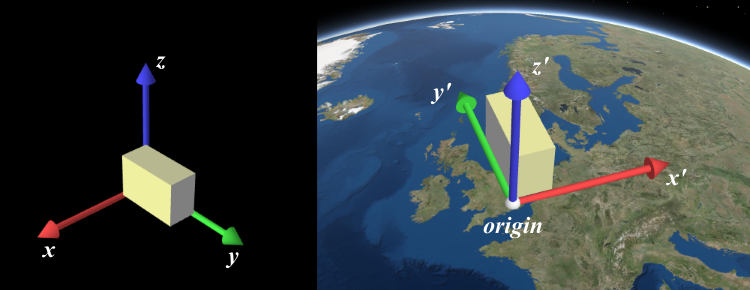
When view.viewingMode is global, a linear
transformation does not take the curvature of the globe or other non-linear projection aspects into account. Thus,
the resulting coordinates will only appear correct within a small region around the origin of the local Cartesian
system.
The allowable spatial reference of origin depends on the
SceneView.viewingMode:
- In
globalmode, it can either be Web Mercator or WGS84. - In
localmode, it has to match view.spatialReference.
If these conditions are not met, nothing will be written to dest and the function will return null.
- Signature
-
renderCoordinateTransformAt <T extends number[] | Float32Array | Float64Array>(view: SceneView, origin: number[] | Float32Array | Float64Array, srcSpatialReference?: SpatialReference, dest?: T): T | null | undefined
Parameters
| Parameter | Type | Description | Required |
|---|---|---|---|
| view | The view for which the transformation will be used. | | |
| origin | number[] | Float32Array | Float64Array | The global coordinates of the origin in the local Cartesian coordinate system. | |
| srcSpatialReference | The spatial reference of the origin
coordinates. If undefined, | | |
| dest | T | A reference to an array where the 16 matrix elements will be stored. The resulting matrix follows WebGL conventions where the translation components occupy the 13th, 14th and 15th elements. If undefined, a newly created matrix returned. | |
Example
// places a tetrahedron in New Yorklet verticesLocal = [[10, 10, 10], [10, −10, −10], [−10, 10, −10], [−10, −10, 10]],  transformation = new Array(16),  geographicCoordinates = [  //  lon     lat   elevation      -74,   40.71,    10]
webgl.renderCoordinateTransformAt(view, geographicCoordinates, SpatialReference.WGS84, transformation);
let verticesGlobal = verticesLocal.map(function(vertexLocal) {  // transform the coordinates with the computed transformation (using the syntax of glMatrix, see http://glmatrix.net)  return vec3.transformMat4(new Array(3), vertexLocal, transformation);});
fromRenderCamera
Takes a RenderCamera as input and projects it into a Camera using a given view.
- Signature
-
fromRenderCamera (view: SceneView, camera: RenderCamera): Camera
Parameters
| Parameter | Type | Description | Required |
|---|---|---|---|
| view | The view the output camera should be related to. | | |
| camera | The input render camera. | |
- Returns
- Camera
The new camera using the spatial reference of the view.
toRenderCamera
Coverts a Camera into a new RenderCamera using a given view.
- Signature
-
toRenderCamera (view: SceneView, camera: Camera | null | undefined): RenderCamera
Parameters
- Returns
- RenderCamera
The new camera using the spatial reference of the view.