import HighlightOptions from "@arcgis/core/views/support/HighlightOptions.js";const HighlightOptions = await $arcgis.import("@arcgis/core/views/support/HighlightOptions.js");- Inheritance:
- HighlightOptions→
Accessor
- Since
- ArcGIS Maps SDK for JavaScript 4.32
HighlightOptions are used to customize the appearance of highlights applied to features. You can configure various options (such as color or opacity) to define how a feature will be visually emphasized when highlighted using those options.
To be used in an application, highlight options first need to be added to the View's
View.highlights collection. You can then use the highlight() method on the
appropriate LayerView to apply the options to one or more features. If the
highlight() method is called without passing specific options, the default options will be used. These are the
options which have the name property set to "default". A
pre-configured set of default options is provided for ease of use, but you can also define your own.
The table below shows the pre-configured highlight options in the View's View.highlights collection if the collection has not been modified.
| Highlight options name | Description | Default settings |
|---|---|---|
| default | The default highlight options. Used when layerView.highlight() is called without specifying any particular highlight options. | { name: "default", color: "cyan", haloOpacity: 1, fillOpacity: 0.25, shadowColor: "black", shadowOpacity: 0.4, shadowDifference: 0.2} |
| temporary | The temporary highlight options, pre-configured for common use cases such as hovering over a feature in the view. | { name: "temporary", color: "yellow", haloOpacity: 1, fillOpacity: 0.25} |
In a 3D SceneView, highlighting a feature with the default options also
influences the feature's shadow. You can customize the shadow options or use the pre-configured ones, which will
display the shadow in a darker shade. Shadow options are only supported on the default highlight options; setting
them on other highlights has no effect.
Examples
// Override the default highlights collectionconst view = new MapView({ map: map, // Set the highlight options to be used in the view highlights: [ { name: "default", color: "orange" }, { name: "temporary", color: "magenta" }, { name: "oaks", color: "forestgreen", haloOpacity: 0.8, fillOpacity: 0.3 } ]});// Highlight features based on a query result
// A handler can be used to remove any previous highlight when applying a new onelet highlight;
// Query for particualar features in a layer and then highlight them with the specified optionsview.whenLayerView(treesLayer).then((layerView) => { let query = treesLayer.createQuery(); query.where = "type = 'Quercus'";
treesLayer.queryFeatures(query).then((result) => { // Remove any previous highlight, if it exists highlight?.remove(); // Apply the user-defined "oaks" highlight options to the corresponding tree features highlight = layerView.highlight(result.features, {name: "oaks"}); });});Constructors
Constructor
Parameters
| Parameter | Type | Description | Required |
|---|---|---|---|
| properties | | |
Properties
| Property | Type | Class |
|---|---|---|
| | ||
declaredClass readonly inherited | ||
| | ||
| | ||
| | ||
name readonly | | |
| | ||
| | ||
| |
fillOpacity
- Type
- number
The opacity of the fill (area within the halo). This will be multiplied with the opacity specified in color.
- Default value
- 0.25
haloOpacity
- Type
- number
The opacity of the highlight halo. This will be multiplied with any opacity specified in color.
- Default value
- 1
name
- Type
- string
A name used to uniquely identify the highlight options within the view's
View.highlights collection. To apply a specific set of highlight options,
include this name in the second parameter of a LayerView's highlight() method. If no name is specified, it will
default to default.
- See also
Example
// Use the default highlights collection to apply a highlight to features when you hover over them
// A handler can be used to remove any previous highlight when applying a new onelet hoverHighlight;
view.on("pointer-move", (event) => {  // Search for features in the featureLayer at the hovered location  view.hitTest(event, { include: featureLayer }).then((response) => {    if (response.results.length) {      const features = response.results.map(result => result.graphic);      // Remove any previous highlight, if it exists      hoverHighlight?.remove();      // Highlight the hit features with the temporary highlight options, which are pre-configured for this use case      hoverHighlight = layerView.highlight(features, {name: "temporary"});    }  }).catch((error) => {    console.error("Error during hitTest:", error);  });
shadowColor
- Type
- Color
The color of the highlighted feature's shadow in a 3D SceneView.
Known Limitation
Shadow options are only supported on the default highlight options. Setting them on other highlights has no
effect.
- Default value
- #000000
shadowDifference
- Type
- number
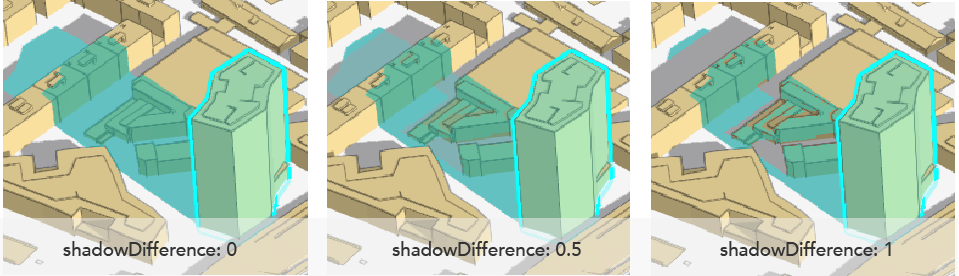
Defines the intensity of the shadow area obtained by overlapping the shadow of the highlighted feature and the
shadow of other objects in a 3D SceneView. The value ranges from 0 to 1.
A value of 0 highlights the overlapping shadow areas in the same way (no difference). Setting it to 1
highlights only the difference between the shadow areas, so the overlapping shadow areas aren't highlighted at
all. Here is an example of what the shadow highlight looks like with different values:
Known Limitation
Shadow options are only supported on the default highlight options. Setting them on other highlights has no
effect.
- Default value
- 0.2
Examples
// SceneView highlights with shadow settings configuredconst view = new SceneView({ map: map, highlights: [ { name: "oaks" color: "forestgreen", haloColor: "green", haloOpacity: 0.9, fillOpacity: 0.2, shadowColor: "goldenrod", shadowOpacity: 0.5 } ]});// A handler can be used to remove any previous highlight when applying a new onelet highlight;
// Query for particualar features in a layer and then highlight them with the specified optionsview.whenLayerView(treesLayer).then((layerView) => { let query = treesLayer.createQuery(); query.where = "type = 'Quercus'"; treesLayer.queryFeatures(query).then((result) => { // Remove any previous highlight, if it exists highlight?.remove(); // Apply the user-defined "oaks" highlight options to the corresponding tree features highlight = layerView.highlight(result.features, {name: "oaks"}); });}); shadowOpacity
- Type
- number
The opacity of the highlighted feature's shadow in a 3D SceneView. This will
be multiplied with the opacity specified in shadowColor.
Known Limitation
Shadow options are only supported on the default highlight options. Setting them on other highlights has no
effect.
- Default value
- 0.4