import DefaultUI from "@arcgis/core/views/ui/DefaultUI.js";const DefaultUI = await $arcgis.import("@arcgis/core/views/ui/DefaultUI.js");- Since
- ArcGIS Maps SDK for JavaScript 4.0
The DefaultUI class exposes the default widgets and components available in either a MapView or a SceneView. This class also provides a simple API for adding, moving and removing widgets and other HTML components from the view's UI.
You typically don't have to create a new instance of this class since a default instance is
available in the ui property of the
SceneView and MapView.
When adding or moving components in the view's UI, you can specify a position. Widgets in the upper region are stacked vertically, while widgets in the lower region are stacked horizontally. The available positions are indicated in the image below.
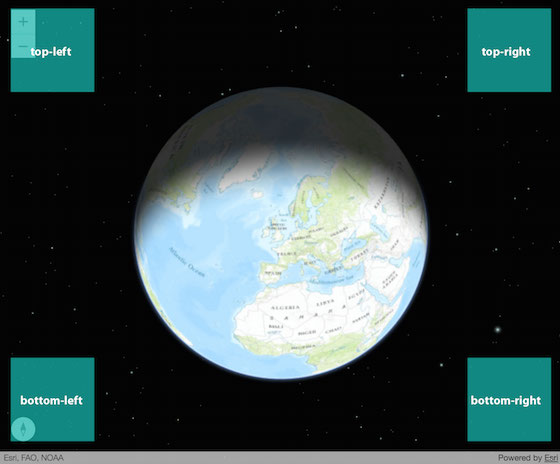
Methods, such as add() and move() can be used to place widgets in specific positions of the UI. In the image below, the Search and BasemapToggle widgets are placed in the view with the add() method.
let searchWidget = new Search({ view: view });let bmToggleWidget = new BasemapToggle({  view: view,  nextBasemap: "hybrid"});
view.ui.add(searchWidget, "top-right");view.ui.add(bmToggleWidget, "bottom-right");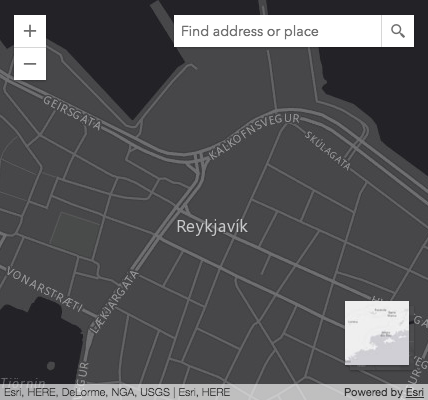
If you dive into the doc of the methods add(), empty() and move(), you'll notice some of the possible values include "leading" and "trailing". That's because the ArcGIS Maps SDK for JavaScript provides bidirectional support.
For left-to-right (LTR), "leading" is left and "trailing" is right. For right-to-left (RTL), "leading" is right and "trailing" is left.
To enable right-to-left(RTL), set the dir attribute in the <html> or <body> tag to rtl.
<html dir="rtl">- See also
Constructors
Constructor
Parameters
| Parameter | Type | Description | Required |
|---|---|---|---|
| properties | | |
Properties
components
- Type
- ComponentName[]
An array of strings representing the default widgets visible when a MapView or SceneView is created. The default widgets differ between MapView and SceneView.
The following are the default widgets in each view:
MapView: ["zoom"]
SceneView: ["navigation-toggle", "compass", "zoom"]
As of version 5.0, attribution is a part of the view itself. To control the visibility of the attribution, use the View.attributionVisible property.
container
- Type
- HTMLElement | null | undefined
The HTML Element that contains the view.
- See also
View2D.container for MapView and LinkChartView
padding
- Type
- any
Defines the padding for the UI from the top, left, right, and bottom sides of the container or View. If the value is a number, it will be used to pad all sides of the container.
- Default value
- { left: 15, top: 15, right: 15, bottom: 15 }
Example
// Setting a single number to this propertyui.padding = 0;// is the same as setting it on all properties of the objectui.padding = { top: 0, left: 0, right: 0, bottom: 0 };Methods
| Method | Signature | Class |
|---|---|---|
add inherited | add(component: Widget | HTMLElement | string | any[] | ComponentCompatible, position?: string | UIPosition | Options): void | |
emit inherited | emit<Type extends EventNames<this>>(type: Type, event?: this["@eventTypes"][Type]): boolean | |
empty inherited | empty(position?: UIPosition): void | |
find inherited | find(id: string): Widget | HTMLElement | null | undefined | |
getComponents inherited | getComponents(position?: UIPosition | UIPosition[]): (Widget<any> | HTMLElement)[] | |
hasEventListener inherited | hasEventListener<Type extends EventNames<this>>(type: Type): boolean | |
move inherited | move(component: ComponentCompatible | ComponentCompatible[], position?: UIPosition | MoveOptions): void | |
on inherited | on<Type extends EventNames<this>>(type: Type, listener: EventedCallback<this["@eventTypes"][Type]>): ResourceHandle | |
remove inherited | remove(component: ComponentCompatible | ComponentCompatible[]): void |
add
- Signature
-
add (component: Widget | HTMLElement | string | any[] | ComponentCompatible, position?: string | UIPosition | Options): void
Adds one or more HTML component(s) or widgets to the UI.
Parameters
| Parameter | Type | Description | Required |
|---|---|---|---|
| component | Widget | HTMLElement | string | any[] | ComponentCompatible | The component(s) to add to the UI. This can be a widget instance, HTML element, a string value representing a DOM node ID, or an array containing a combination of any of those types. See the example snippets below for code examples. Alternatively, you can pass an array of objects with the following specification. | |
| position | string | UIPosition | Options | The position in the view at which to add the component.
If not specified, | |
- Returns
- void
Examples
let toggle = new BasemapToggle({ view: view, nextBasemap: "hybrid"});// Adds an instance of BasemapToggle widget to the// top right of the view's container.view.ui.add(toggle, "top-right");// Adds multiple widgets to the top right of the viewview.ui.add([ compass, toggle ], "top-leading");// Adds multiple components of different types to the bottom left of the viewview.ui.add([ searchWidget, "infoDiv" ], "bottom-left");// Adds multiple components of various types to different view positionsview.ui.add([ { component: compassWidget, position: "top-left", index: 0 }, { component: "infoDiv", position: "bottom-trailing" }, { component: searchWidget, position: "top-right", index: 0 }, { component: legendWidgetDomNode, position: "top-right", index: 1 }]); emit
- Signature
-
emit <Type extends EventNames<this>>(type: Type, event?: this["@eventTypes"][Type]): boolean
- Type parameters
- <Type extends EventNames<this>>
- Since
- ArcGIS Maps SDK for JavaScript 4.5
Emits an event on the instance. This method should only be used when creating subclasses of this class.
empty
- Signature
-
empty (position?: UIPosition): void
Removes all components from a given position.
Parameters
| Parameter | Type | Description | Required |
|---|---|---|---|
| position | The position in the view at which to add the component.
If not specified, | |
- Returns
- void
Example
// Removes all of the elements in the top-left of the view's container// including the default widgets zoom and compass (if working in SceneView)view.ui.empty("top-left"); find
- Signature
-
find (id: string): Widget | HTMLElement | null | undefined
Find a component by widget or DOM ID.
Parameters
| Parameter | Type | Description | Required |
|---|---|---|---|
| id | The component's ID. | |
- Returns
- Widget | HTMLElement | null | undefined
Returns the Widget or HTMLElement if the id is found, otherwise returns
null.
Example
let compassWidget = new Compass({  view: view,  id: "myCompassWidget" // set an id to get the widget with find});
// Add the Compass widget to the top left corner of the viewview.ui.add(compassWidget, "top-left");
// Find the Widget with the specified IDlet compassWidgetFind = view.ui.find("myCompassWidget"))
getComponents
- Signature
-
getComponents (position?: UIPosition | UIPosition[]): (Widget<any> | HTMLElement)[]
- Since
- ArcGIS Maps SDK for JavaScript 4.27
Returns all widgets and/or HTML elements in the view, or only components at specified positions in the view.
Parameters
| Parameter | Type | Description | Required |
|---|---|---|---|
| position | UIPosition | UIPosition[] | The position or array of positions from which to fetch the components. If not specified, all components will be returned from the View. | |
- Returns
- (Widget<any> | HTMLElement)[]
Returns an array of Widgets and/or HTML elements in the View.
Examples
// Display the number of components added to MapView by default.const view = new MapView({ map, container: "viewDiv", zoom: 4, center: [-100, 35]});await view.when();const components = view.ui.getComponents();console.log(`There are ${components.length} components added to MapView.`); // There are 4 components added to MapView.// Display the label of the first manually placed widget in SceneView.const view = new SceneView({ map, container: "viewDiv", zoom: 4, center: [-100, 35]});await view.when();console.log("Widget label is: ${view.ui.getComponents("manual")[0].label}.`); // Widget label is: Attribution.// Display how many components (i.e. widgets or HTMLElements) are placed in the top-left corner of the View.const view = new MapView({ map, container: "viewDiv", zoom: 4, center: [-100, 35]});await view.when();const components = view.ui.getComponents("top-left");console.log(`There is/are ${components.length} component(s) located in MapView's top-left corner.`);// There is/are 1 component(s) located in MapView's top-left corner. hasEventListener
- Signature
-
hasEventListener <Type extends EventNames<this>>(type: Type): boolean
- Type parameters
- <Type extends EventNames<this>>
Indicates whether there is an event listener on the instance that matches the provided event name.
Parameters
| Parameter | Type | Description | Required |
|---|---|---|---|
| type | Type | The name of the event. | |
- Returns
- boolean
Returns true if the class supports the input event.
move
- Signature
-
move (component: ComponentCompatible | ComponentCompatible[], position?: UIPosition | MoveOptions): void
Moves one or more UI component(s) to the specified position.
Parameters
| Parameter | Type | Description | Required |
|---|---|---|---|
| component | The component(s) to move. This value can be a widget instance, HTML element, a string value representing a DOM node ID, or an array containing a combination of any of those types. See the example snippets below for code examples. Alternatively, you can pass an array of objects with the following specification. | | |
| position | The destination position. The component will be placed in the UI container when not provided. | |
- Returns
- void
Examples
// Moves the BasemapToggle widget from the view if added.// See the example for add() for more contextview.ui.move(toggle, "bottom-leading");// Moves the default zoom widget to the bottom left corner of the view's containerview.ui.move("zoom", "bottom-left");// Moves multiple widgets to the bottom right of the view's UIview.ui.move([ compass, toggle, "zoom" ], "bottom-right");// Moves the legend to the topmost position in the top-right corner of the view's UI.view.ui.move({component: legend, position: "top-right", index: 0}); on
- Signature
-
on <Type extends EventNames<this>>(type: Type, listener: EventedCallback<this["@eventTypes"][Type]>): ResourceHandle
- Type parameters
- <Type extends EventNames<this>>
Registers an event handler on the instance. Call this method to hook an event with a listener.
Parameters
| Parameter | Type | Description | Required |
|---|---|---|---|
| type | Type | An event or an array of events to listen for. | |
| listener | EventedCallback<this["@eventTypes"][Type]> | The function to call when the event fires. | |
- Returns
- ResourceHandle
Returns an event handler with a
remove()method that should be called to stop listening for the event(s).Property Type Description remove Function When called, removes the listener from the event.
Example
view.on("click", function(event){ // event is the event handle returned after the event fires. console.log(event.mapPoint);}); remove
- Signature
-
remove (component: ComponentCompatible | ComponentCompatible[]): void
Removes one or more HTML component(s) or widgets from the UI.
Parameters
| Parameter | Type | Description | Required |
|---|---|---|---|
| component | The component(s) to remove from the UI. This can be a widget instance, HTML element, a string value representing a DOM node ID, or an array containing a combination of any of those types. See the example snippets below for code examples. | |
- Returns
- void
Examples
// Removes the BasemapToggle widget from the view if added.// See the example for add() for more contextview.ui.remove(toggle);// Removes the default zoom widget from the view's containerview.ui.remove("zoom");// Removes multiple widgets from the view's UIview.ui.remove([ compass, toggle, "zoom" ]);