import Glow from "@arcgis/core/webscene/Glow.js";const Glow = await $arcgis.import("@arcgis/core/webscene/Glow.js");- Inheritance:
- Glow→
Accessor
- Since
- ArcGIS Maps SDK for JavaScript 5.0
Glow is a global stylized effect that enhances the appearance of light-emitting elements and applies to all emitters in the scene. If a scene contains no emissive elements, enabling glow has no visible effect.
When Glow is set to null, emissive elements render naturally, simulating atmospheric light scattering with a bright but realistic appearance. The intensity controls the strength of the effect: a value of 0 produces a subtle glow, while 1 creates a pronounced, exaggerated glow for strong visual emphasis.
Add light emitters to the scene by configuring Symbol3DEmissive property in Symbol3DMaterial on volumetric symbol layers, or by including 3D models with emission defined (for example, via emissive maps or materials with an emissive color or factor). See the Visualization with light-emitting symbols sample to learn how to use emissive materials and glow to highlight features and build nighttime scenes.
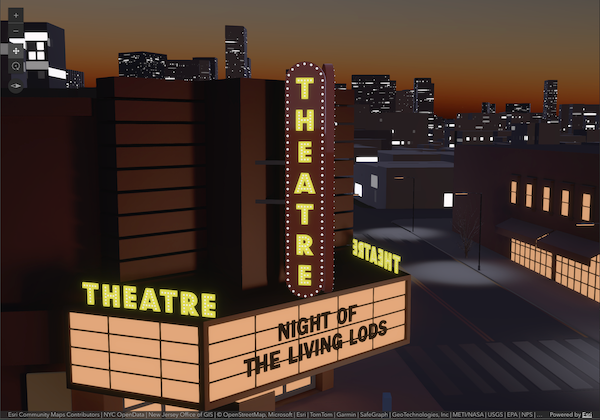 | 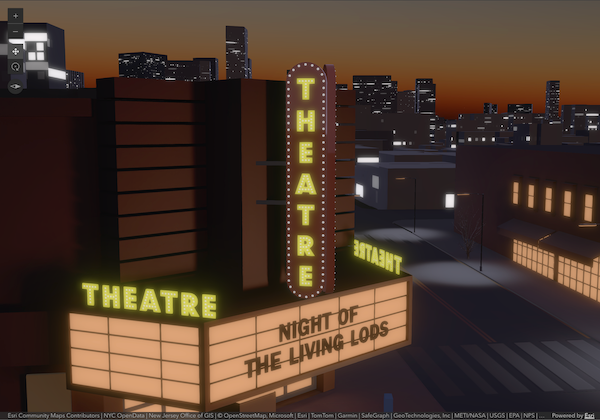 | 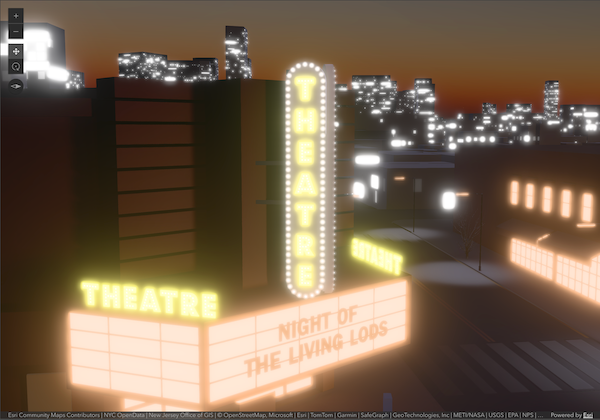 |
|---|---|---|
glow: null | glow: { intensity: 0 } | glow: { intensity: 1 } |
| Without glow, emissive elements display with a bright, natural appearance. | Glow enables a more stylized look of emissive elements across the scene. intensity:0 adds a subtle glow only. | intensity:1 adds an exaggerated glow, helpful for strong emphasis of emissive elements. |
Known Limitations
Symbol3DEmissive and Glow require support for the WebGL2 extension EXT_float_blend.
Example:
let view = new SceneView({ map: new Map({ basemap: "satellite", ground: "world-elevation" }), environment: { lighting: { type: "sun", glow: { intensity: 0.2 }, } }});The visualization updates as soon as the property changes:
view.environment.lighting.glow = new Glow({ intensity: 0.8});Constructors
Constructor
Parameters
| Parameter | Type | Description | Required |
|---|---|---|---|
| properties | | |
Properties
| Property | Type | Class |
|---|---|---|
declaredClass readonly inherited | ||
| |
intensity
- Type
- number
Amount of stylized glow on emissive elements in the scene. The range spans from 0 to 1, going from subtle to strong stylized glow for emphasis.
- Default value
- 0.5
Methods
fromJSON
- Signature
-
fromJSON (json: any): any
Creates a new instance of this class and initializes it with values from a JSON object
generated from an ArcGIS product. The object passed into the input json
parameter often comes from a response to a query operation in the REST API or a
toJSON()
method from another ArcGIS product. See the Using fromJSON()
topic in the Guide for details and examples of when and how to use this function.
Parameters
| Parameter | Type | Description | Required |
|---|---|---|---|
| json | A JSON representation of the instance in the ArcGIS format. See the ArcGIS REST API documentation for examples of the structure of various input JSON objects. | |
- Returns
- any
Returns a new instance of this class.
clone
- Signature
-
clone (): this
Creates a deep clone of this object. Any properties that store values by reference will be assigned copies of the referenced values on the cloned instance.
- Returns
- this
A deep clone of the class instance that invoked this method.
toJSON
- Signature
-
toJSON (): any
Converts an instance of this class to its ArcGIS portal JSON representation. See the Using fromJSON() guide topic for more information.
- Returns
- any
The ArcGIS portal JSON representation of an instance of this class.