import BookmarksVisibleElements from "@arcgis/core/widgets/Bookmarks/BookmarksVisibleElements.js";const BookmarksVisibleElements = await $arcgis.import("@arcgis/core/widgets/Bookmarks/BookmarksVisibleElements.js");- Inheritance:
- BookmarksVisibleElements→
Accessor
- Since
- ArcGIS Maps SDK for JavaScript 5.0
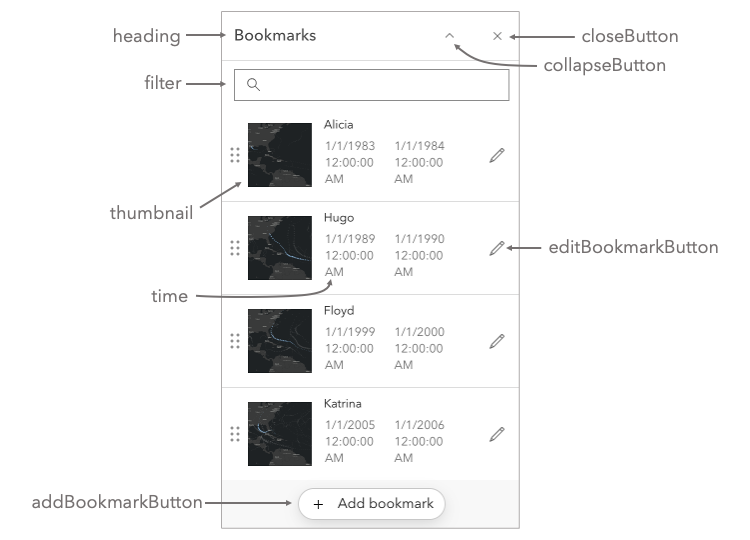
The visible elements that are displayed within the widget. This provides the ability to turn individual elements of the widget's display on/off.
Constructors
Constructor
Parameters
| Parameter | Type | Description | Required |
|---|---|---|---|
| properties | | |
Properties
| Property | Type | Class |
|---|---|---|
| | ||
| | ||
| | ||
declaredClass readonly inherited | ||
| | ||
| | ||
| | ||
| | ||
| | ||
| |
addBookmarkButton
- Type
- boolean
Indicates whether the button to add a new bookmark displays.
- Default value
- false
closeButton
- Type
- boolean
Indicates whether to display a close button at the top of the widget.
- Default value
- false
collapseButton
- Type
- boolean
Indicates whether to display a collapse button at the top of the widget.
- Default value
- false
editBookmarkButton
- Type
- boolean
Indicates whether the button to edit a bookmark displays.
- Default value
- false
flow
- Type
- boolean
Determines whether the widget should be shown within its built-in flow component or if the flow component should be excluded. The widget will be displayed within its original flow component if set to true. The flow component will be omitted from the widget if set to false. To place the widget into an existing Calcite flow component, set this property to false.
- Default value
- true
heading
- Type
- boolean
Indicates whether to display the widget heading. The heading text is "Bookmarks".
- Default value
- false
thumbnail
- Type
- boolean
Indicates whether the thumbnail associated with the bookmark displays.
- Default value
- true
time
- Type
- boolean
Indicates whether the time (h:m:s) is displayed alongside the date if the bookmark has a time extent defined.
- Default value
- true