import FeatureTemplatesViewModel from "@arcgis/core/widgets/FeatureTemplates/FeatureTemplatesViewModel.js";const FeatureTemplatesViewModel = await $arcgis.import("@arcgis/core/widgets/FeatureTemplates/FeatureTemplatesViewModel.js");- Inheritance:
- FeatureTemplatesViewModel→
Accessor
- Since
- ArcGIS Maps SDK for JavaScript 4.10
Provides the logic for the FeatureTemplates widget.
Example
const templatesVM = new FeatureTemplatesViewModel({  layers: layers});
const featureTemplates = new FeatureTemplates({  viewModel: templatesVM  container: "templatesDiv"});
Constructors
Constructor
Parameters
| Parameter | Type | Description | Required |
|---|---|---|---|
| properties | | |
Properties
| Property | Type | Class |
|---|---|---|
declaredClass readonly inherited | ||
| | ||
| | ||
GroupByType | null | undefined | | |
items readonly | | |
| | ||
state readonly | |
disabled
- Type
- boolean
- Since
- ArcGIS Maps SDK for JavaScript 4.28
Used to disable the associated user interface. This does not prevent the view model from functioning programmatically. Methods invoked programmatically still work as expected.
- Default value
- false
filterFunction
function can be defined to help filter template items within the widget. A custom function can be used to aid when searching for templates. It takes a function which passes in an object containing a name property of the template item.

Example
// Filter and display templates only if their names contain the word `Street`function myFilterFunction(filter) {  let containsName = filter.label.includes("Street");  return containsName;}
// Create the FeatureTemplates widgetconst templates = new FeatureTemplates({  container: "templatesDiv",  visibleElements = {    filter: false // does not display the default feature templates filter  },  layers: [featureLayer], // in this example, one layer is used  filterFunction: myFilterFunction});
groupBy
- Type
- GroupByType | null | undefined
It is possible to group template items. This can aid in managing various template items and how they display within the widget. The values are discussed below.
| Type | Description | Example |
|---|---|---|
| layer | This is the default grouping. Groups template items by layers. | 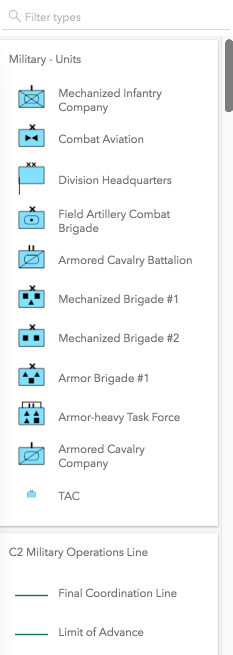 |
| geometry | Groups template items by geometry type. | 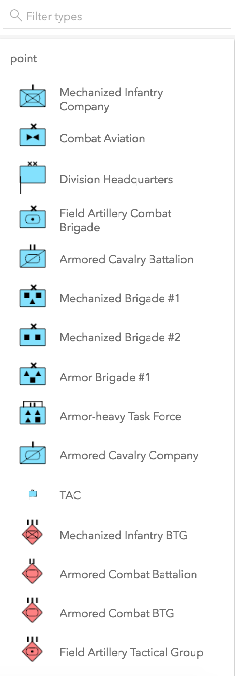 |
| none | The widget displays everything in one list with no grouping. | 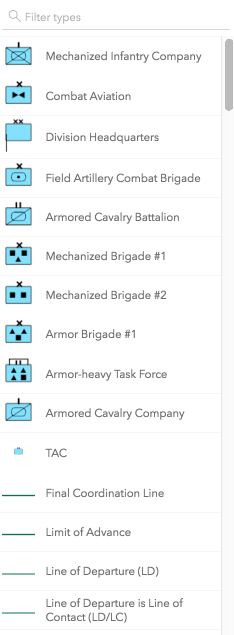 |
| GroupByFunction | Custom function that takes an object containing a FeatureTemplate and FeatureLayer. | 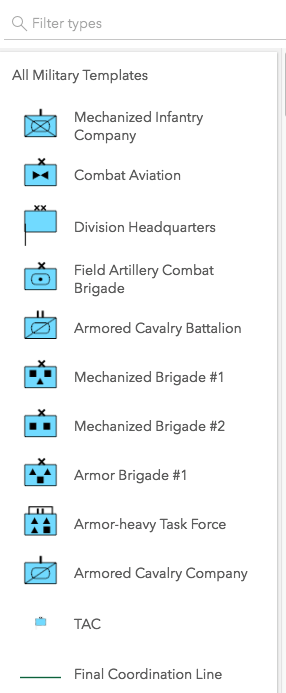 |
- Default value
- "layer"
Example
// This example shows using a function to check if// the layer title contains the word 'military'. If so,// return a group of items called "All Military Templates"function customGroup(grouping) {  // Consolidate all military layers  if (grouping.layer.title.toLowerCase().indexOf("military") > -1) {    return "All Military Templates"  }// Otherwise, group by layer title  return grouping.layer.title;}
// Create the FeatureTemplates widgettemplates = new FeatureTemplates({  container: "templatesDiv",  layers: layers,  groupBy: customGroup});
items
- Type
- (TemplateItem | TemplateItemGroup)[]
The template items or grouped template items.
layers
An array of FeatureLayers that are associated with the widget. The order in which these layers are set in the array dictates how they display within the widget.
The widget is designed to only display layers that are enabled for editing. It will not display layers that are enabled to only edit attributes.
Example
// The layers to display within the widgetlet militaryUnits = new FeatureLayer({  url: "http://sampleserver6.arcgisonline.com/arcgis/rest/services/Military/FeatureServer/2"});
let militaryHostile = new FeatureLayer({  url: "http://sampleserver6.arcgisonline.com/arcgis/rest/services/Military/FeatureServer/6"});
let layers = [militaryUnits, militaryHostile];
// Create FeatureTemplates widgettemplates = new FeatureTemplates({ container: "templatesDiv", layers: layers});Methods
| Method | Signature | Class |
|---|---|---|
emit inherited | emit<Type extends EventNames<this>>(type: Type, event?: this["@eventTypes"][Type]): boolean | |
hasEventListener inherited | hasEventListener<Type extends EventNames<this>>(type: Type): boolean | |
on inherited | on<Type extends EventNames<this>>(type: Type, listener: EventedCallback<this["@eventTypes"][Type]>): ResourceHandle | |
refresh(): void | | |
select(item: TemplateItem | null | undefined): void | |
emit
- Signature
-
emit <Type extends EventNames<this>>(type: Type, event?: this["@eventTypes"][Type]): boolean
- Type parameters
- <Type extends EventNames<this>>
Emits an event on the instance. This method should only be used when creating subclasses of this class.
hasEventListener
- Signature
-
hasEventListener <Type extends EventNames<this>>(type: Type): boolean
- Type parameters
- <Type extends EventNames<this>>
Indicates whether there is an event listener on the instance that matches the provided event name.
Parameters
| Parameter | Type | Description | Required |
|---|---|---|---|
| type | Type | The name of the event. | |
- Returns
- boolean
Returns true if the class supports the input event.
on
- Signature
-
on <Type extends EventNames<this>>(type: Type, listener: EventedCallback<this["@eventTypes"][Type]>): ResourceHandle
- Type parameters
- <Type extends EventNames<this>>
Registers an event handler on the instance. Call this method to hook an event with a listener.
Parameters
| Parameter | Type | Description | Required |
|---|---|---|---|
| type | Type | An event or an array of events to listen for. | |
| listener | EventedCallback<this["@eventTypes"][Type]> | The function to call when the event fires. | |
- Returns
- ResourceHandle
Returns an event handler with a
remove()method that should be called to stop listening for the event(s).Property Type Description remove Function When called, removes the listener from the event.
Example
view.on("click", function(event){ // event is the event handle returned after the event fires. console.log(event.mapPoint);}); refresh
- Signature
-
refresh (): void
This method updates the template items with the provided filter.
- Returns
- void
select
- Signature
-
select (item: TemplateItem | null | undefined): void
Selects the template item to use.
- See also
Parameters
| Parameter | Type | Description | Required |
|---|---|---|---|
| item | The template item to select. | |
- Returns
- void
Events
| Name | Type |
|---|---|
select
select: CustomEvent<SelectEvent> Fires when a template item is selected. This occurs when the select() method is called.
Example
// Listen for when a template item is selectedtemplates.on("select", function(evtTemplate) {  // Access the selected template item's attributes  attributes = evtTemplate.template.prototype.attributes;
  // Create a new feature with the selected template at cursor location  const handler = view.on("click", function(event) {    handler.remove(); // remove click event handler.    event.stopPropagation(); // Stop click event propagation
    if (event.mapPoint) {      // Create a new feature with the selected template item.      editFeature = new Graphic({        geometry: event.mapPoint,          attributes: {            "IncidentType": attributes.IncidentType          }      });
      // Setup the applyEdits parameter with adds.      const edits = {        addFeatures: [editFeature]      };      featureLayer.applyEdits(params).then(function(editsResult) {        if (editsResult.addFeatureResults.length > 0) {          console.log("Created a new feature.")        }      });    }  });});
Type definitions
SelectEvent
template
- Type
- FeatureTemplate | SharedTemplateMetadata | null | undefined
The feature template associated with the template item.