import UtilityNetworkAssociations from "@arcgis/core/widgets/UtilityNetworkAssociations.js";const UtilityNetworkAssociations = await $arcgis.import("@arcgis/core/widgets/UtilityNetworkAssociations.js");- Inheritance:
- UtilityNetworkAssociations→
Widget<UtilityNetworkAssociationsProperties>→ Accessor
- Since
- ArcGIS Maps SDK for JavaScript 4.26
The UtilityNetworkAssociations widget class, functioning as a part of the ArcGIS Maps SDK for JavaScript, simplifies the management and manipulation of associations within a utility network. It offers an intuitive user interface, reducing the complexity of working with utility network associations. It efficiently handles associations between various utility network elements like junctions, edges, and terminals, providing precise control over the network topology. The UtilityNetworkAssociations widget class empowers developers to streamline their workflow, enhance data integrity, and enable effective network analysis and visualization within utility network applications.
Here is an example of autoRefreshAssociations set to false.
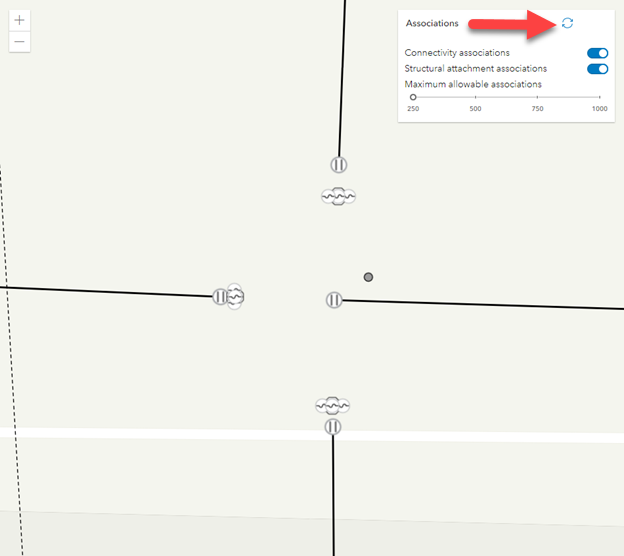
By clicking the refresh button the associations will appear.

Here is an example of autoRefreshAssociations set to true.
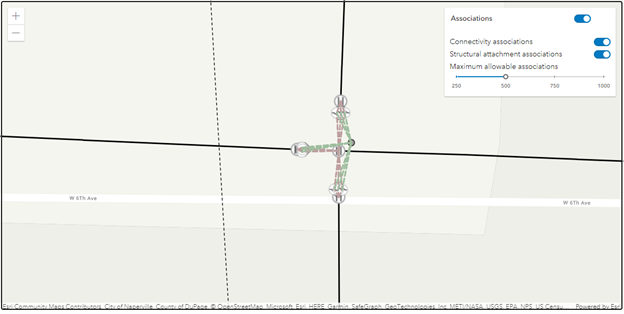
Notes
The UtilityNetworkAssociations widget class is unable to support proxied feature services or feature services that utilize stored credentials.
Example
// Create a new instance of the UtilityNetworkAssociations widget and set// its required parameters.const unAssociationsWidget = new UtilityNetworkAssociations({  view: view});
view.ui.add(unAssociationsWidget, "top-right");
Constructors
Constructor
Parameters
| Parameter | Type | Description | Required |
|---|---|---|---|
| properties | | |
Properties
| Property | Type | Class |
|---|---|---|
| | ||
| | ||
container inherited | HTMLElement | null | undefined | |
declaredClass readonly inherited | ||
destroyed readonly inherited | ||
Icon["icon"] | | |
id inherited | ||
| | ||
| | ||
| | ||
| | ||
| | ||
| | ||
| | ||
| | ||
| | ||
| | ||
| | ||
| | ||
| | ||
| | ||
visible inherited | ||
| |
autoRefreshAssociations
- Type
- boolean
Indicates whether to show a toggle to automatically show associations every time the map extent changes, or an action button to show associations within the current map extent on demand.
- Default value
- true
connectivityAssociationsLineSymbol
- Type
- SimpleLineSymbol
A SimpleLineSymbol used for representing the polyline geometry that is being drawn for connectivity associations.
container
- Type
- HTMLElement | null | undefined
The ID or node representing the DOM element containing the widget. This property can only be set once. The following examples are all valid use case when working with widgets.
Examples
// Create the HTML div element programmatically at runtime and set to the widget's containerconst basemapGallery = new BasemapGallery({  view: view,  container: document.createElement("div")});
// Add the widget to the top-right corner of the viewview.ui.add(basemapGallery, {  position: "top-right"});
// Specify an already-defined HTML div element in the widget's container
const basemapGallery = new BasemapGallery({ view: view, container: basemapGalleryDiv});
// Add the widget to the top-right corner of the viewview.ui.add(basemapGallery, { position: "top-right"});
// HTML markup<body> <div id="viewDiv"></div> <div id="basemapGalleryDiv"></div></body>// Specify the widget while adding to the view's UIconst basemapGallery = new BasemapGallery({ view: view});
// Add the widget to the top-right corner of the viewview.ui.add(basemapGallery, { position: "top-right"}); icon
- Type
- Icon["icon"]
- Since
- ArcGIS Maps SDK for JavaScript 4.27
Icon displayed in the widget's button.
- Default value
- "view-associations"
includeConnectivityAssociations
- Type
- boolean
Indicates whether to query and display connectivity associations.
- Default value
- true
includeStructuralAttachmentAssociations
- Type
- boolean
Indicates whether to query and display structural attachment associations.
- Default value
- true
maxAllowableAssociations
- Type
- number
The maximum number of associations that can be returned from the server.
- Default value
- 250
maxAllowableAssociationsSliderMax
- Type
- number
The maximum value or upper bound of the Maximum allowable associations slider.
If the value in the constructor is less than or equal to the value set for maxAllowableAssociationsSliderMin, the property will be set to a default value (1000).
maxAllowableAssociationsSliderMin
- Type
- number
The minimum value or lower bound of the Maximum allowable associations slider.
If the value in the constructor is less than 0, the property will be set to a default value (250). If the value in the constructor is greater than or equal to maxAllowableAssociationsSliderMax, the property will be set to a default value (250).
maxAllowableAssociationsSliderStep
- Type
- number
Specifies the interval to move the maximum allowable associations slider with the up, or down keys.
showArrowsConnectivity
- Type
- boolean
Indicates whether to show arrows for connectivity associations.
- Default value
- false
showArrowsStructuralAttachment
- Type
- boolean
Indicates whether to show arrows for structural attachment associations.
- Default value
- false
showAssociationsEnabled
- Type
- boolean
When autoRefreshAssociations is true, indicates whether to automatically show associations
every time the current map extent changes.
- Default value
- false
structuralAttachmentAssociationsLineSymbol
- Type
- SimpleLineSymbol
A SimpleLineSymbol used for representing the polyline geometry that is being drawn for structural attachment associations.
utilityNetwork
- Type
- UtilityNetwork | null | undefined
Determines the utility network to use.
viewModel
The view model for this widget.
visible
- Type
- boolean
Indicates whether the widget is visible.
If false, the widget will no longer be rendered in the web document. This may affect the layout of other elements or widgets in the document. For example, if this widget is
the first of three widgets associated to the upper right hand corner of the DefaultUI, then the other widgets will reposition when this widget is made invisible.
For more information, refer to the css display value of "none".
- Default value
- true
Example
// Hides the widget in the viewwidget.visible = false; visibleElements
- Type
- VisibleElements
The visible elements that are displayed within the widget.
Methods
| Method | Signature | Class |
|---|---|---|
classes inherited | classes(...classNames: ((string | null | undefined) | ((string[] | Record<string, boolean>) | null | undefined) | false | null | undefined)[]): string | |
destroy inherited | destroy(): void | |
emit inherited | emit<Type extends EventNames<this>>(type: Type, event?: this["@eventTypes"][Type]): boolean | |
hasEventListener inherited | hasEventListener<Type extends EventNames<this>>(type: Type): boolean | |
isFulfilled inherited | isFulfilled(): boolean | |
isRejected inherited | isRejected(): boolean | |
isResolved inherited | isResolved(): boolean | |
on inherited | on<Type extends EventNames<this>>(type: Type, listener: EventedCallback<this["@eventTypes"][Type]>): ResourceHandle | |
postInitialize inherited | postInitialize(): void | |
render inherited | render(): any | null | |
renderNow inherited | renderNow(): void | |
scheduleRender inherited | scheduleRender(): void | |
when inherited | when<TResult1 = this, TResult2 = never>(onFulfilled?: OnFulfilledCallback<this, TResult1> | null | undefined, onRejected?: OnRejectedCallback<TResult2> | null | undefined): Promise<TResult1 | TResult2> |
classes
- Signature
-
classes (...classNames: ((string | null | undefined) | ((string[] | Record<string, boolean>) | null | undefined) | false | null | undefined)[]): string
A utility method used for building the value for a widget's class property.
This aids in simplifying css class setup.
Parameters
- Returns
- string
The computed class name.
Example
// .tsx syntax showing how to set css classes while rendering the widget
render() {  const dynamicClasses = {    [css.flip]: this.flip,    [css.primary]: this.primary  };
return ( <div class={classes(css.root, css.mixin, dynamicClasses)} /> );} emit
- Signature
-
emit <Type extends EventNames<this>>(type: Type, event?: this["@eventTypes"][Type]): boolean
- Type parameters
- <Type extends EventNames<this>>
Emits an event on the instance. This method should only be used when creating subclasses of this class.
hasEventListener
- Signature
-
hasEventListener <Type extends EventNames<this>>(type: Type): boolean
- Type parameters
- <Type extends EventNames<this>>
Indicates whether there is an event listener on the instance that matches the provided event name.
Parameters
| Parameter | Type | Description | Required |
|---|---|---|---|
| type | Type | The name of the event. | |
- Returns
- boolean
Returns true if the class supports the input event.
isFulfilled
- Signature
-
isFulfilled (): boolean
isFulfilled() may be used to verify if creating an instance of the class is fulfilled (either resolved or rejected).
If it is fulfilled, true will be returned.
- Returns
- boolean
Indicates whether creating an instance of the class has been fulfilled (either resolved or rejected).
isRejected
- Signature
-
isRejected (): boolean
isRejected() may be used to verify if creating an instance of the class is rejected.
If it is rejected, true will be returned.
- Returns
- boolean
Indicates whether creating an instance of the class has been rejected.
isResolved
- Signature
-
isResolved (): boolean
isResolved() may be used to verify if creating an instance of the class is resolved.
If it is resolved, true will be returned.
- Returns
- boolean
Indicates whether creating an instance of the class has been resolved.
on
- Signature
-
on <Type extends EventNames<this>>(type: Type, listener: EventedCallback<this["@eventTypes"][Type]>): ResourceHandle
- Type parameters
- <Type extends EventNames<this>>
Registers an event handler on the instance. Call this method to hook an event with a listener.
Parameters
| Parameter | Type | Description | Required |
|---|---|---|---|
| type | Type | An event or an array of events to listen for. | |
| listener | EventedCallback<this["@eventTypes"][Type]> | The function to call when the event fires. | |
- Returns
- ResourceHandle
Returns an event handler with a
remove()method that should be called to stop listening for the event(s).Property Type Description remove Function When called, removes the listener from the event.
Example
view.on("click", function(event){ // event is the event handle returned after the event fires. console.log(event.mapPoint);}); when
- Signature
-
when <TResult1 = this, TResult2 = never>(onFulfilled?: OnFulfilledCallback<this, TResult1> | null | undefined, onRejected?: OnRejectedCallback<TResult2> | null | undefined): Promise<TResult1 | TResult2>
when() may be leveraged once an instance of the class is created. This method takes two input parameters: an onFulfilled function and an onRejected function.
The onFulfilled executes when the instance of the class loads. The
onRejected executes if the instance of the class fails to load.
Parameters
| Parameter | Type | Description | Required |
|---|---|---|---|
| onFulfilled | OnFulfilledCallback<this, TResult1> | null | undefined | The function to call when the promise resolves. | |
| onRejected | The function to execute when the promise fails. | |
- Returns
- Promise<TResult1 | TResult2>
Returns a new promise for the result of
onFulfilledthat may be used to chain additional functions.
Example
// Although this example uses MapView, any class instance that is a promise may use when() in the same waylet view = new MapView();view.when(function(){ // This function will execute once the promise is resolved}, function(error){ // This function will execute if the promise is rejected due to an error});