Configure the environment settings in a local scene to change the lighting conditions and background appearance.
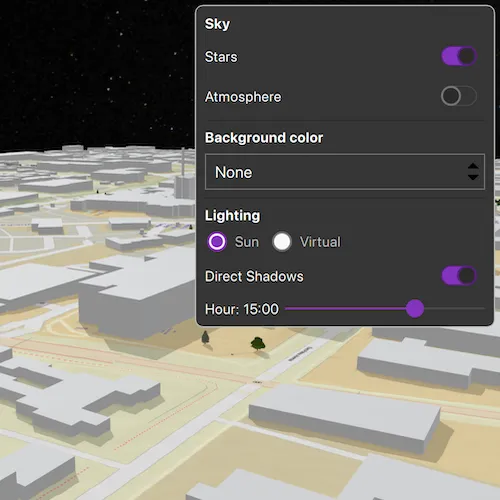
Use case
The scene environment defines the appearance of a scene. This includes sky and background color settings, whether objects in the scene cast shadows, and the lighting used to illuminate the scene.
For an exploration scenario, like a city planning app, a developer might decide to enable sun lighting and direct shadows so the user can see how buildings and trees cast shadows at a given date and time.
For an analytic scenario, like examining a building scene layer, the developer may choose to use a virtual light source with shadows disabled and a solid background color instead of the atmosphere.
How to use the sample
At start-up, you will see a local scene with a set of scene environment controls. Adjusting the controls will change the scene’s environment altering the presentation of the scene.
Sky and Background color settings
Toggling the “Stars” and “Atmosphere” buttons will enable or disable those features.
Selecting a color from the dropdown will set a solid color for the background color. Selecting a new background color will disable the stars and atmosphere so you can see the new color.
Some notes about the behavior of the sky and background:
- The atmosphere is rendered in front of the stars and the stars are rendered in front of the background color.
- Stars are not rendered when using virtual lighting.
- To fully see the background color, atmosphere and stars must be deactivated.
- The background color shows in the night sky if the atmosphere is enabled and the stars are disabled.
Lighting settings
The lighting buttons switch between sun lighting and virtual lighting. Switching to virtual lighting disables the “Stars” button since stars do not exist in a virtually lit scene. The time slider is also disabled under virtual lighting since time does not have an effect on the virtual light.
The “Direct Shadows” button will enable or disable the rendering of shadows for 3d objects in the scene. Shadows are not rendered for surface terrain.
If sun lighting is active, the slider under the buttons will set the hour of the day ranging from midnight to 11pm (23:00). Dragging the bar will change the position of the simulated sun causing changes to shading and direct shadows.
How it works
- Create a
Scenefrom an online resource and add it to theLocalSceneView. The sample’s controls are updated to reflect the web scene’s initial environment. - Changes to the sky and background color settings will set values directly on the
SceneEnvironmentobject.IsAtmosphereEnabledandAreStarsEnabledare boolean properties dictating whether the atmosphere and star field are visible.- Colors selected from the dropdown are set to the
BackgroundColor.
- Changes to the settings in the lighting controls manipulate the
SceneLightingobject in theSceneEnvironment.Lightingproperty.- Switching between “Sun” and “Virtual” lighting assigns a new
SunLightingorVirtualLightingobject to the lighting property.- Sun lighting simulates the position of the sun based on a given date and time. This includes lighting conditions for day, twilight, and night.
- For virtual lighting, the light source is always on and is slightly offset from the camera. As the scene rotated or panned, the light source stays in the same position relative to the camera.
- The “Direct Shadows” button sets the
AreDirectShadowsEnabledboolean property on the lighting object. This toggles the shadows cast by objects in the scene. - If
SunLightingis active, manipulating the slider changes the hour of theSimulatedDateproperty on the lighting object.VirtualLightingdoes not have a slider because the lighting is always the same regardless of time.
- Switching between “Sun” and “Virtual” lighting assigns a new
Relevant API
- LocalSceneView
- Scene
- SceneEnvironment
- SceneLighting
- SunLighting
- VirtualLighting
About the data
The WebM Open 3D Esri Local Scene used for this sample contains a clipped local scene consisting of a surface and 3D objects representing the buildings. The scene is located in Santa Fe, New Mexico, USA.
Tags
3D, environment, lighting, scene
Sample code
// [WriteFile Name=ConfigureSceneEnvironment, Category=Scenes]// [Legal]// Copyright 2026 Esri.//// Licensed under the Apache License, Version 2.0 (the "License");// you may not use this file except in compliance with the License.// You may obtain a copy of the License at// http://www.apache.org/licenses/LICENSE-2.0//// Unless required by applicable law or agreed to in writing, software// distributed under the License is distributed on an "AS IS" BASIS,// WITHOUT WARRANTIES OR CONDITIONS OF ANY KIND, either express or implied.// See the License for the specific language governing permissions and// limitations under the License.// [Legal]
#ifdef PCH_BUILD#include "pch.hpp"#endif // PCH_BUILD
// sample headers#include "ConfigureSceneEnvironment.h"
// ArcGIS Maps SDK headers#include "LocalSceneQuickView.h"#include "Scene.h"#include "SceneEnvironment.h"#include "SunLighting.h"#include "TimeZoneOffset.h"#include "VirtualLighting.h"
// Qt headers#include <QColor>
using namespace Esri::ArcGISRuntime;
ConfigureSceneEnvironment::ConfigureSceneEnvironment(QObject* parent /* = nullptr */) :  QObject(parent),  m_scene(new Scene(QUrl("https://www.arcgis.com/home/item.html?id=fcebd77958634ac3874bbc0e6b0677a4"), this)){  // Read the initial environment state once the scene has loaded.  connect(m_scene, &Scene::doneLoading, this, &ConfigureSceneEnvironment::readInitialEnvironmentState);}
ConfigureSceneEnvironment::~ConfigureSceneEnvironment() = default;
void ConfigureSceneEnvironment::init(){  qmlRegisterType<LocalSceneQuickView>("Esri.Samples", 1, 0, "LocalSceneView");  qmlRegisterType<ConfigureSceneEnvironment>("Esri.Samples", 1, 0, "ConfigureSceneEnvironmentSample");}
LocalSceneQuickView* ConfigureSceneEnvironment::localSceneView() const{  return m_localSceneView;}
void ConfigureSceneEnvironment::setLocalSceneView(LocalSceneQuickView* localSceneView){  if (!localSceneView || localSceneView == m_localSceneView)  {    return;  }
  m_localSceneView = localSceneView;  m_localSceneView->setArcGISScene(m_scene);
  emit localSceneViewChanged();}
void ConfigureSceneEnvironment::readInitialEnvironmentState(){  if (!m_scene || !m_scene->environment())  {    return;  }
  SceneEnvironment* env = m_scene->environment();
  // Read sky state.  m_starsEnabled = env->areStarsEnabled();  emit starsEnabledChanged();
  m_atmosphereEnabled = env->isAtmosphereEnabled();  emit atmosphereEnabledChanged();
  // Read lighting state.  if (SunLighting* sun = qobject_cast<SunLighting*>(env->lighting()))  {    m_sunLighting = true;    m_directShadowsEnabled = sun->areDirectShadowsEnabled();    m_lightingDateTime = sun->simulatedDate();
    // Time zone offset    double offsetHours = 0.0;    if (TimeZoneOffset* tz = sun->displayTimeZone())    {      offsetHours = tz->hours();    }
    m_lightingHour = m_lightingDateTime.addSecs(offsetHours * 3600LL).time().hour();  }  else  {    m_sunLighting = false;    m_directShadowsEnabled = env->lighting()->areDirectShadowsEnabled();  }
  emit sunLightingChanged();  emit directShadowsEnabledChanged();  emit lightingHourChanged();}
bool ConfigureSceneEnvironment::starsEnabled() const{  return m_starsEnabled;}
void ConfigureSceneEnvironment::setStarsEnabled(bool enabled){  if (m_starsEnabled == enabled)  {    return;  }
  if (!m_scene || !m_scene->environment())  {    return;  }
  m_starsEnabled = enabled;  m_scene->environment()->setStarsEnabled(enabled);  emit starsEnabledChanged();}
bool ConfigureSceneEnvironment::atmosphereEnabled() const{  return m_atmosphereEnabled;}
void ConfigureSceneEnvironment::setAtmosphereEnabled(bool enabled){  if (m_atmosphereEnabled == enabled)  {    return;  }
  if (!m_scene || !m_scene->environment())  {    return;  }
  m_atmosphereEnabled = enabled;  m_scene->environment()->setAtmosphereEnabled(enabled);  emit atmosphereEnabledChanged();}
QString ConfigureSceneEnvironment::backgroundColor() const{  return m_backgroundColor;}
void ConfigureSceneEnvironment::setBackgroundColor(const QString& color){  if (m_backgroundColor == color)  {    return;  }
  if (!m_scene || !m_scene->environment())  {    return;  }
  m_backgroundColor = color;  m_scene->environment()->setBackgroundColor(QColor(color));
  // Disable atmosphere and stars so the background color is visible.  setAtmosphereEnabled(false);  setStarsEnabled(false);
  emit backgroundColorChanged();}
bool ConfigureSceneEnvironment::sunLighting() const{  return m_sunLighting;}
void ConfigureSceneEnvironment::setSunLighting(bool isSun){  if (m_sunLighting == isSun)  {    return;  }
  if (!m_scene || !m_scene->environment())  {    return;  }
  m_sunLighting = isSun;
  if (SceneLighting* currentLighting = m_scene->environment()->lighting())  {    currentLighting->deleteLater();  }
  if (isSun)  {    SunLighting* sun = new SunLighting(m_lightingDateTime, m_directShadowsEnabled, this);    m_scene->environment()->setLighting(sun);  }  else  {    VirtualLighting* virtualLight = new VirtualLighting(m_directShadowsEnabled, this);    m_scene->environment()->setLighting(virtualLight);  }
  emit sunLightingChanged();}
bool ConfigureSceneEnvironment::directShadowsEnabled() const{  return m_directShadowsEnabled;}
void ConfigureSceneEnvironment::setDirectShadowsEnabled(bool enabled){  if (m_directShadowsEnabled == enabled)  {    return;  }
  if (!m_scene || !m_scene->environment() || !m_scene->environment()->lighting())  {    return;  }
  m_directShadowsEnabled = enabled;  m_scene->environment()->lighting()->setDirectShadowsEnabled(enabled);  emit directShadowsEnabledChanged();}
int ConfigureSceneEnvironment::lightingHour() const{  return m_lightingHour;}
void ConfigureSceneEnvironment::setLightingHour(int hour){  if (m_lightingHour == hour)  {    return;  }
  if (!m_scene || !m_scene->environment() || !m_scene->environment()->lighting())  {    return;  }
  const int hourDiff = hour - m_lightingHour;  m_lightingHour = hour;  m_lightingDateTime = m_lightingDateTime.addSecs(hourDiff * 3600LL);
  if (SunLighting* sun = qobject_cast<SunLighting*>(m_scene->environment()->lighting()))  {    sun->setSimulatedDate(m_lightingDateTime);  }
  emit lightingHourChanged();}
// [WriteFile Name=ConfigureSceneEnvironment, Category=Scenes]// [Legal]// Copyright 2026 Esri.//// Licensed under the Apache License, Version 2.0 (the "License");// you may not use this file except in compliance with the License.// You may obtain a copy of the License at// http://www.apache.org/licenses/LICENSE-2.0//// Unless required by applicable law or agreed to in writing, software// distributed under the License is distributed on an "AS IS" BASIS,// WITHOUT WARRANTIES OR CONDITIONS OF ANY KIND, either express or implied.// See the License for the specific language governing permissions and// limitations under the License.// [Legal]
#ifndef CONFIGURESCENEENVIRONMENT_H#define CONFIGURESCENEENVIRONMENT_H
// Qt headers#include <QDateTime>#include <QObject>
namespace Esri::ArcGISRuntime{ class Scene; class LocalSceneQuickView;} // namespace Esri::ArcGISRuntime
Q_MOC_INCLUDE("LocalSceneQuickView.h");
class ConfigureSceneEnvironment : public QObject{ Q_OBJECT
Q_PROPERTY(Esri::ArcGISRuntime::LocalSceneQuickView* localSceneView READ localSceneView WRITE setLocalSceneView NOTIFY localSceneViewChanged)
// Sky properties. Q_PROPERTY(bool starsEnabled READ starsEnabled WRITE setStarsEnabled NOTIFY starsEnabledChanged) Q_PROPERTY(bool atmosphereEnabled READ atmosphereEnabled WRITE setAtmosphereEnabled NOTIFY atmosphereEnabledChanged)
// Background color property. Q_PROPERTY(QString backgroundColor READ backgroundColor WRITE setBackgroundColor NOTIFY backgroundColorChanged)
// Lighting properties. Q_PROPERTY(bool sunLighting READ sunLighting WRITE setSunLighting NOTIFY sunLightingChanged) Q_PROPERTY(bool directShadowsEnabled READ directShadowsEnabled WRITE setDirectShadowsEnabled NOTIFY directShadowsEnabledChanged) Q_PROPERTY(int lightingHour READ lightingHour WRITE setLightingHour NOTIFY lightingHourChanged)
public: explicit ConfigureSceneEnvironment(QObject* parent = nullptr); ~ConfigureSceneEnvironment() override;
static void init();
// Sky accessors. bool starsEnabled() const; void setStarsEnabled(bool enabled);
bool atmosphereEnabled() const; void setAtmosphereEnabled(bool enabled);
// Background color accessors. QString backgroundColor() const; void setBackgroundColor(const QString& color);
// Lighting accessors. bool sunLighting() const; void setSunLighting(bool isSun);
bool directShadowsEnabled() const; void setDirectShadowsEnabled(bool enabled);
int lightingHour() const; void setLightingHour(int hour);
signals: void localSceneViewChanged(); void starsEnabledChanged(); void atmosphereEnabledChanged(); void backgroundColorChanged(); void sunLightingChanged(); void directShadowsEnabledChanged(); void lightingHourChanged();
private: Esri::ArcGISRuntime::LocalSceneQuickView* localSceneView() const; void setLocalSceneView(Esri::ArcGISRuntime::LocalSceneQuickView* localSceneView);
void readInitialEnvironmentState();
Esri::ArcGISRuntime::Scene* m_scene = nullptr; Esri::ArcGISRuntime::LocalSceneQuickView* m_localSceneView = nullptr;
// Tracked environment state. bool m_starsEnabled = true; bool m_atmosphereEnabled = true; QString m_backgroundColor = "transparent"; bool m_sunLighting = true; bool m_directShadowsEnabled = false; QDateTime m_lightingDateTime; int m_lightingHour = 12;};
#endif // CONFIGURESCENEENVIRONMENT_H// [WriteFile Name=ConfigureSceneEnvironment, Category=Scenes]// [Legal]// Copyright 2026 Esri.//// Licensed under the Apache License, Version 2.0 (the "License");// you may not use this file except in compliance with the License.// You may obtain a copy of the License at// http://www.apache.org/licenses/LICENSE-2.0//// Unless required by applicable law or agreed to in writing, software// distributed under the License is distributed on an "AS IS" BASIS,// WITHOUT WARRANTIES OR CONDITIONS OF ANY KIND, either express or implied.// See the License for the specific language governing permissions and// limitations under the License.// [Legal]
import QtQuickimport QtQuick.Controlsimport QtQuick.Layoutsimport Esri.Samples
Item { LocalSceneView { id: view anchors.fill: parent Component.onCompleted: { forceActiveFocus(); } }
ConfigureSceneEnvironmentSample { id: sceneModel localSceneView: view }
// Settings panel Rectangle { anchors { top: parent.top right: parent.right margins: 10 } width: Math.min(300, parent.width - 20) height: Math.min(panelContent.implicitHeight + 20, parent.height * 0.7) color: palette.base radius: 8 border.color: palette.dark border.width: 1
MouseArea { anchors.fill: parent onClicked: mouse => mouse.accepted = true onWheel: wheel => wheel.accepted = true }
Flickable { id: flickable anchors.fill: parent anchors.margins: 10 contentHeight: panelContent.implicitHeight clip: true boundsBehavior: Flickable.StopAtBounds
ScrollBar.vertical: ScrollBar { policy: ScrollBar.AsNeeded }
ColumnLayout { id: panelContent width: flickable.width spacing: 8
Label { text: qsTr("Sky") font.bold: true font.pixelSize: 14 color: palette.text }
RowLayout { Layout.fillWidth: true Label { text: qsTr("Stars") color: palette.text Layout.fillWidth: true } Switch { checked: sceneModel.starsEnabled onToggled: sceneModel.starsEnabled = checked } }
RowLayout { Layout.fillWidth: true Label { text: qsTr("Atmosphere") color: palette.text Layout.fillWidth: true } Switch { checked: sceneModel.atmosphereEnabled onToggled: sceneModel.atmosphereEnabled = checked } }
Rectangle { Layout.fillWidth: true height: 1 color: palette.mid }
Label { text: qsTr("Background color") font.bold: true font.pixelSize: 14 color: palette.text }
ComboBox { Layout.fillWidth: true model: ListModel { ListElement { text: qsTr("None"); value: "transparent" } ListElement { text: qsTr("Black"); value: "black" } ListElement { text: qsTr("Red"); value: "red" } ListElement { text: qsTr("Orange"); value: "orange" } ListElement { text: qsTr("Yellow"); value: "yellow" } ListElement { text: qsTr("Green"); value: "green" } ListElement { text: qsTr("Blue"); value: "blue" } ListElement { text: qsTr("Purple"); value: "purple" } ListElement { text: qsTr("White"); value: "white" } } textRole: "text" valueRole: "value" currentIndex: 0 onActivated: sceneModel.backgroundColor = currentValue }
Rectangle { Layout.fillWidth: true height: 1 color: palette.mid }
Label { text: qsTr("Lighting") font.bold: true font.pixelSize: 14 color: palette.text }
RowLayout { spacing: 10 RadioButton { id: sunRadioButton text: qsTr("Sun") checked: sceneModel.sunLighting onToggled: { if (checked) { sceneModel.sunLighting = true } } } RadioButton { text: qsTr("Virtual") checked: !sceneModel.sunLighting onToggled: { if (checked) { sceneModel.sunLighting = false; } } } }
RowLayout { Layout.fillWidth: true Label { text: qsTr("Direct Shadows") color: palette.text Layout.fillWidth: true } Switch { checked: sceneModel.directShadowsEnabled onToggled: sceneModel.directShadowsEnabled = checked } }
RowLayout { Layout.fillWidth: true spacing: 5 enabled: sunRadioButton.checked Label { text: qsTr("Hour: %1:00").arg(Math.floor(hourSlider.value)) color: palette.text Layout.minimumWidth: 75 } Slider { id: hourSlider Layout.fillWidth: true from: 0 to: 23 value: 12 stepSize: 1 onMoved: sceneModel.lightingHour = value } } } } }}