Get the elevation for a given point on a surface.
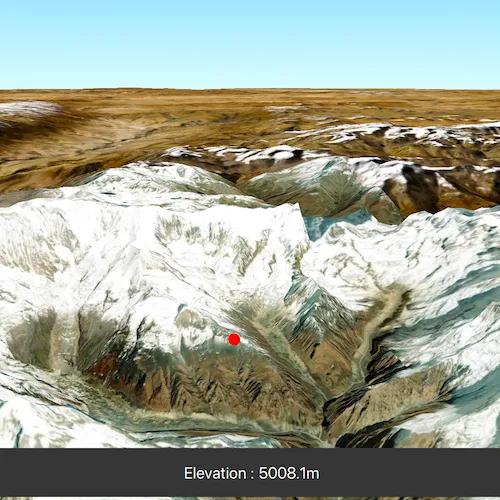
Use case
Knowing the elevation at a given point in a landscape can aid in navigation, planning and survey in the field.
How to use the sample
Click anywhere on the surface to get the elevation at that point.
How it works
- Create a
SceneViewandScenewith an imagery base map. - Set an
ArcGISTiledElevationSourceas the elevation source of the scene’s base surface. - Use the
screenToBaseSurface(screenPoint)method on the scene view to convert the clicked screen point into a point on surface. - Use the
elevationAsync(surfacePoint)method on the base surface to asynchronously get the elevation.
Relevant API
- ArcGISTiledElevationSource
- BaseSurface
- ElevationSourceListModel
- SceneView
Additional information
Calling elevationAsync(surfacePoint) retrieves the most accurate available elevation value at a given point which requires it to go to the server or local raster file and load the highest level of detail of data for the target location and return the elevation value.
If multiple elevation sources are present in the surface the top most visible elevation source with a valid elevation in the given location is used to determine the result.
Tags
elevation, MapViews SceneViews and UI, surface
Sample code
// [WriteFile Name=GetElevationAtPoint, Category=Scenes]// [Legal]// Copyright 2019 Esri.//// Licensed under the Apache License, Version 2.0 (the "License");// you may not use this file except in compliance with the License.// You may obtain a copy of the License at// http://www.apache.org/licenses/LICENSE-2.0//// Unless required by applicable law or agreed to in writing, software// distributed under the License is distributed on an "AS IS" BASIS,// WITHOUT WARRANTIES OR CONDITIONS OF ANY KIND, either express or implied.// See the License for the specific language governing permissions and// limitations under the License.// [Legal]
#ifdef PCH_BUILD#include "pch.hpp"#endif // PCH_BUILD
// sample headers#include "GetElevationAtPoint.h"
// ArcGIS Maps SDK headers#include "ArcGISTiledElevationSource.h"#include "Camera.h"#include "ElevationSourceListModel.h"#include "Graphic.h"#include "GraphicListModel.h"#include "GraphicsOverlay.h"#include "GraphicsOverlayListModel.h"#include "MapTypes.h"#include "Point.h"#include "Scene.h"#include "SceneQuickView.h"#include "SimpleMarkerSymbol.h"#include "Surface.h"#include "SymbolTypes.h"
// Qt headers#include <QFuture>#include <QUuid>
using namespace Esri::ArcGISRuntime;
GetElevationAtPoint::GetElevationAtPoint(QObject* parent /* = nullptr */) :  QObject(parent),  m_scene(new Scene(BasemapStyle::ArcGISImageryStandard, this)),  m_graphicsOverlay(new GraphicsOverlay(this)),  m_elevationMarker(new Graphic(Geometry(), new SimpleMarkerSymbol(SimpleMarkerSymbolStyle::Circle, QColor("red"), 12, this), this)){  // create a new elevation source from Terrain3D REST service  ArcGISTiledElevationSource* elevationSource =    new ArcGISTiledElevationSource(QUrl("https://elevation3d.arcgis.com/arcgis/rest/services/WorldElevation3D/Terrain3D/ImageServer"), this);
  // add the elevation source to the scene to display elevation  m_scene->baseSurface()->elevationSources()->append(elevationSource);
  // Set the marker to be invisible initially, will be flaggd visible when user interacts with scene for the first time, to visualise clicked position  m_elevationMarker->setVisible(false);
  // Add the marker to the graphics overlay so it will be displayed. Graphics overlay is attached to the sceneView in ::setSceneView()  m_graphicsOverlay->graphics()->append(m_elevationMarker);}
GetElevationAtPoint::~GetElevationAtPoint() = default;
void GetElevationAtPoint::init(){  // Register classes for QML  qmlRegisterType<SceneQuickView>("Esri.Samples", 1, 0, "SceneView");  qmlRegisterType<GetElevationAtPoint>("Esri.Samples", 1, 0, "GetElevationAtPointSample");}
SceneQuickView* GetElevationAtPoint::sceneView() const{  return m_sceneView;}
// Set the view (created in QML)void GetElevationAtPoint::setSceneView(SceneQuickView* sceneView){  if (!sceneView || sceneView == m_sceneView)  {    return;  }
  m_sceneView = sceneView;  m_sceneView->setArcGISScene(m_scene);
  // Create a camera, looking at the Himalayan mountain range.  constexpr double latitude = 28.4;  constexpr double longitude = 83.9;  constexpr double altitude = 10000.0;  constexpr double heading = 10.0;  constexpr double pitch = 80.0;  constexpr double roll = 0.0;  Camera camera(latitude, longitude, altitude, heading, pitch, roll);
  // Set the sceneview to use above camera, waits for load so scene is immediately displayed in appropriate place.  m_sceneView->setViewpointCameraAndWait(camera);
  // Append the graphics overlays to the sceneview, so we can visualise elevation on click  m_sceneView->graphicsOverlays()->append(m_graphicsOverlay);
  // Hook up clicks into the 3d scene to below behaviour that displays marker & elevation value.  connect(sceneView, &SceneQuickView::mouseClicked, this, &GetElevationAtPoint::displayElevationOnClick);
  emit sceneViewChanged();}
void GetElevationAtPoint::displayElevationOnClick(QMouseEvent& mouseEvent){  // Convert clicked screen position to position on the map surface.  const Point baseSurfacePos = m_sceneView->screenToBaseSurface(mouseEvent.position().x(), mouseEvent.position().y());
  m_elevationQueryFuture = m_scene->baseSurface()->elevationAsync(baseSurfacePos);  m_elevationQueryFuture.then(this, [this, baseSurfacePos](double elevation)  {    // Place the elevation marker circle at the clicked position    m_elevationMarker->setGeometry(baseSurfacePos);    m_elevationMarker->setVisible(true);
    // Assign the elevation value. UI is bound to this value, so it updates to display new elevation.    m_elevation = elevation;
    // Notify of property changes    emit elevationChanged(elevation);    emit elevationQueryRunningChanged();  });
  //Signal the start of the query  emit elevationQueryRunningChanged();}
double GetElevationAtPoint::elevation() const{  return m_elevation;}
bool GetElevationAtPoint::elevationQueryRunning() const{  return m_elevationQueryFuture.isRunning();}
// [WriteFile Name=GetElevationAtPoint, Category=Scenes]// [Legal]// Copyright 2019 Esri.//// Licensed under the Apache License, Version 2.0 (the "License");// you may not use this file except in compliance with the License.// You may obtain a copy of the License at// http://www.apache.org/licenses/LICENSE-2.0//// Unless required by applicable law or agreed to in writing, software// distributed under the License is distributed on an "AS IS" BASIS,// WITHOUT WARRANTIES OR CONDITIONS OF ANY KIND, either express or implied.// See the License for the specific language governing permissions and// limitations under the License.// [Legal]
#ifndef GETELEVATIONATPOINT_H#define GETELEVATIONATPOINT_H
// Qt headers#include <QFuture>#include <QObject>
namespace Esri::ArcGISRuntime{ class Graphic; class GraphicsOverlay; class Scene; class SceneQuickView;} // namespace Esri::ArcGISRuntime
class QMouseEvent;
Q_MOC_INCLUDE("SceneQuickView.h")
class GetElevationAtPoint : public QObject{ Q_OBJECT
Q_PROPERTY(Esri::ArcGISRuntime::SceneQuickView* sceneView READ sceneView WRITE setSceneView NOTIFY sceneViewChanged) Q_PROPERTY(double elevation READ elevation NOTIFY elevationChanged) Q_PROPERTY(bool elevationQueryRunning READ elevationQueryRunning NOTIFY elevationQueryRunningChanged)
public: explicit GetElevationAtPoint(QObject* parent = nullptr); ~GetElevationAtPoint();
static void init();
private slots: void displayElevationOnClick(QMouseEvent& mouseEvent);
signals: void sceneViewChanged(); void elevationChanged(double newElevation); void elevationQueryRunningChanged();
private: Esri::ArcGISRuntime::SceneQuickView* sceneView() const; void setSceneView(Esri::ArcGISRuntime::SceneQuickView* sceneView);
Esri::ArcGISRuntime::Scene* m_scene = nullptr; Esri::ArcGISRuntime::SceneQuickView* m_sceneView = nullptr;
Esri::ArcGISRuntime::GraphicsOverlay* m_graphicsOverlay = nullptr; Esri::ArcGISRuntime::Graphic* m_elevationMarker = nullptr;
//Property exposing elevation to the QML UI. double elevation() const; //Property exposing whether the elevation query is running to the QML UI, so the busy indicator can be displayed bool elevationQueryRunning() const;
double m_elevation = 0.0; QFuture<double> m_elevationQueryFuture;};
#endif // GETELEVATIONATPOINT_H// [WriteFile Name=GetElevationAtPoint, Category=Scenes]// [Legal]// Copyright 2019 Esri.//// Licensed under the Apache License, Version 2.0 (the "License");// you may not use this file except in compliance with the License.// You may obtain a copy of the License at// http://www.apache.org/licenses/LICENSE-2.0//// Unless required by applicable law or agreed to in writing, software// distributed under the License is distributed on an "AS IS" BASIS,// WITHOUT WARRANTIES OR CONDITIONS OF ANY KIND, either express or implied.// See the License for the specific language governing permissions and// limitations under the License.// [Legal]
import Esri.Samplesimport QtQuickimport QtQuick.Controls
Item {
SceneView { id: view anchors.fill: parent
Component.onCompleted: { // Set the focus on SceneView to initially enable keyboard navigation forceActiveFocus(); } }
// Declare the C++ instance which creates the scene etc. and supply the view GetElevationAtPointSample { id: model sceneView: view }
// Background rectangle for elevation display Rectangle { anchors { bottom: parent.bottom left: parent.left right: parent.right margins: 30 }
color: palette.base height: childrenRect.height
// Elevation display text Label { anchors { horizontalCenter: parent.horizontalCenter } padding: 15 font.pointSize: 16
// For vertical screens, keep the text within the bounding box via scaling down. scale: Math.min(1, (parent.width - padding) / contentWidth)
// Display elevation value in meters, round to a single decimal place. text: qsTr("Elevation : " + Math.round(model.elevation * 10) / 10 + "m") } }
// Display an indictor when the elevation query is running, since it might take a couple of seconds BusyIndicator { running: model.elevationQueryRunning anchors.centerIn: parent width: Math.min(parent.width, parent.height) / 6.0 height: width visible: model.elevationQueryRunning }
}