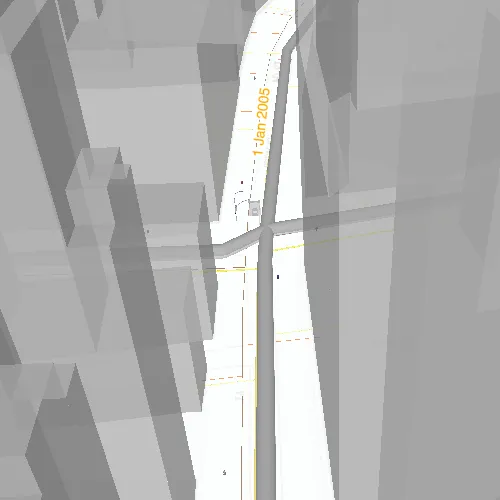
This sample demonstrates how to display custom labels in a 3D scene.
Use case
Labeling features is useful to visually display information or attributes on a scene. For example, city officials or maintenance crews may want to show installation dates of features of a gas network.
How to use the sample
Pan and zoom to explore the scene. Notice the labels showing installation dates of features in the 3D gas network.
How it works
- Create a
Scenefrom aPortalItem. - Add the scene to a
SceneViewand load it. - After loading is complete, obtain the
FeatureLayerfrom one of theGroupLayers in the scene’soperationalLayers. - Create a
TextSymbolto define how labels are stylized. - After the
Scenehas loaded, obtain theFeatureLayerfrom the scene’soperationalLayers. - Create an
LabelDefinitionusing anArcadeLabelExpression.- Set the “labelExpressionInfo.expression” key to define what text the label should display. You can use fields of the feature by using
$feature.NAMEin the expression.
- Set the “labelExpressionInfo.expression” key to define what text the label should display. You can use fields of the feature by using
- Add the definition to the feature layer’s
labelDefinitionsarray.
Relevant API
- ArcadeLabelExpression
- FeatureLayer
- LabelDefinition
- Scene
- SceneView
- TextSymbol
About the data
This sample shows a New York City infrastructure scene hosted on ArcGIS Online.
Tags
3D, arcade, attribute, buildings, label, model, scene, symbol, text, URL, visualization
Sample code
// [WriteFile Name=ShowLabelsOnLayerIn3D, Category=Scenes]// [Legal]// Copyright 2021 Esri.//// Licensed under the Apache License, Version 2.0 (the "License");// you may not use this file except in compliance with the License.// You may obtain a copy of the License at// http://www.apache.org/licenses/LICENSE-2.0//// Unless required by applicable law or agreed to in writing, software// distributed under the License is distributed on an "AS IS" BASIS,// WITHOUT WARRANTIES OR CONDITIONS OF ANY KIND, either express or implied.// See the License for the specific language governing permissions and// limitations under the License.// [Legal]
#ifdef PCH_BUILD#include "pch.hpp"#endif // PCH_BUILD
// sample headers#include "ShowLabelsOnLayerIn3D.h"
// ArcGIS Maps SDK headers#include "ArcadeLabelExpression.h"#include "Error.h"#include "FeatureLayer.h"#include "GroupLayer.h"#include "LabelDefinition.h"#include "LabelDefinitionListModel.h"#include "LayerListModel.h"#include "Scene.h"#include "SceneQuickView.h"#include "LabelingTypes.h"#include "TextSymbol.h"
using namespace Esri::ArcGISRuntime;
ShowLabelsOnLayerIn3D::ShowLabelsOnLayerIn3D(QObject* parent /* = nullptr */) :  QObject(parent),  m_scene(new Scene(QUrl("https://www.arcgis.com/home/item.html?id=850dfee7d30f4d9da0ebca34a533c169"), this)){  connect(m_scene, &Scene::doneLoading, this, [this]()  {    for (Layer* layer : *m_scene->operationalLayers())    {      if (layer->name() == "Gas")      {        // The gas layer is a GroupLayer type consisting of Layer types.        // Labels can only be displayed on FeatureLayer types, so we must first convert it to a FeatureLayer class.        GroupLayer* gasGroupLayer = dynamic_cast<GroupLayer*>(layer);        if (!gasGroupLayer)        {          continue;        }
        FeatureLayer* gasFeatureLayer = dynamic_cast<FeatureLayer*>(gasGroupLayer->layers()->first());        if (gasFeatureLayer)        {          display3DLabelsOnFeatureLayer(gasFeatureLayer);        }
        break;      }    }  });}
void ShowLabelsOnLayerIn3D::display3DLabelsOnFeatureLayer(FeatureLayer* featureLayer){  TextSymbol* textSymbol = new TextSymbol(this);  textSymbol->setColor(QColor("#ffa500"));  textSymbol->setHaloColor(QColor(Qt::white));  textSymbol->setHaloWidth(2.0);  textSymbol->setSize(14.0);
  ArcadeLabelExpression* labelExpression = new ArcadeLabelExpression("Text($feature.INSTALLATIONDATE, 'D MMM Y')", this);  LabelDefinition* labelDefinition = new LabelDefinition(labelExpression, textSymbol, this);  labelDefinition->setPlacement(LabelingPlacement::LineAboveAlong);  labelDefinition->setUseCodedValues(true);
  featureLayer->labelDefinitions()->clear();  featureLayer->labelDefinitions()->append(labelDefinition);  featureLayer->setLabelsEnabled(true);}
ShowLabelsOnLayerIn3D::~ShowLabelsOnLayerIn3D() = default;
void ShowLabelsOnLayerIn3D::init(){  // Register classes for QML  qmlRegisterType<SceneQuickView>("Esri.Samples", 1, 0, "SceneView");  qmlRegisterType<ShowLabelsOnLayerIn3D>("Esri.Samples", 1, 0, "ShowLabelsOnLayerIn3DSample");}
SceneQuickView* ShowLabelsOnLayerIn3D::sceneView() const{  return m_sceneView;}
// Set the view (created in QML)void ShowLabelsOnLayerIn3D::setSceneView(SceneQuickView* sceneView){  if (!sceneView || sceneView == m_sceneView)  {    return;  }
  m_sceneView = sceneView;  m_sceneView->setArcGISScene(m_scene);
  emit sceneViewChanged();}
// [WriteFile Name=ShowLabelsOnLayerIn3D, Category=Scenes]// [Legal]// Copyright 2021 Esri.//// Licensed under the Apache License, Version 2.0 (the "License");// you may not use this file except in compliance with the License.// You may obtain a copy of the License at// http://www.apache.org/licenses/LICENSE-2.0//// Unless required by applicable law or agreed to in writing, software// distributed under the License is distributed on an "AS IS" BASIS,// WITHOUT WARRANTIES OR CONDITIONS OF ANY KIND, either express or implied.// See the License for the specific language governing permissions and// limitations under the License.// [Legal]
#ifndef SHOWLABELSONLAYERIN3D_H#define SHOWLABELSONLAYERIN3D_H
// Qt headers#include <QObject>
namespace Esri::ArcGISRuntime{ class Scene; class SceneQuickView; class FeatureLayer;} // namespace Esri::ArcGISRuntime
Q_MOC_INCLUDE("SceneQuickView.h")
class ShowLabelsOnLayerIn3D : public QObject{ Q_OBJECT
Q_PROPERTY(Esri::ArcGISRuntime::SceneQuickView* sceneView READ sceneView WRITE setSceneView NOTIFY sceneViewChanged)
public: explicit ShowLabelsOnLayerIn3D(QObject* parent = nullptr); ~ShowLabelsOnLayerIn3D();
static void init();
signals: void sceneViewChanged();
private: Esri::ArcGISRuntime::SceneQuickView* sceneView() const; void setSceneView(Esri::ArcGISRuntime::SceneQuickView* sceneView); void display3DLabelsOnFeatureLayer(Esri::ArcGISRuntime::FeatureLayer* featureLayer);
Esri::ArcGISRuntime::Scene* m_scene = nullptr; Esri::ArcGISRuntime::SceneQuickView* m_sceneView = nullptr;};
#endif // SHOWLABELSONLAYERIN3D_H// [WriteFile Name=ShowLabelsOnLayerIn3D, Category=Scenes]// [Legal]// Copyright 2021 Esri.//// Licensed under the Apache License, Version 2.0 (the "License");// you may not use this file except in compliance with the License.// You may obtain a copy of the License at// http://www.apache.org/licenses/LICENSE-2.0//// Unless required by applicable law or agreed to in writing, software// distributed under the License is distributed on an "AS IS" BASIS,// WITHOUT WARRANTIES OR CONDITIONS OF ANY KIND, either express or implied.// See the License for the specific language governing permissions and// limitations under the License.// [Legal]
import QtQuickimport QtQuick.Controlsimport Esri.Samples
Item {
SceneView { id: view anchors.fill: parent
Component.onCompleted: { // Set the focus on SceneView to initially enable keyboard navigation forceActiveFocus(); } }
// Declare the C++ instance which creates the scene etc. and supply the view ShowLabelsOnLayerIn3DSample { id: model sceneView: view }}