import LengthDimension from "@arcgis/core/analysis/LengthDimension.js";const LengthDimension = await $arcgis.import("@arcgis/core/analysis/LengthDimension.js");- Inheritance:
- LengthDimension→
Accessor
- Since
- ArcGIS Maps SDK for JavaScript 4.25
LengthDimension enables the measurement of linear distances between the specified start and end points. Depending on the measure type, either the direct, horizontal, or vertical distance between these points is measured.

Length dimensions can be displayed by adding them to a DimensionAnalysis.
// create the dimension objectconst lengthDimension = new LengthDimension({ measureType: "vertical", startPoint: new Point({ spatialReference: { wkid: 32610 }, x: 265, y: 24, z: 26 }), endPoint: new Point({ spatialReference: { wkid: 32610 }, x: 265, y: 24, z: 38 }), orientation: 90, offset: 2});// create the analysis and add the dimension object to itconst dimensionAnalysis = new DimensionAnalysis({ dimensions: [lengthDimension]});// add the analysis to the viewview.analyses.add(dimensionAnalysis);Known Limitations
Dimensioning is only supported in a 3D SceneView. Direct and vertical distances are always computed in a Euclidean manner. How horizontal distances are computed depends on the scene's spatial reference:
- In geographic coordinate systems (GCS) and in Web Mercator, they are computed geodetically.
- In projected coordinate systems (PCS), apart from Web Mercator, they are computed in a Euclidean manner.
Vertical and horizontal dimensions can be used to measure distances of up to 100 kilometers. To measure longer distances use the
"direct"
measureTypeinstead.
Constructors
Constructor
Parameters
| Parameter | Type | Description | Required |
|---|---|---|---|
| properties | | |
Properties
| Property | Type | Class |
|---|---|---|
declaredClass readonly inherited | ||
| | ||
| | ||
| | ||
| | ||
| | ||
valid readonly | |
measureType
The type of length that should be measured between the startPoint and endPoint.
The measureType allows the user to measure either the horizontal distance (delta in xy space),
vertical distance (elevation difference), or direct distance between the start and end points.
If either vertical or horizontal mode is used, the orientation is not applied
and the offset direction is relative to the input points (on a plane derived from them).

- Default value
- "direct"
offset
- Type
- number
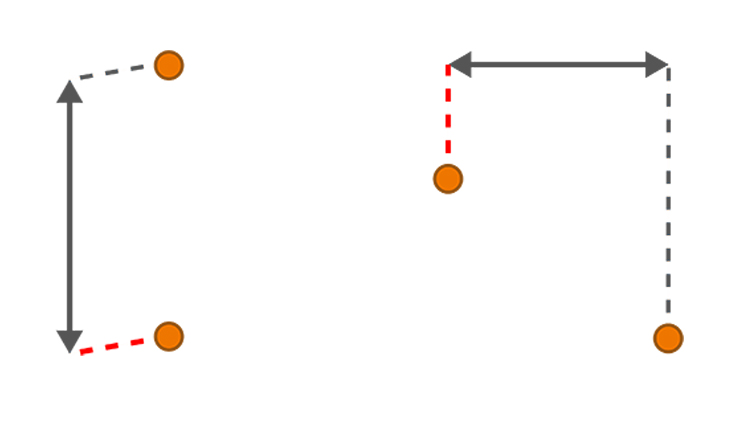
Styling option that controls the shortest distance from the startPoint or endPoint to the dimension line in meters.
- Default value
- 0
orientation
- Type
- number
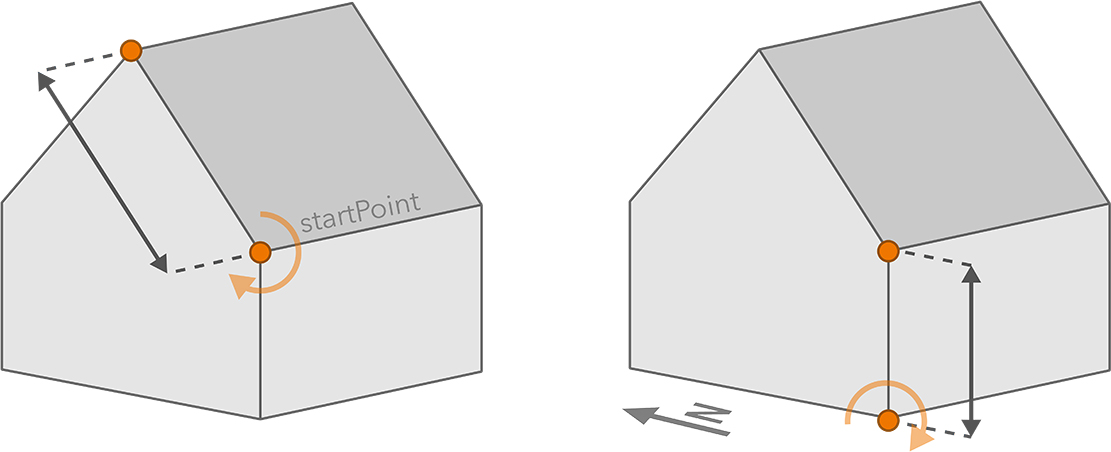
The orientation determines the relative direction the dimension line is extended to. It applies only to direct dimensions and when an offset is specified.
An orientation of 0 extends the offset upwards, whereas an orientation of 90 extends the offset sideways, to the right side of the dimension when viewing from its start point. When the start and end points are vertically aligned, increasing the orientation rotates the dimension clockwise relative to compass north.
- Default value
- 0
valid
- Type
- boolean
- Since
- ArcGIS Maps SDK for JavaScript 4.33
Indicates whether the dimension is ready to be computed and interacted with in the view. It requires both the startPoint and endPoint to be set.
Methods
fromJSON
- Signature
-
fromJSON (json: any): any
Creates a new instance of this class and initializes it with values from a JSON object
generated from an ArcGIS product. The object passed into the input json
parameter often comes from a response to a query operation in the REST API or a
toJSON()
method from another ArcGIS product. See the Using fromJSON()
topic in the Guide for details and examples of when and how to use this function.
Parameters
| Parameter | Type | Description | Required |
|---|---|---|---|
| json | A JSON representation of the instance in the ArcGIS format. See the ArcGIS REST API documentation for examples of the structure of various input JSON objects. | |
- Returns
- any
Returns a new instance of this class.
clone
- Signature
-
clone (): this
Creates a deep clone of this object. Any properties that store values by reference will be assigned copies of the referenced values on the cloned instance.
- Returns
- this
A deep clone of the class instance that invoked this method.
toJSON
- Signature
-
toJSON (): any
Converts an instance of this class to its ArcGIS portal JSON representation. See the Using fromJSON() guide topic for more information.
- Returns
- any
The ArcGIS portal JSON representation of an instance of this class.