import GroupElement from "@arcgis/core/form/elements/GroupElement.js";const GroupElement = await $arcgis.import("@arcgis/core/form/elements/GroupElement.js");- Since
- ArcGIS Maps SDK for JavaScript 4.16
A GroupElement form element defines a container that holds a set of
form elements
that can be expanded, collapsed, or displayed together. Use this to set grouped field configurations within a
FeatureForm.formTemplate
or FeatureLayer.formTemplate formTemplate.
| Form with individual field elements | Form with grouped field elements |
|---|---|
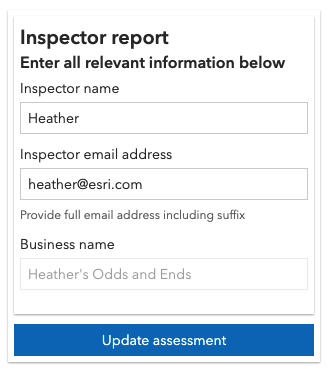 | 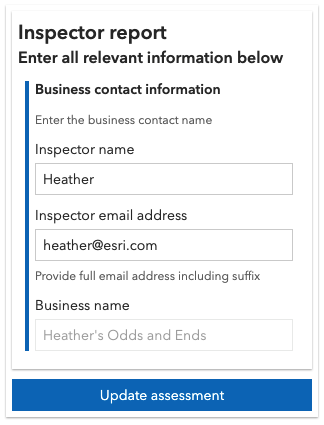 |
Nested group elements are not supported. A group element must be visible if it contains a required field.
Example
const fieldElement1 = new FieldElement({  fieldName: "inspector",  label: "Inspector name"});
const fieldElement2 = new FieldElement({  fieldName: "inspdate",  label: "Inspection date",  description: "Date inspection was handled",  input: { // autocastable to DateTimePickerInput    type: "datetime-picker",      includeTime: true,      min: 1547678342000,      max: 1610836742000    }});
const fieldElement3 = new FieldElement({  fieldName: "placename",  label: "Business name",  editable: false});
// Create the group element and pass in elements from aboveconst groupElement = new GroupElement({  label: "Business contact information",  description: "Enter the business contact name",  elements:[fieldElement1, fieldElement2, fieldElement3]});
// Next pass in any elements to the FormTemplateconst formTemplate = new FormTemplate({  title: "Inspector report",  description: "Enter all relevant information below",  elements: [groupElement] // Add group element to the template});
Constructors
Constructor
Parameters
| Parameter | Type | Description | Required |
|---|---|---|---|
| properties | | |
Properties
| Property | Type | Class |
|---|---|---|
declaredClass readonly inherited | ||
description inherited | ||
| | ||
| | ||
label inherited | ||
type readonly | "group" | |
visibilityExpression inherited |
elements
- Type
- NestableFormElementUnion[]
An array of field, relationship, and text elements to display as grouped. These objects represent an ordered list of form elements.
- Nested group elements are not supported.
- The
AttachmentElementis not yet fully supported by the FeatureForm widget. Support will be added in a future release.
initialState
- Type
- GroupState
Defines if the group should be expanded or collapsed when the form is initially displayed.
| Possible Value | Description |
|---|---|
| collapsed | The grouped elements appear collapsed. |
| expanded | The grouped elements appear expanded. |
- Default value
- "expanded"
label
A string value containing the field alias. This should not be used for referencing fields in Arcade expressions. Rather, the service FieldElement.fieldName should be referenced.
visibilityExpression
A reference to the ExpressionInfo.name of an Arcade expression defined in the FormTemplate.expressionInfos of the FormTemplate.
When this expression evaluates to true, the element is displayed. When the expression evaluates to false the element is not displayed. If no expression
is provided, the element is always displayed.
Care must be taken when defining a visibility expression for a non-nullable
field as to make certain the specified field has either 1) a default value, or 2) is made visible to the end user to enter a value before submitting the form.
The expression must follow the specification defined in the Form Calculation Profile. This expression references field values within an individual feature or in other layers and must return either a date, number, or string value. The referenced expression must be defined in the form template's FormTemplate.expressionInfos. It cannot be set inline within the element object. Field and Group elements must be visible if the field or one of the grouped fields is required.
Example
// Expression created within ExpressionInfos and is referenced in elementconst expression = new ExpressionInfo({  name: "alwaysHidden",  expression: "false"});
// Reference an already-defined visibilityExpression set within the ExpressionInfosconst fieldElement = new FieldElement({  type: "field",  fieldName: "inspemail",  label: "Email address",  visibilityExpression: "alwaysHidden"});
formTemplate.expressionInfos = [ expression ];formTemplate.elements = [ fieldElement ];
Methods
fromJSON
- Signature
-
fromJSON (json: any): any
Creates a new instance of this class and initializes it with values from a JSON object
generated from an ArcGIS product. The object passed into the input json
parameter often comes from a response to a query operation in the REST API or a
toJSON()
method from another ArcGIS product. See the Using fromJSON()
topic in the Guide for details and examples of when and how to use this function.
Parameters
| Parameter | Type | Description | Required |
|---|---|---|---|
| json | A JSON representation of the instance in the ArcGIS format. See the ArcGIS REST API documentation for examples of the structure of various input JSON objects. | |
- Returns
- any
Returns a new instance of this class.
clone
- Signature
-
clone (): GroupElement
Creates a deep clone of the GroupElement class.
- Returns
- GroupElement
A deep clone of the GroupElement instance.
toJSON
- Signature
-
toJSON (): any
Converts an instance of this class to its ArcGIS portal JSON representation. See the Using fromJSON() guide topic for more information.
- Returns
- any
The ArcGIS portal JSON representation of an instance of this class.