import TextElement from "@arcgis/core/form/elements/TextElement.js";const TextElement = await $arcgis.import("@arcgis/core/form/elements/TextElement.js");A TextElement form element is used to define descriptive text as an element within a layer or FeatureForm FormTemplate and can be used to aid those entering or updating information.
The text may reference values returned from a field attribute or an
Arcade expression defined in a FormTemplate's FormTemplate.expressionInfos property.
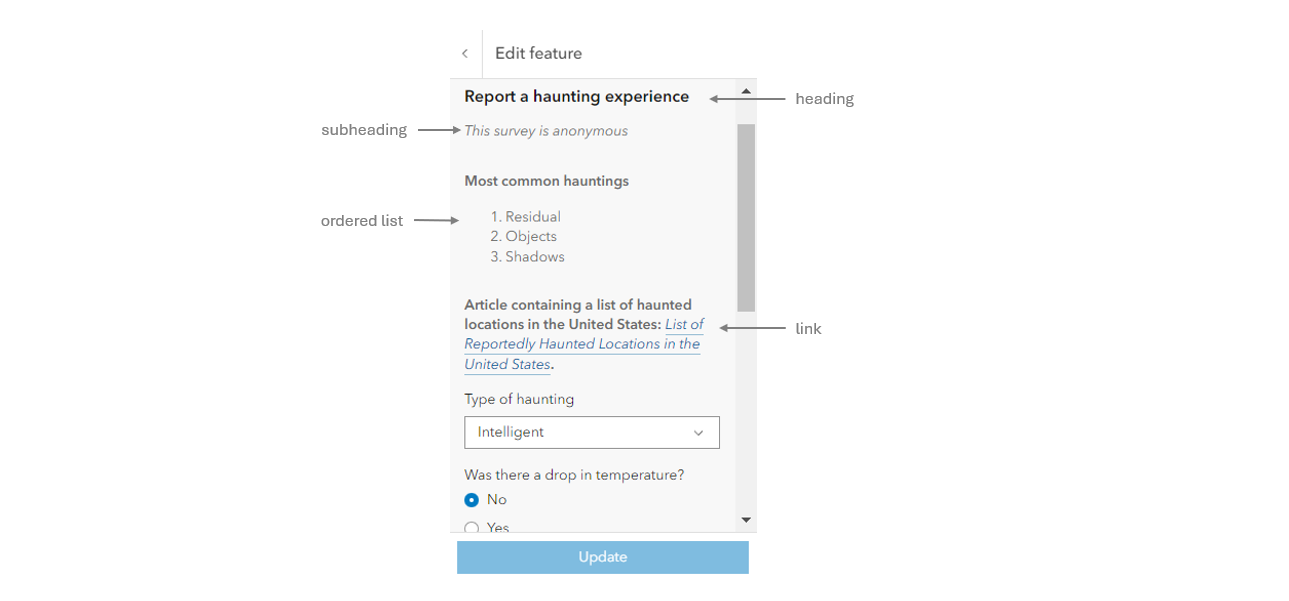
Example
// Create a plain-text element.const textElement = new TextElement({  text: "Tree species: {COMMONNAME}."});
// Create a markdown text element with italics and bold text.const markdownTextElement = new TextElement({  textFormat: "markdown",  text: "_This text is italicized_ & **This text is bold.**"});
layer.formTemplate = new FormTemplate({  title: "Plain-text and markdown text elements",  elements: [ textElement, markdownTextElement ]});
Constructors
Constructor
Parameters
| Parameter | Type | Description | Required |
|---|---|---|---|
| properties | | |
Properties
| Property | Type | Class |
|---|---|---|
declaredClass readonly inherited | ||
description inherited | ||
label inherited | ||
| | ||
| | ||
type readonly | "text" | |
visibilityExpression inherited |
label
A string value containing the field alias. This should not be used for referencing fields in Arcade expressions. Rather, the service FieldElement.fieldName should be referenced.
text
The formatted string content to display. This may contain a field
name enclosed in {} (e.g. {FIELDNAME}), or an Arcade
expression ExpressionInfo.name (e.g. {expression/EXPRESSIONNAME}).
Text content may also leverage Markdown formatting for these features:
- Bold
- Bullet lists
- Headings
- Italic
- Links
- Numbered lists
- Quoting code
- Strikethrough
Example
// This TextElement uses the markdown large heading.const textElement = new TextElement({ textFormat: "markdown", text: "##### This tree type is {COMMONNAME}."}); textFormat
- Type
- TextFormatType
Defines the format of the text property.
- Default value
- "plain-text"
visibilityExpression
A reference to the ExpressionInfo.name of an Arcade expression defined in the FormTemplate.expressionInfos of the FormTemplate.
When this expression evaluates to true, the element is displayed. When the expression evaluates to false the element is not displayed. If no expression
is provided, the element is always displayed.
Care must be taken when defining a visibility expression for a non-nullable
field as to make certain the specified field has either 1) a default value, or 2) is made visible to the end user to enter a value before submitting the form.
The expression must follow the specification defined in the Form Calculation Profile. This expression references field values within an individual feature or in other layers and must return either a date, number, or string value. The referenced expression must be defined in the form template's FormTemplate.expressionInfos. It cannot be set inline within the element object. Field and Group elements must be visible if the field or one of the grouped fields is required.
Example
// Expression created within ExpressionInfos and is referenced in elementconst expression = new ExpressionInfo({  name: "alwaysHidden",  expression: "false"});
// Reference an already-defined visibilityExpression set within the ExpressionInfosconst fieldElement = new FieldElement({  type: "field",  fieldName: "inspemail",  label: "Email address",  visibilityExpression: "alwaysHidden"});
formTemplate.expressionInfos = [ expression ];formTemplate.elements = [ fieldElement ];
Methods
fromJSON
- Signature
-
fromJSON (json: any): any
Creates a new instance of this class and initializes it with values from a JSON object
generated from an ArcGIS product. The object passed into the input json
parameter often comes from a response to a query operation in the REST API or a
toJSON()
method from another ArcGIS product. See the Using fromJSON()
topic in the Guide for details and examples of when and how to use this function.
Parameters
| Parameter | Type | Description | Required |
|---|---|---|---|
| json | A JSON representation of the instance in the ArcGIS format. See the ArcGIS REST API documentation for examples of the structure of various input JSON objects. | |
- Returns
- any
Returns a new instance of this class.
clone
- Signature
-
clone (): TextElement
Creates a deep clone of the TextElement class.
- Returns
- TextElement
A deep clone of the TextElement instance.
toJSON
- Signature
-
toJSON (): any
Converts an instance of this class to its ArcGIS portal JSON representation. See the Using fromJSON() guide topic for more information.
- Returns
- any
The ArcGIS portal JSON representation of an instance of this class.